

Lenovo · Office
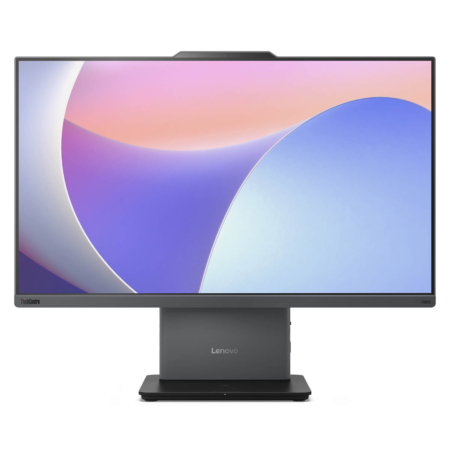
Lenovo ThinkCentre Neo 50a Gen 5 (24" Intel) (2024)
CPUIntel® Core™ i5-13420
RAM16GB DDR5 5200MHz
SSD512GB PCIe
VGAIntel® UHD Graphics
23,990,000₫
All-in-One computers combine the display and the computer in a single body. Just plug in power, a keyboard, and a mouse and you are ready to go, with fewer cables on your desk than a separate desktop needs. It is a great fit for offices, reception desks, classrooms, and families who want a fixed machine with little setup.
At Hung Phat Laptop, the category currently includes the Lenovo ThinkCentre Neo 50a Gen 5 with a 24-inch display (2024), a Windows All-in-One for office use that is on sale and in stock.
With the display and the computer in one unit, an All-in-One keeps your desk tidier and looks better on it. The trade-off is less room to upgrade than a separate desktop, so choose enough RAM and storage from the start.
This model has a 23.8-inch Full HD IPS display panel at 100Hz, a 13th-generation Intel Core i5-13420H processor, 16GB of DDR5 5200MHz RAM, a 512GB SSD, and Intel UHD integrated graphics. The specs are enough for office work, accounting, point-of-sale software, and online classes.
A 5MP webcam, Harman speakers, and dual microphones make video meetings clearer with no extra devices to plug in. It also has an HDMI input port, so it can serve as a second display for a laptop, along with Wi-Fi 6 and a LAN port. This model is on sale at Hung Phat Laptop.

If you are torn between an All-in-One and a separate desktop, the table below summarizes the main differences:
| Criteria | All-in-One (ThinkCentre Neo 50a Gen 5) | Separate Desktop |
|---|---|---|
| Setup | Plug in power, a keyboard, and a mouse and it is ready to use | Connect a tower and a display, with more cables |
| Space | Compact, fewer cables, tidy desk | Takes up more room and needs space for the tower |
| Upgrades | Limited, so choose enough RAM and SSD from the start | Easy to swap RAM and storage, or add a discrete graphics card |
| Best for | Offices, reception desks, classrooms, families | Graphics work, gaming, people who want to upgrade over time |
ThinkCentre Neo 50a Gen 5 specs are taken from its product page at Hung Phat Laptop.
For office work, accounting, or greeting customers, a Windows machine with a 24-inch display like the ThinkCentre Neo 50a is enough, and it is easy to use with business software. If you need to add a discrete graphics card or expect to upgrade a lot later, a separate desktop is more flexible.
Browse more options in the desktop computers category.
Every All-in-One computer at Hung Phat Laptop is a genuine product with an invoice and a clear warranty. Not sure whether to choose an All-in-One or a separate desktop? Send us your daily work and where the computer will sit, and our team will compare them for you in detail. When you buy a computer, you get:


Hung Phat Laptop uses Google cookies (Analytics, Ads) and Microsoft Clarity to measure website traffic and advertising performance. Information about your browsing activity is sensitive personal data. If you do not agree, click “Decline”: these tools will be turned off and you can still browse and shop as usual.
See Privacy Policy