

Genuine Sale -9%
 2 configurations
Asus · Graphics
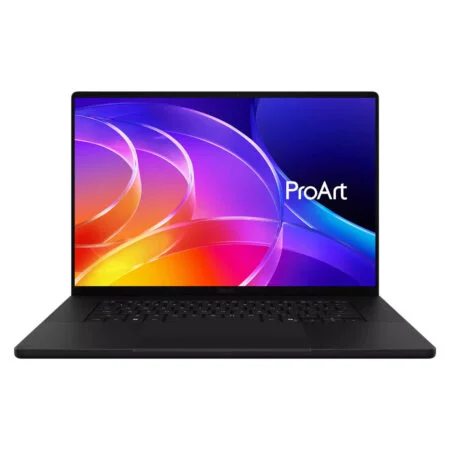
Asus ProArt P16 H7607BA (2026)
CPUNVIDIA RTX Spark N1X 20-Core
RAM64GB LPDDR5X 9400MHz
SSD1TB PCIe
VGABlackwell RTX 6144-core
From 123,990,000₫
2 configurations


Asus ZenBook & ProArt is Asus's premium laptop group for people who want a stunning display and a polished build. Zenbook leans toward light, compact designs with OLED displays that are made for working and carrying every day, a natural fit for office workers, business people and students. ProArt is built for professional creators such as photo editors, video editors and 3D designers who need a color-accurate display and a discrete NVIDIA graphics card.
At Hung Phat Laptop, the category includes 14-inch, 14.5-inch, 15.6-inch and 16-inch sizes, ranging from the 2021 ZenBook Duo UX482 and ZenBook Q408UG and the 2022 Zenbook 14X OLED to the 2023 ZenBook Pro 14 OLED and ProArt Studiobook 16 OLED. These models are currently out of stock, but each page stays up so you can check the specs, compare models and ask about restocks.

What this group has in common is the display: most models use an OLED panel with vivid color and deep blacks, ideal for photo editing and movies. Some models also add a ScreenPad Plus secondary display or an ASUS Dial knob for creative software. The trade-off: many models use LPDDR RAM soldered to the motherboard, so choosing the right capacity from the start matters even more with this line.
ZenBook Pro 14 OLED is for people who edit photos, cut short videos or do design work and still need to carry the laptop to client meetings and shoots. It is more compact than a 16-inch laptop with the same specs, yet it keeps a discrete GPU for Premiere, Lightroom or Blender.
The specs include an Intel Core i9-13900H, 32GB of DDR5 RAM, a 1TB SSD and a GeForce RTX 4060 8GB card. The 14.5-inch OLED display has a 2.8K resolution and a 120Hz refresh rate, which keeps text sharp and motion smooth as you scrub a timeline.

With an H-series chip and an RTX card in a 14-inch body, the fans will be clearly audible during long renders, which is normal.
ProArt Studiobook 16 OLED is made for professional creators who set the laptop up at a desk for video editing, color grading, 3D work or animation.
It uses a 24-core Intel Core i9-13980HX, a GeForce RTX 4060 8GB card, 16GB of DDR5 4800MHz RAM and a 1TB SSD, with a 3.2K OLED display. The physical ASUS Dial knob at the corner of the touchpad lets you adjust brushes, zoom and scrub the timeline quickly in Adobe software, with no need to memorize a long list of shortcuts.

The version at Hung Phat has 16GB of RAM, enough for photo editing and Full HD video editing. If you edit multilayer 4K or render heavy 3D, ask about upgrading to 32GB when you place your order.
ZenBook Pro Duo 15 OLED is for people who work with many windows: video editing, music production, programming or trading that needs several panels watched at once. The ScreenPad Plus secondary display sits right above the keyboard and holds toolbars, timelines or chat windows, which keeps the main display uncluttered.
It uses an Intel Core i9-12900H, 32GB of LPDDR5 RAM, a 1TB SSD and a GeForce RTX 3060 6GB card. The main display is a 15.6-inch 4K touch OLED, and the secondary display tilts up automatically when you open the laptop, which makes it easier to see and improves airflow.

Because the keyboard is pushed down to the bottom edge, there is no palm rest as on a regular laptop, so you should use a separate wrist rest when typing for long periods.
Zenbook 14X OLED suits office workers, students and frequent travelers who want a compact laptop with a display a step above the standard.
It uses an Intel Core i7-1260P, 16GB of LPDDR5 5200MHz RAM, a 512GB SSD and a GeForce MX550 2GB card. The P-series chip balances performance and battery life, enough for heavy office work, web development and basic photo editing.

The MX550 supports only light graphics work and cannot replace an RTX card for video editing or 3D. The 16GB of RAM is soldered to the motherboard, enough for office work and study over the long term.
ZenBook Duo UX482 brings the two-display idea into an easy-to-carry 14-inch laptop, a good fit for office workers who write documents while keeping an eye on email, Zalo or their meeting calendar.
It uses an Intel Core i7-1195G7, 8GB of LPDDR4X RAM, a 512GB SSD and Intel Iris Xe graphics. The 12.65-inch ScreenPad Plus secondary display sits at a slight tilt above the keyboard and works as a second monitor in Windows.

The 8GB of RAM is soldered to the motherboard and cannot be upgraded, so it only suits moderate office work. If you often run many apps at once, the Pro Duo 15 with 32GB of RAM will be more comfortable.
At a more mainstream price tier, the Asus ZenBook Q408UG (2021) uses an AMD Ryzen 5 5500U, 8GB of LPDDR4X RAM, a 256GB SSD and a GeForce MX450 2GB card on a 14-inch display. It is currently out of stock, and its page stays up so you can reference the specs when comparing it with later Zenbook generations.
The table below summarizes the main differences between the models so you can get a quick overview before looking at each laptop in detail.
| Model | Display | Chip | Graphics | RAM | Best For |
|---|---|---|---|---|---|
| ZenBook Pro 14 OLED UX6404 | 14.5 inch OLED 2.8K 120Hz | Intel Core i9-13900H | RTX 4060 8GB | 32GB DDR5 | Photo and video editing on the go |
| ProArt Studiobook 16 OLED | 16 inch OLED 3.2K | Intel Core i9-13980HX | RTX 4060 8GB | 16GB DDR5 | Video editing, 3D, desk work |
| ZenBook Pro Duo 15 OLED UX582 | 15.6 inch OLED 4K, plus ScreenPad Plus | Intel Core i9-12900H | RTX 3060 6GB | 32GB LPDDR5, soldered | Video editing, many windows |
| Zenbook 14X OLED | 14 inch OLED | Intel Core i7-1260P | MX550 2GB | 16GB LPDDR5, soldered | Office work, light photo editing |
| ZenBook Duo UX482 | 14 inch, plus 12.65-inch ScreenPad Plus | Intel Core i7-1195G7 | Intel Iris Xe | 8GB LPDDR4X, soldered | Multitasking office work |
| ZenBook Q408UG | 14 inch | AMD Ryzen 5 5500U | MX450 2GB | 8GB LPDDR4X, soldered | Study, basic office work |
Specs follow the versions listed on the product pages at Hung Phat Laptop. Display specs follow Asus's published figures and vary by version.
The simplest approach is to ask whether your work needs a discrete graphics card. For office work and study with a lot of carrying, the Zenbook 14X OLED or ZenBook Q408UG is enough. For regular photo and video editing while still on the move, the ZenBook Pro 14 OLED with an RTX 4060 is a good balance, and for desk-based video editing and 3D work, the ProArt Studiobook 16 OLED with its HX-series Core i9 chip and 16-inch display will get the job done faster.
If you often keep many windows open, the dual displays of the Duo line change the way you work: the Pro Duo 15 for video editors and the Duo UX482 for office users. With an OLED display, turn on dark mode, let the screen turn off automatically when idle, and avoid leaving a static image on screen for too long at high brightness to limit image retention.
If you want to compare with gaming, office or mainstream lines, you can browse the Asus laptops category.
Every Asus ZenBook and ProArt at Hung Phat Laptop is a genuine product, backed by an invoice and a clear warranty. Our advisors will ask which software you use and whether you work at a desk or travel a lot, so they can recommend the right size, graphics card and amount of RAM. Not sure whether to pick a single-display or dual-display laptop, with or without a discrete card? Tell us about your daily work and our team will compare each configuration currently available in detail. When you buy, you get:


Hung Phat Laptop uses Google cookies (Analytics, Ads) and Microsoft Clarity to measure website traffic and advertising performance. Information about your browsing activity is sensitive personal data. If you do not agree, click “Decline”: these tools will be turned off and you can still browse and shop as usual.
See Privacy Policy