


DELL Precision 7780 Mobile Workstation (2023)
- CPU: Intel Core i9 13950HX vPro Up To 5.5GHz (24 Cores, 32 Threads, 36MB Cache)
- RAM: DDR5 64GB 5200MHz
- SSD: 512GB PCIe Gen4 M.2 SSD
- VGA: NVIDIA® RTX™ A1000 6GB GDDR6
- DISPLAY: 17.3" FHD (1920*1080), 60 Hz, Anti-Glare, Non-Touch, 99% DCIP3, 500 Nits
- CONDITION: Like New 99%
- WARRANTY: 12-month warranty
- Sturdy Dell Precision 7780 design, 17.3-inch workstation chassis
- Precision 7780 17.3-inch display with 99% DCI-P3 coverage, FHD or 120Hz UHD options
- Dell Precision 7780 Performance: Core i9-13950HX, RTX Ada Graphics, and up to 128GB DDR5 RAM
- Full-Size Keyboard, Spacious Touchpad, 8W Speakers, and FHD Webcam on the Precision 7780
- Dell Precision 7780 ports and battery: 2 Thunderbolt 4, HDMI, RJ45, 93Wh battery
- Overview and Review: DELL Precision 7780 Mobile Workstation (2023)
- FAQ - Frequently Asked Questions About the DELL Precision 7780 Mobile Workstation (2023)
- Where to buy a genuine DELL Precision 7780 (2023) at a great price?
A 17.3-inch display covering 99% DCI-P3, Intel Core HX processors with vPro, and professional-grade NVIDIA RTX graphics make the DELL Precision 7780 Mobile Workstation (2023) a go-to mobile workstation for design engineers, architects, and video editors. Powered by 13th Gen Intel Core HX-series processors, with graphics options spanning NVIDIA RTX Ada and even the GeForce RTX 4090, it is built for professionals who need more screen real estate and more sustained processing power than 15- or 16-inch laptops can offer. This guide covers the design, display, performance, connectivity, and key factors to consider before choosing your configuration.
Sturdy Dell Precision 7780 design, 17.3-inch workstation chassis
The Dell Precision 7780 features a gray aluminum chassis with squared-off edges, embodying a true enterprise workstation aesthetic. Its rigid chassis includes cooling vents and a generous port selection on both sides to handle demanding technical workflows.

Measuring 398 x 265.02 x 28.5 mm and weighing 3.05 kg, it belongs to the category of 17-inch workstations best suited for a fixed desk setup rather than daily carrying. In return, the larger chassis delivers an expansive display area and room for a cooling system large enough to sustain heavy workloads on the HX chip and RTX card over long sessions. If you are looking for a Dell laptop for graphics, CAD, and simulation work, the Precision 17 chassis is well worth considering.

Precision 7780 17.3-inch display with 99% DCI-P3 coverage, FHD or 120Hz UHD options
The Precision 7780 offers two non-touch, anti-glare 17.3-inch display options, both featuring a 99% DCI-P3 color gamut and 500 nits of brightness. The FHD (1920 x 1080) panel with a 60Hz refresh rate suits CAD, simulation, and demanding office workflows. The UHD (3840 x 2160) panel with a 120Hz refresh rate delivers sharper detail and smoother motion when editing 4K video or rotating 3D models.

The 500 nits of brightness and anti-glare coating make the screen easy to view when working near windows or in brightly lit conference rooms. The wide DCI-P3 color gamut proves especially valuable for color grading video, photo post-production, or reviewing architectural blueprints in Adobe software and AutoCAD. Three of the configurations currently available feature the 60Hz FHD display, while the RTX 4090 version comes with the 120Hz UHD panel; if you do color-critical work or need higher resolution, the UHD option is the one to prioritize.
Dell Precision 7780 Performance: Core i9-13950HX, RTX Ada Graphics, and up to 128GB DDR5 RAM
All four configurations available at Hung Phat Laptop feature the Intel Core i9-13950HX vPro processor with 24 cores, 32 threads, a 36MB cache, and up to a 5.5GHz max boost clock. The Dell Precision 7780 lineup also offers an Intel Core i7-13850HX vPro option with 20 cores, 28 threads, and up to 5.3GHz. Intel vPro technology supports remote management, making it convenient for enterprise IT departments deploying multiple machines at once.

| CPU | Cinebench R23 Single / Multi-Core | Geekbench 6 Single / Multi-Core |
|---|---|---|
| Intel Core i9-13950HX | 2,096 / 28,681 | 2,851 / 16,169 |
| Intel Core i7-13850HX | No data available | 2,700 / 16,782 |
| Intel Core i7-13700HX (reference) | 1,875 / 20,479 | 2,541 / 11,793 |
Source: Average scores from Notebookcheck. Real-world results may vary depending on power modes, ambient temperatures, and manufacturer-configured power limits.
With 24 cores, the Core i9-13950HX scores roughly 40% higher in Cinebench R23 multi-core than the Core i7-13700HX, noticeably shortening CPU rendering times, code compilation, and simulation runs. In Geekbench 6, the Core i7-13850HX achieves a multi-core score close to the i9-13950HX, making the i7 variant a sensible choice if you want to keep costs down.
| GPU | 3DMark Time Spy Graphics | 3DMark Fire Strike Graphics |
|---|---|---|
| NVIDIA RTX A1000 Laptop | ~4,256 | ~11,321 |
| NVIDIA RTX 3500 Ada Laptop | ~12,806 | ~29,248 |
| NVIDIA RTX 4000 Ada Laptop | ~16,308 | ~40,179 |
| NVIDIA RTX 5000 Ada Laptop | ~14,861 | ~30,422 |
| NVIDIA GeForce RTX 4090 Laptop | ~21,251 | ~46,191 |
Source: Average scores from Notebookcheck. The sample size for the RTX 5000 Ada remains small, so its score may sit below the card's true capabilities; actual performance on the machine depends on configured GPU power limits.
Discrete graphics options on the Precision 7780 include several choices: the RTX A1000 6GB, RTX 3500 Ada 12GB, RTX 4000 Ada 12GB, RTX 5000 Ada 16GB, and GeForce RTX 4090 16GB, all equipped with GDDR6 memory. The RTX A1000 suits 2D CAD, Full HD video editing, and moderate 3D modeling; the RTX 3500 Ada and 4000 Ada provide 12GB of VRAM for Revit, SolidWorks, Blender, and 4K video editing; and the RTX 4090 posts significantly higher 3DMark scores, making it a great match for GPU rendering and AI workloads. Professional RTX cards utilize drivers tailored for engineering suites, so if your workflow requires certified drivers for CAD applications, prioritize an RTX Ada option over GeForce.
The DELL Precision 7780 (2023) uses DDR5 RAM with options for 32GB 5600MHz, 64GB 5200MHz, and 128GB 5200MHz; the 64GB tier easily handles multitasking across Premiere Pro, After Effects, and AutoCAD, while 128GB is built for simulation projects or massive datasets. Storage comes via PCIe Gen4 M.2 SSDs in 512GB, 1TB, and 2TB options; starting with the 512GB configuration leaves room to expand capacity as your project archives grow.
Full-Size Keyboard, Spacious Touchpad, 8W Speakers, and FHD Webcam on the Precision 7780
The keyboard on the Precision 7780 is a full-size layout with a dedicated numeric keypad, convenient for entering data, triggering CAD shortcuts, and managing spreadsheets. Key travel is well-balanced, and a spill-resistant design helps minimize risk if liquids accidentally splash onto the deck. Centered on the palm rest, the large touchpad delivers precise Windows gesture tracking whenever an external mouse is not plugged in.
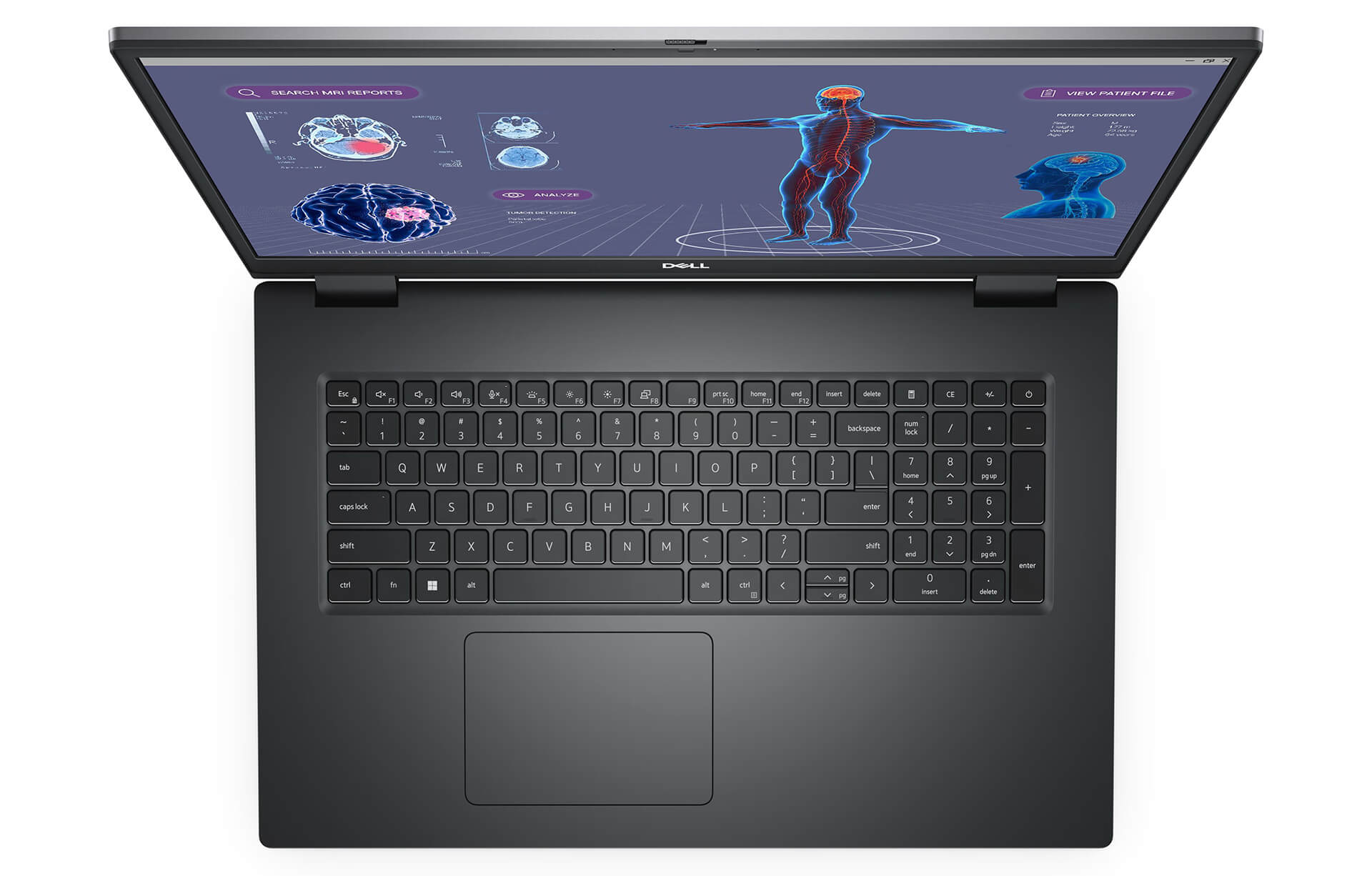
The stereo setup features four 2W speakers totaling 8W of output, offering clear audio for conference calls and video playback. The 1080p 30fps webcam is available in two variants: a standard RGB camera, or an infrared camera paired with a proximity sensor for Windows Hello facial recognition login. Pre-installed Dell Optimizer software fine-tunes performance based on the specific applications you use.
Dell Precision 7780 ports and battery: 2 Thunderbolt 4, HDMI, RJ45, 93Wh battery
The Dell Precision 7780 features 2 Thunderbolt 4 ports (USB-C), 1 USB 3.2 Gen 2 Type-C port with DisplayPort support, 2 USB-A 3.2 Gen 1 ports (1 with PowerShare), 1 HDMI port, an RJ45 Ethernet port, a Nano MicroSD card slot, and a combo headphone/microphone jack. The HDMI port is standard 2.0a on configurations with integrated graphics and standard 2.1 on configurations with discrete graphics.
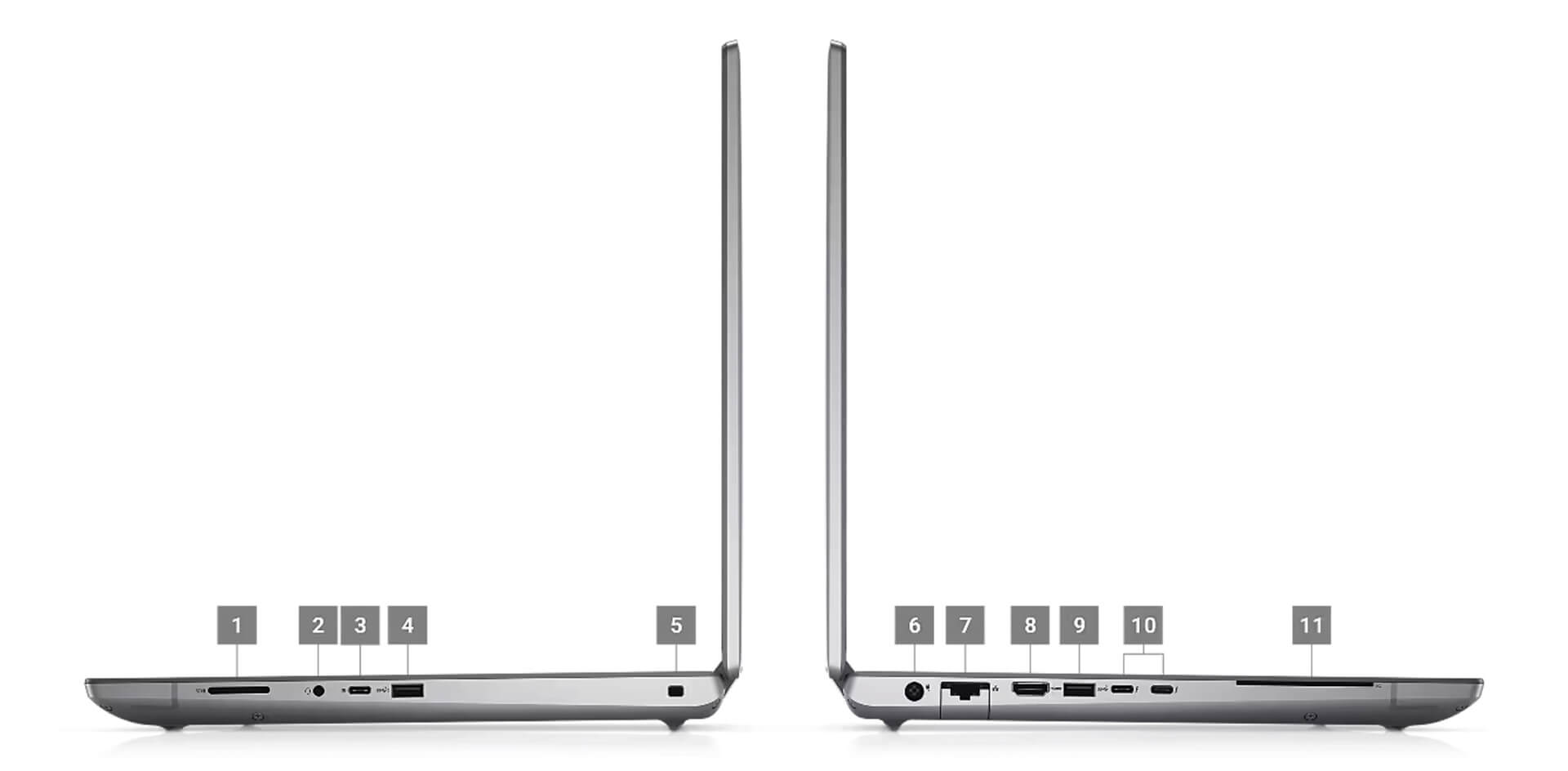
With that array of ports, you can directly connect external monitors, projectors, storage drives, and a wired connection without needing dongles. Wireless connectivity is handled by an Intel Wi-Fi 6E AX211 card and Bluetooth 5.3, providing stable transfers when moving project data across local networks.
The 93Wh battery ranks among the largest capacities in laptops, though HX-series processors and RTX graphics draw significant power under heavy loads. When rendering or running simulations, you should plug in the charger to keep performance consistent; on the go, switch Dell Optimizer to power-saver mode and lower screen brightness to extend battery life.
Overview and Review: DELL Precision 7780 Mobile Workstation (2023)
The DELL Precision 7780 Mobile Workstation (2023) is a 17.3-inch workstation built for professionals who need an expansive, color-accurate DCI-P3 display, a Core i9-13950HX processor, and professional-grade RTX graphics in a portable chassis. It suits design engineers, architects, CAD/CAM specialists, video editors, and businesses that manage hardware through vPro.
One factor to consider is its 3.05kg weight, making a well-padded 17-inch backpack recommended when commuting. Most currently available configurations come with a 60Hz FHD screen; if you need higher resolution, choose the 120Hz UHD panel. Workstation pricing runs higher than mainstream laptops, so if your budget is limited, you can start with the RTX A1000 configuration. You can also view other configurations in the Dell Precision 17 category.
| Pros | Cons |
|---|---|
|
|
FAQ - Frequently Asked Questions About the DELL Precision 7780 Mobile Workstation (2023)
1. How much does the Dell Precision 7780 weigh?
The laptop weighs 3.05kg with dimensions of 398 x 265.02 x 28.5mm. As a 17-inch workstation, it is best suited for a fixed desk setup and occasional business travel.
2. Should you choose an RTX Ada GPU or the GeForce RTX 4090?
The RTX 4090 delivers higher 3DMark scores, making it well-suited for GPU rendering and AI. If your work primarily involves CAD, BIM, and engineering applications that require certified drivers, the RTX 3500 Ada or RTX 4000 Ada configurations are more practical options.
3. Is the RTX A1000 enough for 3D design?
It is sufficient for 2D CAD, medium 3D models, and Full HD video editing. If you frequently handle large 3D scenes, GPU rendering, or 4K editing, you should opt for the RTX 3500 Ada or higher.
4. How do the FHD and UHD displays differ?
Both are 17.3-inch anti-glare panels with 99% DCI-P3 coverage and 500 nits brightness. The FHD version runs at 60Hz, while the UHD version features a 3840 x 2160 resolution and a 120Hz refresh rate.
5. Does the laptop have HDMI and an Ethernet port?
Yes. It includes an HDMI port (2.1 on configurations with discrete graphics), an RJ45 port, 2 Thunderbolt 4 ports, 1 USB-C 3.2 Gen 2 port, 2 USB-A ports, and a Nano MicroSD slot.
6. What support is included when buying from Hung Phat Laptop?
You receive genuine authorized products with full invoices, clear warranty terms, 30-day returns for manufacturer defects, RAM and SSD upgrade support, and nationwide shipping.
Two other models to consider: DELL Precision 7770 Mobile Workstation (2022) and DELL Precision 5770 Mobile Workstation (2022).
Where to buy a genuine DELL Precision 7780 (2023) at a great price?
Do you work in CAD, video editing, or 3D rendering? Let Hung Phat Laptop know which software you run every day. We will help you choose between Precision 7780 configurations with the RTX A1000, RTX Ada, or RTX 4090. If you need 17-inch workstations for your engineering team, our consulting staff will compare each configuration against your budget.
Every Dell Precision workstation at our store is a genuine product backed by a complete invoice. Warranty terms are clearly detailed on the warranty slip. Any unit with a manufacturer defect is eligible for a 30-day return or exchange. Our technicians are ready to upgrade RAM or install additional SSD storage whenever you need. Enjoy nationwide delivery and long-term technical support at Hung Phat Laptop.
Performance & benchmarks DELL Precision 7780 Mobile Workstation (2023)
Intel Core i9-13950HX NVIDIA RTX A1000 Laptop GPU - best for Office 10/10, Programming 9.5/10.
Intel Core i9-13950HX
- Cinebench R23 (multi-core)28,681
- Geekbench 6 (multi-core)16,169
- Geekbench 6 (single-core)2,851
- PassMark40,291
- Cores / Threads24/32
NVIDIA RTX A1000 Laptop GPU
- 3DMark Time Spy4,255.5
- 3DMark Fire Strike11,321
- VRAM4 GB
- ArchitectureAmpere
Best for
Scored from real benchmarks- Gaming4.5/10
- Video / Graphics6.5/10
- Programming9.5/10
- Office10/10
Why does the CPU matter?
The CPU is the "brain" that handles every task: launching apps, multitasking, compiling code and editing video. The stronger the CPU, the faster and smoother the laptop runs when you juggle many things at once.
- BasicThis product
Web browsing, streaming and light office work.
- MainstreamThis product
Office work, moderate multitasking and studying.
- Mid-rangeThis product
Solid multitasking, programming and light graphics work.
- StrongThis product
Video editing, heavy programming, virtualization and gaming.
- FlagshipThis product
Heavy rendering, 4K/8K editing, virtual machines and AI workloads.
Why does the GPU matter?
The GPU (graphics card) handles visuals: gaming, video editing, 3D rendering and AI acceleration. The stronger the GPU, the higher your frame rates and the faster your video exports.
- Basic (iGPU)This product
Smooth display, 4K video and very light games (League of Legends, Valorant on low).
- MainstreamThis product
1080p eSports gaming, photo editing and light video editing.
- Mid-rangeThis product
1080p gaming on medium-high settings and smooth Full HD video editing.
- StrongThis product
1080p/1440p gaming on high settings, 4K video editing and 3D rendering.
- FlagshipThis product
4K/240Hz gaming, ray tracing, heavy rendering and AI.
Game performance
Real FPS - FHD- Dota 2182 fps1080p Ultra
- CS2201 fps1080p Ultra
- GTA V141 fps1080p Ultra
- CoD: Black Ops 6145 fps1080p Ultra
- Battlefield 6127 fps1080p Ultra
- Star Wars Outlaws76 fps1080p Ultra
- Black Myth: Wukong53 fps1080p Ultra
- God of War Ragnarök163 fps1080p Ultra
- Final Fantasy XVI99 fps1080p Ultra
- Cyberpunk 2077123 fps1080p Ultra
≥60fps very smooth30-60fps playable<30fps lower the settings
Local AI performance
Tokens/second running locally on GPU 4GB VRAM- Gemma 4 E2B3.1 GB · ctx 256K51 tok/sDecent
- Qwen 3.5 2B2.5 GB · ctx 32K63 tok/sDecent
- Phi-4 Mini Reasoning2.4 GB · ctx 16K65 tok/sRuns well
- Llama 3.2 3B2 GB · ctx 128K78 tok/sRuns well
- SmolLM3 3B2 GB · ctx 128K78 tok/sRuns well
- DeepSeek R1 1.5B1.3 GB · ctx 64K121 tok/sRuns great
- Qwen 3.5 0.8B1.3 GB · ctx 32K121 tok/sRuns great
- TinyLlama 1.1B1.1 GB · ctx 2K143 tok/sRuns great
- Llama 3.2 1B1 GB · ctx 128K157 tok/sRuns great
- Qwen 3 4B2.5 GB · ctx 32K63 tok/sDecent
- Gemma 3 4B2.5 GB · ctx 128K63 tok/sDecent
- Phi-3.5 Mini2.4 GB · ctx 128K65 tok/sRuns well
- Gemma 2 2B1.5 GB · ctx 8K105 tok/sRuns great
- Qwen 3 1.7B1.4 GB · ctx 32K112 tok/sRuns great
- Qwen 2.5 Coder 1.5B1.3 GB · ctx 32K121 tok/sRuns great
- Qwen 3 0.6B1.1 GB · ctx 32K143 tok/sRuns great
- Gemma 3 1B1 GB · ctx 32K157 tok/sRuns great
GreatWellDecent4-bit quantized, ctx = context window
-
JM Jess Macc
Excellent service. Good laptop. Quick Delivery. Laptop in an excellent condition and working perfectly.
Reply • like- TP Phạm Thiên Phước Administrator
Thank you for your trust in purchasing our products.
Reply • like
-
Q&A about DELL Precision 7780 Mobile Workstation (2023)
Frequently asked questions about DELL Precision 7780 Mobile Workstation (2023)
What are the specifications of DELL Precision 7780 Mobile Workstation (2023)?
What is the warranty for DELL Precision 7780 Mobile Workstation (2023)?
Can I buy DELL Precision 7780 Mobile Workstation (2023) with home delivery?
Worth a Look
 3 configurations
DELL Precision 7770 Mobile Workstation (2022)
Dell Precision 5770 Mobile Workstation (2022)
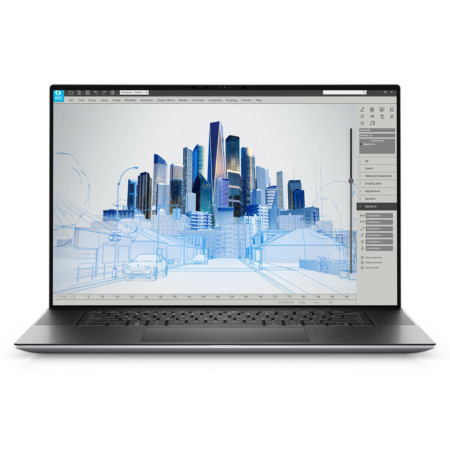
Dell Precision 5760 Mobile Workstation
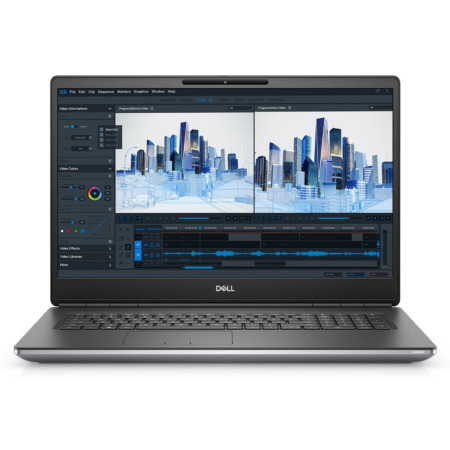 2 configurations


Trần Hoàng Long 24/07/2026
The machine runs incredibly smoothly, and video rendering is truly fast. The screen is sharp and beautiful, making it perfect for graphic design. It's great value for money for professionals.
Nguyễn Anh Thái 06/05/2024Purchased at Hung Phat
Right near my house, super reliable! :))
Phạm Thanh Cầu 18/08/2023Purchased at Hung Phat
Great price