Product Categories

Laptop Accessories

100% genuine 12-month warranty Fast nationwide delivery

Sort by: 1 products
Learn more

A clutter-free workspace does not always start with a more powerful laptop-it starts with how efficiently you connect everything around it. The laptop accessories in this category currently highlight the Dell Pro Smart Dock SD25, a USB-C docking station from Dell's latest Dell Pro generation designed for modern corporate environments. Hung Phat Laptop continuously updates inventory status, and the guide below helps customers clearly understand its features, port selection, and compatibility before making a purchasing decision.

Dell SD25 Laptop Accessories for Enterprise Workspaces

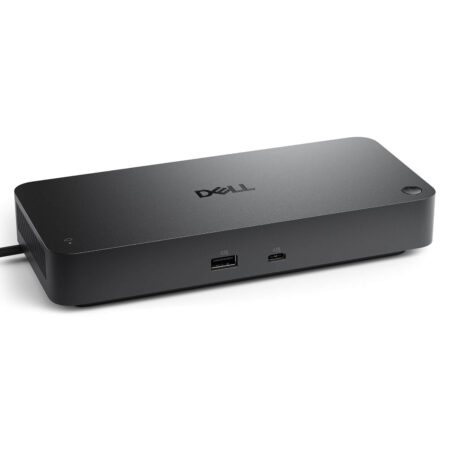
Dell positions the Dell Pro Smart Dock SD25 specifically for commercial laptop setups, especially when users need external monitors, wired networking, keyboards, mice, and high-speed charging through a single USB-C cable. Within the Dell laptop accessories catalog at Hung Phat, this is currently the only model listed on our website, and it is presently out of stock.

What sets the Dell SD25 apart is the "Smart" moniker, indicating cloud-based remote management capabilities within the Dell ecosystem. For IT departments, this dock is far more than a simple port hub-it is a manageable endpoint that allows administrators to monitor device health, push firmware updates, and independently control specific ports across enterprise deployments.

According to Dell specifications, the SD25 connects via USB-C with DP Alt Mode support, featuring an integrated 0.9 m cable that can be routed to either the left or right side depending on your desk arrangement. The included 180W power adapter delivers up to 130W to compatible Dell commercial laptops and up to 96W to third-party laptops, depending on regional markets, hardware configuration, and the host device's power profile.

Dell SD25 Dock: Single-Cable Connectivity for Displays and Wired Networking

The ideal audience for the Dell SD25 dock includes dedicated desk workers, professionals who frequently join virtual meetings, multi-monitor power users, and anyone requiring a stable wired LAN connection. With all peripherals routed through a central hub, packing up or heading to a meeting is as simple as unplugging a single USB-C cable from your laptop.

Accessory Model Primary Host Interface Key Highlights Reference Price
Dell Pro Smart Dock SD25 - 130W USB-C Dock USB-C, DP Alt Mode Up to 130W charging for Dell commercial laptops, 2.5 Gigabit LAN, remote fleet management Out of stock

Video outputs on the SD25 include 2 DisplayPort 1.4 ports, 1 HDMI 2.1 port, and 1 multifunctional USB-C 3.2 Gen 2 port supporting DP 1.4 video output. Dell states that the dock can drive up to 4 displays simultaneously, though actual display count and resolutions depend on your laptop's GPU capabilities, video output standards, and Display Stream Compression (DSC) support.

For peripheral data connectivity, the SD25 provides 1 USB-C 3.2 Gen 2 data port, 4 USB-A 3.2 Gen 2 ports delivering up to 10Gbps speeds, and a 2.5 Gigabit LAN port. The USB-A ports feature PowerShare with up to 4.5W per port, and Dell notes that these ports can charge connected devices even when no laptop is docked.

On the management side, the dock supports MAC address pass-through, PXE Boot, Wake-On-LAN, and power button sync. Dell also highlights PC-less remote firmware updates, Microsoft Intune enrollment, WPA3 192-bit enterprise Wi-Fi encryption, and centralized administration via Dell Device Management Console. For full technical specifications, visit the official Dell Pro Smart Dock (SD25) - Laptop USB-C Docking Station product page.

How to Choose the Dell SD25 Based on Hardware Compatibility

Before selecting a Dell dock, checking full laptop compatibility is critical. According to Dell's compatibility matrix updated as of June 26, 2026, many Latitude 3000, 5000, 7000, and 9000 models from the 3330 generation and newer are officially certified, whereas select Inspiron models like the 5440, 5445, 7440, and 7640 are listed as unsupported.

Dell also lists the Dell Pro Premium PA13250, PA14250, and PA14260 as compatible with the SD25. However, power delivery levels, external monitor limits, and specific fleet management features should always be verified against Dell's compatibility charts before orchestrating large-scale corporate deployments.

Measuring 205 x 90 x 35.25 mm and weighing 562 g, the unit supports Windows 10, Windows 11, Ubuntu 24.04, RHEL 9.6 or later, and ChromeOS 137. The chassis is constructed with up to 65% post-consumer recycled plastic and features both a Kensington lock slot and a wedge-shaped lock slot, making it ideal for corporate environments requiring physical desk security.

The Dell Pro Smart Dock SD25 - 130W USB-C Dock is currently out of stock at Hung Phat Laptop. As soon as incoming stock arrives, our website will update inventory status, included accessories, and official pricing to keep customers in Ho Chi Minh City fully informed.

Frequently Asked Questions About Dell SD25 Laptop Accessories

Is the Dell SD25 a Dell Thunderbolt 4 dock?

No. The Dell SD25 is a USB-C dock operating over DP Alt Mode, unlike Dell Thunderbolt 4 models within the same product generation such as the SD25TB4 or WD25TB4.

Does the Dell SD25 deliver 130W charging to any laptop?

Dell specifies up to 130W power delivery for compatible Dell commercial laptops and up to 96W for third-party systems. Real-world wattage depends on your laptop model, USB-C Power Delivery profile, and Dell's compatibility guide.

Can the Dell SD25 dock run four external monitors simultaneously?

Dell states that the SD25 supports up to 4 monitors, but exact resolutions and multi-display configurations depend on the host laptop's GPU capabilities and DSC support. We advise confirming your target display resolutions prior to purchase.

When will Hung Phat restock the Dell SD25 laptop dock?

This category is currently entirely out of stock. Hung Phat Laptop will update product availability directly on the website as soon as new inventory arrives.