


DELL Precision 5480 Mobile Workstation (2023)
- CPU: Intel Core i9 13900H vPro Up To 5.4GHz (14 Cores, 20 Threads, 24MB Cache)
- RAM: LPDDR5 64GB 6000MHz
- SSD: 512GB PCIe Gen4 M.2 SSD
- VGA: NVIDIA® RTX™ 3000 Ada 8GB GDDR6
- DISPLAY: 14" FHD+ (1920*1200), 60Hz, Non-Touch, Low Blue Light, 100% sRGB, 500 nits
- CONDITION: Like New 99%
- WARRANTY: 12-month warranty
- Compact Dell Precision 5480 Design: A Workstation at Just 1.48kg
- Dell Precision 14 5480 Display: 16:10, 100% sRGB, 500 Nits
- Dell Precision 5480 Performance with Core i9-13900H, RTX 3000 Ada and 64GB RAM
- Keyboard, Touchpad, 8W Speakers and IR Webcam on the Dell Precision 5480
- Dell Precision 14 5480 Ports and Battery: 4 Thunderbolt 4, 72Wh Battery
- DELL Precision 5480 Mobile Workstation (2023) Overview and Review
- FAQ - Frequently Asked Questions About the DELL Precision 5480 Mobile Workstation (2023)
- Where to Buy a Genuine Dell Precision 5480 at a Great Price?
The DELL Precision 5480 Mobile Workstation (2023) is Dell's 14-inch mobile workstation, packing 13th Gen Intel Core H-series vPro processors and professional NVIDIA RTX Ada graphics into a 1.48kg chassis. It is built for engineers, architects, designers and video editors who need to run professional software but still want a machine they can carry every day. This article covers the design, display, performance, connectivity, battery and the trade-offs worth weighing before you buy.
Compact Dell Precision 5480 Design: A Workstation at Just 1.48kg
The Dell Precision 5480 has a 14-inch chassis that weighs 1.48kg and measures 310.60mm wide and 210.35mm deep. It is 7.49mm thick at the front edge, 11.09mm at the rear and 18.95mm at its thickest, noticeably more compact than the familiar 15- and 16-inch workstations.
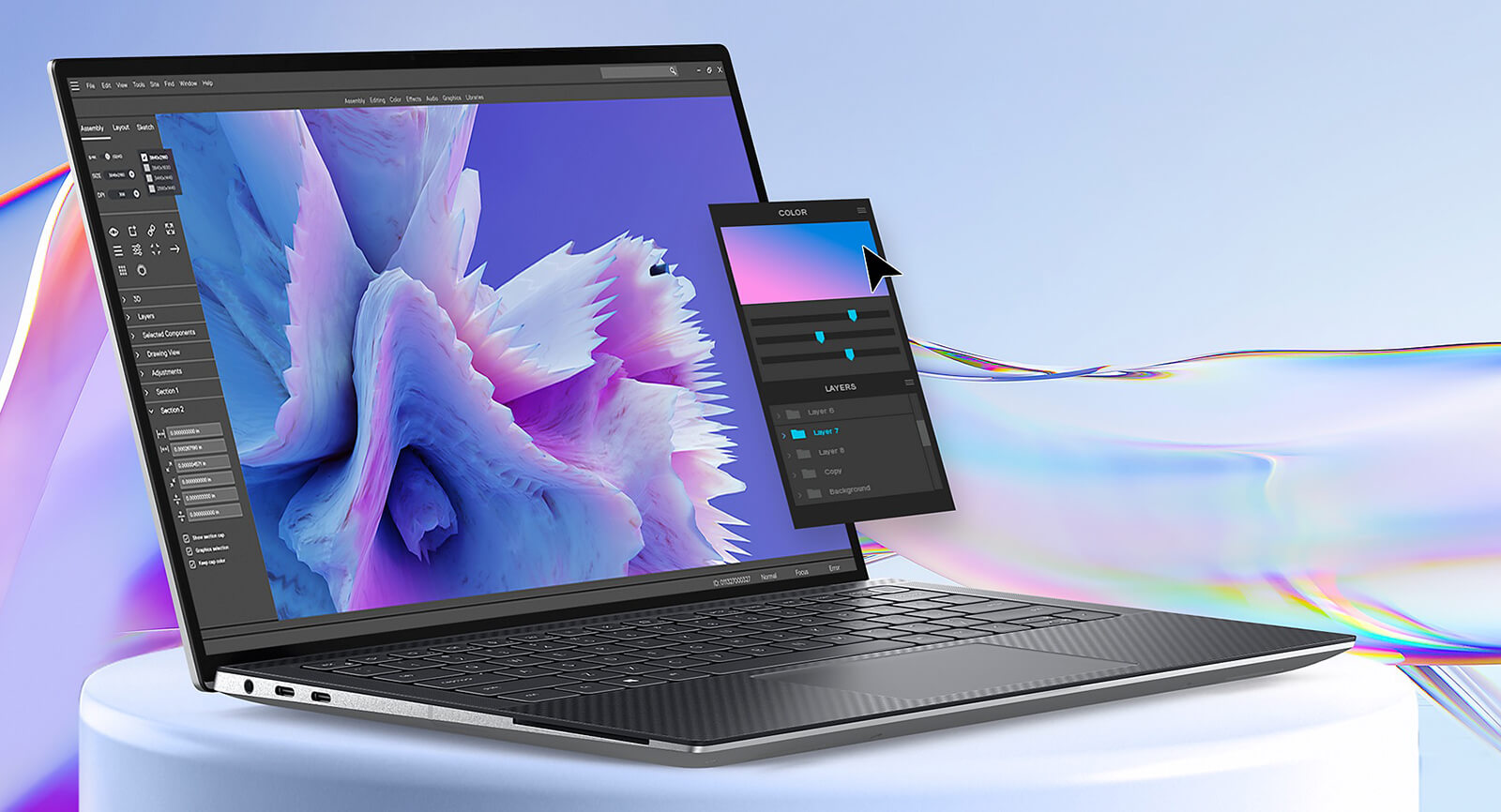
That footprint fits in a 14-inch backpack, making it a good match for people who move between the office, job sites and client meetings. Thin display bezels keep the machine compact in hand while still leaving plenty of screen space. If you need a Dell laptop that can run engineering software without hauling a workstation that weighs over 2kg, the Precision 14 5480 is worth considering.
Dell Precision 14 5480 Display: 16:10, 100% sRGB, 500 Nits
The Dell Precision 14 5480 offers two 14-inch 16:10 display options. The QHD+ (2560 x 1600) panel is a touchscreen, while the FHD+ (1920 x 1200) panel is non-touch; both cover 100% sRGB, reach 500 nits of brightness, run at a 60Hz refresh rate and include a Low Blue Light mode. The unit currently sold at Hung Phat Laptop uses the FHD+ display.
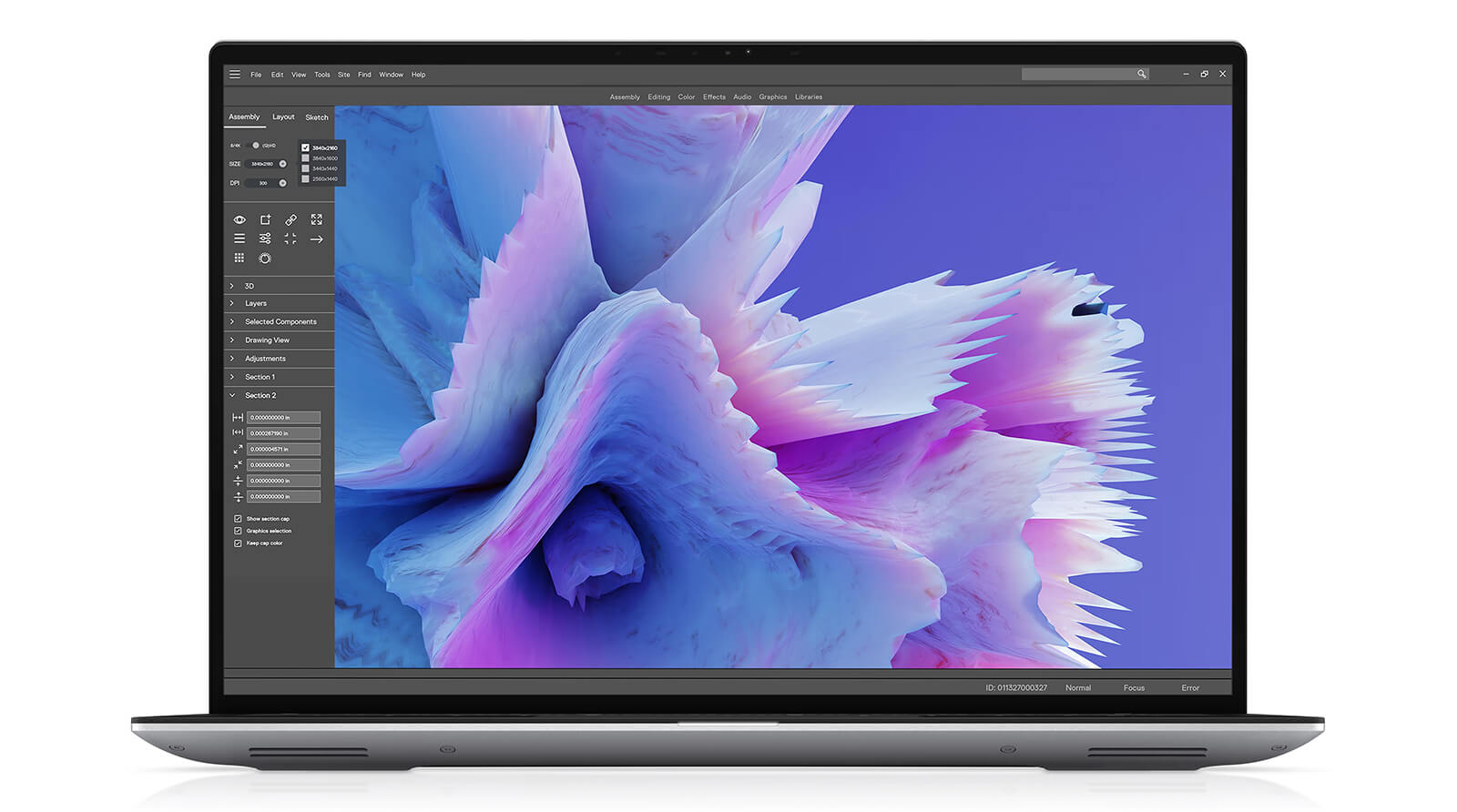
The 16:10 aspect ratio adds vertical space, so you can see more AutoCAD and Photoshop toolbars or more of a video timeline than on a 16:9 screen. 100% sRGB coverage is enough for graphic design, editing photos for the web and everyday video editing, while 500 nits of brightness keeps the screen readable near a window. The FHD+ panel is easier on the battery; if you need higher resolution to inspect drawing details or want touch input, go with the QHD+ version.
Dell Precision 5480 Performance with Core i9-13900H, RTX 3000 Ada and 64GB RAM
The unit sold at Hung Phat Laptop runs an Intel Core i9-13900H vPro with 14 cores, 20 threads, up to 5.4GHz and 24MB of cache. The Dell Precision 5480 lineup also offers the Intel Core i7-13800H vPro, likewise with 14 cores and 20 threads, at up to 5.2GHz. vPro technology helps corporate IT teams manage and secure the machine remotely.

| CPU | Cinebench R23 single / multi-core | Geekbench 6 single / multi-core |
|---|---|---|
| Intel Core i9-13900H | 1,965 / 17,471 | 2,654 / 12,644 |
| Intel Core i7-13800H | 2,017 / 17,591 | 2,766 / 12,876 |
| Intel Core Ultra 7 155H (reference) | 1,743 / 15,028 | 2,409 / 12,385 |
Source: Notebookcheck average scores. The Core i7-13800H has fewer measured samples, so its score may vary; real-world results also depend on the power mode and ambient temperature.
Based on average scores, the Core i9-13900H and Core i7-13800H are nearly identical, and both edge out the newer Core Ultra 7 155H in multi-core. In a 14-inch chassis, the gap between the two chips depends more on cooling and power mode than on the chip name, so it makes more sense to choose first by graphics card and RAM capacity.
The unit on sale uses professional NVIDIA RTX 3000 Ada graphics with 8GB of GDDR6, built on the Ada Lovelace architecture, with drivers designed for engineering software such as AutoCAD, SolidWorks, Revit and 3D rendering applications. The Precision 5480 lineup also offers NVIDIA RTX 1000 Ada 8GB GDDR6, or integrated Intel Iris Xe Graphics only for lighter needs.
| GPU | 3DMark Time Spy Graphics | 3DMark Fire Strike Graphics |
|---|---|---|
| NVIDIA RTX 3000 Ada Generation Laptop | ~8,351 | ~20,908 |
| Intel Iris Xe Graphics G7 96EUs | ~1,561 | ~5,160 |
Source: Notebookcheck average scores. The RTX 1000 Ada does not have enough data yet, so it is not included in the table; in a thin 14-inch machine, the discrete GPU may run at a lower power level, so real-world scores may be lower than shown.
The RTX 3000 Ada scores roughly 5 times higher than Iris Xe in graphics, enough to rotate 3D models, render in Blender, color grade in DaVinci Resolve and run AI workloads that need CUDA. If your work is mostly 2D AutoCAD, Photoshop and office tasks, the RTX 1000 Ada or Iris Xe version will cost less.
The DELL Precision 5480 Mobile Workstation (2023) uses LPDDR5 6000MHz RAM in 32GB or 64GB depending on configuration; the unit on sale has 64GB, enough for virtual machines, large BIM models and many applications at once. LPDDR5 RAM is soldered to the motherboard and cannot be upgraded, so choose enough capacity from the start. Storage is a 512GB PCIe Gen4 M.2 SSD, which can be swapped for a larger drive as your projects and asset libraries grow.
Keyboard, Touchpad, 8W Speakers and IR Webcam on the Dell Precision 5480
The keyboard on the Dell Precision 5480 spans nearly the full width of the chassis, with wide keys that stay comfortable during long writing sessions. The up and down arrow keys are half-height and may feel a bit awkward at first; if you often use the arrow keys to adjust drawings, you can add an external keyboard when working at a desk. A large touchpad sits centered in the palm rest, with accurate scrolling and multi-touch gestures.
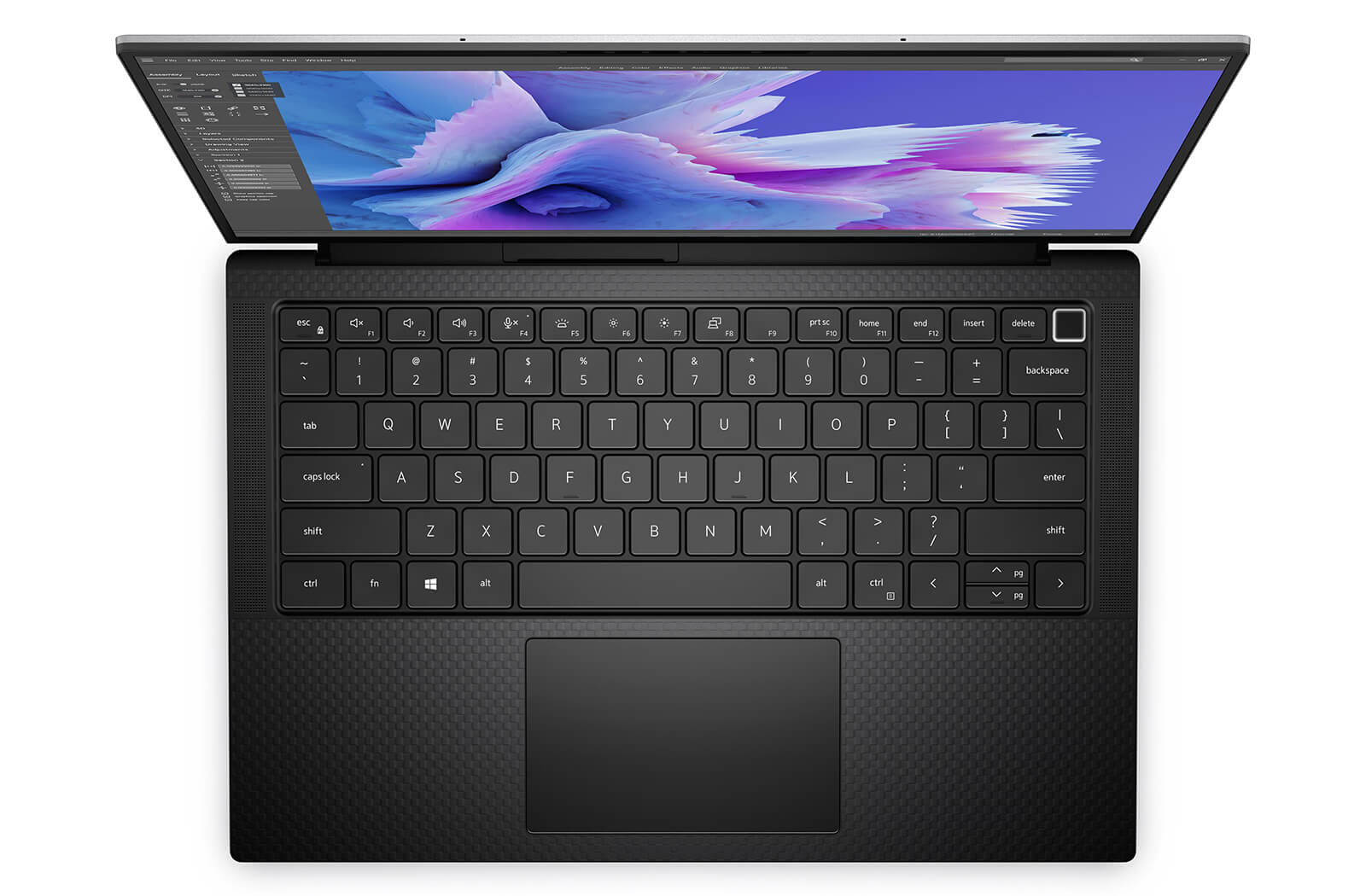
The stereo sound system uses four 2W speakers for 8W total, clear enough for online meetings and watching videos in the office. The 720p 30fps webcam pairs with an IR camera for Windows Hello facial sign-in, plus an ambient light sensor (ALS). 720p image quality is only adequate; if you need a sharper picture for presentations or livestreams, you can attach an external webcam via USB-C.
Dell Precision 14 5480 Ports and Battery: 4 Thunderbolt 4, 72Wh Battery
The Dell Precision 14 5480 has 4 Thunderbolt 4 (USB-C) ports, all supporting Power Delivery charging and DisplayPort output, plus 1 MicroSD card reader and 1 headphone/microphone combo jack. With four Thunderbolt ports, you can plug the charger in on either side, drive multiple external monitors or use a Thunderbolt dock to get network, USB and display ports over a single cable.
The laptop has no USB-A or HDMI ports, so you will need a USB-C adapter or Thunderbolt dock to connect a mouse, older USB drives or a projector. Wireless connectivity comes from an Intel Wi-Fi 6E AX211 2x2 card with MU-MIMO and Bluetooth 5, stable when transferring large projects over the local network or cloud storage.
The 72Wh battery is fairly large for a 14-inch laptop and charges over USB-C, so you can share a USB-C charger with suitable wattage on business trips. Real-world battery life depends heavily on whether the RTX card is in use; away from an outlet, switching to a battery-saving mode and letting the machine use integrated graphics for light tasks will help the battery last longer.
DELL Precision 5480 Mobile Workstation (2023) Overview and Review
The DELL Precision 5480 Mobile Workstation (2023) is a 1.48kg 14-inch workstation with a 13th Gen Intel Core H-series vPro chip, professional RTX Ada graphics and up to 64GB of LPDDR5 RAM. It is a strong fit for engineers, architects, 3D artists and video editors who want workstation-class processing in a machine that is easy to carry. You can also browse other models in the Dell Precision 14 category.
Two points to weigh: the soldered RAM cannot be upgraded, so choose the 64GB version if you work with large models. The laptop has only USB-C ports, and a USB-C adapter or Thunderbolt dock solves the lack of USB-A and HDMI. The 720p webcam and 60Hz display are adequate for work, but not meant for professional livestreaming or fast-paced gaming.
| Pros | Cons |
|---|---|
|
|
FAQ - Frequently Asked Questions About the DELL Precision 5480 Mobile Workstation (2023)
1. How much does the Dell Precision 5480 weigh and what are its dimensions?
It weighs 1.48kg and measures 310.60mm wide and 210.35mm deep, with a thickness of 7.49mm at the front edge, 11.09mm at the rear and 18.95mm at its thickest.
2. Can the Precision 5480's RAM and SSD be upgraded?
The LPDDR5 RAM is soldered to the motherboard, so it cannot be upgraded. The PCIe Gen4 M.2 SSD can be replaced with a larger drive when needed.
3. Should I choose the RTX 3000 Ada or the RTX 1000 Ada?
The RTX 3000 Ada suits 3D rendering, large BIM models, video editing and AI. If you mainly work in 2D AutoCAD, Photoshop and office apps, the RTX 1000 Ada or Iris Xe version will cost less.
4. Does the laptop have USB-A and HDMI ports?
No. It has 4 Thunderbolt 4 ports with charging and DisplayPort output, a MicroSD card reader and a headphone jack. You can use a USB-C adapter or Thunderbolt dock to add USB-A and HDMI.
5. Should I choose the FHD+ or QHD+ display?
Both are 14-inch 16:10 panels with 100% sRGB and 500 nits of brightness. The FHD+ version is non-touch and easier on the battery; the QHD+ version has touch and is sharper for viewing drawing and image details.
6. What support do I get when buying from Hung Phat Laptop?
Every laptop is a genuine product with an invoice and clear warranty terms. You also get 30-day returns for manufacturer defects, technical support, SSD upgrade assistance and nationwide delivery.
Two other models worth a look: the DELL Precision 5490 Mobile Workstation (2024) and the DELL Precision 3490 Mobile Workstation (2024).
Where to Buy a Genuine Dell Precision 5480 at a Great Price?
Work in engineering, architecture or video editing? Tell Hung Phat Laptop which software you use every day, and we will help you choose between the RTX 3000 Ada and RTX 1000 Ada, 32GB or 64GB of RAM, and an FHD+ or QHD+ display for your Dell Precision 5480. Looking for a thin and light 14-inch workstation for CAD work? Our team will compare each configuration side by side for you.
Every Precision at our store is a genuine product with a full invoice, and warranty terms are clearly stated. Units with manufacturer defects within the first 30 days can be exchanged or returned. Our technicians can install a larger SSD for you and provide long-term technical support, and we deliver nationwide. Order today at Hung Phat Laptop.
Performance & benchmarks DELL Precision 5480 Mobile Workstation (2023)
Intel Core i9-13900H NVIDIA RTX 3000 Ada Generation Laptop - best for Office 10/10, Programming 9.5/10.
Intel Core i9-13900H
- Cinebench R23 (multi-core)17,471
- Geekbench 6 (multi-core)12,644
- Geekbench 6 (single-core)2,653.5
- PassMark26,992
- Cores / Threads14/20
NVIDIA RTX 3000 Ada Generation Laptop
- 3DMark Time Spy8,351
- 3DMark Fire Strike20,908
- VRAM8 GB
- AI INT8319 TOPS
- ArchitectureAda Lovelace
Best for
Scored from real benchmarks- Gaming6/10
- Video / Graphics7/10
- Programming9.5/10
- Office10/10
Why does the CPU matter?
The CPU is the "brain" that handles every task: launching apps, multitasking, compiling code and editing video. The stronger the CPU, the faster and smoother the laptop runs when you juggle many things at once.
- BasicThis product
Web browsing, streaming and light office work.
- MainstreamThis product
Office work, moderate multitasking and studying.
- Mid-rangeThis product
Solid multitasking, programming and light graphics work.
- StrongThis product
Video editing, heavy programming, virtualization and gaming.
- FlagshipThis product
Heavy rendering, 4K/8K editing, virtual machines and AI workloads.
Why does the GPU matter?
The GPU (graphics card) handles visuals: gaming, video editing, 3D rendering and AI acceleration. The stronger the GPU, the higher your frame rates and the faster your video exports.
- Basic (iGPU)This product
Smooth display, 4K video and very light games (League of Legends, Valorant on low).
- MainstreamThis product
1080p eSports gaming, photo editing and light video editing.
- Mid-rangeThis product
1080p gaming on medium-high settings and smooth Full HD video editing.
- StrongThis product
1080p/1440p gaming on high settings, 4K video editing and 3D rendering.
- FlagshipThis product
4K/240Hz gaming, ray tracing, heavy rendering and AI.
Local AI performance
Tokens/second running locally on GPU 8GB VRAM- Llama 3.2 11B Vision6.1 GB · ctx 128K29 tok/sDecent
- Gemma 4 E2B IT5.6 GB · ctx 256K32 tok/sDecent
- GLM-4 9B5.1 GB · ctx 128K35 tok/sDecent
- Gemma 4 E4B4.6 GB · ctx 256K39 tok/sDecent
- Ministral 8B4.6 GB · ctx 32K39 tok/sDecent
- Qwen 3.5 4B4.6 GB · ctx 32K39 tok/sDecent
- DeepSeek R1 Distill 7B4.1 GB · ctx 64K44 tok/sRuns well
- Gemma 4 E2B3.1 GB · ctx 256K58 tok/sRuns well
- Qwen 3.5 2B2.5 GB · ctx 32K72 tok/sRuns great
- Phi-4 Mini Reasoning2.4 GB · ctx 16K75 tok/sRuns great
- Llama 3.2 3B2 GB · ctx 128K90 tok/sRuns great
- SmolLM3 3B2 GB · ctx 128K90 tok/sRuns great
- DeepSeek R1 1.5B1.3 GB · ctx 64K138 tok/sRuns great
- Qwen 3.5 0.8B1.3 GB · ctx 32K138 tok/sRuns great
- TinyLlama 1.1B1.1 GB · ctx 2K163 tok/sRuns great
- Llama 3.2 1B1 GB · ctx 128K179 tok/sRuns great
- Gemma 2 9B5.1 GB · ctx 8K35 tok/sDecent
- Nemotron Nano 9B v25.1 GB · ctx 128K35 tok/sDecent
- Llama 3.1 8B4.6 GB · ctx 128K39 tok/sDecent
- Qwen 3 8B4.6 GB · ctx 128K39 tok/sDecent
- Mistral 7B v0.34.1 GB · ctx 32K44 tok/sRuns well
- Qwen 2.5 7B4.1 GB · ctx 128K44 tok/sRuns well
- Qwen 2.5 Coder 7B4.1 GB · ctx 128K44 tok/sRuns well
- Qwen 3 4B2.5 GB · ctx 32K72 tok/sRuns great
- Gemma 3 4B2.5 GB · ctx 128K72 tok/sRuns great
- Phi-3.5 Mini2.4 GB · ctx 128K75 tok/sRuns great
- Gemma 2 2B1.5 GB · ctx 8K119 tok/sRuns great
- Qwen 3 1.7B1.4 GB · ctx 32K128 tok/sRuns great
- Qwen 2.5 Coder 1.5B1.3 GB · ctx 32K138 tok/sRuns great
- Qwen 3 0.6B1.1 GB · ctx 32K163 tok/sRuns great
- Gemma 3 1B1 GB · ctx 32K179 tok/sRuns great
GreatWellDecent4-bit quantized, ctx = context window
No comments yet
Q&A about DELL Precision 5480 Mobile Workstation (2023)
Frequently asked questions about DELL Precision 5480 Mobile Workstation (2023)
What are the specifications of DELL Precision 5480 Mobile Workstation (2023)?
What is the warranty for DELL Precision 5480 Mobile Workstation (2023)?
Can I buy DELL Precision 5480 Mobile Workstation (2023) with home delivery?
Worth a Look


Lê Thánh Hậu 02/05/2024Purchased at Hung Phat
Unboxing it yourself is such an incredible feeling...
Nguyễn Lê Trung Hiếu 01/06/2023Purchased at Hung Phat
4 stars, will come back to leave a 5-star review after using it for a while if the machine is good.
Nguyễn Tôn Thành 28/01/2023Purchased at Hung Phat
Friendly and cheerful staff