
Microsoft: Cyberattack campaign targets pirated movie viewers
Microsoft has just announced a large-scale cyberattack campaign exploiting malvertising on pirated movie streaming sites, infecting nearly 1 million devices worldwide with malware.
According to a report from Microsoft Threat Intelligence, this attack occurred in December 2024, targeting users visiting two websites: movies7 and 0123movie. Hackers injected malicious code into video advertisements, which then automatically redirected users to malicious websites.
How malware spreads through malvertising
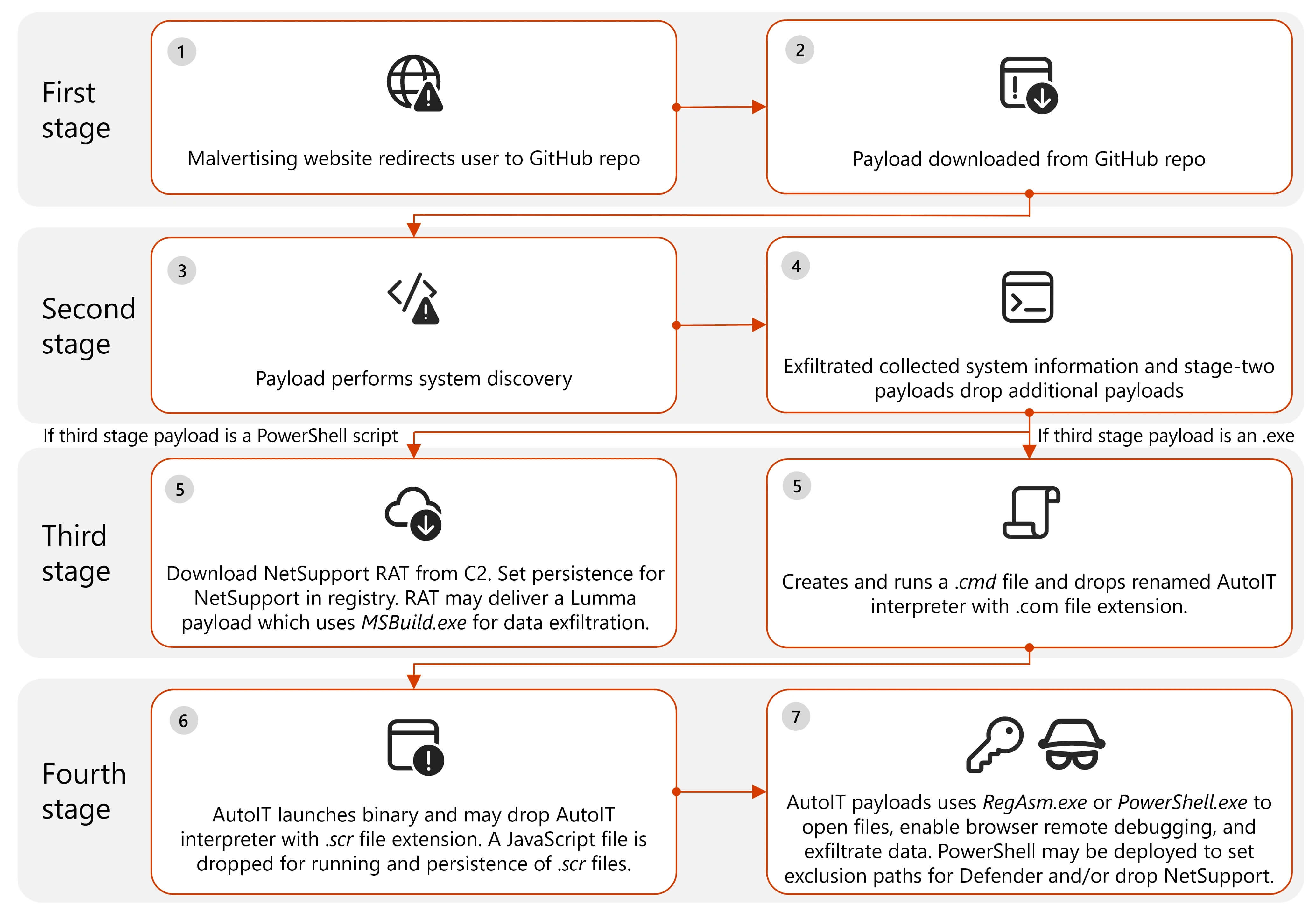
1. Malicious ads on pirated movie sites
- When users watch videos on movies7 or 0123movie, ads embedded in the video trigger a malicious redirection chain.
- Hackers exploit pay-per-view or pay-per-click systems to monetize through advertising platforms.
2. Redirection to phishing websites
- Users are redirected to fake websites, such as fraudulent technical support or financial phishing pages.
- They are then further led to GitHub, which hosts malicious files.
3. Downloading and deploying malware
- Hackers use GitHub to distribute malicious files, infecting users' computers.
- Microsoft has identified and removed these repositories, but many devices were infected beforehand.
4. Malware installation and remote control
- The malware collects system information and sends it back to the hacker's command and control server.
- A PowerShell script is executed to download NetSupport RAT (Remote Access Trojan), allowing hackers to remotely control the infected device.
- The RAT then downloads Lumma Infostealer or Doenerium Infostealer, helping hackers steal personal data, documents, passwords, and browsing history.
Security risks and prevention methods
Threats from malvertising malware
- This malware can monitor browsing activities, interfere with Chrome, Firefox, and Edge browsers, and even change the content of displayed web pages.
- Malicious files are digitally signed with legitimate certificates, helping them easily bypass security tools.
- Microsoft has revoked 12 digital certificates related to this attack.
How to protect devices from malvertising
- Do not access pirated movie websites, as these are ideal environments for hackers to distribute malware.
- Install antivirus software, especially programs capable of detecting malvertising and malicious redirections.
- Avoid clicking on ads from unknown sources, even if they appear on popular websites.
- Enable Windows Defender or other security software to detect and prevent malware.
- Regularly update your operating system and browsers to avoid exploitation through security vulnerabilities.
According to Microsoft, Windows Defender can detect and block this type of malware, but users still need to remain vigilant while browsing. This serves as an important reminder to limit access to copyright-infringing platforms, where hackers are exploiting the environment to distribute malware on a large scale.