


Lenovo ThinkPad E16 Gen 2 (2024)
- CPU: AMD Ryzen™ 5 7535U Up To 4.55GHz (6 Cores, 12 Threads, 19MB Cache)
- RAM: DDR5 16GB 4800MHz
- SSD: 256GB PCIe Gen4 M.2 SSD
- VGA: AMD Radeon™ 660M Graphics
- OS: Windows 11 Pro
- DISPLAY: 16" WUXGA (1920x1200) IPS, 60Hz, Anti-Glare, 45% NTSC, 300nits
- CONDITION: New 100% Full Box
- WARRANTY: 12-month warranty
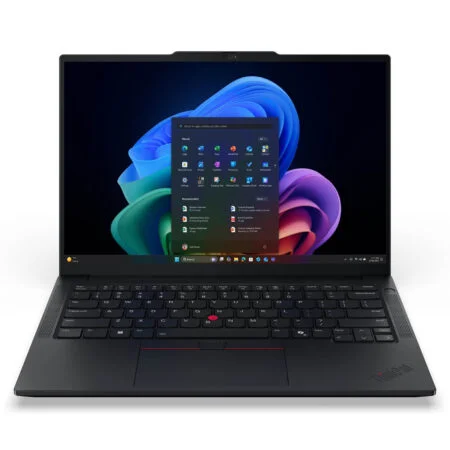
- Lenovo ThinkPad E16 Gen 2 16-inch aluminum chassis design
- Display on the ThinkPad E16 Gen 2 (2024)
- ThinkPad E16 Gen 2 Performance: Intel Core Ultra and AMD Ryzen
- Easy RAM and SSD Upgrades on ThinkPad E16 Gen 2 AMD and Intel
- ThinkPad E16 Gen 2 Keyboard & Touchpad
- Audio and camera for online meetings
- Battery and cooling on the ThinkPad E16 Gen 2
- Slots & Connectivity on the ThinkPad E16 Gen 2
- Summary and Verdict: Lenovo ThinkPad E16 Gen 2 (2024)
- FAQ - Frequently Asked Questions About the Lenovo ThinkPad E16 Gen 2 (2024)
- Where to Buy the Lenovo ThinkPad E16 Gen 2 (2024) with Confidence at a Great Price?
Lenovo ThinkPad E16 Gen 2 is a 2024 16-inch business laptop featuring a numeric keypad, upgradable RAM up to 64GB, and MIL-STD-810H military-grade durability standards. The device comes in two platforms: the Intel version uses Intel Core Ultra (Series 1), while the AMD version uses AMD Ryzen 7035 series, such as the Ryzen 5 7535U or Ryzen 7 7735HS. This article compares the options for both versions so you can choose the right configuration for your work.
Lenovo ThinkPad E16 Gen 2 16-inch aluminum chassis design
Lenovo ThinkPad E16 Gen 2 features an aluminum lid and a base made of either PC-ABS plastic or aluminum depending on the version, finished in the signature ThinkPad black. It measures 356.1 x 247.7mm, is 20.2mm thick, and starts at a weight of 1.78kg for the plastic base version; the aluminum base version is slightly thinner (19.85mm) and starts at 1.81kg. The bezels are thin, resulting in a 90.7% screen-to-body ratio.

Both Intel and AMD versions share the same chassis and both pass MIL-STD-810H durability tests for vibration, temperature, and humidity. Some configurations include a fingerprint sensor integrated into the power button, allowing you to log in simply by pressing the button to wake the machine. At 1.78kg, this laptop is better suited for a fixed office setup or being carried a few times a week rather than constant all-day travel.
Display on the ThinkPad E16 Gen 2 (2024)
With a 16-inch 16:10 display, Lenovo ThinkPad E16 Gen 2 offers four anti-glare IPS panel options with a 60Hz refresh rate, which are identical across both Intel and AMD versions: WUXGA 1920 x 1200 300 nits with 45% NTSC (available with or without touch), WUXGA 1920 x 1200 400 nits with 100% sRGB, and WQXGA 2560 x 1600 400 nits with 100% sRGB.

The 300 nits version is sufficient for text, Excel, and online meetings in a room, but the colors are somewhat washed out, making it unsuitable for photo editing. The two 400 nits versions are brighter, have more accurate colors, and feature Eyesafe 2.0 certification, which reduces blue light at the hardware level without making the screen look yellowish. The WQXGA 2.5K version provides sharper text, making it ideal for designers or those working with multiple spreadsheets simultaneously.
ThinkPad E16 Gen 2 Performance: Intel Core Ultra and AMD Ryzen
The major difference across ThinkPad E16 Gen 2 versions lies in the processor, as Lenovo offers both Intel and AMD platforms across multiple configurations. On the Intel side, the machine offers the Core Ultra 5 125U, 135U, 125H, and Core Ultra 7 155U, 165U, 155H processors paired with DDR5-5600 RAM. On the AMD platform, buyers can choose between the Ryzen 3 7335U, Ryzen 5 7535U, Ryzen 5 7535HS, Ryzen 7 7735U, Ryzen 7 7735HS, as well as two rebranded chips, the Ryzen 5 150 and Ryzen 7 170 (which share identical specs with the 7535HS and 7735HS), paired with DDR5-4800 RAM. The table below compares the most common processors to help you gauge the performance differences.

| Processor | Cores / Threads | Integrated Graphics | Geekbench 6 Single-Core | Geekbench 6 Multi-Core |
|---|---|---|---|---|
| AMD Ryzen 3 7335U | 4 / 8 | Radeon 660M | 1,801 | 4,963 |
| AMD Ryzen 5 7535U | 6 / 12 | Radeon 660M | 1,943 | 7,463 |
| AMD Ryzen 7 7735U | 8 / 16 | Radeon 680M | 2,001 | 7,987 |
| AMD Ryzen 7 7735HS | 8 / 16 | Radeon 680M | 2,098 | 9,970 |
| Intel Core Ultra 5 125U | 12 / 14 | Intel Graphics | 2,150 | 9,351 |
| Intel Core Ultra 7 155H | 16 / 22 | 8-core Intel Arc | 2,409 | 12,385 |
Reference average figures sourced from Notebookcheck; individual test results vary based on performance mode.
The ThinkPad E16 Gen 2 AMD Ryzen 5 7535U configuration (6 cores, 12 threads, up to 4.55 GHz boost) comfortably handles Word, multi-sheet Excel files, accounting software, Zoom, Teams, and dozens of Chrome tabs at the same time. Stepping up to the Ryzen 7 7735HS yields an approximately 34% increase in multi-core scores, delivering plenty of headroom for programming, lightweight virtual machines, or Full HD video editing. The Core Ultra 7 155H serves as a very powerful processor in this lineup, outperforming the 7735HS by about 24% in multi-core performance.
Beyond raw processing power, the two platforms differ in AI capability. Intel Core Ultra processors feature a dedicated neural processing unit (NPU), the Intel AI Boost with up to 11 TOPS, which accelerates features like background blur during video calls while conserving battery life. In contrast, AMD Ryzen 7035-series processors lack an NPU, leaving those workloads to the CPU and integrated graphics. Both versions feature a dedicated Copilot key, though neither qualifies as a Copilot+ PC (which requires an NPU with at least 40 TOPS); ChatGPT, Copilot, and Gemini continue to run normally.
Integrated graphics capabilities also vary by processor. The Radeon 680M on Ryzen 7 models and Intel Arc on Core Ultra H-series chips deliver noticeably stronger performance than the Radeon 660M and Intel Graphics found on other models: 3DMark Time Spy scores reach roughly 2,303 and 3,270 points respectively, compared to 1,535 for the Radeon 660M. These two GPUs can comfortably run League of Legends, Valorant, or Dota 2 at 1080p on low settings. Note that Intel Arc graphics are only activated when the laptop has at least 16GB of dual-channel RAM (two modules).
Easy RAM and SSD Upgrades on ThinkPad E16 Gen 2 AMD and Intel
Upgradeability is a major advantage of the ThinkPad E16 Gen 2 compared to many laptops with soldered memory today. Whether you choose the Intel or AMD version, the laptop provides two DDR5 SO-DIMM slots supporting up to 64GB in dual-channel mode when both slots are populated; the only difference is memory speed, with Intel models using 5600 MHz RAM and AMD models running at 4800 MHz. The machine also houses two SSD slots: one M.2 2280 slot and one M.2 2242 slot, both running on PCIe 4.0 and supporting drives up to 1TB per slot.
To put this into perspective, look at the AMD-based 21M5000GUS configuration, which includes a Ryzen 5 7535U, 16GB of RAM, a 256GB SSD, a WUXGA display, and Windows 11 Pro. It comes with a single 16GB DDR5-4800 stick, meaning it runs in single-channel mode out of the box. Adding a second 16GB DDR5-4800 module upgrades the system to 32GB in dual-channel mode, smoothing out multi-app multitasking and providing extra bandwidth for the integrated graphics. While the 256GB boot drive is modest, the vacant M.2 2242 slot lets you easily add a second drive without having to reinstall Windows.
ThinkPad E16 Gen 2 Keyboard & Touchpad
The keyboard on the Lenovo ThinkPad E16 Gen 2 features a 6-row spill-resistant layout complete with a dedicated numeric keypad and a Copilot key. Key travel measures 1.5 mm (1.35 mm on the function row and the G, H, and B keys), delivering crisp tactile feedback for fatigue-free extended typing sessions. A backlit keyboard is optional and available on select configurations.

The touchpad measures 68 x 115 mm with a Mylar surface, supporting multi-touch Windows gestures alongside three physical click buttons positioned above it. Centered in the keyboard is ThinkPad's iconic red TrackPoint nub, allowing precise cursor control without lifting your hands from the keys; double-tapping the TrackPoint brings up a quick menu to adjust sensitivity or mute and unmute the microphone.
Audio and camera for online meetings
The speaker system features two 2W speakers tuned by HARMAN and supports Dolby Atmos, providing sufficient volume for small meeting rooms and watching movies. A dual-microphone array with intelligent noise cancellation helps voices sound clearer during Zoom or Teams calls in noisy environments.

The camera has three options: 720p HD, 1080p Full HD, and 1080p Full HD with an infrared sensor for facial recognition unlocking (Windows Hello). All versions include a physical camera shutter; the 1080p version adds image noise reduction for low-light rooms. The 21M5000GUS configuration uses a 1080p camera with a shutter.
Battery and cooling on the ThinkPad E16 Gen 2
Battery life is quite similar across both platforms since they share the same battery and charger. The machine features a 47Wh battery supporting Rapid Charge Pro (50% charge in 30 minutes) or a 57Wh battery supporting Rapid Charge (80% charge in 1 hour), coming with a 65W USB-C adapter. According to Lenovo's MobileMark 25 testing, the Intel Core Ultra 5 125U version lasts up to about 11.6 hours, while the AMD Ryzen 7 7735HS 57Wh version lasts up to about 12.7 hours; real-world use with high brightness and multiple applications will result in shorter times.

The cooling system on the ThinkPad E16 Gen 2 keeps the machine quiet during office work. With H and HS chips like the Core Ultra 7 155H or Ryzen 7 7735HS, the fans will spin faster and become more audible during long video exports or code compilation, providing higher performance than the U-series versions.
Slots & Connectivity on the ThinkPad E16 Gen 2
Connectivity is where the two platforms differ significantly, even though the number of ports and their locations are the same. The Intel version has one 40Gbps Thunderbolt 4 port, one 20Gbps USB-C port (supporting both charging and video output), one 5Gbps USB-A port, one 10Gbps USB-A port that provides power to charge phones while the laptop is off, HDMI 2.1, an RJ-45 LAN port, and a 3.5mm headphone jack. Moving to the AMD version, the machine retains the same USB-A, HDMI, LAN, and audio jack ports, but the two USB-C ports only reach 5Gbps and 10Gbps and lack Thunderbolt. For needs like connecting a mouse, an external monitor, or charging via USB-C, this difference has almost no impact.

Both versions can output to up to four displays simultaneously (the laptop screen plus three external monitors); HDMI supports 4K 60Hz, while the 10Gbps and 20Gbps USB-C ports support up to 5K. Wireless connectivity options include Wi-Fi 6 or Wi-Fi 6E with Bluetooth 5.2 or 5.3. The machine does not have an SD card reader, so those who frequently transfer photos from cameras should prepare a USB card reader.
Summary and Verdict: Lenovo ThinkPad E16 Gen 2 (2024)
The Lenovo ThinkPad E16 Gen 2 is well suited for businesses, accountants, programmers, and students looking for an expansive display, a dedicated numeric keypad, and long-term durability. AMD configurations like the Ryzen 5 7535U offer an accessible price point with ample performance for daily office tasks, while Intel Core Ultra options provide Thunderbolt 4, an integrated NPU, and faster memory speeds. Both platforms support straightforward RAM and SSD upgrades and feature dedicated LAN and HDMI ports.
Points to consider: starting weight is 1.78 kg, the base display tops out at 300 nits and 60 Hz, AMD variants lack Thunderbolt and an NPU, there is no memory card slot, and neither platform meets Microsoft's Copilot+ PC standard.
| Pros | Cons |
|---|---|
|
|
FAQ - Frequently Asked Questions About the Lenovo ThinkPad E16 Gen 2 (2024)
1. How do the Intel and AMD versions of the ThinkPad E16 Gen 2 differ?
Both versions share the same chassis, display options, keyboard, speakers, and battery. The Intel variant features Core Ultra processors, DDR5-5600 RAM, Thunderbolt 4, and an Intel AI Boost NPU. The AMD variant is powered by Ryzen 7035 series processors with DDR5-4800 RAM and dual USB-C ports (5 Gbps and 10 Gbps), but lacks Thunderbolt and an NPU, typically arriving at a more accessible price point.
2. Which processor options are available on the AMD version?
Available processors include the Ryzen 3 7335U, Ryzen 5 7535U, Ryzen 5 7535HS, Ryzen 5 150, Ryzen 7 7735U, Ryzen 7 7735HS, and Ryzen 7 170. Ryzen 5 and Ryzen 3 configurations use Radeon 660M graphics, while Ryzen 7 models feature the more capable Radeon 680M.
3. Are the specs on the 21M5000GUS (Ryzen 5 7535U) sufficient for daily use?
It provides plenty of performance for standard office productivity, accounting, schoolwork, and video conferences. The system comes configured with a single 16 GB DDR5-4800 RAM stick and a 256 GB SSD; adding a second 16 GB stick enables dual-channel memory, and you can install a secondary drive in the available M.2 2242 slot if you need more storage capacity.
4. Can the RAM and SSD be upgraded?
Yes. The machine provides two DDR5 SO-DIMM slots supporting up to 64 GB of memory, alongside two M.2 PCIe 4.0 SSD slots (2280 and 2242 sizes), each accommodating drives up to 1 TB.
5. What display options are available?
There are four 16-inch anti-glare IPS options running at 60 Hz: WUXGA 300 nits 45% NTSC (touch or non-touch), WUXGA 400 nits 100% sRGB, and WQXGA 2560 x 1600 400 nits 100% sRGB. Both 400-nit configurations include Eyesafe 2.0 certification.
6. Is the ThinkPad E16 Gen 2 durable?
Yes. It passes MIL-STD-810H durability tests covering vibration, temperature, and humidity, features a spill-resistant keyboard, and includes an aluminum top cover.
7. How long does the battery last?
According to Lenovo, the 57 Wh battery delivers roughly 11.6 to 12.7 hours in the MobileMark 25 benchmark depending on the processor. Real-world runtimes at higher display brightness will be shorter. The 47 Wh battery charges to 50% in 30 minutes, while the 57 Wh battery reaches 80% charge in 1 hour.
8. What ports are available on the laptop?
Intel configurations include Thunderbolt 4, USB-C 20 Gbps, two USB-A ports, HDMI 2.1, an RJ-45 LAN port, and a 3.5 mm audio jack. AMD configurations include two USB-C ports (5 Gbps and 10 Gbps), two USB-A ports, HDMI 2.1, an RJ-45 LAN port, and a 3.5 mm audio jack. Neither model features a memory card reader.
9. Can this laptop handle gaming or graphic design?
Running on integrated graphics, it easily handles lighter titles like League of Legends and Valorant at low visual settings, with smoother frame rates on Ryzen 7 (Radeon 680M) and Core Ultra H-series (Intel Arc) configurations. It is well suited for 2D design and basic photo editing, but is not built for demanding 3D rendering or AAA gaming.
10. Is this machine a Copilot+ PC?
No. The Intel Core Ultra Series 1 NPU reaches up to 11 TOPS, while AMD Ryzen 7035 processors do not have an NPU, both falling below Microsoft's 40 TOPS requirement. However, the dedicated Copilot keyboard key and cloud-based AI tools continue to work normally.
Browse more models in the ThinkPad E Series category, or widen your options with Lenovo laptops. If you are comparing options, also see the Lenovo ThinkPad E16 Gen 3 (2025) and the Lenovo ThinkPad E15 Gen 2.
Where to Buy the Lenovo ThinkPad E16 Gen 2 (2024) with Confidence at a Great Price?
If you need a reliable 16-inch ThinkPad laptop with a full numeric keypad and easy upgradeability for long-term productivity, the Lenovo ThinkPad E16 Gen 2 (2024), in either Intel or AMD configurations, is a compelling choice in its price category.
At Hung Phat Laptop, our specialists will help you select the ideal processor, display panel, and RAM capacity for your workflow, with on-the-spot RAM and SSD installation, 100% genuine products, full VAT invoicing, clear warranty coverage, and nationwide delivery.
Performance & benchmarks Lenovo ThinkPad E16 Gen 2 (2024)
AMD Ryzen 5 7535U AMD Radeon 660M - best for Programming 6/10, Office 6/10.
AMD Ryzen 5 7535U
AMD Radeon 660M
- 3DMark Time Spy1,535
- 3DMark Fire Strike4,881
- ArchitectureRDNA 2
Best for
Scored from real benchmarks- Gaming1/10
- Video / Graphics2/10
- Programming6/10
- Office6/10
Why does the CPU matter?
The CPU is the "brain" that handles every task: launching apps, multitasking, compiling code and editing video. The stronger the CPU, the faster and smoother the laptop runs when you juggle many things at once.
- BasicThis product
Web browsing, streaming and light office work.
- MainstreamThis product
Office work, moderate multitasking and studying.
- Mid-rangeThis product
Solid multitasking, programming and light graphics work.
- StrongThis product
Video editing, heavy programming, virtualization and gaming.
- FlagshipThis product
Heavy rendering, 4K/8K editing, virtual machines and AI workloads.
Why does the GPU matter?
The GPU (graphics card) handles visuals: gaming, video editing, 3D rendering and AI acceleration. The stronger the GPU, the higher your frame rates and the faster your video exports.
- Basic (iGPU)This product
Smooth display, 4K video and very light games (League of Legends, Valorant on low).
- MainstreamThis product
1080p eSports gaming, photo editing and light video editing.
- Mid-rangeThis product
1080p gaming on medium-high settings and smooth Full HD video editing.
- StrongThis product
1080p/1440p gaming on high settings, 4K video editing and 3D rendering.
- FlagshipThis product
4K/240Hz gaming, ray tracing, heavy rendering and AI.
Game performance
Real FPS - FHD- Dota 253 fps1080p Ultra
- CS257 fps1080p Medium
- GTA V105 fps1080p Medium
- CoD: Black Ops 620 fps1080p Low
- God of War Ragnarök19 fps1080p Low
- Final Fantasy XVI11 fps1080p Low
- Cyberpunk 207721 fps1080p Low
≥60fps very smooth30-60fps playable<30fps lower the settings
No comments yet
Q&A about Lenovo ThinkPad E16 Gen 2 (2024)
Frequently asked questions about Lenovo ThinkPad E16 Gen 2 (2024)
What are the specifications of Lenovo ThinkPad E16 Gen 2 (2024)?
What is the warranty for Lenovo ThinkPad E16 Gen 2 (2024)?
Can I buy Lenovo ThinkPad E16 Gen 2 (2024) with home delivery?
Worth a Look
 2 configurations
Lenovo ThinkPad E14 Gen 8 (2026)
 5 configurations
Lenovo ThinkPad E16 Gen 3 (2025)
 6 configurations


Phan Nhật Minh 20/05/2026
This machine runs incredibly smoothly; the new Core Ultra chip is extremely fast, and the 16-inch screen is large and clear. The keyboard feels great to type on, and the overall design looks truly premium and sophisticated.
Trịnh Thảo Vy 20/05/2026
This machine is great, everyone. The new Ultra chip is incredibly fast. The 16-inch screen is large and clear, making it perfect for working comfortably. The build quality feels solid and sturdy, not flimsy at all.