


Lenovo ThinkPad X1 Carbon Gen 9
- CPU: Intel® Core™ i7 1185G7 vPro Up To 4.8GHz (4 Cores 12MB Cache)
- RAM: LPDDR4x 16GB 4266MHz
- SSD: 512GB PCIe M.2 SSD
- VGA: Intel® Iris® Xe Graphics
- DISPLAY: 14" FHD+ (1920 x 1200) IPS, anti-glare, low-power, 400 nits
- CONDITION: Like New 99%
- WARRANTY: 6-month warranty
From the display aspect ratio, screen quality, and battery life to much more, Lenovo has introduced extensive changes to the ThinkPad X1 Carbon Gen 9. As a result, while preserving its signature look, the machine promises a next-generation experience tailored to even the most demanding enterprise and executive users (directors, business professionals, early tech adopters, etc.).
Signature Design with Thoughtful Refinements
In overall design, the ThinkPad X1 Carbon Gen 9 retains the core DNA of the lineup: a clean, thin and light chassis, a matte black finish covering the surface, a full-sized keyboard, and of course the legendary TrackPoint. Long-time users of ThinkPad laptops in general and the X1 Carbon in particular will feel right at home visually, tactilely, and in daily use. Take a closer look, however, and Lenovo's subtle tweaks across the X1 Carbon Gen 9 become immediately apparent. The top lid is slightly thicker (to accommodate the LCD controller, which had to be relocated due to the new aspect ratio), while the two speakers and power button have also been repositioned (flanking the keyboard and sitting above it).
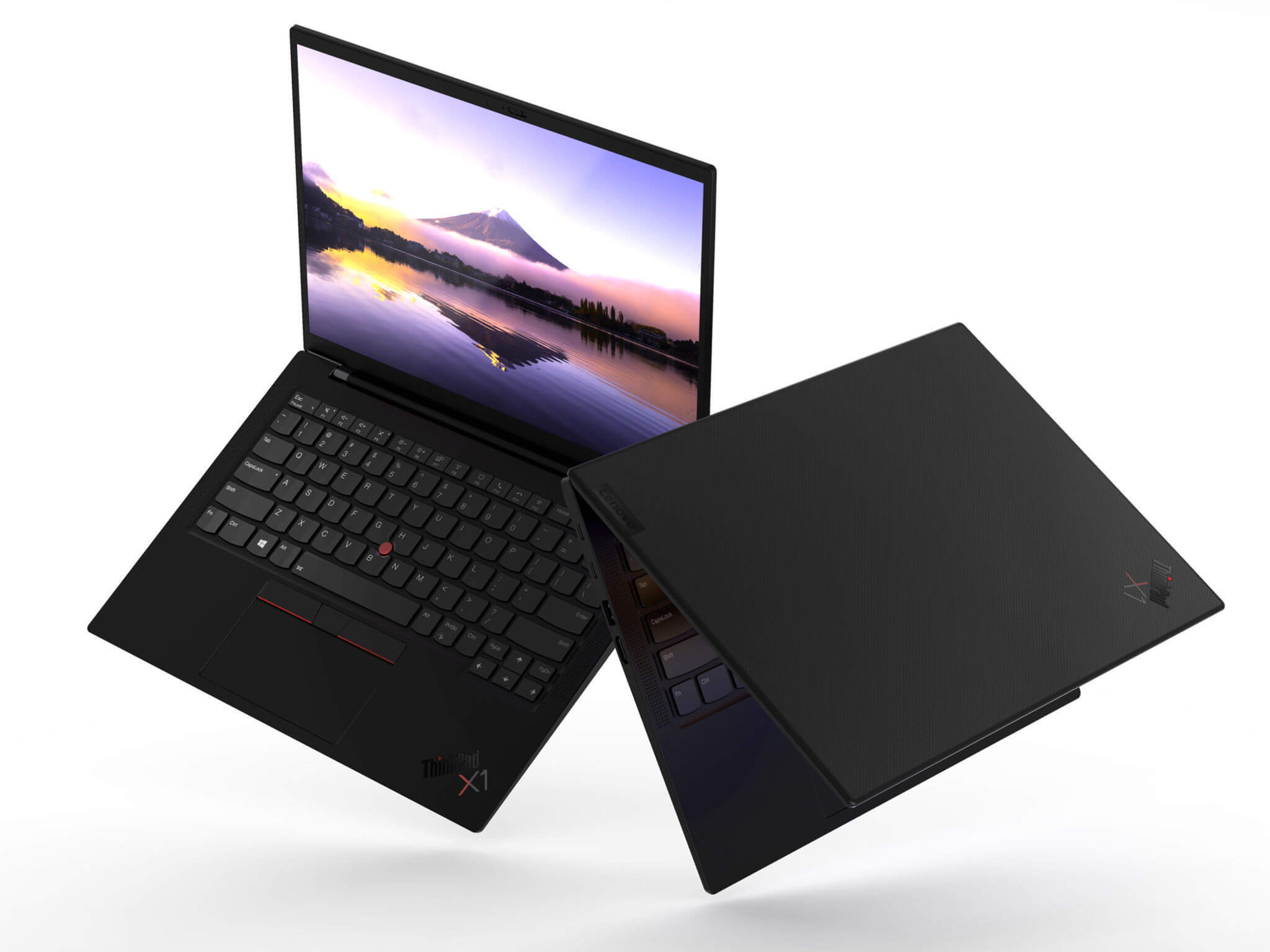
Overall, these adjustments hardly alter your daily workflow. Portable handling feels as familiar as ever, and typing requires virtually no adjustment period. For durability, the ThinkPad X1 Carbon Gen 9 maintains its proven aluminum-magnesium build. On the scales, however, it comes in slightly heavier than previous generations (1.156 kg versus 1.082 kg) - yet still remains lighter than many competing models.
Finally, Lenovo slightly redesigned the hinge to resemble the X1 Extreme line. It feels exceptionally solid and reassuring in use, opening past 180 degrees for plenty of flexibility.
New Display Ratio, Premium Color Accuracy
The 16:10 aspect ratio is the defining upgrade on the ThinkPad X1 Carbon Gen 9 display. Beyond delivering more vertical screen real estate, it gives the laptop slimmer, more uniform bezels than predecessor models (ThinkPad X1 Carbon Gen 8 and older) - an especially welcome touch given Lenovo also offers a touchscreen configuration. In visual performance, multiple resolution and brightness configurations are available. The baseline option provides FullHD+ (1920 x 1200) at 400 nits brightness, while the top-tier panel delivers UHD+ (3840 x 2400) at 500 nits with HDR support.
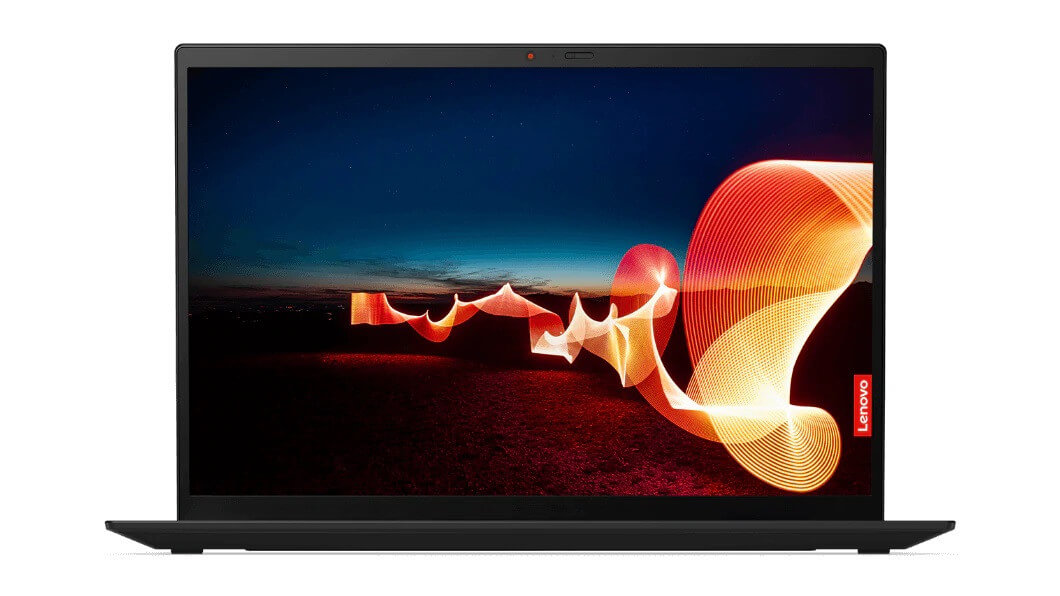
Whichever configuration you choose, you get excellent color coverage (100% sRGB) for reliable everyday work. The UHD+ variant steps up to 100% DCI-P3 cinema-grade color gamut for entertainment and high-level creative workloads.
Above the display sits an HD webcam alongside Windows Hello facial-recognition sensors. When you want complete privacy, the built-in ThinkShutter slider is always ready to cover the lens.
Revamped Keyboard and Touchpad
On the ThinkPad X1 Carbon Gen 9 keyboard, Lenovo introduced several adjustments to streamline the deck while keeping the typing feel comfortable and responsive. Specifically, the keyboard frame width was narrowed to make room for two side-firing speakers, and keycap thickness was trimmed down noticeably. If you are used to older X1 Carbon keyboards, typing on Gen 9 might feel slightly different at first: key travel remains deep and the deck stays rigid, though each keystroke feels slightly lighter. Compared to typical ultrabooks, however, the typing experience on the ThinkPad X1 Carbon Gen 9 easily remains among the best on the market. If you want an ultra-slim laptop with a standout keyboard, it remains a compelling choice.

Instead of sitting on the side chassis, the power button now rests above the keyboard - a more traditional placement that proves much more convenient.
The touchpad has also been redesigned with a wider surface, giving your multi-touch gestures extra room. Tracking feels as smooth and accurate as ever thanks to the slick glass finish paired with Windows Precision drivers. You can also navigate using the TrackPoint, whose responsive tracking lets you keep your hands anchored on the keyboard without reaching for the touchpad.
Robust Specs Backed by an Upgraded Cooling System
The ThinkPad X1 Carbon Gen 9 offers a choice of four 11th Gen Intel Tiger Lake processors, starting with the 4-core, 8-thread Core i5-1135G7. Compared to the previous generation, Intel improved these chips across several key fronts: higher power consumption (28W versus 15W), a new 10nm SuperFin process node, and boosted single- and multi-core clock speeds to handle a wider spectrum of tasks efficiently.
Notably on this new X1 Carbon revision, Lenovo added a second cooling fan to help the CPU sustain peak performance. With twin fans spinning, the Core i5-1135G7 can pull up to 35W during burst loads and maintain a steady 28WW under sustained heavier applications. Against the hardware in the X1 Carbon Gen 8, Gen 9 shows a clear leap in performance. Even against configurations running 6-core chips like the Core i7-10810U, previous-gen output still falls behind the new processor.
As for the integrated Intel Iris Xe Graphics, raw compute power is plenty for graphic design software (Photoshop CC, Lightroom Classic CC, Premiere Pro, etc.) as well as casual gaming. However, under prolonged combined CPU loads, Iris Xe can occasionally exhibit minor throttling - a behavior carried over from the X1 Carbon Gen 8. While it rarely derails daily use, an update from Lenovo to smooth out peak load consistency would be welcome.
For memory and storage, the ThinkPad X1 Carbon Gen 9 provides generous allotments right out of the box. Alongside a 512GB NVMe SSD (upgradable up to 2TB), you get 16GB of LPDDR4 RAM - marking the first time this memory standard appears on the series. Because the RAM is soldered directly onto the motherboard, it cannot be upgraded later. Buyers should carefully evaluate their memory requirements beforehand (8GB, 16GB, or 32GB) to ensure long-term headroom.
Well-Rounded Port Selection
Despite its slim profile, Lenovo has consistently balanced the X1 Carbon chassis to provide full peripheral connectivity. The ThinkPad X1 Carbon Gen 9 continues that tradition, equipping you with 2 USB-C ports with Thunderbolt 4 support, 2 USB-A 3.2 Gen1 ports, an HDMI 2.0 port, and a 3.5mm headphone/mic combo jack.
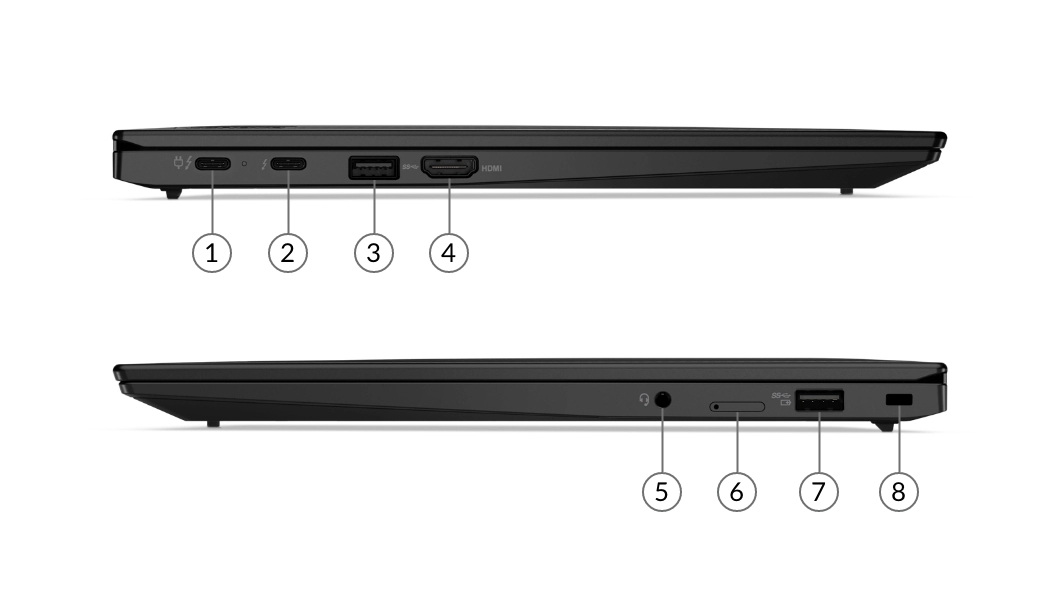
- Thunderbolt™ 4 power input
- Thunderbolt 4
- USB-A 3.2 Gen 1
- HDMI 2.0
- Headphone / mic combo
- Optional Nano SIM slot
- USB-A 3.2 Gen 1
- Kensington lock slot
Browse more models in the ThinkPad X Series category, or widen your options with Lenovo laptops. If you are comparing options, also see the Lenovo ThinkPad X1 Carbon Gen 8 and the Lenovo ThinkPad X1 Carbon Gen 7.
Improved Battery Life
With the ThinkPad X1 Carbon Gen 9, Lenovo restored battery capacity to 57Wh, marking the first increase after dropping down to 51Wh on the X1 Carbon Gen 7. On common daily workloads like web browsing and document editing at 70% brightness, the Gen 9 model with the FullHD+ panel can deliver nearly 8 hours of runtime - easily covering a full workday.
Performance & benchmarks Lenovo ThinkPad X1 Carbon Gen 9
Intel Core i7-1185G7 Intel® Iris® Xe Graphics - best for Office 8/10, Programming 4.5/10.
Intel Core i7-1185G7
- Cinebench R23 (multi-core)5,383.5
- Geekbench 6 (multi-core)5,669
- Geekbench 6 (single-core)1,864
- PassMark9,856
- Cores / Threads4/8
Intel Iris Xe Graphics
Best for
Scored from real benchmarks- Gaming2.5/10
- Video / Graphics3/10
- Programming4.5/10
- Office8/10
Why does the CPU matter?
The CPU is the "brain" that handles every task: launching apps, multitasking, compiling code and editing video. The stronger the CPU, the faster and smoother the laptop runs when you juggle many things at once.
- BasicThis product
Web browsing, streaming and light office work.
- MainstreamThis product
Office work, moderate multitasking and studying.
- Mid-rangeThis product
Solid multitasking, programming and light graphics work.
- StrongThis product
Video editing, heavy programming, virtualization and gaming.
- FlagshipThis product
Heavy rendering, 4K/8K editing, virtual machines and AI workloads.
Why does the GPU matter?
The GPU (graphics card) handles visuals: gaming, video editing, 3D rendering and AI acceleration. The stronger the GPU, the higher your frame rates and the faster your video exports.
- Basic (iGPU)This product
Smooth display, 4K video and very light games (League of Legends, Valorant on low).
- MainstreamThis product
1080p eSports gaming, photo editing and light video editing.
- Mid-rangeThis product
1080p gaming on medium-high settings and smooth Full HD video editing.
- StrongThis product
1080p/1440p gaming on high settings, 4K video editing and 3D rendering.
- FlagshipThis product
4K/240Hz gaming, ray tracing, heavy rendering and AI.
-
AH Do Anh Hai
How does it compare to the ThinkPad X1 Titanium i7-1160G7 450 nits with Pen? Which one should I buy?
Reply • like- TP Phạm Thiên Phước Administrator
@Do Anh Hai: Hi there, the 1165G7 chip in the X1 Carbon series is slightly more powerful than the 1160G7 in the Titanium series. Also, please note that neither the X1 Carbon nor the Titanium series supports Pen input.
Reply • like
-
Q&A about Lenovo ThinkPad X1 Carbon Gen 9
Frequently asked questions about Lenovo ThinkPad X1 Carbon Gen 9
What are the specifications of Lenovo ThinkPad X1 Carbon Gen 9?
What is the warranty for Lenovo ThinkPad X1 Carbon Gen 9?
Can I buy Lenovo ThinkPad X1 Carbon Gen 9 with home delivery?
Worth a Look
Lenovo ThinkPad X1 2-in-1 Gen 11 | Aura Edition (2026)
 3 configurations
Lenovo ThinkPad X1 Carbon Gen 14 | Aura Edition (2026)
Lenovo ThinkPad X9 14-inch | Aura Edition (2025)
 3 configurations
Lenovo ThinkPad X13 Gen 6 (Intel) (2025)


Nguyễn Hữu Đạt 05/01/2025Purchased at Hung Phat
Beautiful laptop, perfect in every detail.
Anh Quý 10/02/2024Purchased at Hung Phat
The shop owner is very reputable and trustworthy.
Phan Hoàn Nam 24/07/2023Purchased at Hung Phat
5-star quality
Anh Quang 06/05/2023Purchased at Hung Phat
I found Hung Phat through Google, and the website looks very professional. The warranty information is also very clear.