

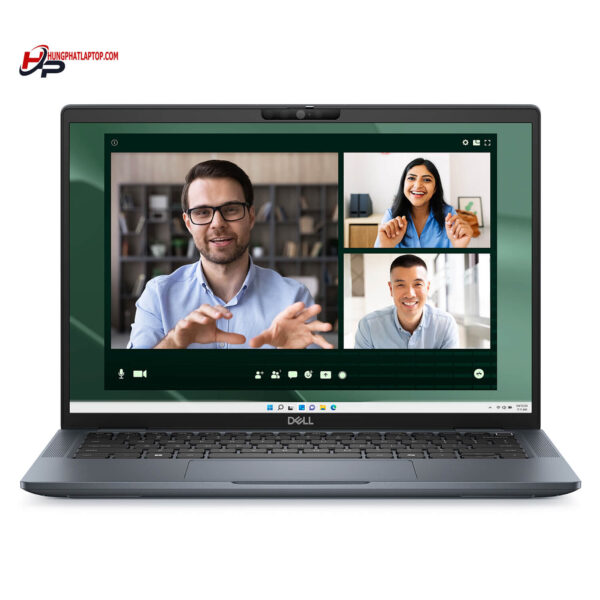

Dell Latitude 7350 (2024)
- CPU: Intel Core Ultra 7 165U vPro Up To 4.9GHz (12 Cores, 14 Threads, 12MB Cache)
- RAM: LPDDR5X 32GB 6400MHz
- SSD: 512GB TLC PCIe Gen4 M.2 SSD
- VGA: Intel® Graphics
- DISPLAY: 13.3″ IPS FHD+ (1920*1200), Anti-Glare, Touchscreen, 300 nits
- CONDITION: Like New 99%
- WARRANTY: 12-month warranty
- Compact, Versatile, and Refined Design
- Powerful Performance with Intel® Core™ Ultra
- Display on the Dell Latitude 7350 (2024)
- Comprehensive Security - Data Protection
- Keyboard and Touchpad on the Dell Latitude 7350
- Slots & Connectivity on the Dell Latitude 13 7350
- Dell Latitude 7350 (2024) Summary & Review
- FAQ - Frequently Asked Questions About the Dell Latitude 7350 (2024)
- Where to Buy the Dell Latitude 7350 (2024) with Confidence at a Great Price?
The Dell Latitude 13 7350 stands out in the premium Dell Latitude Ultrabook lineup, built specifically for modern professionals. Combining a compact footprint, solid performance, and advanced security features, the Latitude 7350 delivers maximum flexibility and convenience for users who travel frequently or work in demanding corporate environments. This review takes an in-depth look at what makes this Dell Latitude UltraBook genuinely practical, spanning its design, performance, user experience, and comprehensive security.
Compact, Versatile, and Refined Design
The Dell Latitude 7350 (2024) makes an immediate impression with its compact chassis and optimized weight, tailored for people on the move. Measuring just 16.44 - 17.75 mm thin with a starting weight of 0.989 kg (Ultralight model), this premium Dell Latitude Ultrabook ranks among the lightest commercial laptops available today. Its overall dimensions make it easy to slip into a backpack or briefcase without adding bulk, ideal for fast-paced business environments.

The build materials on the Dell Latitude 7350 also reflect Dell's meticulous craftsmanship. Built with either an ultralight magnesium alloy or premium aluminum depending on the configuration, the device pairs exceptional durability with clean, elegant lines. Two sophisticated color options, River Blue and Titan Gray, add aesthetic appeal while projecting a polished, professional look in offices and conference rooms.
Beyond its striking looks, the Latitude 7350 Core Ultra stands out for its 2-in-1 versatility, switching smoothly between laptop, tent, stand, and tablet modes. This adaptable design helps users transition between different workflows: typing documents, delivering presentations, taking notes, or joining video conferences. That adaptability makes the Latitude 7350 an exceptional contender in the premium business laptop category.
Powerful Performance with Intel® Core™ Ultra
The Dell Latitude 7350 comes powered by 14th Gen Intel® Core™ Ultra vPro processors, ranging from the Ultra 5 135U up to the Ultra 7 165U. With a 12-core, 14-thread architecture and clock speeds reaching up to 4.9GHz, this premium Dell Latitude Ultrabook easily handles demanding workloads like video editing, data modeling, and specialized creative or engineering software.
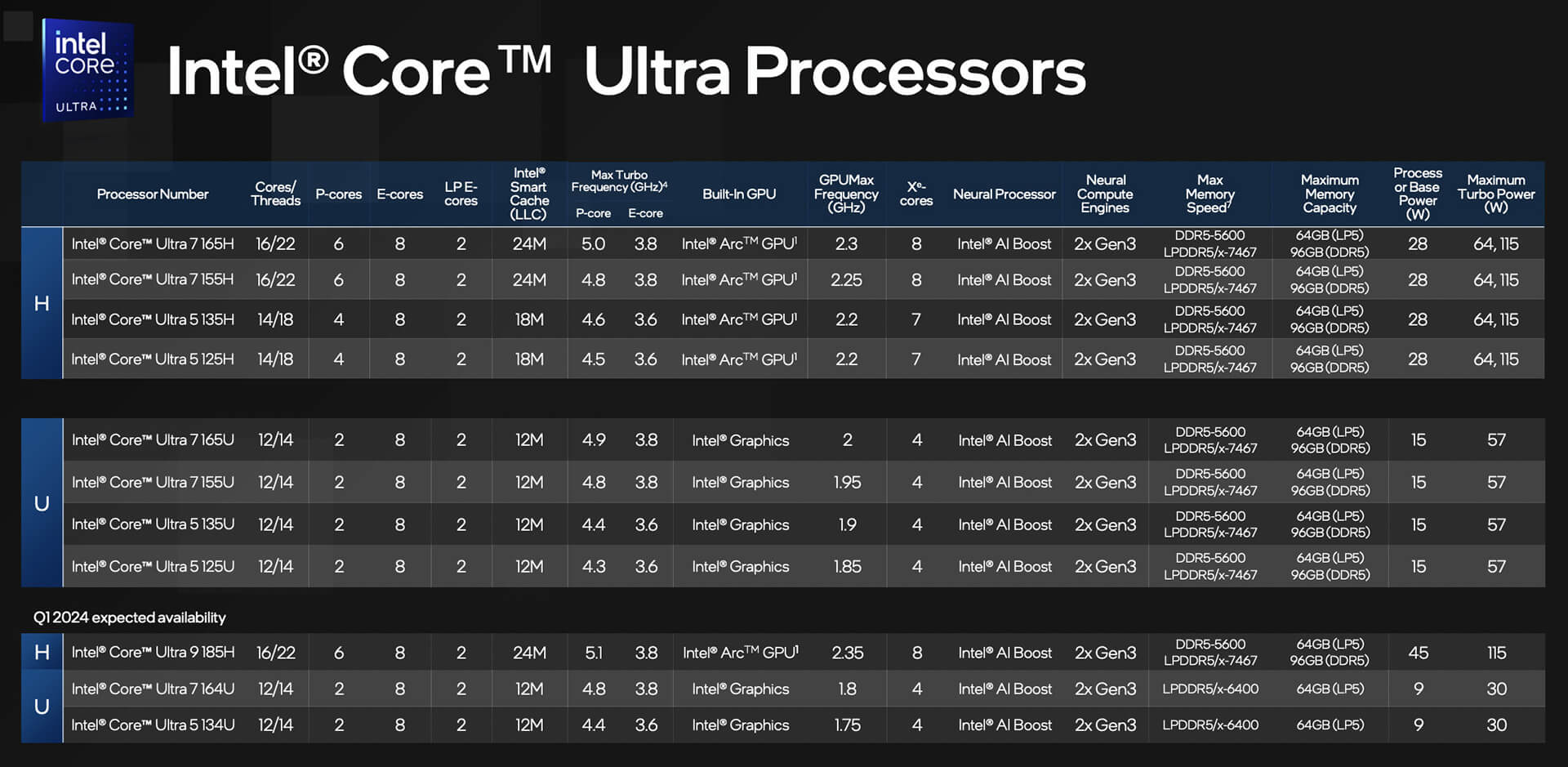
Alongside raw CPU power, the Dell Latitude 7350 Core Ultra uses an intelligent hybrid architecture to distribute tasks efficiently: the NPU accelerates dedicated AI workloads, the GPU drives graphics rendering, and the CPU maximizes overall system performance. This split workload keeps the system running smoothly during heavy multitasking, ensuring steady performance and extended energy efficiency throughout the workday.
Battery life is another major highlight. Equipped with a 3-cell 57Wh battery and ExpressCharge™ technology, the Latitude 7350 provides up to 12 hours of continuous runtime while drastically cutting down recharge times - a crucial benefit for professionals working on the move or away from a desk.
Display on the Dell Latitude 7350 (2024)
The display on the Dell Latitude 7350 (2024) features a 13.3-inch panel with an FHD+ (1920 x 1200) resolution, delivering sharp, crisp visuals. Wide-viewing-angle (WVA) technology ensures colors stay consistent across different angles. With a peak brightness of 300 nits and an anti-glare finish, users can comfortably work in bright environments while keeping on-screen content clear and legible.
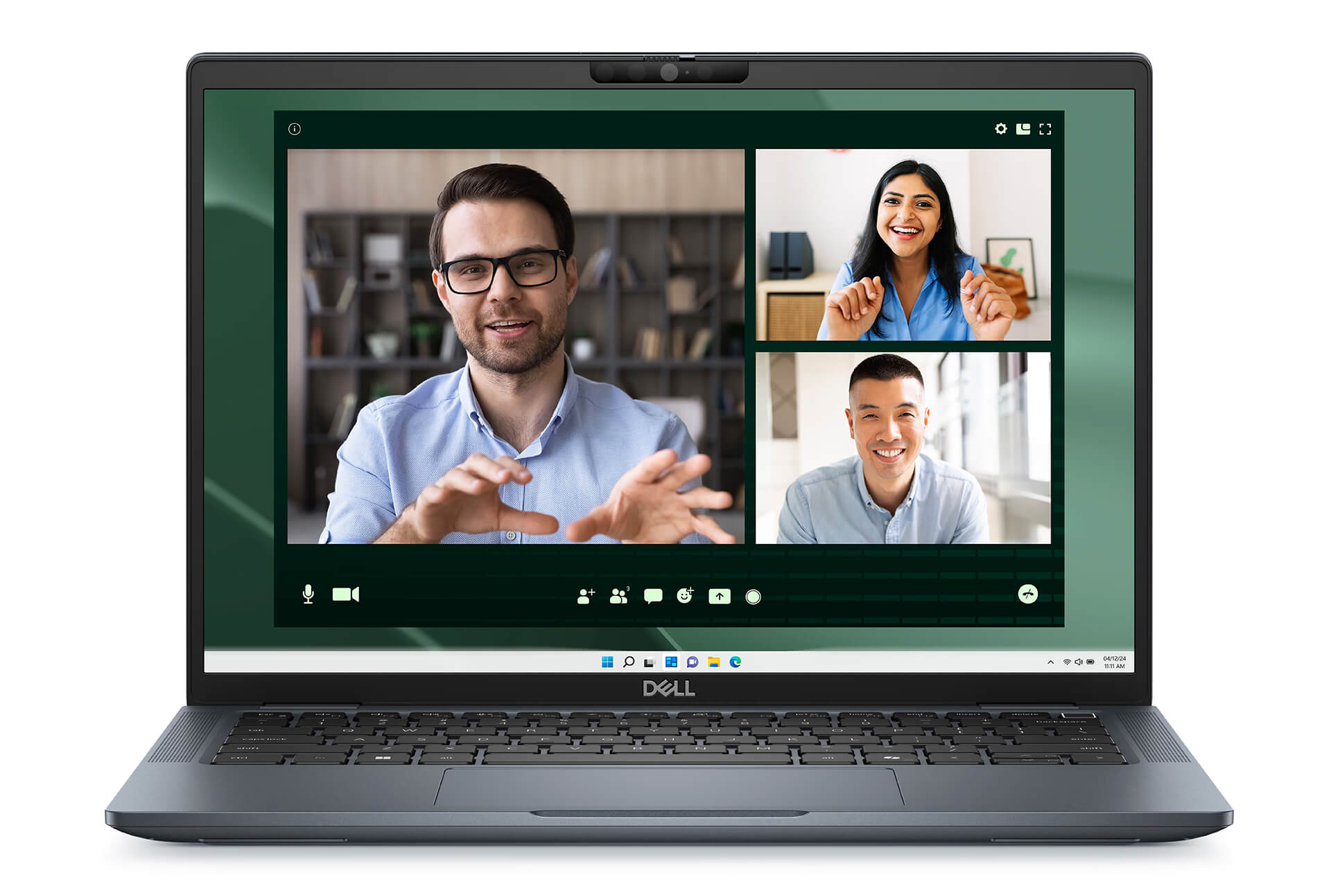
The touchscreen option on the Dell Latitude 7350 UltraBook adds intuitive, direct interaction. Users can navigate quickly by touch, boosting productivity during slide presentations, video calls, or collaborative group sessions. Having touch support optimizes the workflow without requiring external peripherals.
Select display configurations also feature ComfortView+ and HDR technology, reducing eye strain during long working sessions while improving visibility in challenging lighting conditions. HDR enhances contrast and shadow detail, proving especially helpful in video conferences and visual presentations to provide a high-quality viewing experience for business users.
Comprehensive Security - Data Protection
Designed to safeguard user data across every work environment, the Dell Latitude 7350 integrates an extensive suite of hardware-based security technologies. The Dell Safe ID chip and a dedicated TPM play a central role in securely storing credentials and thwarting external attacks. The system also supports ExpressSign-in, which automatically locks the PC when you step away and quickly unlocks it when you return, keeping your workflow secure without added friction.
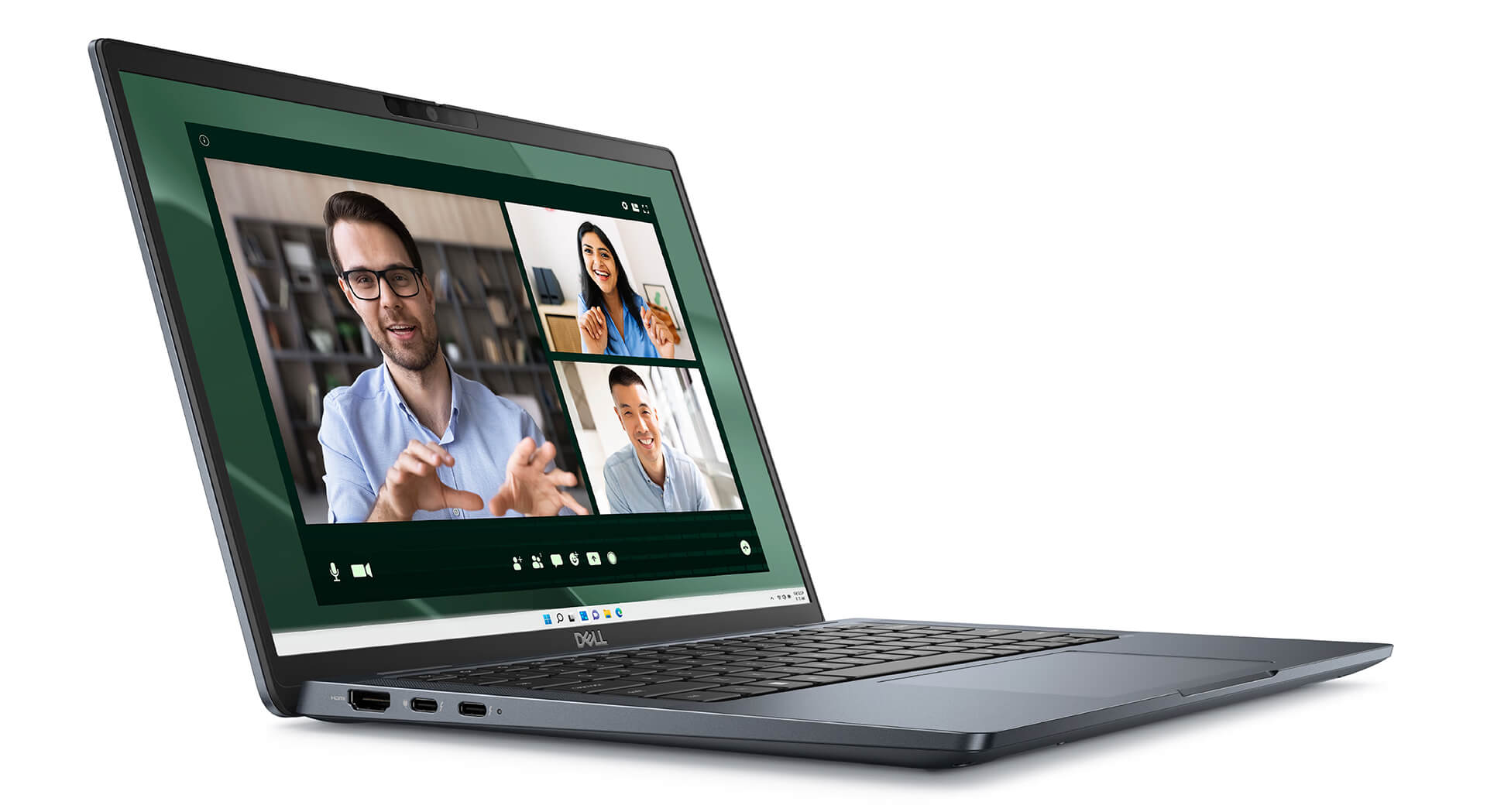
Complementing the hardware, the Dell Optimizer suite strengthens software-based security. Beyond learning user habits to tune performance, it includes privacy features that alert you when someone is looking over your shoulder or automatically dim the screen when your attention wanders. These tools work exceptionally well in shared workspaces, protecting privacy and keeping sensitive data secure in real time.
Additionally, this premium Dell Latitude Ultrabook meets rigorous MIL-STD 810H military durability standards, proving its resilience in demanding operating conditions. This certification underscores both hardware reliability and peace of mind, assuring users of complete protection on both a physical and digital level.
Keyboard and Touchpad on the Dell Latitude 7350
The keyboard on the Dell Latitude 7350 is designed around the user experience, featuring well-judged key travel and responsive tactile feedback that make typing feel natural and comfortable. Integrated mini-LED backlighting helps users work easily in low-light conditions, making it especially convenient at night or in dim spaces and ensuring productivity stays uninterrupted.
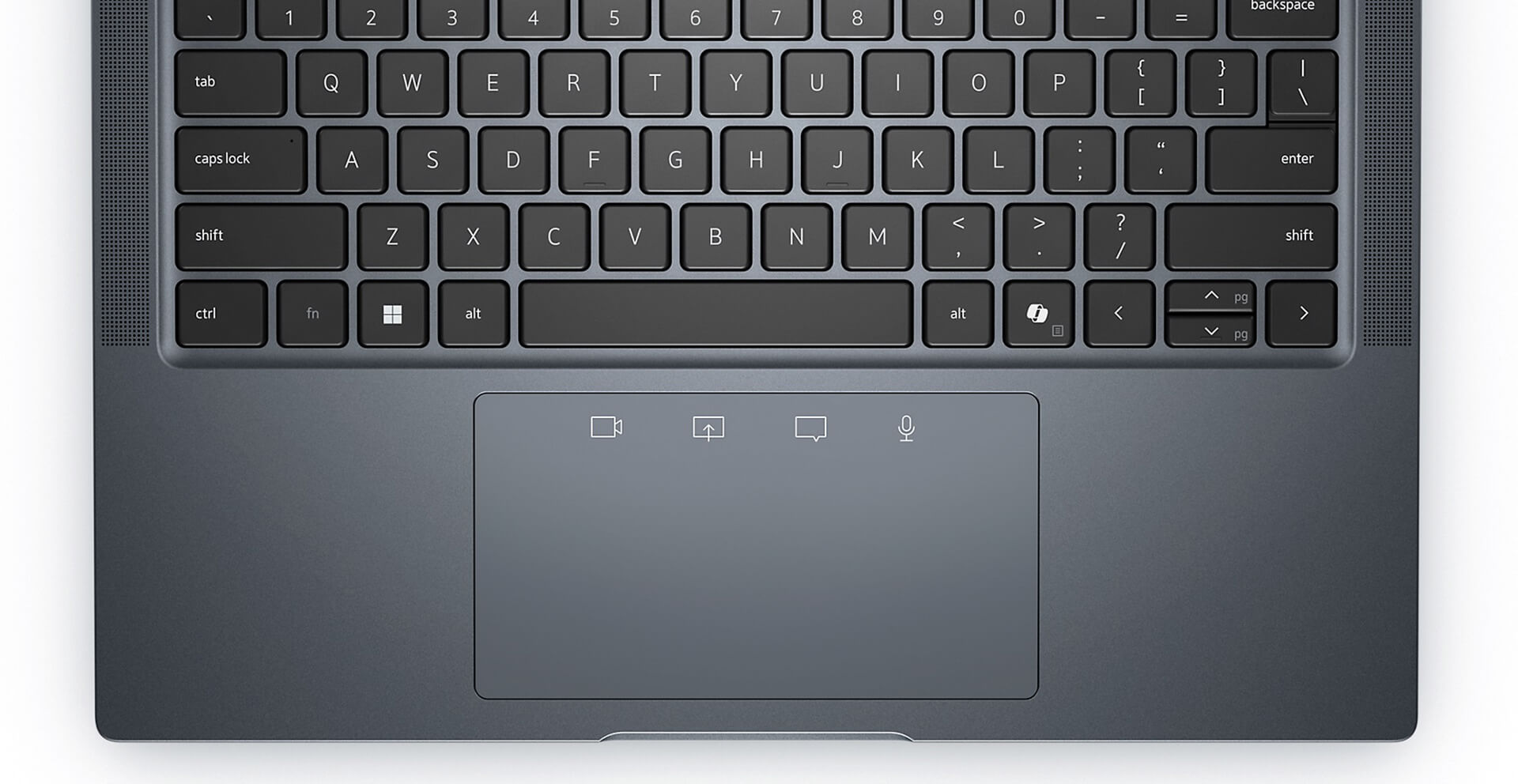
Meanwhile, the touchpad on the Dell Latitude 7350 (2024) is generously sized and offers responsive multi-touch support for smooth scrolling, zooming, and window switching. Together, the keyboard and touchpad provide flexible input and navigation, boosting day-to-day work efficiency for business users and tech professionals.
Slots & Connectivity on the Dell Latitude 13 7350
The Dell Latitude 7350 is engineered with a versatile selection of ports that readily meets the demands of modern business users. It comes equipped with USB 3.2 Gen 1, HDMI 2.1, Thunderbolt™ 4.0, and a universal audio jack, allowing quick connections to peripherals such as external displays, storage drives, and headsets. As a result, users can easily work across different environments without having to carry cumbersome adapters.
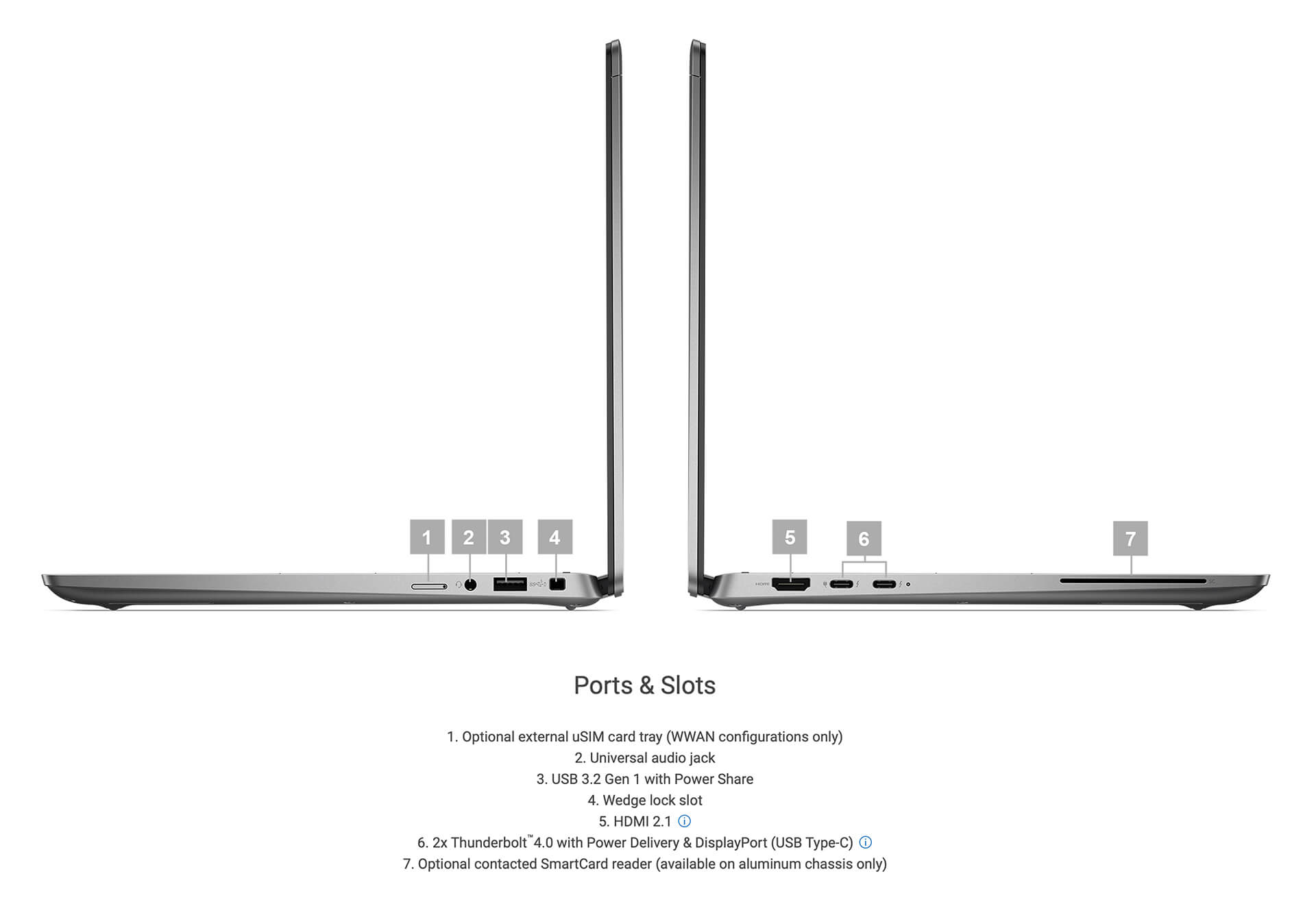
For wireless connectivity, the Dell Latitude 7350 supports Wi-Fi 7 and Bluetooth 5.4 standards, ensuring fast, stable, and highly secure speeds for data transfers and online meetings. In addition, the machine supports an optional uSIM card slot and SmartCard reader, expanding enterprise device management and security. These features deliver added flexibility and efficiency when deploying and managing devices across professional work environments.
Dell Latitude 7350 (2024) Summary & Review
Combining modern design, standout performance, and strong security, the Dell Latitude 7350 (2024) is an ideal choice for tech professionals, senior office staff, and business travelers on the move. This Dell Latitude Core Ultra laptop delivers optimal versatility through its multi-mode capabilities alongside long-lasting battery life, keeping you productive throughout the day.
Every design detail is optimized for performance and user experience. From a sharp display and a backlit keyboard that is easy to navigate in any lighting condition to a modern selection of ports, the Latitude 7350 thoroughly meets professional work requirements. It stands as one of the premium Dell Latitude UltraBooks well worth the investment for users who prioritize stability, security, and long-term efficiency.
| Pros | Cons |
|---|---|
|
|
FAQ - Frequently Asked Questions About the Dell Latitude 7350 (2024)
1. Is the Dell Latitude 7350 design suitable for business environments?
The Latitude 7350 features a sturdy CNC metal chassis built to MIL-STD 810H standards, with a lightweight profile and compact dimensions ideal for office workers and mobile professionals.
2. Does the 13.3
The machine features a 13.3″ FHD+ (1920 × 1200) non-touch IPS display panel with ~250 nits of brightness - sharp and well-optimized for reading documents, spreadsheets, and presentations.
3. Can the Latitude 7350 handle intensive office workloads smoothly?
Powered by an Intel Core Ultra CPU (12 cores), LPDDR5x RAM, and a high-speed PCIe Gen4 SSD, the system handles complex spreadsheets, video conferences, and data analysis in Excel or Power BI without lag.
4. Is the machine capable enough for programming and software development?
Its multi-core CPU and fast SSD help the Latitude 7350 smoothly run IDEs like VS Code and IntelliJ IDEA, while handling debugging, builds, and Docker containers efficiently across a full workday.
5. Can the Latitude 7350 be used for 2D design or basic photo editing?
The integrated Intel graphics and color-accurate display panel comfortably handle basic 2D design work in Photoshop, Figma, and Illustrator, making it a solid fit for marketers or creators producing light content.
6. What is the real-world battery life of the Dell Latitude 7350?
With the 57 Wh battery configuration, the Latitude 7350 can deliver about 14 hours of light web browsing or 11 hours of continuous video playback at 120 nits brightness in battery saver mode.
Source: LaptopMedia
7. Does the machine sustain its performance when multitasking across multiple apps?
An efficient cooling system keeps operating temperatures stable even when handling dozens of browser tabs, video calls, and continuous code compilation, ensuring performance does not throttle.
8. Does the Latitude 7350 support Linux for developers?
The Latitude 7350 is well-compatible with Linux distributions such as Ubuntu or Fedora. Users may need to install drivers for the touchpad or Wi-Fi to keep every feature working smoothly.
Source: Dell Support
9. What is the warranty policy for the Latitude 7350 at Hung Phat Laptop?
Hung Phat Laptop provides a 12-month warranty for new units with 30-day replacement support if manufacturer defects occur. Like-new and pre-owned machines carry a 6-month warranty with the same 30-day initial replacement policy. Customers also receive complimentary software installation, cleaning, and nationwide delivery.
Where to Buy the Dell Latitude 7350 (2024) with Confidence at a Great Price?
The Dell Latitude 7350 (2024) is an ideal choice for anyone looking for a premium business laptop that strikes a balance between powerful performance and a sleek, modern aesthetic. Backed by smooth processing power and enterprise-grade reliability, this Dell Latitude UltraBook is particularly well-suited for professionals who travel frequently or work in demanding corporate settings where stability and flexibility are non-negotiable.
To ensure you receive a genuine Dell Latitude product backed by valid invoices and verified origin, Hung Phat Laptop is a dependable retailer. Specializing in officially imported Latitude lines, the store maintains transparent warranty standards and provides appealing offers for buyers. With extensive industry experience and dedicated customer care, Hung Phat Laptop gives users full confidence when investing in a high-caliber computing device.
Performance & benchmarks Dell Latitude 7350 (2024)
Intel Core Ultra 7 165U Intel Graphics 4-Core iGPU (Meteor / Arrow Lake) - best for Office 9.5/10, Programming 7/10.
Intel Core Ultra 7 165U
- Cinebench R23 (multi-core)10,226
- Geekbench 6 (multi-core)9,441
- Geekbench 6 (single-core)2,282.5
- Cores / Threads12/14
Intel Graphics 4-Core iGPU (Meteor / Arrow Lake) iGPU
- 3DMark Time Spy1,902
- 3DMark Fire Strike4,973
- AI INT88 TOPS
- ArchitectureXe LPG
Best for
Scored from real benchmarks- Gaming2/10
- Video / Graphics3.5/10
- Programming7/10
- Office9.5/10
Why does the CPU matter?
The CPU is the "brain" that handles every task: launching apps, multitasking, compiling code and editing video. The stronger the CPU, the faster and smoother the laptop runs when you juggle many things at once.
- BasicThis product
Web browsing, streaming and light office work.
- MainstreamThis product
Office work, moderate multitasking and studying.
- Mid-rangeThis product
Solid multitasking, programming and light graphics work.
- StrongThis product
Video editing, heavy programming, virtualization and gaming.
- FlagshipThis product
Heavy rendering, 4K/8K editing, virtual machines and AI workloads.
Why does the GPU matter?
The GPU (graphics card) handles visuals: gaming, video editing, 3D rendering and AI acceleration. The stronger the GPU, the higher your frame rates and the faster your video exports.
- Basic (iGPU)This product
Smooth display, 4K video and very light games (League of Legends, Valorant on low).
- MainstreamThis product
1080p eSports gaming, photo editing and light video editing.
- Mid-rangeThis product
1080p gaming on medium-high settings and smooth Full HD video editing.
- StrongThis product
1080p/1440p gaming on high settings, 4K video editing and 3D rendering.
- FlagshipThis product
4K/240Hz gaming, ray tracing, heavy rendering and AI.
Game performance
Real FPS - FHD- Dota 253 fps1080p Ultra
- CS248 fps1080p Medium
- GTA V101 fps1080p Medium
- CoD: Black Ops 615 fps1080p Low
- God of War Ragnarök21 fps1080p Low
- Final Fantasy XVI8 fps1080p Low
- Cyberpunk 207719 fps1080p Low
≥60fps very smooth30-60fps playable<30fps lower the settings
No comments yet
Q&A about Dell Latitude 7350 (2024)
Frequently asked questions about Dell Latitude 7350 (2024)
What are the specifications of Dell Latitude 7350 (2024)?
What is the warranty for Dell Latitude 7350 (2024)?
Can I buy Dell Latitude 7350 (2024) with home delivery?
Worth a Look
DELL Latitude 5330 (2 in 1) (2022)

Dell Latitude 7350 (2 in 1) (2024)
 3 configurations
DELL Latitude 5550 (2024)
DELL Latitude 5350 (2024)
 3 configurations





Trần Quốc Minh 12/07/2026
The machine is beautiful and incredibly lightweight, making it very pleasant to carry. It runs very smoothly; the only downside is that the storage capacity is a bit low, but everything else is great.
Anh Khang Lê 28/08/2024Purchased at Hung Phat
It's been a while since my last review for the Shop, 5 stars! Excellent after-sales service.
Vũ Quang Hưng 15/03/2024Purchased at Hung Phat
Enthusiastic support