


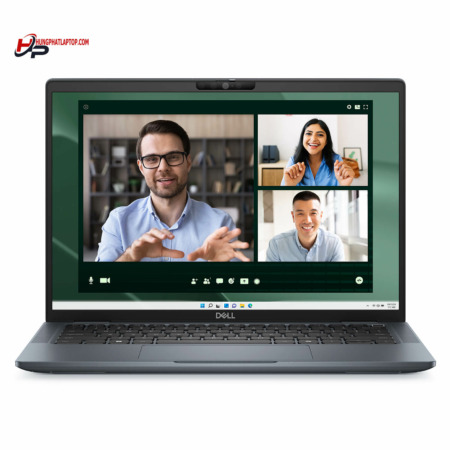
DELL Latitude 7450 (2024)
- CPU: Intel Core Ultra 5 135U vPro Up To 4.4GHz (12 Cores, 14 Threads, 12MB Cache)
- RAM: LPDDR5X 32GB 6400MHz
- SSD: 1TB TLC PCIe Gen4 M.2 SSD
- VGA: Intel® Graphics
- DISPLAY: 14″ IPS FHD+ (1920*1200), Anti-Glare, Non-Touch, 250 nits
- CONDITION: New 100% Full Box
- WARRANTY: 12-month warranty
- Dell Latitude 7450 Design: Compact, Light, and Two Chassis Options
- Dell Latitude 14 7450 Display: 16:10, Anti-Glare, Multiple Options
- Latitude 7450 Performance With Intel Core Ultra vPro, LPDDR5X RAM and Gen4 SSD
- Backlit Keyboard, Wide Touchpad and 1080p Webcam on the Latitude 7450
- Multi-Layered Security on the Dell Latitude 7450 for Businesses
- Dell Latitude 14 7450 Ports and Battery: Thunderbolt 4, HDMI 2.1, Wi-Fi 7
- DELL Latitude 7450 (2024) Overview and Review
- FAQ - Frequently Asked Questions About the DELL Latitude 7450 (2024)
- Where to Buy a Genuine DELL Latitude 7450 (2024) at a Good Price?
The DELL Latitude 7450 (2024) is Dell's 14-inch business laptop for office staff, managers and frequent business travelers who need a compact, durable machine that is easy to manage. It runs on 14th-generation Intel Core Ultra vPro processors with integrated graphics, comes in two chassis options, aluminum and ultralight, and offers a range of 16:10 display choices. This article covers the design, display, performance, security, connectivity and the points worth weighing before you buy.
Dell Latitude 7450 Design: Compact, Light, and Two Chassis Options
The Dell Latitude 7450 follows the familiar minimalist style of the Latitude line, with a neutral gray finish, slim display bezels and neatly rounded edges that fit in just as well in a meeting room as on a shared desk. This Dell laptop is aimed at businesses, putting durability and portability ahead of decorative details.

The laptop comes in two chassis versions. The Ultralight version starts at 1.058kg and measures 17.95mm thick, 313mm wide and 220.2mm deep. The Aluminum version starts at 1.33kg and measures 18.21mm thick, 313mm wide and 222.8mm deep. Both slip easily into a 14-inch backpack or bag, making them a good fit for people who move often between the office, the airport and client meetings.

The flat lid carries only the Dell logo in the center, keeping a professional look when you open the laptop in front of partners. The machine has also passed MIL-STD 810H durability testing, giving you more peace of mind on long business trips.
Dell Latitude 14 7450 Display: 16:10, Anti-Glare, Multiple Options
The Dell Latitude 14 7450 uses a 14-inch IPS display panel with a 16:10 aspect ratio and an anti-glare coating on every version. The configuration sold at Hung Phat Laptop has a non-touch FHD+ (1920 x 1200) display with 250 nits of brightness, clear enough for writing, spreadsheets and online meetings in the office.

Depending on the configuration, the lineup also offers an FHD+ ComfortView Plus panel at 400 nits that reduces blue light, an FHD+ touch panel at 300 nits, and a QHD+ (2560 x 1600) touch panel with 100% sRGB coverage and 400 nits of brightness for those who need accurate color for photo editing or presentations. The 16:10 ratio adds vertical space, showing more lines of text and spreadsheet rows than a 16:9 screen.
The 250 nits of the configuration on sale suits indoor work. If you often sit near large windows or work outdoors, ask about the 300 or 400 nit options first so the screen is easier to read.
Latitude 7450 Performance With Intel Core Ultra vPro, LPDDR5X RAM and Gen4 SSD
The Latitude 7450 configuration on sale uses the Intel Core Ultra 5 135U vPro processor with 12 cores, 14 threads, 12MB of cache and a max boost clock of 4.4GHz. Depending on the configuration, the laptop is also offered with the Core Ultra 7 155U, Core Ultra 7 165U, Core Ultra 5 135H (14 cores, 18 threads) and Core Ultra 7 165H (16 cores, 22 threads, max boost clock of 5.0GHz).

| CPU | Cinebench R23 single / multi-core | Geekbench 6 single / multi-core |
|---|---|---|
| Intel Core Ultra 5 135U (configuration on sale) | 1,563 / 9,315 | 2,176 / 9,514 |
| Intel Core Ultra 7 155U | 1,666 / 9,675 | 2,312 / 9,278 |
| Intel Core Ultra 7 165U | 1,662 / 10,226 | 2,283 / 9,441 |
| Intel Core Ultra 5 135H | 1,700 / 11,876 | 2,278 / 10,368 |
| Intel Core Ultra 7 165H | 1,759 / 14,551 | 2,422 / 12,231 |
Source: average scores from Notebookcheck. Results on an actual machine may vary depending on the power mode and ambient temperature.
In real-world use, the Core Ultra 5 135U handles Word, Excel, browsing with many tabs, Teams and Zoom meetings, and light photo editing. U-series chips draw little power, so the laptop runs cool and holds its charge better. If you regularly work with large datasets or run virtual machines, the Core Ultra 7 165H configuration scores about 56% higher than the 135U in Cinebench multi-core. The vPro platform on every option makes it easier for IT departments to manage and support the laptop remotely.
The laptop uses integrated Intel Graphics, which is enough for presentations, video playback, driving an external display and basic photo editing. With no discrete graphics, it is not meant for demanding games, 3D work or long video renders; for those needs, you should choose a workstation line with discrete graphics.
The DELL Latitude 7450 (2024) uses LPDDR5X 6400MHz RAM with a choice of 16GB or 32GB. This memory is soldered to the motherboard and cannot be upgraded later, so the 32GB configuration on sale is a safe choice for long-term use. The TLC PCIe Gen4 M.2 SSD comes in 512GB and 1TB options; the configuration on sale has 1TB, enough for documents, software and project files, and when you need more storage, you can swap in a larger M.2 SSD.
Backlit Keyboard, Wide Touchpad and 1080p Webcam on the Latitude 7450
The keyboard on the Latitude 7450 is backlit, with a clear layout and moderate key travel, well suited to long typing sessions or working in dim spaces. The touchpad has a wide surface and supports multi-touch gestures for quick scrolling and window switching without an external mouse.

The FHD 1080p 30fps webcam uses an RGB HDR sensor with Temporal Noise Reduction and a built-in camera shutter, delivering a clear image in online meetings. The stereo speakers use the Realtek ALC3281 audio controller and are clear enough for voices in meetings; if you need better sound in noisy places, you can use a headset through the universal audio jack.
Multi-Layered Security on the Dell Latitude 7450 for Businesses
The Dell Latitude 7450 uses Intel vPro processors on every option, supporting enterprise-grade management and security features. It comes with Windows 11 Pro preinstalled, has a TPM 2.0 security chip and supports BitLocker drive encryption, making the data harder to access without authorization if the laptop is lost.
The built-in camera shutter lets you block the webcam yourself when you are not in a meeting. The laptop supports fast sign-in through Windows Hello, with a fingerprint reader depending on the configuration, cutting down on typing passwords many times a day.
Dell Latitude 14 7450 Ports and Battery: Thunderbolt 4, HDMI 2.1, Wi-Fi 7
The Dell Latitude 14 7450 has 2 Thunderbolt 4 ports with DisplayPort Alt Mode, USB4 and Power Delivery charging, 1 HDMI 2.1 port, 2 USB 3.2 Gen 1 ports and 1 universal audio jack. With HDMI and USB built in, you can plug in a projector, a mouse or an older USB drive without carrying an extra adapter.

Wireless connectivity comes from an Intel BE200 Wi-Fi 7 2x2 card and Bluetooth 5.4. To take advantage of Wi-Fi 7 speeds, you need a router that supports the standard; with an older router, the laptop still connects normally at the matching standard.
The 57Wh battery is moderate for a 14-inch laptop, but the power-efficient U-series chip lets it last through most of an office workday. The laptop charges through its Thunderbolt 4 ports, so on business trips you can carry one compact USB-C Power Delivery charger for both your laptop and your phone.
DELL Latitude 7450 (2024) Overview and Review
The DELL Latitude 7450 (2024) is a compact, lightweight 14-inch business laptop with an Intel Core Ultra vPro processor, LPDDR5X RAM, Wi-Fi 7 and a full set of HDMI, USB and Thunderbolt 4 ports for everyday work. It suits office workers, accountants, managers and frequent travelers who need a durable, secure machine that is easy to manage.
One thing to consider is that the display on the configuration on sale is only 250 nits, which suits indoor use; if you often work outdoors, choose the 400 nit option. The RAM is soldered to the motherboard, so you need to pick enough memory from the start, and the 32GB configuration on sale covers that well. The laptop uses integrated graphics, so it is not meant for demanding games or 3D work. You can browse more models in the Dell Latitude category.
| Pros | Cons |
|---|---|
|
|
FAQ - Frequently Asked Questions About the DELL Latitude 7450 (2024)
1. Can the RAM in the Latitude 7450 be upgraded?
No. The laptop uses LPDDR5X RAM soldered to the motherboard, with a choice of 16GB or 32GB. The M.2 SSD, however, can be replaced with a larger drive.
2. Do I need to buy an extra port adapter for the Latitude 7450?
In most cases, no. The laptop comes with 2 Thunderbolt 4 ports, 1 HDMI 2.1 port, 2 USB 3.2 Gen 1 ports and a universal audio jack.
3. How do the Aluminum and Ultralight versions differ?
The Ultralight version starts at 1.058kg and is 17.95mm thick. The Aluminum version starts at 1.33kg and is 18.21mm thick. Both versions are 313mm wide.
4. What kind of work is the Core Ultra 5 135U good for?
The chip handles office work, spreadsheets, online meetings, browsing with many tabs and light photo editing. If you need to process heavier data, the Core Ultra 7 165H configuration delivers clearly higher multi-core scores.
5. Is the display on the configuration on sale bright enough?
The 250 nit FHD+ display is clear enough for indoor work. If you often work near large windows or outdoors, the 300 or 400 nit options will be easier to read.
6. What support do I get when buying from Hung Phat Laptop?
The laptop is a genuine product with an invoice, a clear warranty, a 30-day return or exchange for manufacturer defects, SSD upgrade support and nationwide delivery.
You can also compare it with the DELL Latitude 5450 (2024) or the DELL Latitude 7350 (2024).
Where to Buy a Genuine DELL Latitude 7450 (2024) at a Good Price?
Do you need a 14-inch business laptop for the office or for a team that travels often? Hung Phat Laptop starts by asking about your workload, then advises whether a U-series or H-series chip and a 250 nit or 400 nit display suit your DELL Latitude 7450 best. Businesses buying in volume also receive a recommended configuration.
Every laptop sold in our store is a genuine product, 100% brand new in the box, with a full invoice. The warranty policy is clearly stated, and if a laptop has a manufacturer defect within the first 30 days, we exchange it. Our technicians handle SSD upgrades and provide long-term technical support. We deliver nationwide to everyone buying a genuine Dell Latitude. Order now at Hung Phat Laptop.
Performance & benchmarks DELL Latitude 7450 (2024)
Intel Core Ultra 5 135U Intel Graphics 4-Core iGPU (Meteor / Arrow Lake) - best for Office 9.5/10, Programming 7/10.
Intel Core Ultra 5 135U
- Cinebench R23 (multi-core)9,315
- Geekbench 6 (multi-core)9,514
- Geekbench 6 (single-core)2,176
- PassMark16,630
- NPU (AI)11 TOPS
- Cores / Threads12/14
Intel Graphics 4-Core iGPU (Meteor / Arrow Lake) iGPU
- 3DMark Time Spy1,902
- 3DMark Fire Strike4,973
- AI INT88 TOPS
- ArchitectureXe LPG
Best for
Scored from real benchmarks- Gaming2/10
- Video / Graphics3.5/10
- Programming7/10
- Office9.5/10
Why does the CPU matter?
The CPU is the "brain" that handles every task: launching apps, multitasking, compiling code and editing video. The stronger the CPU, the faster and smoother the laptop runs when you juggle many things at once.
- BasicThis product
Web browsing, streaming and light office work.
- MainstreamThis product
Office work, moderate multitasking and studying.
- Mid-rangeThis product
Solid multitasking, programming and light graphics work.
- StrongThis product
Video editing, heavy programming, virtualization and gaming.
- FlagshipThis product
Heavy rendering, 4K/8K editing, virtual machines and AI workloads.
Why does the GPU matter?
The GPU (graphics card) handles visuals: gaming, video editing, 3D rendering and AI acceleration. The stronger the GPU, the higher your frame rates and the faster your video exports.
- Basic (iGPU)This product
Smooth display, 4K video and very light games (League of Legends, Valorant on low).
- MainstreamThis product
1080p eSports gaming, photo editing and light video editing.
- Mid-rangeThis product
1080p gaming on medium-high settings and smooth Full HD video editing.
- StrongThis product
1080p/1440p gaming on high settings, 4K video editing and 3D rendering.
- FlagshipThis product
4K/240Hz gaming, ray tracing, heavy rendering and AI.
Game performance
Real FPS - FHD- Dota 253 fps1080p Ultra
- CS248 fps1080p Medium
- GTA V101 fps1080p Medium
- CoD: Black Ops 615 fps1080p Low
- God of War Ragnarök21 fps1080p Low
- Final Fantasy XVI8 fps1080p Low
- Cyberpunk 207719 fps1080p Low
≥60fps very smooth30-60fps playable<30fps lower the settings
No comments yet
Q&A about DELL Latitude 7450 (2024)
Frequently asked questions about DELL Latitude 7450 (2024)
What are the specifications of DELL Latitude 7450 (2024)?
What is the warranty for DELL Latitude 7450 (2024)?
Can I buy DELL Latitude 7450 (2024) with home delivery?
Worth a Look
DELL Latitude 5330 (2 in 1) (2022)
DELL Latitude 7350 (2 in 1) (2024)
DELL Latitude 5550 (2024)
DELL Latitude 5350 (2024)


Lê Đức Trang 11/08/2024Purchased at Hung Phat
Great product and dedicated support
Huỳnh Duy Khoa 21/04/2024Purchased at Hung Phat
The shop is very enthusiastic with their after-sales service, highly recommended with 5 stars.
Anh Sang 04/03/2024Purchased at Hung Phat
The shop is very enthusiastic with after-sales service, highly recommended with 5 stars.