


DELL Latitude 5540 (2023)
- CPU: Intel Core i5 1350P vPro Up To 4.7GHz (12 Cores, 16 Threads, 12MB Cache)
- RAM: DDR4 16GB 3200MHz
- SSD: 256GB PCIe Gen 4 M.2 SSD
- VGA: Intel® Iris® Xe Graphics
- DISPLAY: 15.6″ IPS FHD+ (1920*1200), Anti-Glare, Non-Touch, 250 nits
- CONDITION: Like New 99%
- WARRANTY: 12-month warranty
- Dell Latitude 5540 Design: Clean, Compact and Built for Business
- Dell Latitude 15 5540 Display: Anti-Glare FHD+ in a 16:10 Format
- Latitude 5540 Performance With 13th Gen Intel Core i5 and i7 vPro, 16GB RAM and a PCIe Gen 4 SSD
- Keyboard With Numeric Keypad, 4W Speakers and a 1080p IR Webcam on the Dell Latitude 5540
- Dell Latitude 15 5540 Ports and Battery: 2 Thunderbolt 4, HDMI, LAN and a 54Wh Battery
- DELL Latitude 5540 (2023) Overview and Verdict
- FAQ - Frequently Asked Questions About the DELL Latitude 5540 (2023)
- Where to Buy a Genuine Dell Latitude 5540 (2023) at a Good Price?
DELL Latitude 5540 (2023) is Dell's 15.6-inch business laptop, built for office staff, accountants, engineers and managers who need a machine that works all day and has every port they need. It runs 13th Gen Intel Core vPro processors with integrated Intel Iris Xe graphics, has a dedicated numeric keypad, and features a 1080p webcam that supports facial sign-in. This article covers the design, display, performance, connectivity and the points you should weigh before choosing a configuration.
Dell Latitude 5540 Design: Clean, Compact and Built for Business
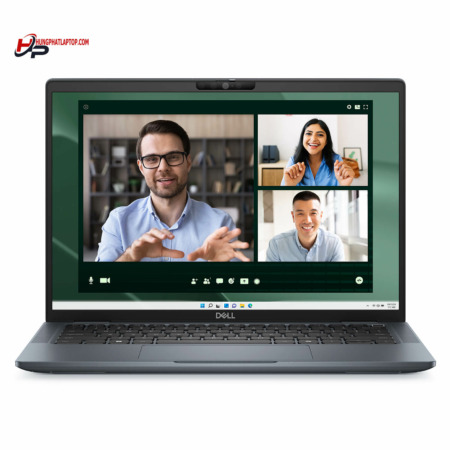
Dell Latitude 5540 follows the familiar minimalist style of the Latitude line: a gray chassis, squared-off edges and a Dell logo centered on the bottom display bezel. The side bezels are fairly slim, which keeps the 15.6-inch frame compact and well suited to an office desk.

The laptop weighs 1.613kg and measures 20.8mm thick at the front and 22.8mm at the rear, 357.8mm wide and 233.3mm deep. At this size, Latitude 15 5540 fits in a 15.6-inch backpack and is light enough to take on business trips or client meetings. If you need a large-screen Dell laptop for everyday work, this chassis is easy to use and easy to get used to.
Dell Latitude 15 5540 Display: Anti-Glare FHD+ in a 16:10 Format
Dell Latitude 15 5540 uses a 15.6-inch IPS display panel with FHD+ (1920 x 1200) resolution, an anti-glare coating, no touch input and 250 nits of brightness. The 16:10 aspect ratio adds vertical space compared with a 16:9 screen, showing more rows of spreadsheets, documents and email without constant scrolling.

The IPS panel offers wide viewing angles, which helps when you turn the laptop around to share the screen with a colleague. 250 nits of brightness is enough for an indoor office, but it will look a little dim near a window or outdoors; in that case, pick a seat away from direct sunlight or connect an external monitor through the HDMI or Thunderbolt 4 port.
Latitude 5540 Performance With 13th Gen Intel Core i5 and i7 vPro, 16GB RAM and a PCIe Gen 4 SSD
DELL Latitude 5540 (2023) offers three processor options depending on the configuration: the Intel Core i5-1345U vPro (10 cores, 12 threads, up to 4.7GHz), the Intel Core i5-1350P vPro (12 cores, 16 threads, up to 4.7GHz) and the Intel Core i7-1355U vPro (10 cores, 12 threads, up to 5.0GHz), all with 12MB of cache. Hung Phat Laptop currently sells two versions: Core i5-1350P and Core i7-1355U. The vPro platform helps IT departments manage and secure machines remotely, which suits companies with many laptops.

| CPU | Cinebench R23 single / multi-core | Geekbench 6 single / multi-core |
|---|---|---|
| Intel Core i5-1345U | 1,724 / 7,724 | 2,338 / 8,245 |
| Intel Core i5-1350P | 1,780 / 9,844 | 2,435 / 9,204 |
| Intel Core i7-1355U | 1,825 / 8,286 | 2,505 / 8,908 |
Source: average scores from Notebookcheck. Results on an actual unit may vary depending on the Windows power mode and ambient temperature.
According to the table, the P-series Core i5-1350P scores higher in multi-core than the two U-series chips thanks to its 12 cores and 16 threads, making it a good fit for people who often run many apps at once or work with large Excel files. The Core i7-1355U is slightly ahead in single-core, so it feels quick when opening software, browsing the web and working in Office. The gap between the three chips is small, so for typical office work, any version handles the job well.
The integrated Intel Iris Xe Graphics is enough for driving an external monitor, watching video, online meetings and light photo editing. With no discrete graphics card, the laptop is not meant for 3D work or demanding games; if your work requires serious graphics performance, consider the Dell Precision workstation line.
Latitude 5540 comes with 16GB of DDR4 3200MHz RAM, enough for office multitasking, many browser tabs and Teams or Zoom calls at the same time. The PCIe Gen 4 M.2 SSD comes in 256GB and 512GB capacities; the i5-1350P version on sale uses 256GB, while the i7-1355U version has 512GB. If you store a lot of data, choose the 512GB version or upgrade to a larger SSD.
Keyboard With Numeric Keypad, 4W Speakers and a 1080p IR Webcam on the Dell Latitude 5540
The keyboard on the Dell Latitude 5540 is a full-size layout with a numeric keypad on the right, handy for accounting, data entry and spreadsheets. The touchpad sits in the middle of the palm rest and is reasonably wide for scrolling and Windows multi-finger gestures.

The laptop has two 2W stereo speakers, 4W in total, tuned with Realtek Waves MaxxAudio 12.0, clear enough for online meetings and casual music listening; when you need louder sound, you can use headphones or external speakers. The 1080p 30fps webcam includes an IR camera, dual microphones and an ambient light sensor. Express Sign-In with presence detection makes signing in quick when you sit down at the laptop, while Intelligent Privacy helps protect your privacy when working in crowded places.
Dell Latitude 15 5540 Ports and Battery: 2 Thunderbolt 4, HDMI, LAN and a 54Wh Battery
Dell Latitude 15 5540 has 2 Thunderbolt 4 ports with Power Delivery charging and DisplayPort output, 1 USB 3.2 Gen 1 port with PowerShare, 1 USB 3.2 Gen 1 port, 1 HDMI 2.0 port, 1 RJ-45 Ethernet port, 1 microSD card slot and 1 audio jack. With USB-A, HDMI and LAN all built in, you can plug in a mouse, a projector and a wired connection without an adapter.

Wireless connectivity comes from an Intel Wi-Fi 6E AX211 2x2 card and Bluetooth 5, stable for online meetings and transferring files over the local network. The 54Wh Lithium-Ion battery is average for a 15.6-inch laptop and enough for a session of office work; if you need to work away from an outlet for longer, lower the screen brightness, turn on Windows battery saver and carry a USB-C charger, since the Thunderbolt 4 ports support charging.
DELL Latitude 5540 (2023) Overview and Verdict
DELL Latitude 5540 (2023) is a practical 15.6-inch business laptop: a 13th Gen Intel vPro processor, 16GB of RAM, a PCIe Gen 4 SSD, a full set of USB-A, HDMI, LAN and Thunderbolt 4 ports, plus a 1080p webcam with IR. It suits office staff, accountants, managers and companies that need to deploy many matching machines.
The points to consider are the 250-nit display, which looks a little dim near a window and can be offset with an external monitor. The integrated graphics are not meant for 3D or demanding games, and the 54Wh battery is average, so bring the charger for a full day out. You can browse other models in the Dell Latitude category.
| Pros | Cons |
|---|---|
|
|
FAQ - Frequently Asked Questions About the DELL Latitude 5540 (2023)
1. Should I choose the Core i5-1350P or the Core i7-1355U version?
The i5-1350P version scores higher in multi-core, suiting multitasking and large spreadsheets. The i7-1355U version is faster in single-core and has a 512GB SSD, suiting people who need more storage.
2. What is the resolution of the Latitude 5540 display?
The display is a 15.6-inch IPS panel with FHD+ 1920 x 1200 resolution, a 16:10 aspect ratio, anti-glare coating, no touch input and 250 nits of brightness.
3. Does the Latitude 5540 have HDMI and LAN ports?
Yes. It has 1 HDMI 2.0 port, 1 RJ-45 port, 2 Thunderbolt 4 ports, 2 USB 3.2 Gen 1 ports, a microSD card slot and an audio jack.
4. Can the laptop charge over USB-C?
Yes. Both Thunderbolt 4 ports support Power Delivery, so the laptop can charge over USB-C and output video via DisplayPort.
5. How much does the Latitude 5540 weigh?
It weighs 1.613kg and is 20.8mm thick at the front and 22.8mm at the rear.
6. Can it handle gaming or 3D graphics work?
The laptop uses integrated Intel Iris Xe graphics, which suits office work, online meetings and light photo editing. For 3D and demanding games, choose a laptop with a discrete graphics card.
7. What support do I get when buying from Hung Phat Laptop?
Genuine products with an invoice, a clear warranty, returns within 30 days for manufacturer defects, SSD upgrade support and nationwide delivery.
If you are comparing options, also see the DELL Latitude 3540 (2023) and the DELL Latitude 5440 (2023).
Where to Buy a Genuine Dell Latitude 5540 (2023) at a Good Price?
Do you work in accounting, juggle heavy multitasking, or mostly write documents and join online meetings? Tell Hung Phat Laptop about your work. We will advise whether the Core i5-1350P or Core i7-1355U version of the Dell Latitude 5540 is the better fit. If you are looking for a 15.6-inch office laptop with a numeric keypad, our team is ready to compare each configuration with you.
Every Latitude we sell is a genuine product with a full invoice. Warranty terms are stated clearly on the warranty card. Units with manufacturer defects can be returned within the first 30 days. Our technicians help upgrade the SSD when you need more storage. You also get long-term technical support and business laptop delivery to your door nationwide. Order now at Hung Phat Laptop.
Performance & benchmarks DELL Latitude 5540 (2023)
Intel Core i5-1350P Intel Iris Xe Graphics G7 80EUs - best for Office 8.5/10, Programming 6/10.
Intel Core i5-1350P
- Cinebench R23 (multi-core)9,844
- Geekbench 6 (multi-core)9,204
- Geekbench 6 (single-core)2,435
- PassMark18,558
- Cores / Threads12/16
Intel Iris Xe Graphics G7 80EUs iGPU
- 3DMark Time Spy1,181
- 3DMark Fire Strike4,048
- ArchitectureGen. 11 Ice Lake
Best for
Scored from real benchmarks- Gaming1.5/10
- Video / Graphics3/10
- Programming6/10
- Office8.5/10
Why does the CPU matter?
The CPU is the "brain" that handles every task: launching apps, multitasking, compiling code and editing video. The stronger the CPU, the faster and smoother the laptop runs when you juggle many things at once.
- BasicThis product
Web browsing, streaming and light office work.
- MainstreamThis product
Office work, moderate multitasking and studying.
- Mid-rangeThis product
Solid multitasking, programming and light graphics work.
- StrongThis product
Video editing, heavy programming, virtualization and gaming.
- FlagshipThis product
Heavy rendering, 4K/8K editing, virtual machines and AI workloads.
Why does the GPU matter?
The GPU (graphics card) handles visuals: gaming, video editing, 3D rendering and AI acceleration. The stronger the GPU, the higher your frame rates and the faster your video exports.
- Basic (iGPU)This product
Smooth display, 4K video and very light games (League of Legends, Valorant on low).
- MainstreamThis product
1080p eSports gaming, photo editing and light video editing.
- Mid-rangeThis product
1080p gaming on medium-high settings and smooth Full HD video editing.
- StrongThis product
1080p/1440p gaming on high settings, 4K video editing and 3D rendering.
- FlagshipThis product
4K/240Hz gaming, ray tracing, heavy rendering and AI.
Game performance
Real FPS - FHD- Dota 243 fps1080p High
- CS231 fps1080p Low
- GTA V71 fps1080p Medium
- CoD: Black Ops 615 fps1080p Low
- God of War Ragnarök14 fps1080p Low
- Cyberpunk 207715 fps1080p Low
≥60fps very smooth30-60fps playable<30fps lower the settings
Local AI performance
Tokens/second running locally on GPU- Gemma 4 E2B IT5.6 GB · ctx 256K6.0 tok/sDecent
- GLM-4 9B5.1 GB · ctx 128K7.0 tok/sDecent
- Gemma 4 E4B4.6 GB · ctx 256K8.0 tok/sDecent
- Ministral 8B4.6 GB · ctx 32K8.0 tok/sDecent
- Qwen 3.5 4B4.6 GB · ctx 32K8.0 tok/sDecent
- DeepSeek R1 Distill 7B4.1 GB · ctx 64K9.0 tok/sRuns well
- Gemma 4 E2B3.1 GB · ctx 256K12 tok/sRuns well
- Qwen 3.5 2B2.5 GB · ctx 32K14 tok/sRuns well
- Phi-4 Mini Reasoning2.4 GB · ctx 16K15 tok/sRuns well
- Llama 3.2 3B2 GB · ctx 128K18 tok/sRuns well
- SmolLM3 3B2 GB · ctx 128K18 tok/sRuns well
- DeepSeek R1 1.5B1.3 GB · ctx 64K28 tok/sRuns great
- Qwen 3.5 0.8B1.3 GB · ctx 32K28 tok/sRuns well
- TinyLlama 1.1B1.1 GB · ctx 2K33 tok/sRuns well
- Llama 3.2 1B1 GB · ctx 128K36 tok/sRuns well
- Gemma 2 9B5.1 GB · ctx 8K7.0 tok/sDecent
- Nemotron Nano 9B v25.1 GB · ctx 128K7.0 tok/sDecent
- Llama 3.1 8B4.6 GB · ctx 128K8.0 tok/sDecent
- Qwen 3 8B4.6 GB · ctx 128K8.0 tok/sDecent
- Mistral 7B v0.34.1 GB · ctx 32K9.0 tok/sRuns well
- Qwen 2.5 7B4.1 GB · ctx 128K9.0 tok/sRuns well
- Qwen 2.5 Coder 7B4.1 GB · ctx 128K9.0 tok/sRuns well
- Qwen 3 4B2.5 GB · ctx 32K14 tok/sRuns well
- Gemma 3 4B2.5 GB · ctx 128K14 tok/sRuns well
- Phi-3.5 Mini2.4 GB · ctx 128K15 tok/sRuns well
- Gemma 2 2B1.5 GB · ctx 8K24 tok/sRuns great
- Qwen 3 1.7B1.4 GB · ctx 32K26 tok/sRuns great
- Qwen 2.5 Coder 1.5B1.3 GB · ctx 32K28 tok/sRuns great
- Qwen 3 0.6B1.1 GB · ctx 32K33 tok/sRuns well
- Gemma 3 1B1 GB · ctx 32K36 tok/sRuns well
GreatWellDecent4-bit quantized, ctx = context window
No comments yet
Q&A about DELL Latitude 5540 (2023)
Frequently asked questions about DELL Latitude 5540 (2023)
What are the specifications of DELL Latitude 5540 (2023)?
What is the warranty for DELL Latitude 5540 (2023)?
Can I buy DELL Latitude 5540 (2023) with home delivery?
Worth a Look
DELL Latitude 5330 (2 in 1) (2022)
DELL Latitude 7350 (2 in 1) (2024)
DELL Latitude 5550 (2024)
DELL Latitude 5350 (2024)


Ms Nhi 20/04/2024Purchased at Hung Phat
The machine runs very quietly; I will provide further reviews after using it for a while.
Vũ Đăng Khánh 19/10/2023Purchased at Hung Phat
Beautiful design, solid configuration.