
Gmail has just rolled out a new feature that helps mobile users save time reading emails. Since late May 2025, Google has begun integrating Gemini AI automatic email summarization directly into the Gmail mobile app, transitioning from an optional tool to a default feature for many users.
Previously, when wanting to view a summary of a long email thread or a message with many replies, users had to manually tap the "Summarize this email" button to request Gemini to generate a summary. Now, this step is no longer necessary.
The Gmail app on Android and iPhone will automatically display a summary card at the top of certain emails, with Gemini deciding when it is necessary-typically for longer conversations or email threads with multiple replies. These summaries are presented as concise bullet points, dynamically updating as new replies are added to the conversation.
Target Audience and Availability of the Gmail Update
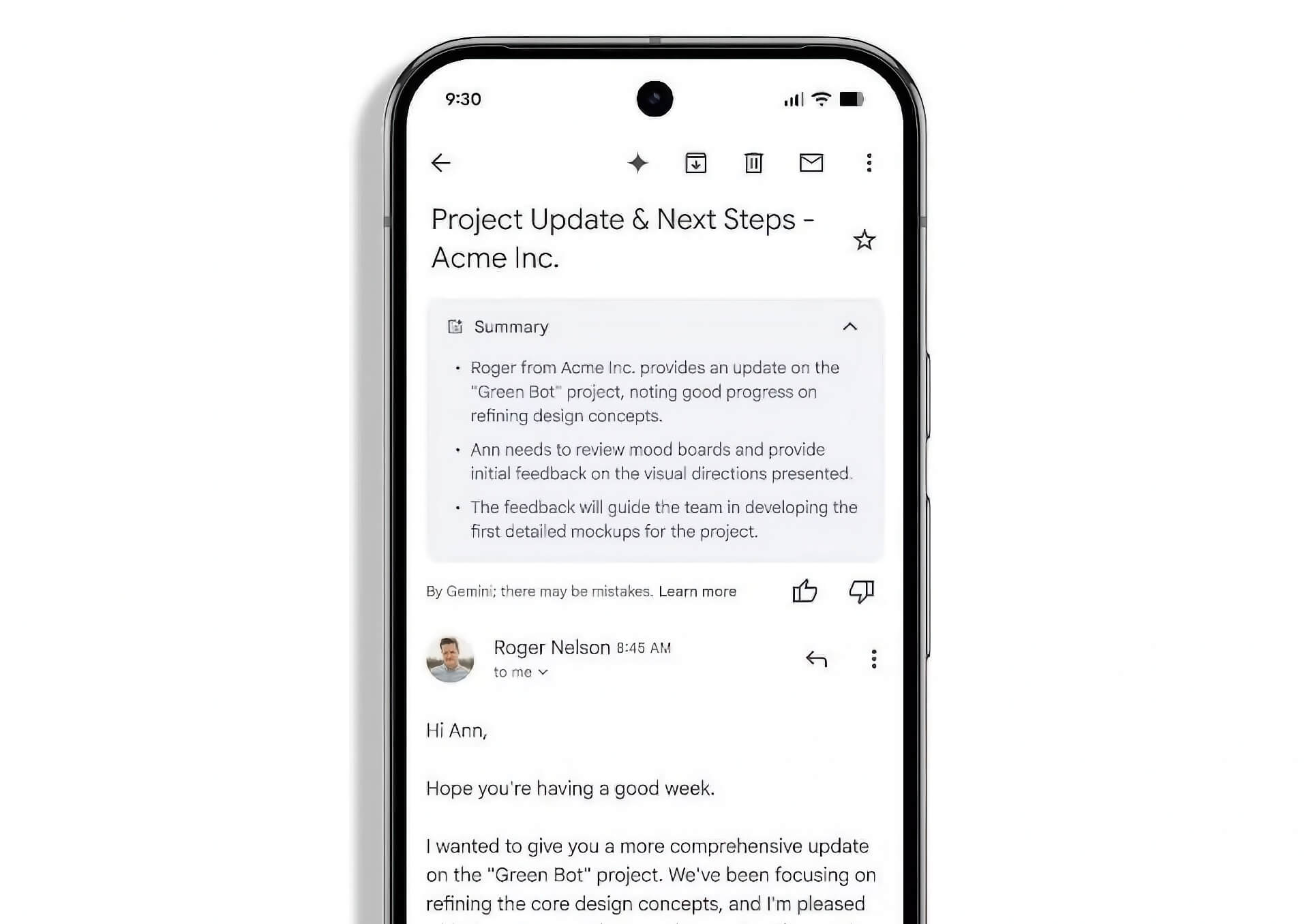
Currently, this automatic summarization feature is being rolled out to Google Workspace customers, Google One AI Premium subscribers, and users with Gemini Education add-on plans. Specifically, the list of applicable audiences includes:
- Business Starter, Standard, and Plus
- Enterprise Starter, Standard, and Plus
- Google One AI Premium
- Users with Gemini Education or Gemini Education Premium plans
- Customers who previously purchased Gemini Business or Gemini Enterprise plans
The feature currently only supports emails written in English and is only available on mobile devices. Google stated that the rollout process will take approximately two weeks, starting from May 29, 2025.
If you do not see a summary card appearing at the top of an email, you can still create a summary by tapping the "Summarize this email" button at the top of the screen.
Technology and Privacy Regarding the Gmail Summarization Feature
The technology behind these summaries is based on advancements in Large Language Models (LLMs), which are also the foundation powering chatbots and other AI assistants. Gemini will synthesize all the key points from the email thread, and any subsequent replies will also be included in the summary, ensuring the information remains up-to-date.
For those who prefer managing messages without AI assistance, there is an opt-out option-though this comes with a trade-off. Disabling the automatic summarization feature requires turning off "smart features" in Gmail, which also disables other tools such as high-priority notifications, package tracking, Smart Compose, and Smart Reply.
Notably, Google's use of your email text in LLMs for processing may raise privacy concerns regarding how personal data is used to further train AI. However, Workspace administrators can enable or disable default personalization settings for all their users in the Admin console.
The shift from manual to automatic aims to save you a click and help you get key information faster-a change that is always welcomed when trying to manage a busy inbox.
Integrating AI summarization as a core part of the Gmail experience reflects a broader trend across Google products. In particular, the summarization feature is seen as a practical application of GenAI, especially for users who frequently handle long or complex email threads.
Summary: Gmail has officially brought Gemini AI automatic email summarization to mobile devices, turning this tool from an option into a default feature for Google Workspace users. Instead of having to manually request a summary, users will now see automatic summary cards appearing at the top of long emails or threads with many replies. This feature currently only supports English emails and is available on mobile devices for Google Workspace, Google One AI Premium, and Gemini Education users. While offering many conveniences, this feature also raises privacy questions as email data is processed through AI. Users can disable this feature but will trade off other smart features of Gmail.