Black Myth: Wukong is a new action RPG inspired deeply by Chinese mythology. Players are invited to embark on a grand journey as the Destined One, exploring majestic landscapes and uncovering hidden truths from ancient legends. The game has garnered significant attention ahead of its release due to its stunning graphics (Unreal Engine 5), intense combat, and rich world system.
We will only touch upon the gameplay minimally because today's article focuses primarily on GPU benchmark testing. The ultimate goal is to compare a large number of graphics cards under the same testing conditions to examine their performance. This will help you clearly see how much faster a potential upgrade would be compared to your current system.
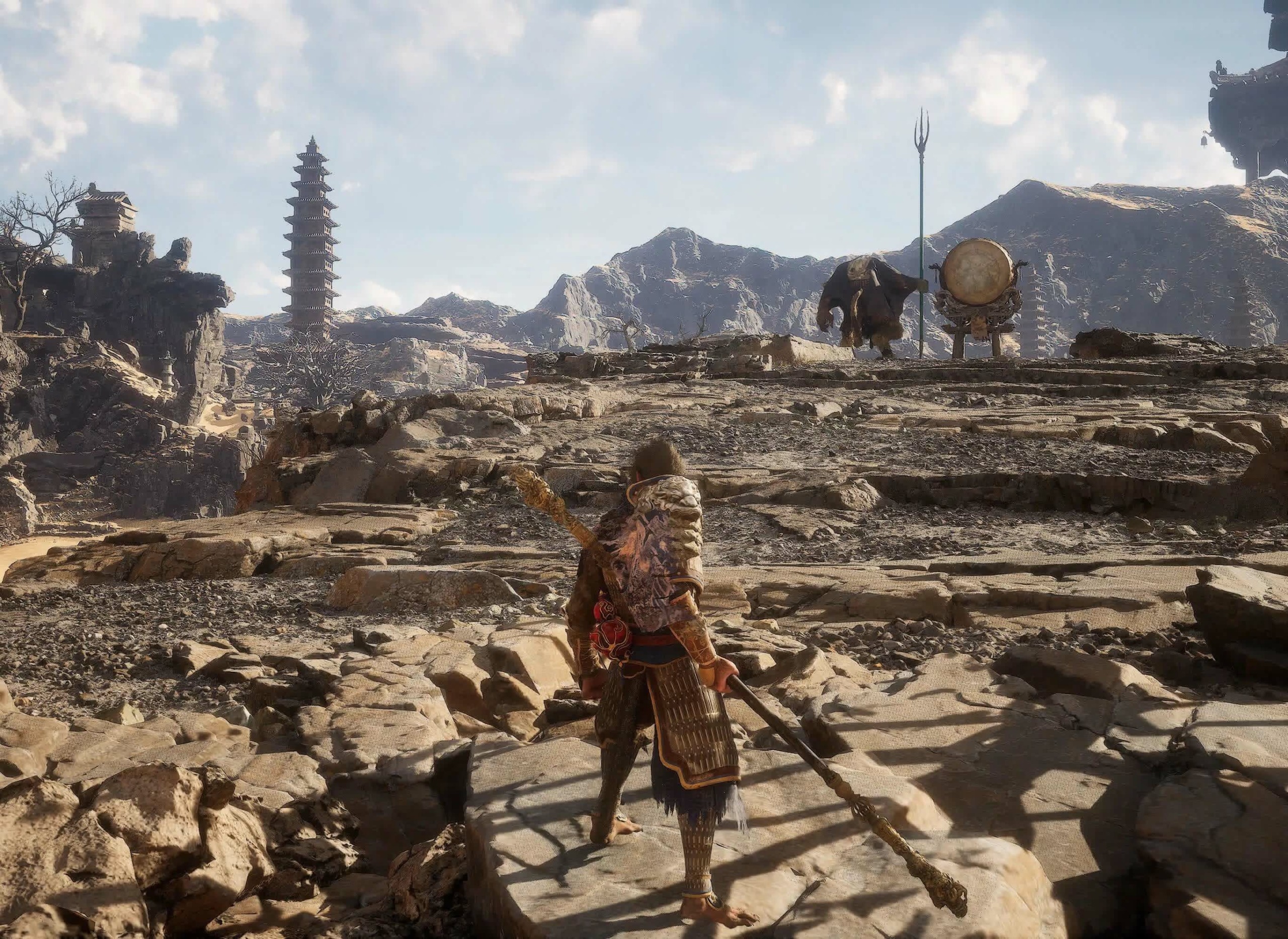
Black Myth: Wukong provides a free benchmark tool on Steam, which is excellent. We hope all game developers can provide such tools. After downloading 7GB, you can run the benchmark on your system. This will help you determine the performance of your current configuration when playing the game. If you need to upgrade your GPU, this guide will show you the performance you can expect from current-generation GPUs, as well as most models from previous generations.
Wukong is developed using Unreal Engine and delivers stunning visuals. This is an Nvidia-sponsored game, so there is a heavy emphasis on ray tracing, although FSR and XeSS are also supported alongside DLSS. Frame generation is also available for both FSR and DLSS, along with TSR.
https://www.youtube.com/watch?v=bzyMLoSwYvk
To perform the performance comparison, we are testing five different configurations, each with three resolutions, using up to 41 GPUs, generating a massive amount of data. We have recorded over 40 hours of work with the benchmark tool on two systems, both using a Ryzen 7 7800X3D, and calibrated to provide consistent results.
We provide two ray tracing configurations for you. One configuration uses cinematic settings with upscaling set to 75%, enabling frame generation and Very High ray tracing mode. We applied DLSS for the GeForce 40 series and FSR for other card lines, as this allows us to enable the frame generation feature. The other configuration keeps all settings the same, except the ray tracing level has been adjusted down one notch to Medium.
For those wondering, there are currently three ray tracing options: Low, Medium, and Very High. We have created a table to show the functionality of each option and will conduct testing with the Very High and Medium options. Additionally, we also have three native configurations that do not use upscaling, frame generation, or ray tracing; however, we will use FSR at 100% for Radeon GPUs and DLSS at 100% for GeForce GPUs. The settings used include Cinematic, High, and Medium.
Finally, to test the GeForce GPUs, we are using Game Ready Driver 560.87, while for Radeon GPUs, we are using Adrenalin Edition 24.7.1. AMD has not yet released a dedicated driver for this game, but we will not wait, as we do not know when that will happen. We have also included the Intel Arc A770 and A750, although they were only tested in Medium and High settings due to suboptimal performance with the current driver. Now, let's look at the data...
Black Myth: Wukong Test Configuration
| CPU | AMD Ryzen 7 7800X3D |
| Cooling | be quiet! Pure Loop 2 FX 360mm |
| Motherboard | Gigabyte X670E Aorus Master [BIOS F32b] |
| Memory | G.Skill Trident Z5 RGB 32GB DDR5-6000 [CL30-38-38-96] |
| ATX Case | MSI Prospect 700R |
| Power Supply | Kolink Regulator Gold ATX 3.0 1200W |
| Storage | TeamGroup T-Force Cardea A440 M.2 PCle 4 NVMe SSD 4TB |
| Operating System | Windows 11 |
| Display Driver | Nvidia Game Ready Driver 560.87 |
| AMD Adrenalin Edition 24.7.1 | |
| Intel Arc 32.0.101.5768 |
GPU Performance Review
Cinematic Quality: Upscaling 75% + Frame-Gen, RT Very High
We will start with the results at Very High ray tracing quality, using Cinematic settings with 75% resolution upscaling and enabling frame generation. It is important to note that the actual frame rate is much lower than what is reported here due to the use of frame generation. As seen previously, any level below 60 fps when frame generation is enabled will lead to a poor experience, which is reasonable. Ideally, you should have a base frame rate of 60 fps, which corresponds to about 100 fps in this chart.
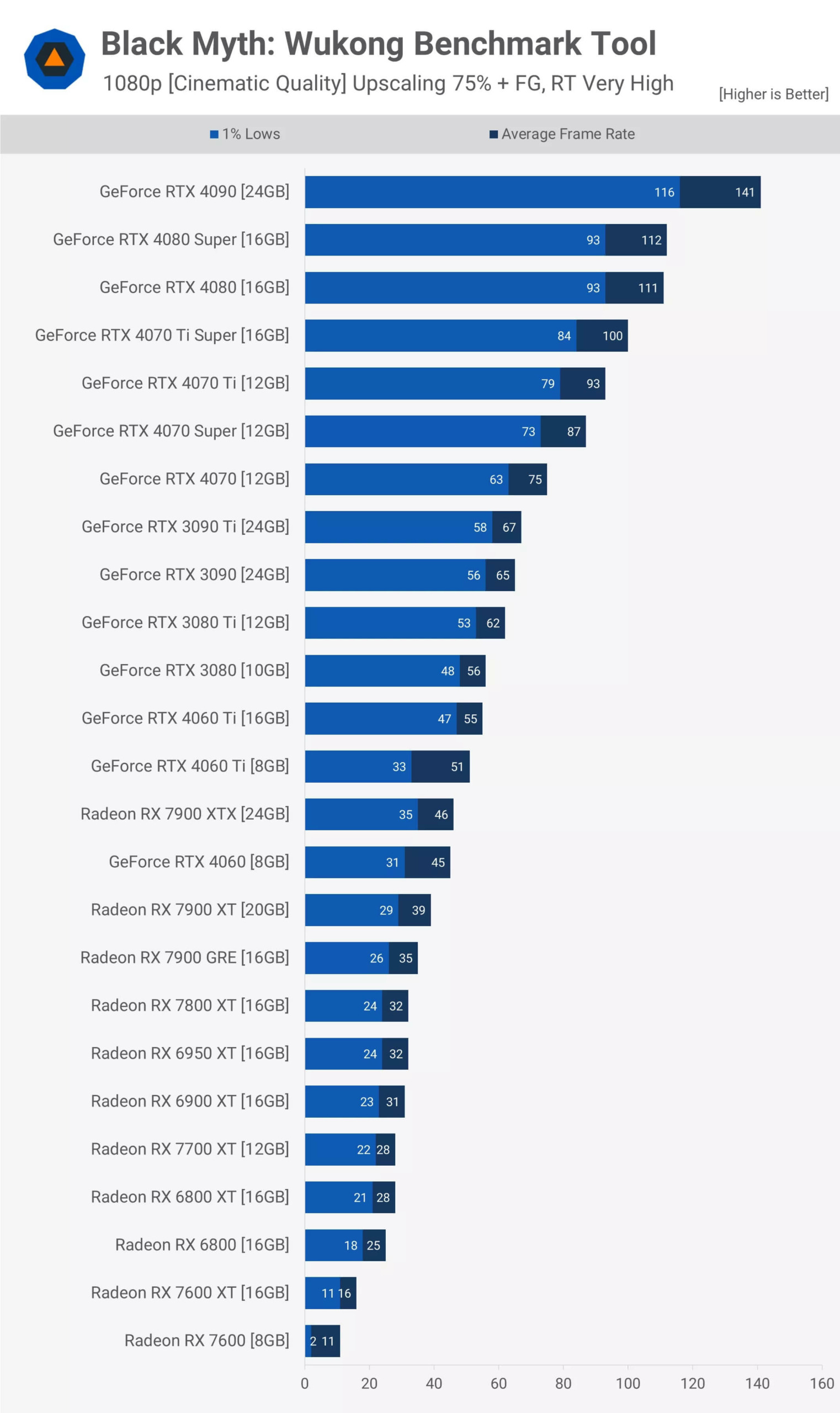
Accordingly, when playing at 1080p resolution, the game struggles under these conditions. Only the RTX 4090 is the only graphics card capable of providing smooth performance, with frame rates up to 141 fps. Note that these numbers include generated frames.
This means that, at minimum, you will need an RTX 4080 Super or a base 4080 model, although you might find an acceptable experience with the 4070 Ti Super, 4070 Ti, or perhaps the 4060 Super. Based on online videos, combat seems to happen quite quickly, so any frame rate below 60 fps with frame generation might feel inadequate. This shows that the RTX 3080 and lower graphics cards in this chart will provide an suboptimal experience for most gamers.
As predicted, those using Radeon GPUs, even the 7900 XTX, will not be able to play Black Myth: Wukong at the highest quality ray tracing settings. The performance of the 7900 XTX is only equivalent to the RTX 4060, which is unsatisfactory.
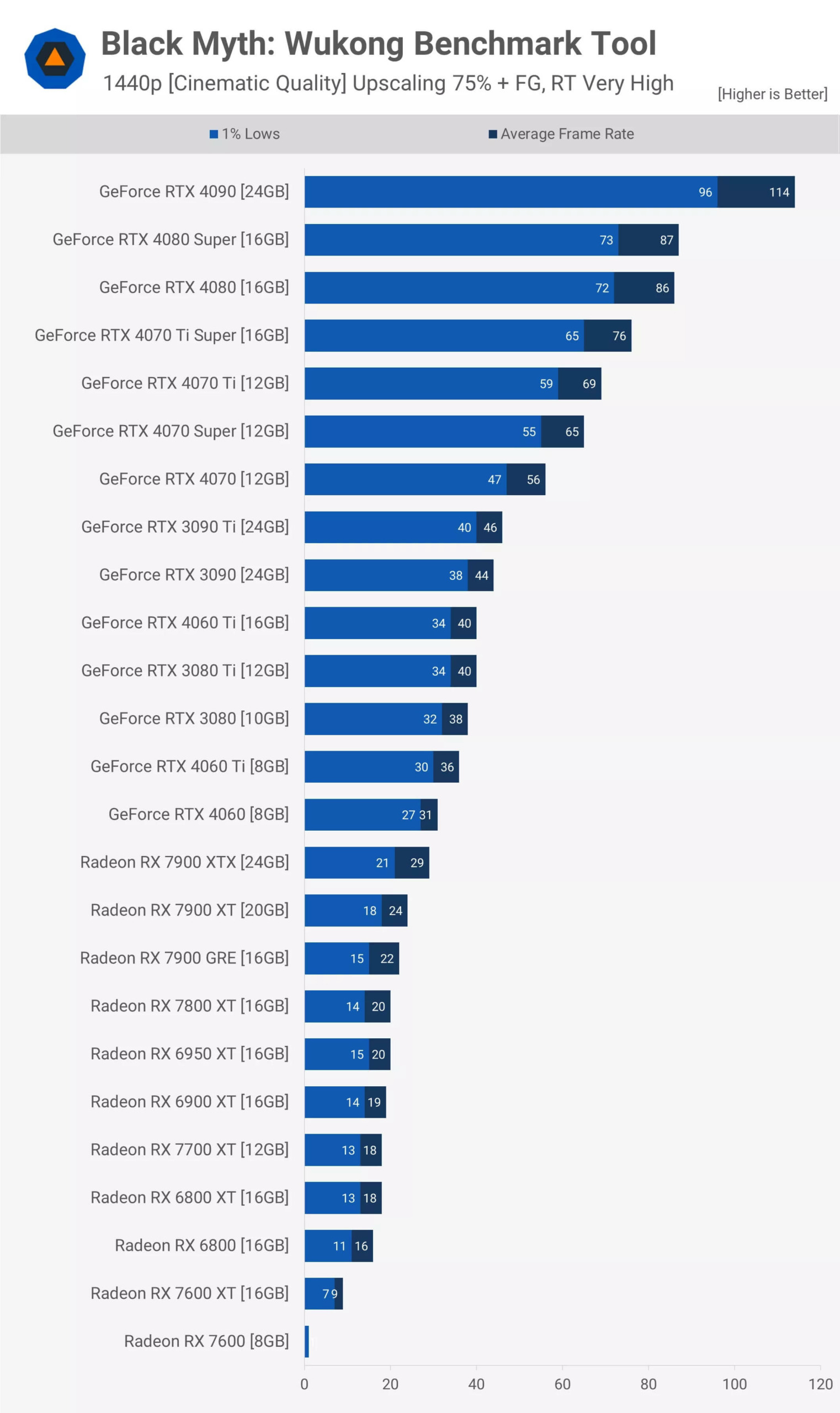
When increasing the resolution to 1440p, the RTX 4090 remains the only graphics card capable of delivering a good or at least acceptable experience when frame generation is enabled. The 4080 Super and 4080 models may feel noticeably sluggish during combat and fast action scenes. The 4070 Super only reaches 65 fps, which in our opinion is not enough to provide a good experience at these settings.
Therefore, at 1440p resolution with these quality settings, the RTX 4070 is not enough for most gamers, and any slower model will be difficult to use. In this case, you may need to lower the quality settings.
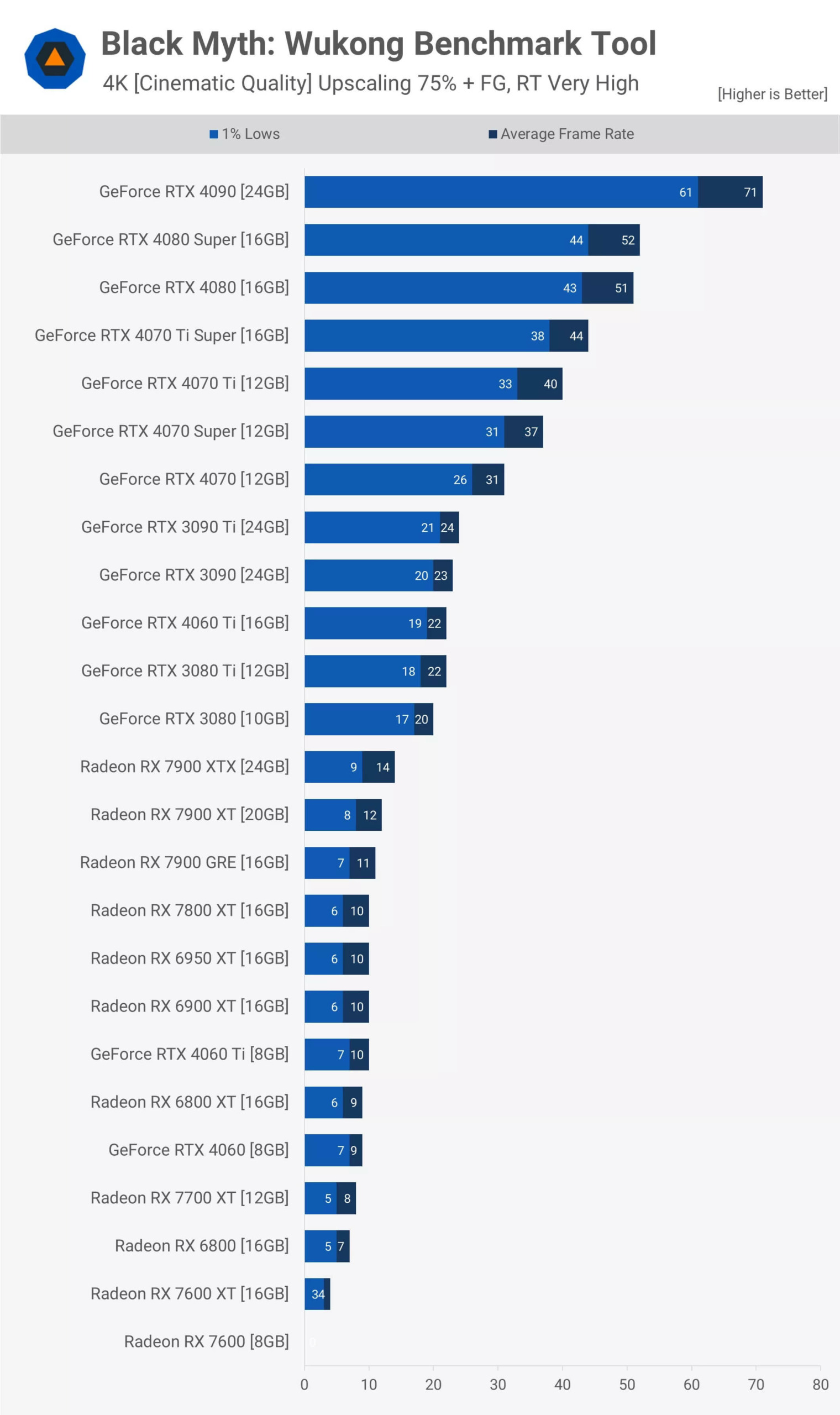
Currently, the performance of the RTX 4090 at 4K resolution is controversial. In the past, with most games, achieving 70 fps with frame generation provided a suboptimal experience.
We do not believe that the RTX 4090 data will provide an excellent experience at 4K resolution, although this may be subjective. Ideally, you should reduce the resolution scale to about 50% at 4K, which is equivalent to the DLSS performance setting.
Under those quality settings, the RTX 4080 Super and lower products will struggle, as having frame rates below 60 fps with frame generation enabled is not ideal. Furthermore, it is worth noting that, at the time of writing, there is no Nvidia Reflex option in the game.
Cinematic Quality: Upscaling 75% + Frame-Gen, RT Medium
When we reduce the ray tracing settings from 'Very High' to 'Medium', the resolution of light and reflections is completely halved and caustics using ray-tracing are completely disabled.
This change only improves the performance of the RTX 4090 at 1080p resolution by 8%, so the increase is insignificant. However, for the 7900 XTX, there is a significant improvement of up to 52%. Even so, this only helps the 7900 XTX reach 70 fps. It is important to note that we are still using frame generation technology - specifically FSR frame generation in this case - so the overall experience will not be good.
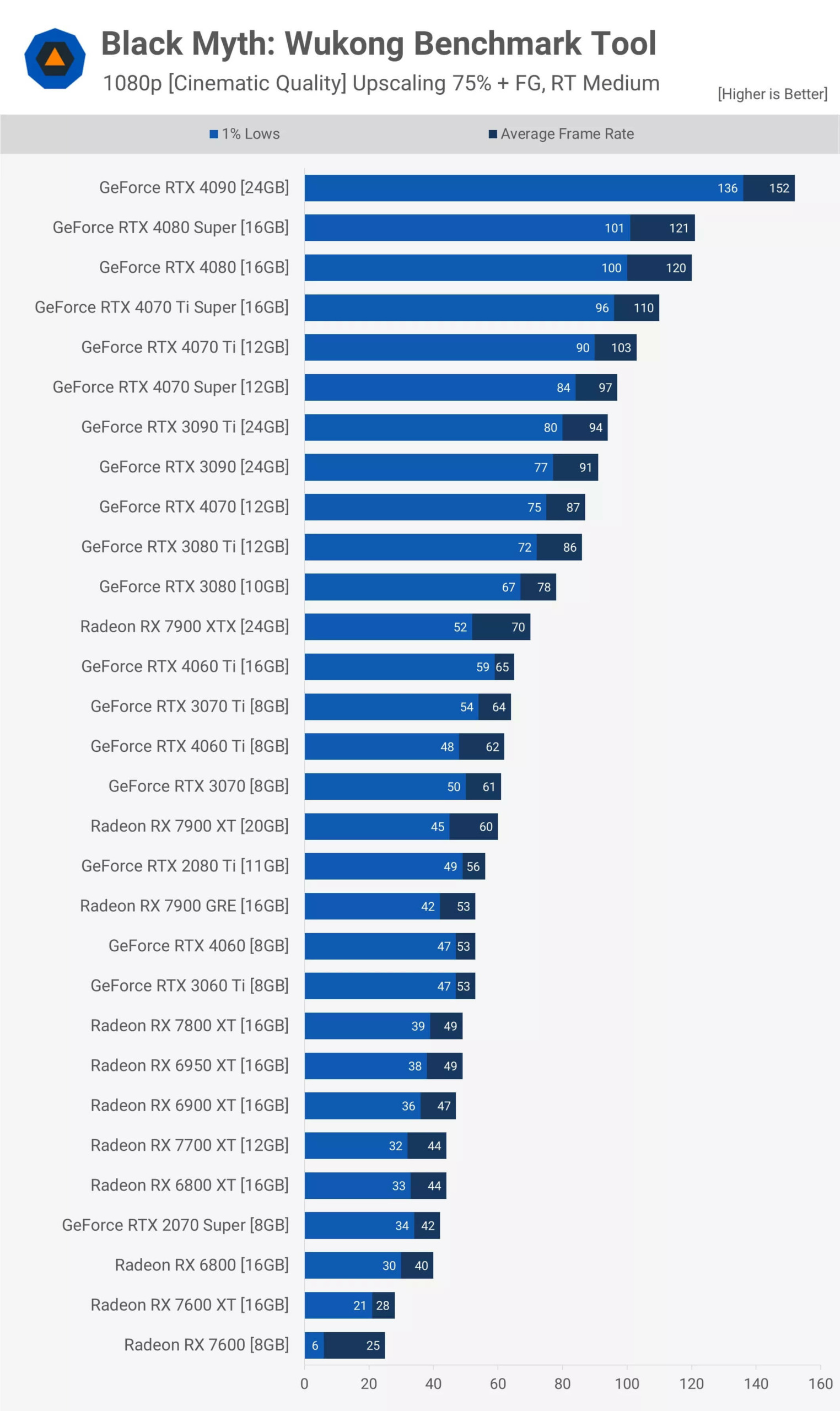
In our view, 60 fps with frame generation technology feels difficult to play and uncomfortable, while 80 fps is the minimum but still has latency. When reaching around 100 fps, the experience becomes acceptable, although it still lacks the responsiveness of a true high frame rate game. As it approaches 150 fps, it starts to become much smoother.
Based on that, the RTX 4090 provides a good experience at 152 fps. The 4080 Super and 4080 models also provide significant performance, while the RTX 4070 Ti and Ti Super offer a satisfying experience. The RTX 3080 nearly reaches our absolute minimum when frame generation is enabled, meaning products like the 7900 XTX and lower models do not meet the requirements.
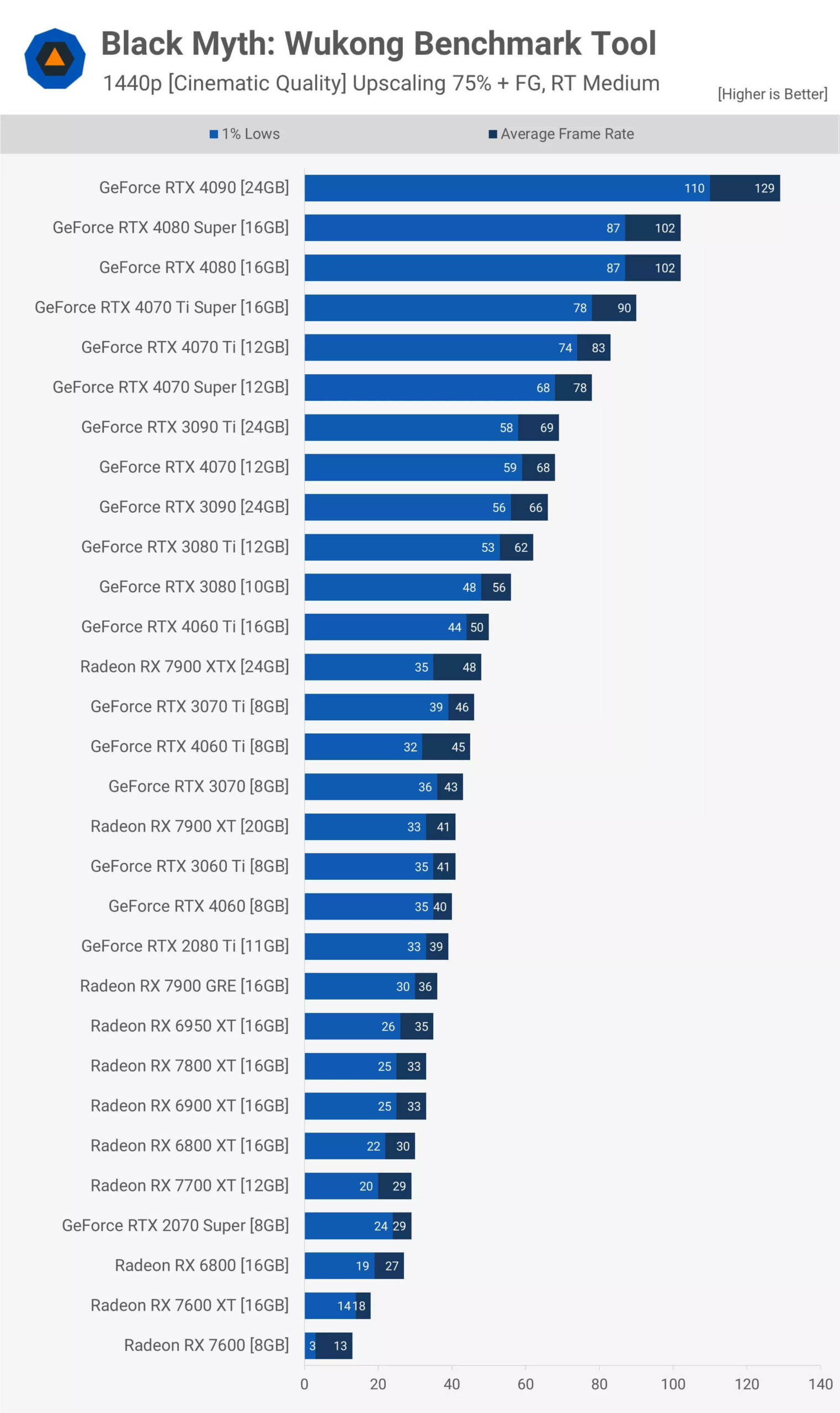
At 1440p resolution, the RTX 4090 still provides a stable experience, while the 4080 models have acceptable performance. The 4070 series provides the minimum experience that we consider acceptable, and any slower GPU will start to feel sluggish. Products below the 3080 Ti are likely not a good choice for this resolution.
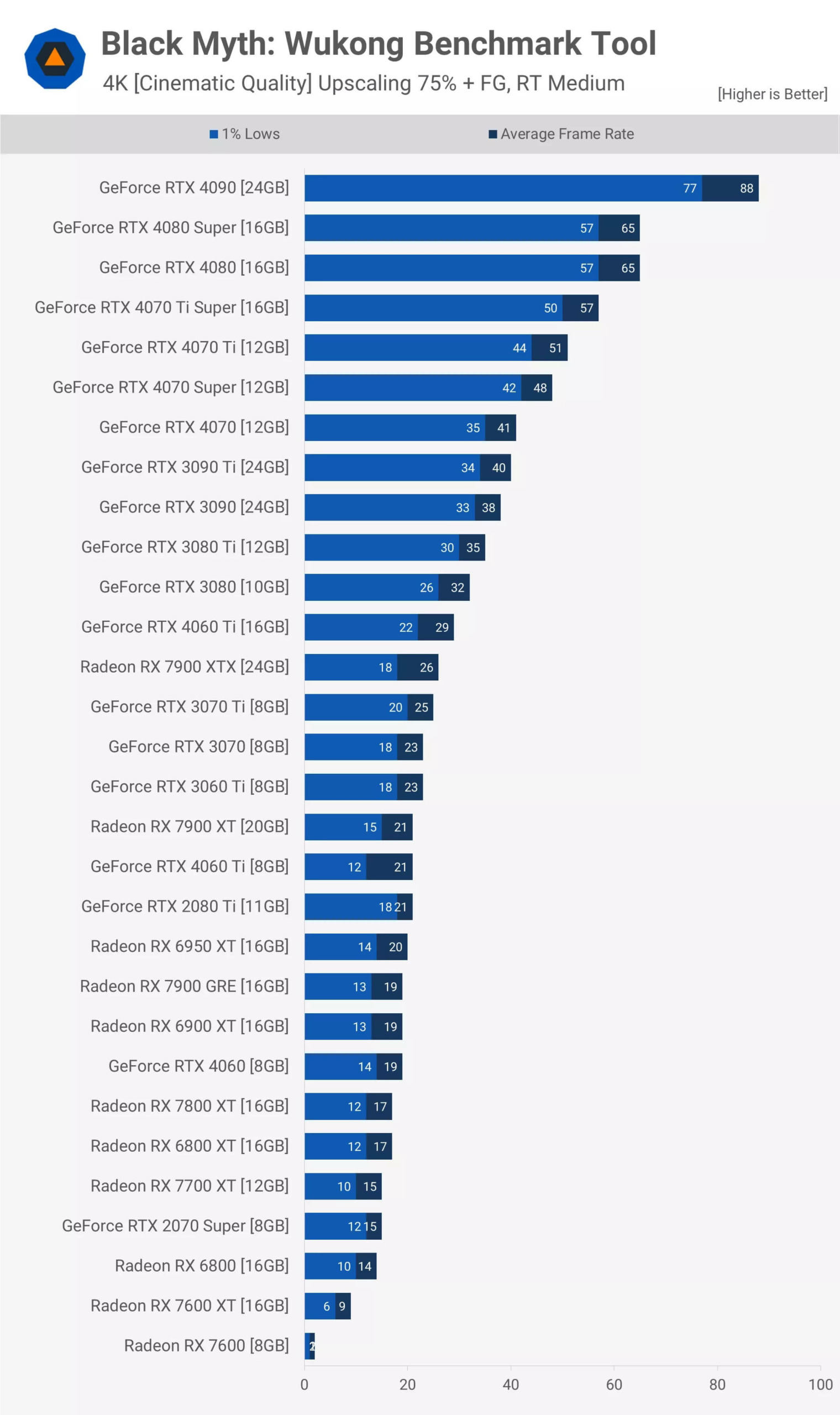
At 4K resolution, performance drops significantly and nothing stands out exceptionally. Therefore, you may have to switch from quality mode to performance mode to upgrade the image and may need to lower the quality settings. Even so, the RTX 4090 remains the only truly viable graphics card in these conditions.
Cinematic Quality: Native Resolution
Let's set aside resolution upscaling, lighting reflections, and frame generation, and focus on native display performance by using the highest quality configuration in the game - Cinematic settings. However, it is important to note that the game still uses software Lumen even when the ray tracing feature is disabled. The only way to turn off this feature is to run the game in DirectX 11 mode, which is feasible and will be discussed further in a future article.
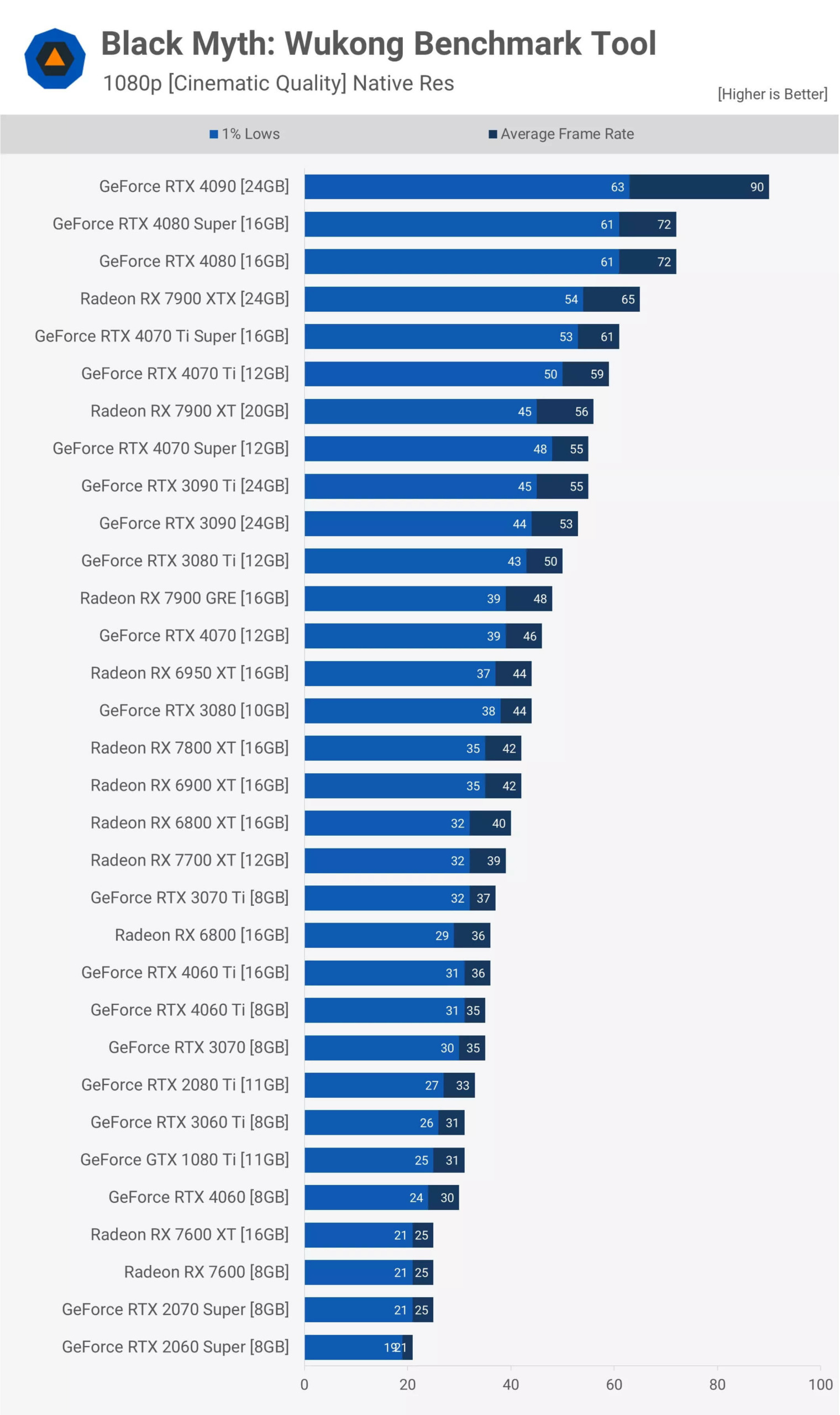
Under these conditions, you should aim for a minimum of 60 fps; any higher level is considered a bonus - especially attractive to gamers who love high refresh rates.
The lowest fps level you can accept below 60 fps depends on personal perception. If performance drops significantly below that threshold, we usually look to increase the frame rate, perhaps by reducing quality settings or lowering the resolution.
At 1080p resolution, the RTX 4090 reaches about 90 fps - not a huge number, but still provides a smooth experience. The 4080 series provides over 70 fps, which is quite decent and certainly playable, although not standout on a high refresh rate monitor. You can enable DLSS to improve performance, but the upscaling ratio will remain the same across other tests. For this data, we kept it at native resolution to ensure an accurate comparison.
The 7900 XTX reaches an average of 65 fps, slightly outperforming the 4070 Ti Super. However, this is not truly impressive, as it often competes with the RTX 4080. The Lumen software feature might be slowing down the Radeon GPU slightly.
For those wanting close to 60 fps, the 7900 XT, 4070 Super, and 3090 Ti are viable options. However, any level in the 40 fps range is insufficient for combat, although it may be acceptable when just exploring the environment. We tested many other GPUs, but most did not meet these quality settings, so let's move on to another topic.
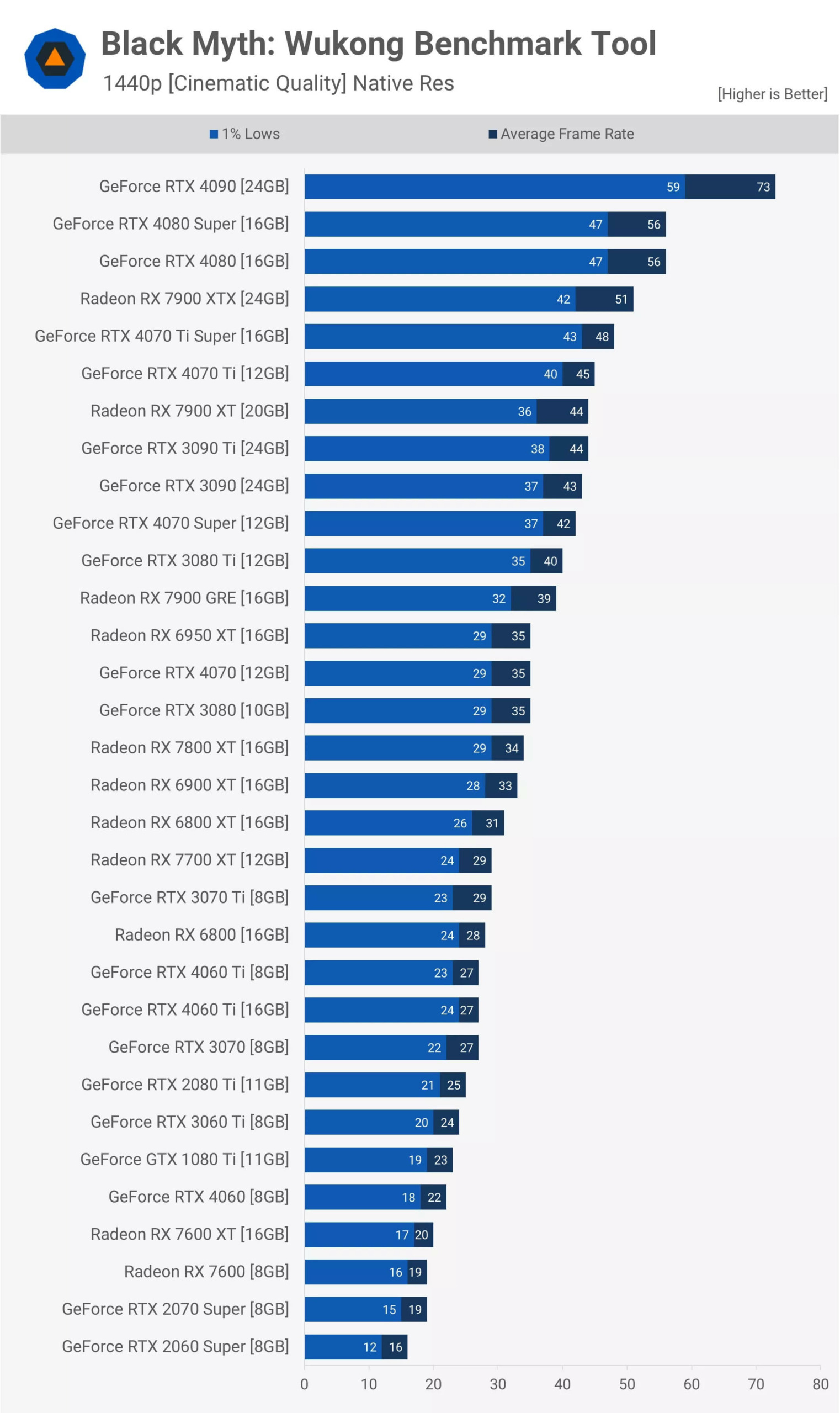
At 1440p resolution, the RTX 4090 drops to 73 fps, still playable, although there is no large performance difference for such a high-end GPU, especially without hardware-based ray tracing effects. Meanwhile, the RTX 4080 Super and RTX 4080 struggle to reach 60 fps, ultimately only reaching 56 fps. The Radeon 7900 XTX is no better, only reaching 51 fps. While not a bad performance level, for a smoother gaming experience, FSR upscaling technology should be used. Below the 4070 Ti Super, upscaling will become necessary if you want to use Cinematic settings at 1440p resolution.
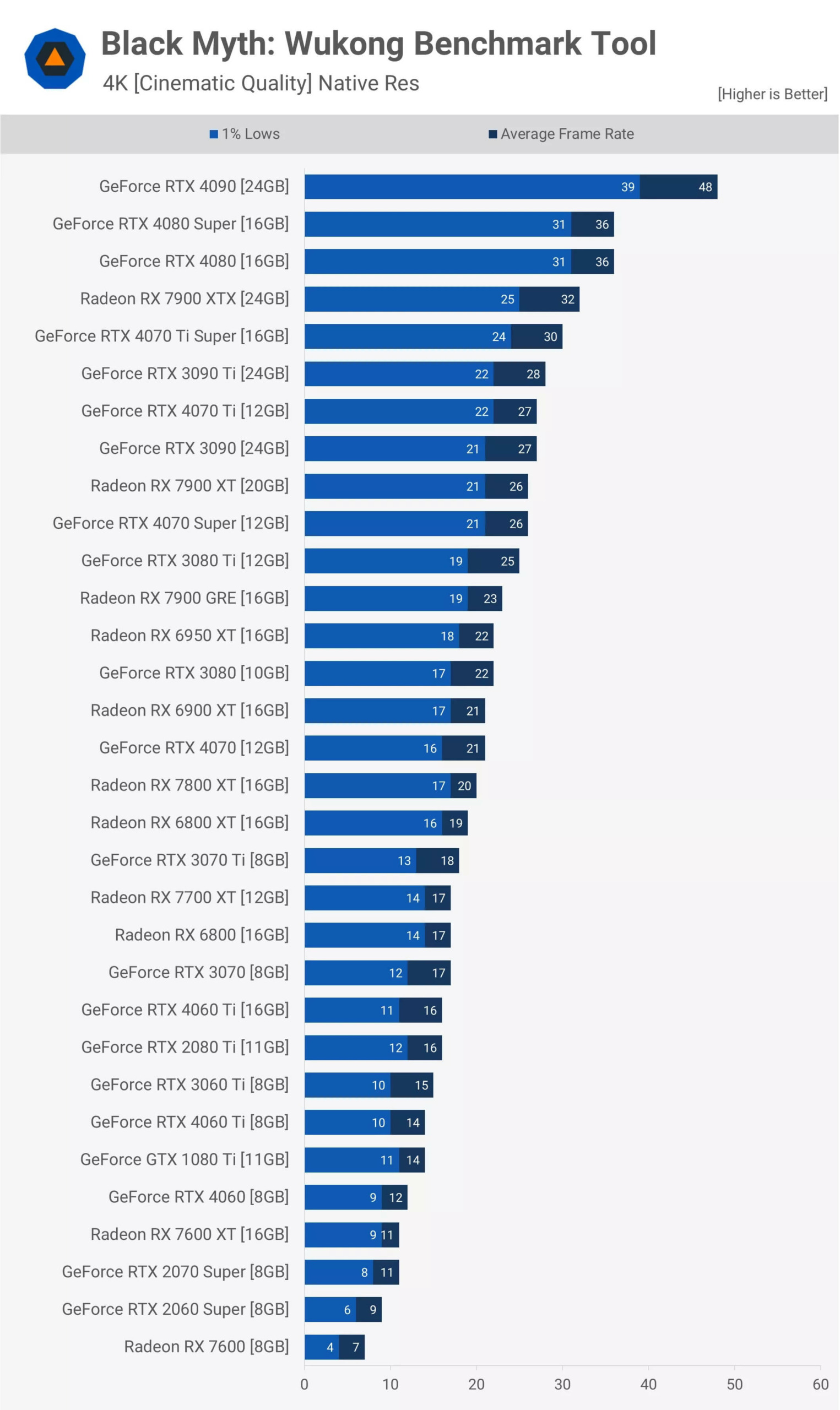
At 4K resolution, image upscaling becomes necessary, even when using the RTX 4090. In fact, even with upscaling, most GPUs will not be able to provide acceptable gaming performance at 4K with these settings. As predicted - or as you may have realized by this point - Black Myth: Wukong is a very resource-intensive game when played at maximum settings.
High Quality: Native Resolution
Switching to High quality settings will significantly improve performance. For example, the RTX 4090 is currently 53% faster, with an average speed reaching 138 fps. If you do not like technologies like frame generation, this setting might be the best choice for high-end GPUs.
It seems that the software-based Lumen level has been reduced or even disabled, as the 7900 XTX recorded a performance increase of up to 74%, now nearly equal to the RTX 4080 and 4080 Super with 113 fps.
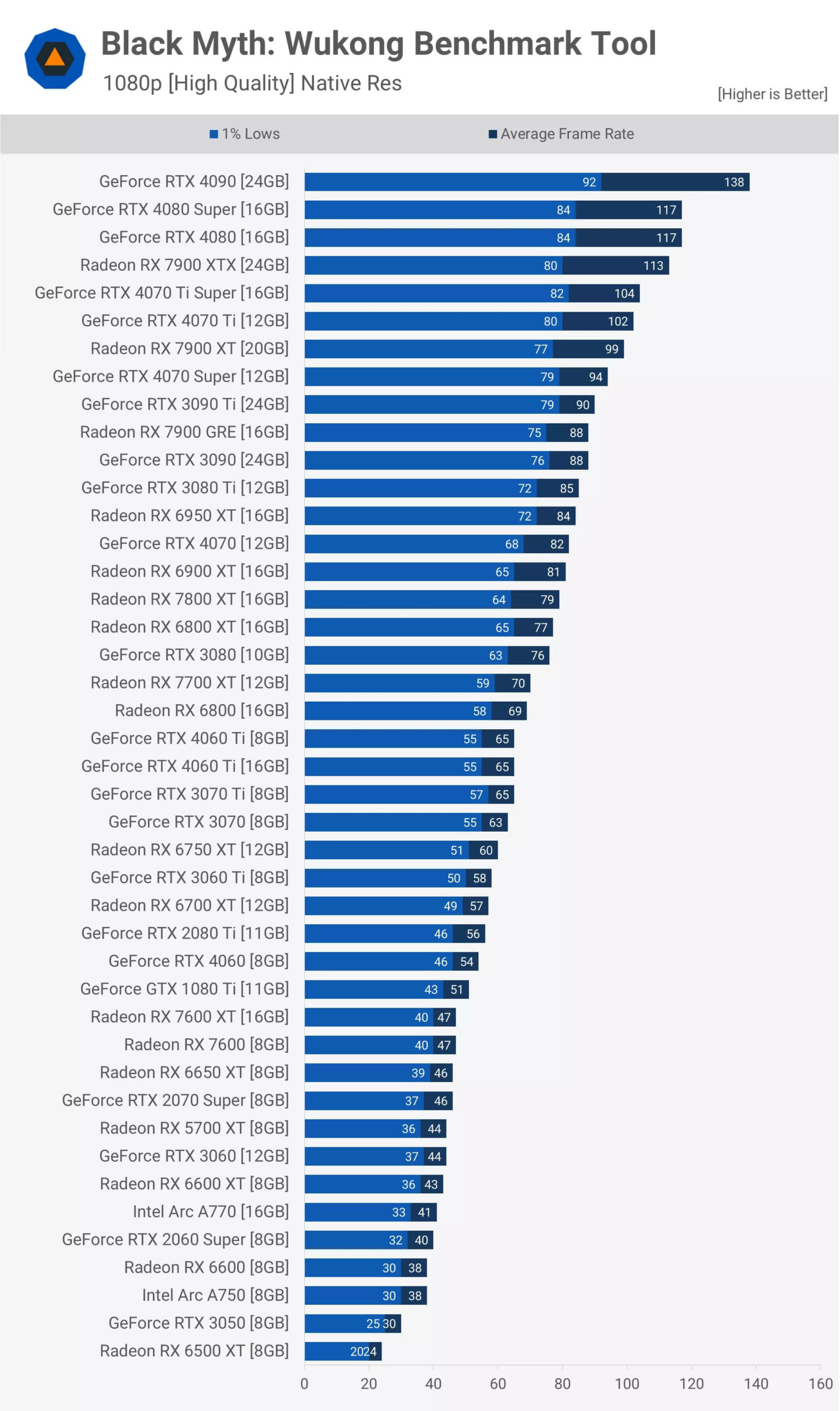
The 7900 XT graphics card is only slightly slower than the RTX 4070 Ti and Ti Super, while the GRE version is equivalent to the 3090, 3090 Ti, and 3080 Ti, being only 7% faster than the RTX 4070.
With 43 GPUs in this chart and more data to analyze, we will not go into detail for all results. You can pause and review any data that we have skipped.
It is interesting to see the 6800 XT and RTX 3080 performing almost equally in these testing conditions. We also noticed that the 7700 XT is 8% faster than both versions of the RTX 4060 Ti.
The old RTX 2080 Ti averages 56 fps, on par with graphics cards like the 6700 XT, 3060 Ti, and the new RTX 4060.
Furthermore, the old Radeon RX 5700 XT maintains performance at 44 fps, providing performance equivalent to the RTX 3060. Notably, it is only a few frames slower than the RTX 2070 Super, a GPU that once had a higher price of over $100. It is surprising that the RX 7600 only brings a 7% increase over the old 5700 XT.
The Intel Arc A770 appears for the first time with an average of 41 fps, 1 fps faster than the RTX 2060 Super. The RX 6600 and Arc A750 also have almost equal performance. Then, we find disappointing products from AMD and Nvidia: the RTX 3050 and 6500 XT 8GB are inefficient, only reaching 24 fps. Unfortunately, testing the original 4GB model in these conditions is not feasible.
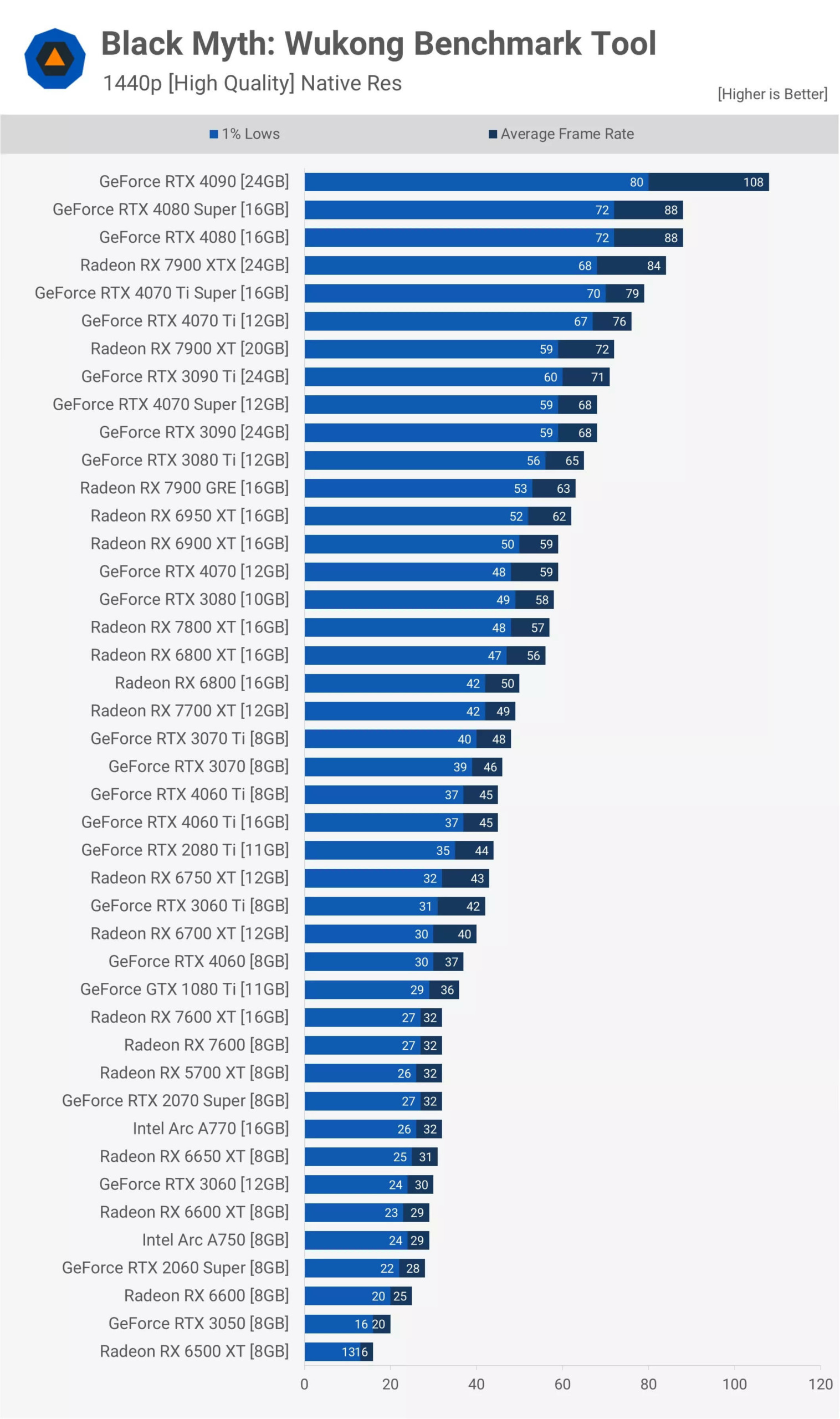
At 1440p resolution, the RTX 4090 graphics card reaches 108 fps, while the RTX 4080 series is almost below 90 fps. The Radeon 7900 XTX is only 5% lower, showing this is a good result for this GPU.
For an average of around 60 fps, you can rely on cards like the 6950 XT, 7900 GRE, RTX 3080 Ti, and RTX 3090. For Nvidia's current generation, it is best not to choose anything lower than the RTX 4070 Super, especially if you do not want to use upscaling - although that might be a good idea.
Below that, performance remains similar to what we observed at 1080p resolution. Any fps level below 60 will require upscaling for a more optimal experience. Otherwise, you may need to lower the quality settings or revert to 1080p resolution.
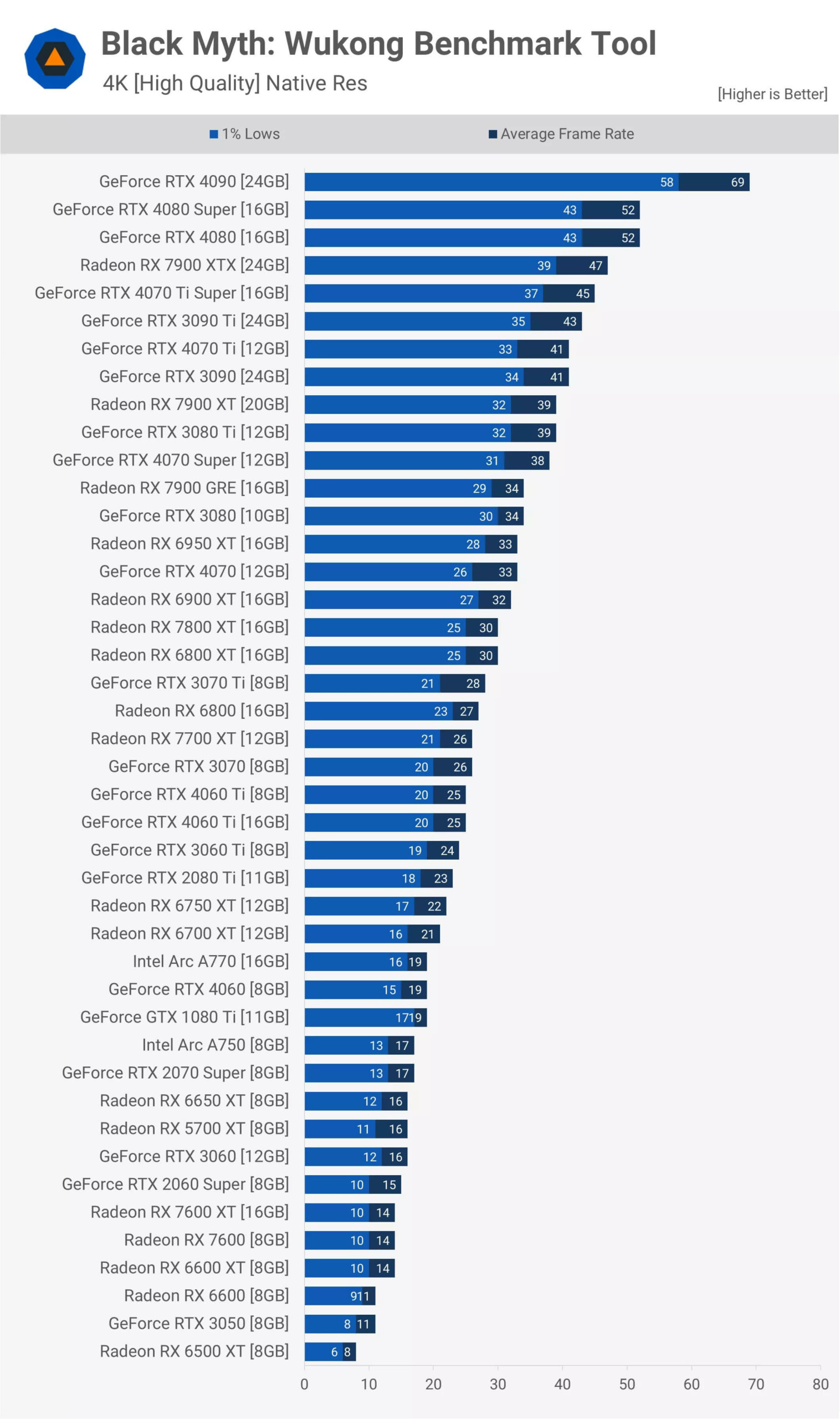
At 4K resolution, the game remains very demanding, even when set to the highest level. The RTX 4090 only reaches an average of 69 fps. Although this is quite smooth, it still hasn't reached high refresh rate performance.
The RTX 4080 only reaches 52 fps, so resolution upscaling is necessary in this case, and this also applies to any GPU with slower performance.
Medium Quality: Native Resolution
This is the lowest quality setting we have tested: the medium quality option with 100% resolution scale. Compared to high settings, the RTX 4090's performance increased by 25%, while the 7900 XTX improved by 28%, helping it achieve performance equivalent to the 4080 Super.
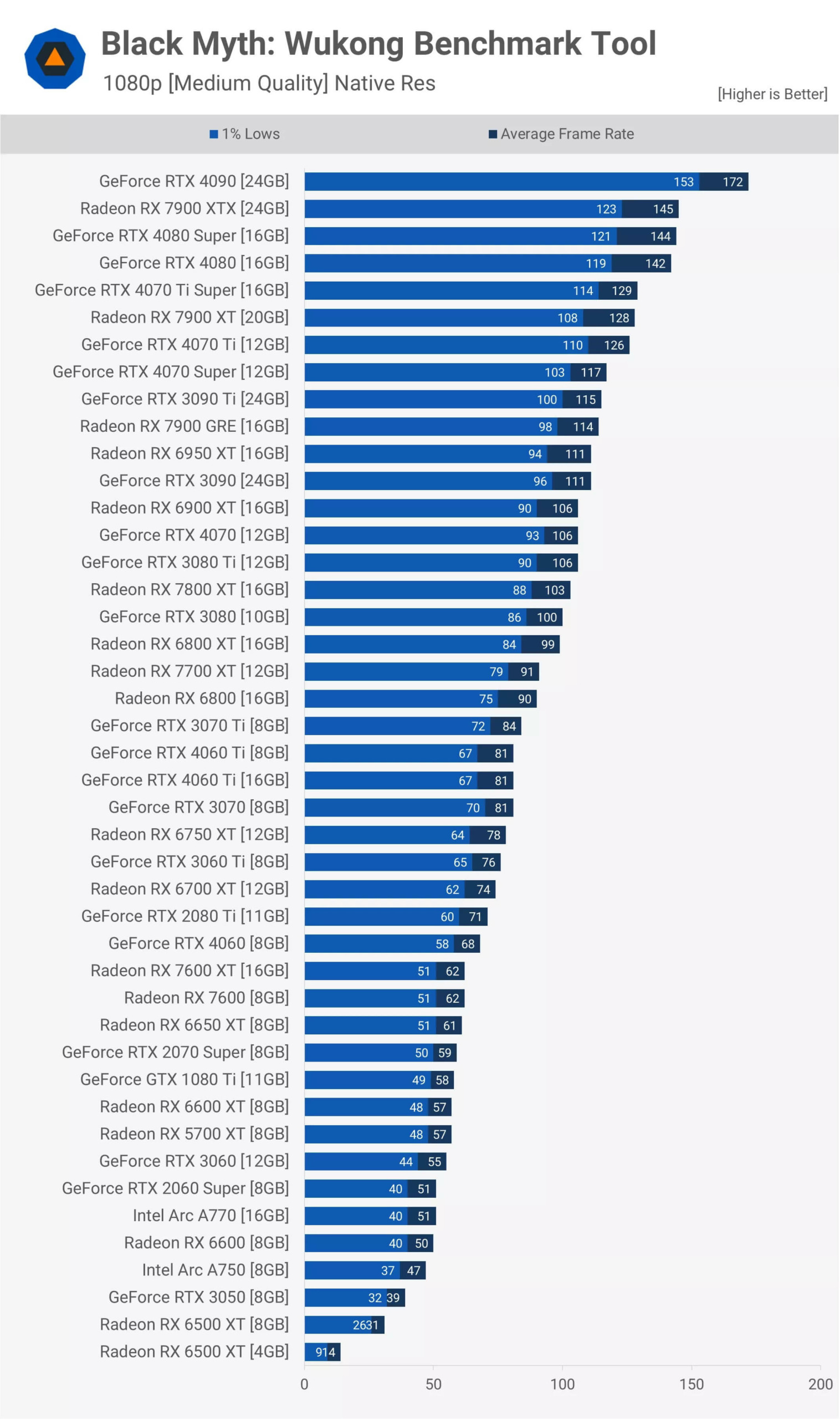
The RTX 4090, 4080, and 7900 XTX all provide high performance with fast refresh rates without needing resolution enhancement. Even the RTX 3080 reaches over 100 fps, showing that, like many latest AAA games, the game is still very smooth at medium quality settings.
To achieve an average of 60 fps at 1080p resolution, the RX 7600 or 7600 XT is sufficient, while the RTX 4060 has slightly better performance at 68 fps - not bad at all.
Once again, the RTX 3050 struggles and the 6500 XT is disappointing. In fact, the original 4GB model only averaged about 14 fps, which is truly poor, especially when compared to the 50 fps of the RX 6600. The Intel Arc A770 also reached 51 fps - not excellent but still viable, and you can always turn on enhancement features like XeSS or FSR.
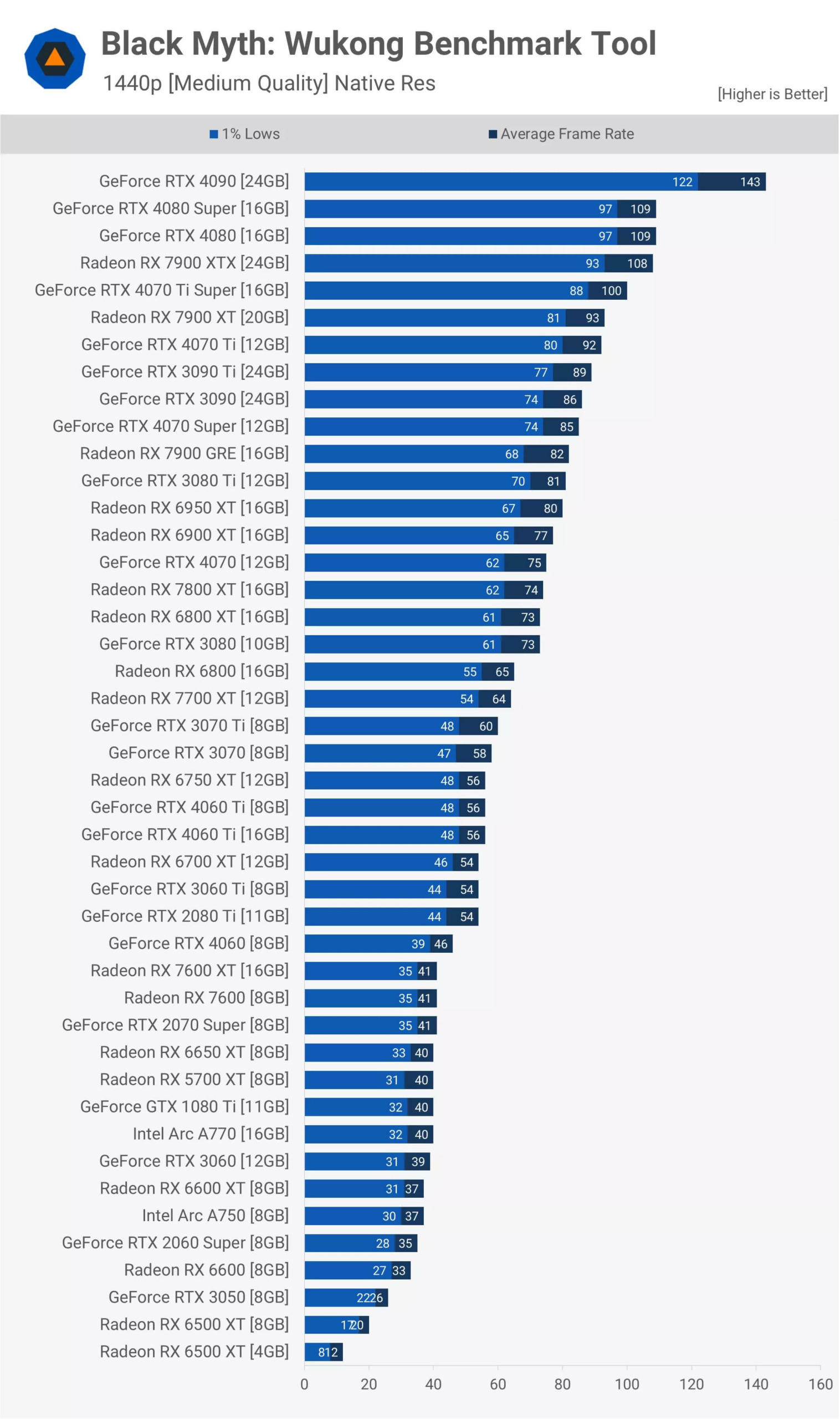
At 1440p resolution, the RTX 4090 continues to provide performance with high frame rates, and the 4080 series along with the 7900 XTX also show good results.
There are about twelve GPUs, from the RTX 3080 to 4070 Ti, achieving from 73 to 92 fps, showing fairly stable performance. Among the cards from the RTX 3080 downwards, only three cards still maintain a level of 60 fps or higher: the RTX 3070, 7700 XT, and RX 6800.
For those desiring at least 40 fps, there are many options, including the old GTX 1080 Ti, with an exact average of 40 fps, along with the 6650 XT, Arc A770, and RX 5700 XT.
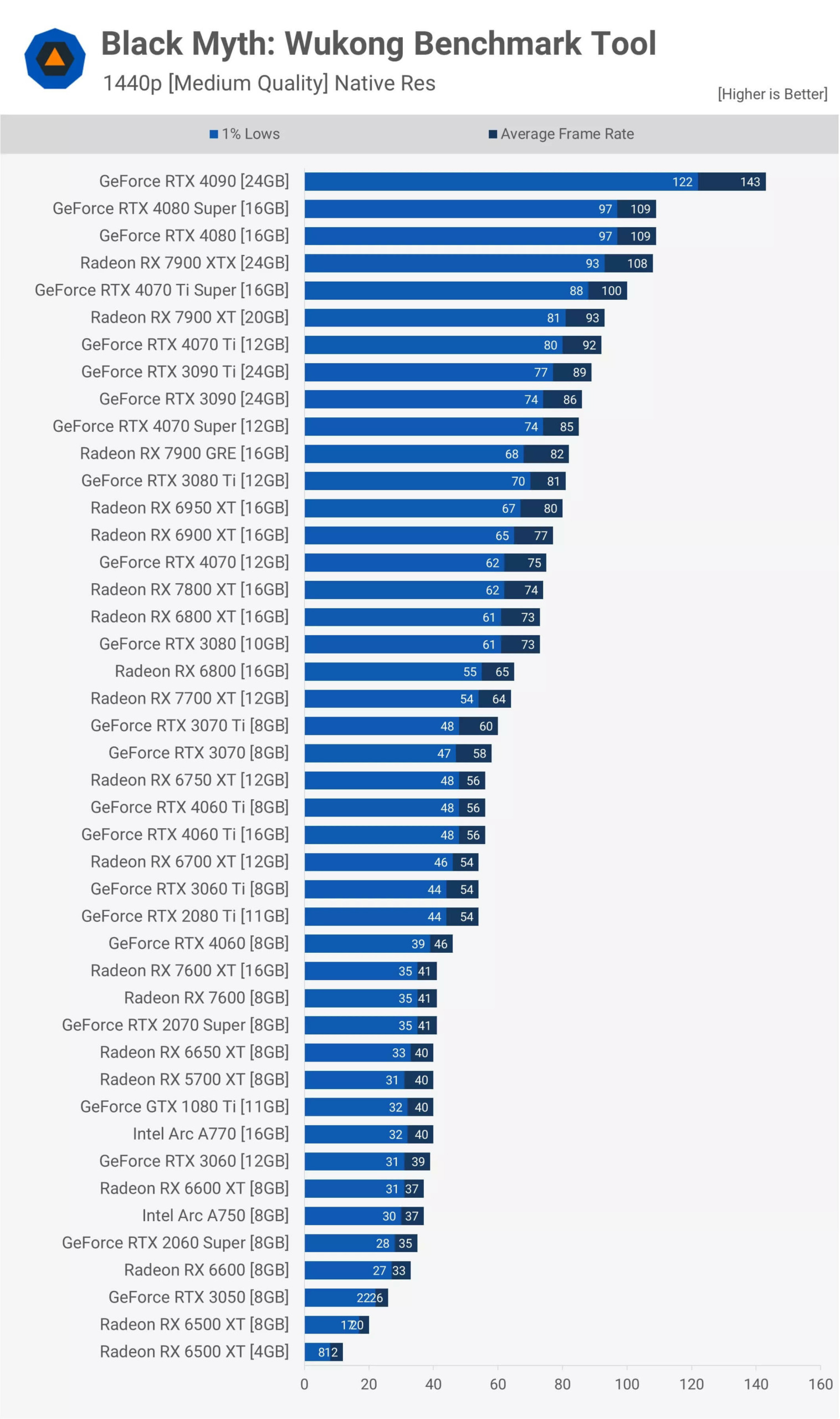
Finally, at 4K resolution, serious graphical processing power is required, as the RTX 4090 only reaches an average of 86 fps. Although this is good overall performance, it is still only at medium quality settings. The RTX 4080 series recorded an average of 66 fps, while the 7900 XTX had a slightly lower result of 61 fps. Beyond this level, you will need to enable image enhancement features to increase the frame rate above 60 fps.
DirectX 11 vs DirectX 12
Finally, let's consider the performance of DX11 vs DX12 when using medium quality settings. At 1080p resolution, the results vary significantly depending on the GPU.
For example, the GTX 1080 Ti shows 18% faster performance with DX12, while the RTX 2060 Super actually has 8% better performance with DX11 - these are quite unusual results. Furthermore, the 5700 XT is 12% faster when using DX11.
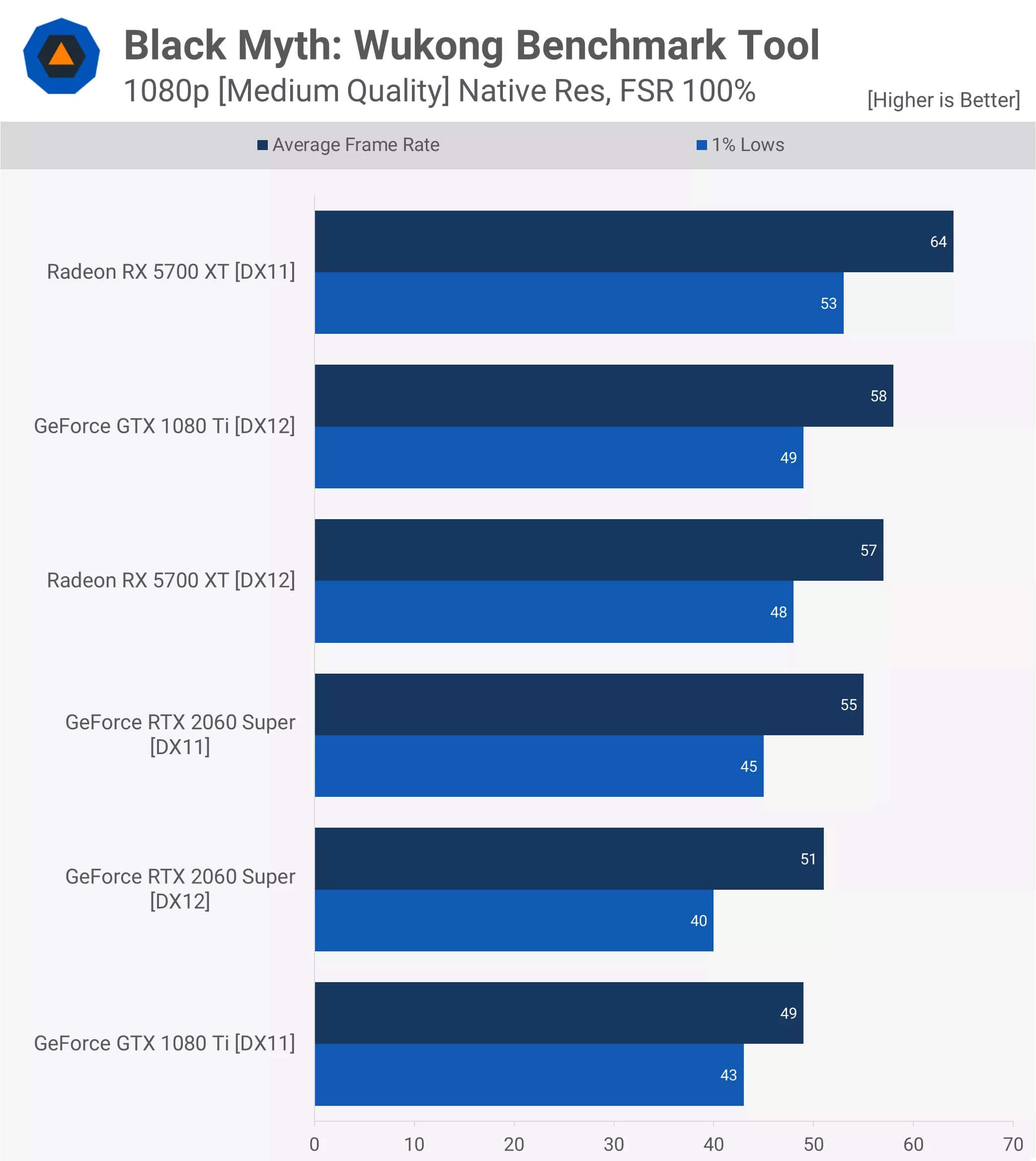
When increasing the resolution to 1440p, the data becomes slightly more favorable for DX11. The 1080 Ti graphics card still runs faster with DX12, but the difference is only 8%, while the RTX 2060 Super sees a 14% improvement when using DX11.
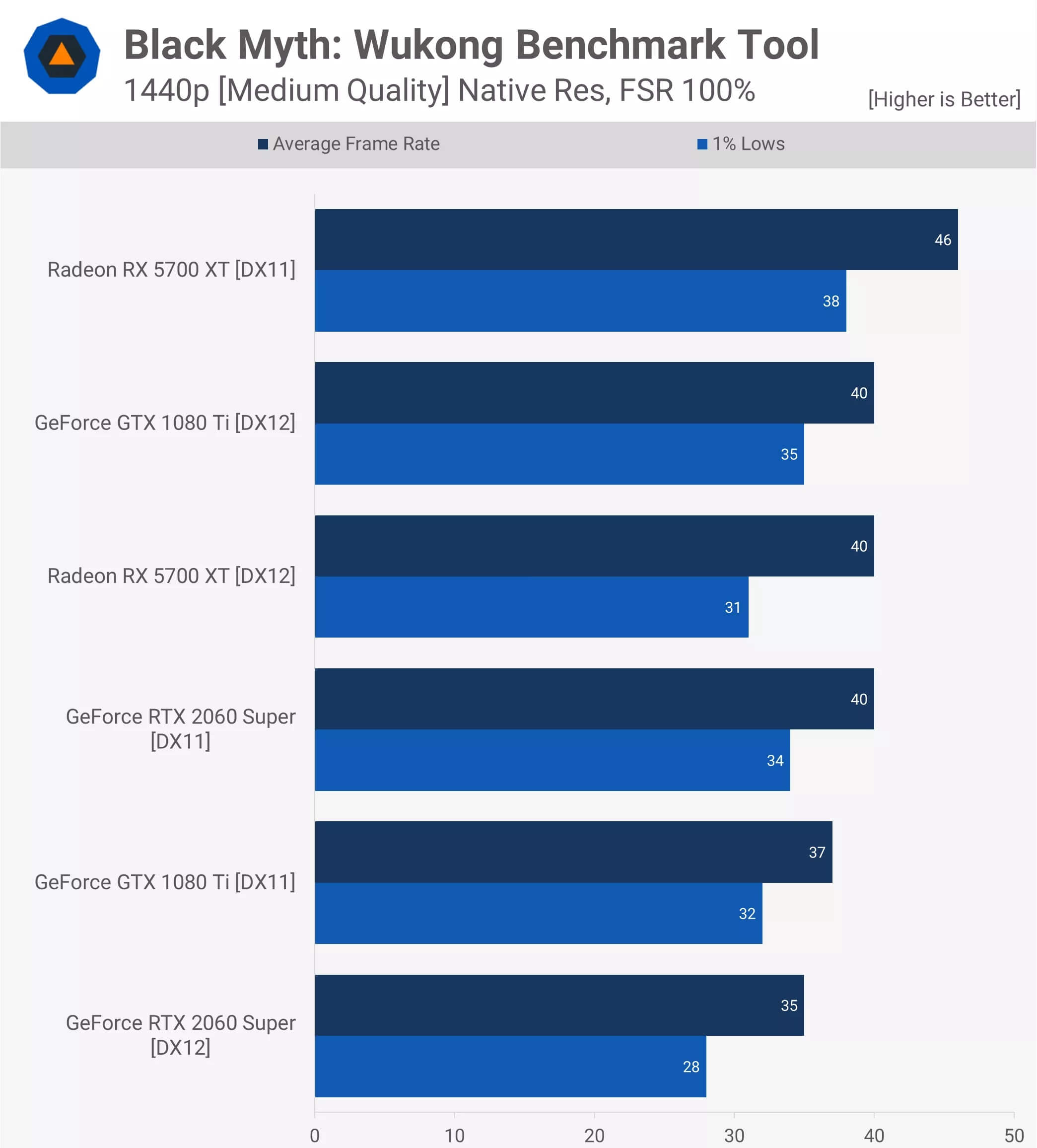
The Radeon 5700 XT graphics card showed a significant performance improvement of up to 15% when using DX11 at 1440p resolution. Therefore, if you still own this old Radeon GPU, we recommend you try DX11 mode.
Our Key Takeaways
So you have the necessary information. After analyzing 522 data points, you will have a clear view of what these GPUs can provide, especially if you are considering an upgrade. We spent three long days just running the Wukong benchmark tool continuously, so we truly hope this data will be useful to you.
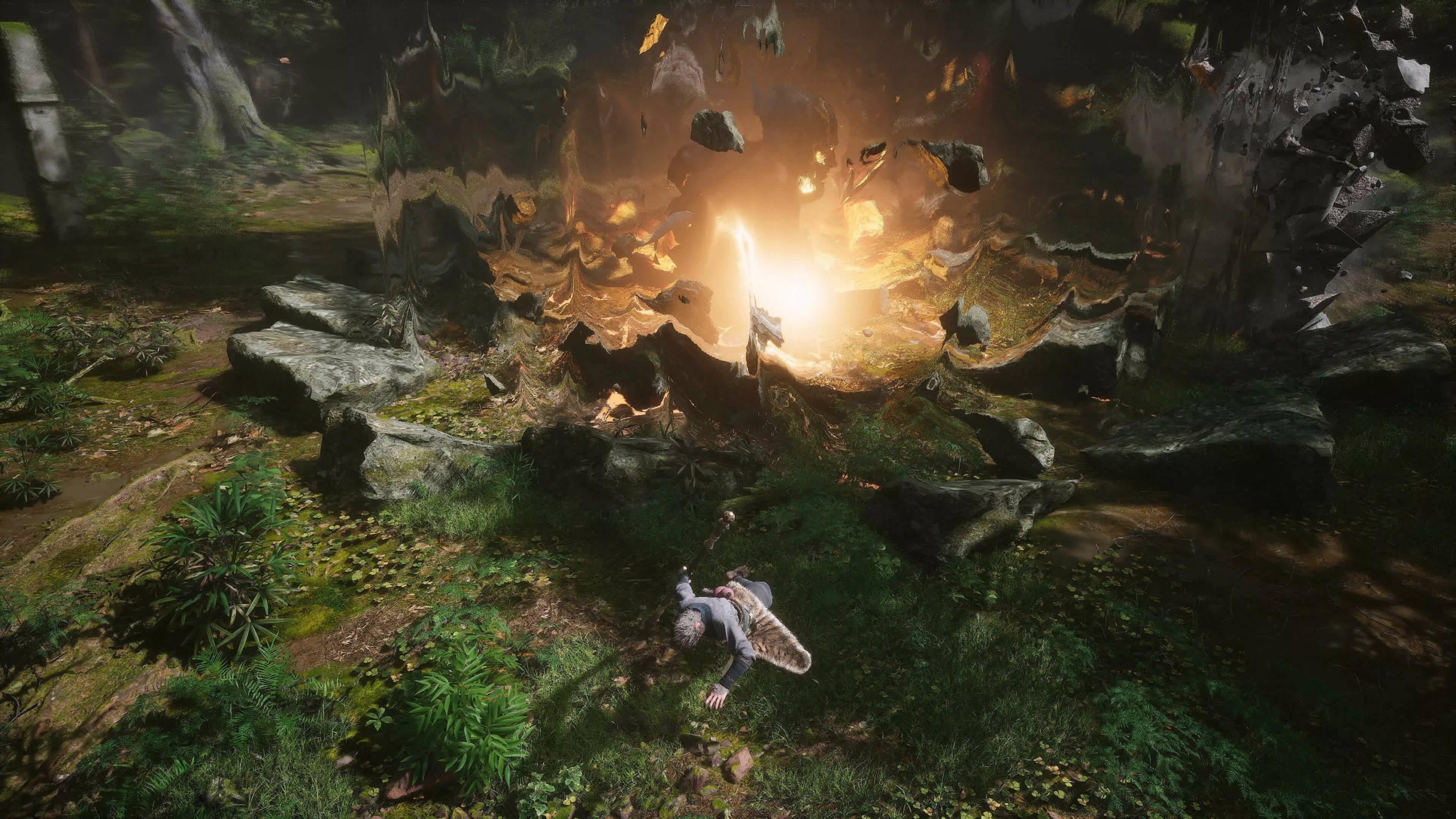
We can affirm that the game looks very impressive, and you will feel that through the video clips we have included in this article. You can also download the benchmark tool and experience it yourself - it is a great option, and we highly appreciate what the developers have done.
The only downside is that testing frame generation in the tool might give you a skewed sense of acceptability, as you cannot actually play the game. Although frame generation seems good, it may not be as smooth as expected when dropping below 80 fps. Additionally, the benchmark tool accurately reflects in-game performance, which is what you really want to see.
https://www.youtube.com/watch?v=PO14eZmtfes
Overall, the game has very beautiful graphics and the level of optimization seems quite good, with good scalability when using lower quality settings. When we have the opportunity to play the actual game in the future, we will look into other details such as VRAM usage, as this cannot be accurately tested through a benchmark tool alone.