


In the same price range of around 28 million VND, customers are faced with a choice between two machines that cost the same but have completely different philosophies: the Asus TUF Gaming A15 FA506NCQ version and the standard Asus Gaming V16 V3607. The Asus TUF Gaming A15 comes in only one configuration, but in return, it offers a TUF-standard chassis, an RJ45 LAN port, and the ability to upgrade RAM up to 64GB. The Asus Gaming V16 is 350 grams lighter, features a 16-inch 16:10 screen with 300 nits brightness, a 63Wh battery, and is available in four different versions. Hung Phat provides a comparison using real data to help you make a quick decision based on your needs.
Asus TUF Gaming A15 and Asus Gaming V16: Same price, different directions
First, we must clarify something because many places list it incorrectly: the Asus TUF Gaming A15 FA506NCQ does not have many versions; it is sold in only one configuration with an AMD Ryzen 7 170, 16GB DDR5 4800MHz RAM, 512GB PCIe 4.0 SSD, and RTX 3050 4GB, priced around 28 million VND. The advantage of this is that you don't have to worry about which version to pick; once you buy it, you know exactly what you are getting. The chassis follows the TUF durability standard and includes enough ports: USB-C with DisplayPort support, three USB-A ports, HDMI, RJ45 LAN, and a 3.5mm jack.
| Criteria | Asus TUF Gaming A15 FA506NCQ | Asus Gaming V16 V3607 |
|---|---|---|
| Real Price | Around 28 million, single configuration | Around 28 - 35 million, four versions |
| CPU | AMD Ryzen 7 170, 8 cores 16 threads, boost 4.75 GHz, PassMark 21,040 | Core 5 210H 8 cores 12 threads (PassMark 18,280) or Core 7 240H 10 cores 16 threads |
| GPU | RTX 3050 4GB GDDR6, 60W, 75W with Dynamic Boost | RTX 3050 6GB, RTX 4050 6GB, RTX 5050 8GB or RTX 5060 8GB |
| RAM | 16GB DDR5 4800MHz, 2x SO-DIMM slots, up to 64GB | 16GB DDR5 5600MHz, up to 32GB |
| SSD | 512GB PCIe 4.0 NVMe M.2 | 512GB or 1TB PCIe 4.0 NVMe M.2 |
| Display | 15.6 inch FHD 16:9, IPS, 144Hz, G-SYNC, 250 nits, 45% NTSC | 16 inch FHD+ 1920x1200 16:10 ratio, IPS, 144Hz, 300 nits, 45% NTSC |
| Battery | 48Wh, approx. 3 - 5 hours light office work | 63Wh, approx. 5 - 7 hours light office work |
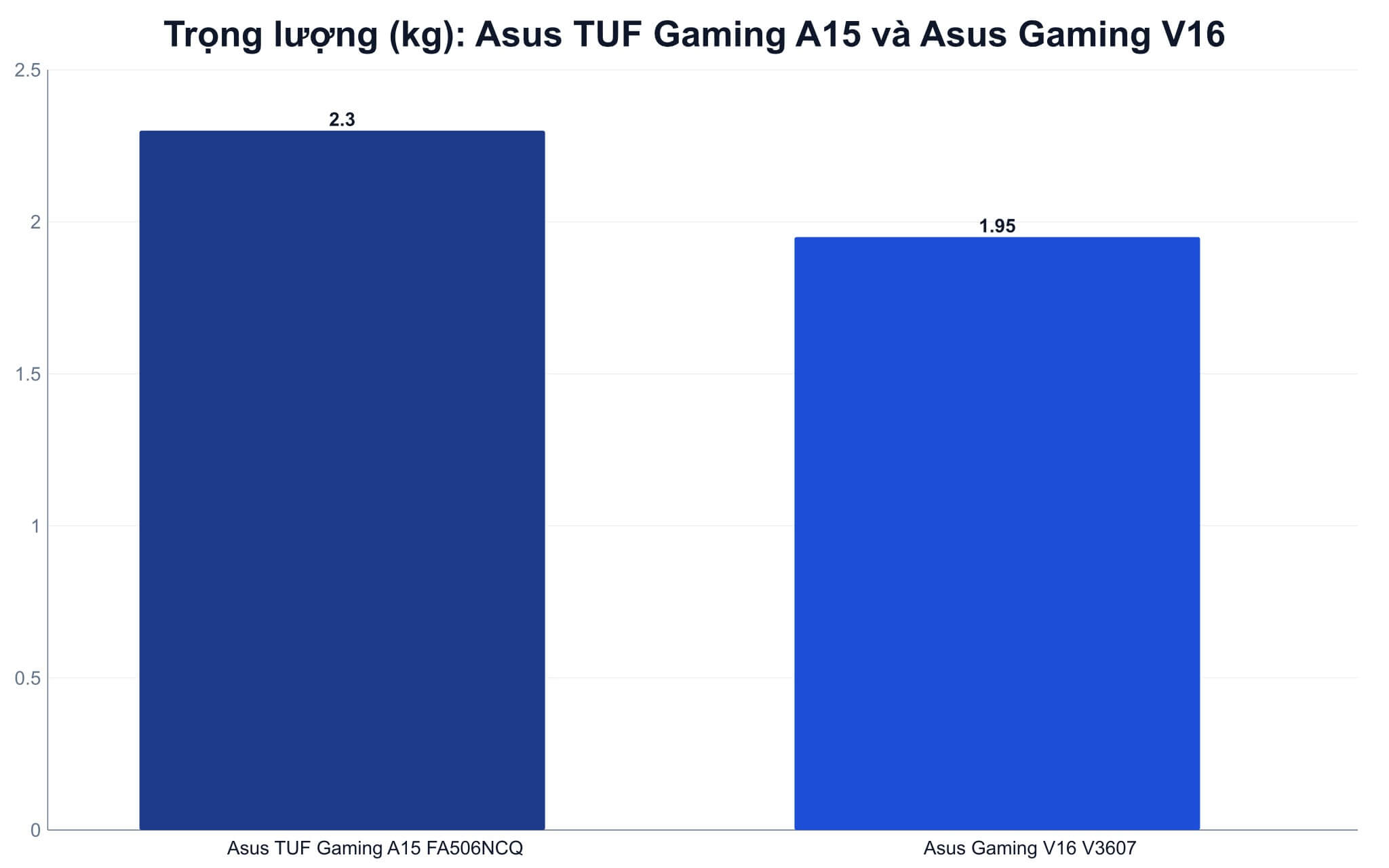
| Weight & Network | 2.30 kg, includes RJ45 LAN | 1.95 kg, no RJ45 LAN |
Asus Gaming V16 V3607 takes a more practical approach with four versions. The base version uses a Core 5 210H, 16GB RAM, 512GB SSD, and RTX 3050 6GB, which is priced similarly to the Asus TUF Gaming A15. The Core 7 240H version with RTX 4050 6GB is only a few hundred thousand VND more than the base model; the RTX 5050 8GB version is around 31 - 32 million VND, and the highest version with a 1TB SSD and RTX 5060 8GB is around 34 - 35 million VND. The machine weighs 1.95 kg, features a 16-inch 16:10 screen with 300 nits brightness, and a 63Wh battery. You can compare these specifications on the official ASUS Gaming V16 V3607 product page.
Hung Phat provides this quick advice to make choosing easier. If you need a sturdy machine for a fixed desk setup, for eSports gaming, studying, requiring a wired LAN connection, and wanting future RAM upgradeability, the Asus TUF Gaming A15 is the safe choice. If you carry your laptop every day, need a taller screen for viewing more content, and want to choose a newer generation GPU, the Asus Gaming V16 is more worth considering. Specifically, the V16 RTX 4050 version is only a few hundred thousand VND more expensive than the base model but offers a massive performance jump, so this is the option you should consider most carefully before deciding.
Configuration and measured performance of Asus TUF Gaming A15
Both machines feature 16GB DDR5 RAM, PCIe 4.0 SSD, and 144Hz displays, but the experience is not the same. The Asus TUF Gaming A15 uses a 15.6-inch FHD 16:9 screen with 250 nits brightness and includes G-SYNC, making it suitable for indoor gaming and basic work. The Asus Gaming V16 uses a 16-inch FHD+ 1920x1200 16:10 screen with 300 nits brightness, providing a more spacious view when working with spreadsheets, video timelines, or multiple browser tabs. A 50-nit difference and the 16:10 ratio may seem small, but they are quite noticeable when sitting near a window.
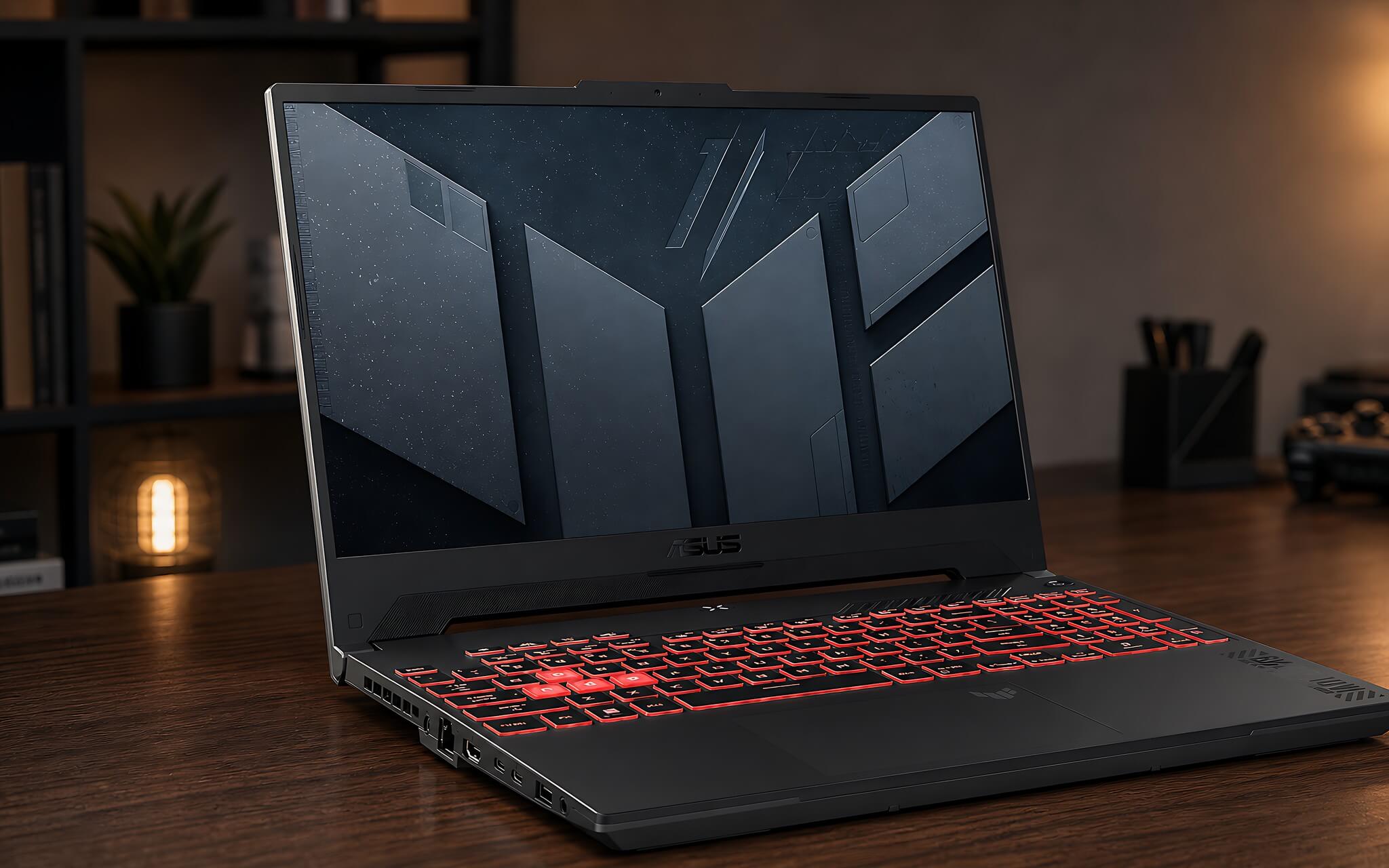
Regarding the processor, there is a detail you should know before comparing names. Although the Ryzen 7 170 on the Asus TUF Gaming A15 sounds new, it belongs to the Rembrandt line, sharing the same core generation as the previously released Ryzen 6000 series, with 8 cores, 16 threads, 45W TDP, and a PassMark score of 21,040. The Core 5 210H on the V16 belongs to the Raptor Lake-H Refresh line, with 8 cores, 12 threads, a Cinebench R23 single-core score of 1,771, a multi-core score of 11,830, and a PassMark score of 18,280. Upgrading to the Core 7 240H with 10 cores and 16 threads increases the R23 multi-core score to 15,764, which is about 33% higher than the Core 5 210H, making it better suited for file exporting and heavy image processing.
As for the GPU, this is where the biggest differences between versions emerge. The RTX 3050 4GB on the Asus TUF Gaming A15 has a Fire Strike reference score of 11,949 and Time Spy of 4,497; these are median scores for this GPU class, not specific to one model, and are sufficient for online games and AAA games at medium settings. The RTX 3050 6GB on the base V16 model achieves Fire Strike 11,973 and Time Spy 4,571, which is nearly equal to the A15, differing only in VRAM capacity. However, the RTX 4050 6GB achieves Fire Strike 21,949 and Time Spy 8,125, which is about 78% higher than the RTX 3050 group, while the RTX 5050 8GB achieves a Time Spy score of 9,122 with 440 AI TOPS according to NVIDIA's announcement. Hung Phat analyzes the differences between these two GPU generations in detail in our article Nvidia RTX 5050 launch: performance exceeds RTX 4050.
Asus Gaming V16 or Asus TUF Gaming A15: Which is better for you?
You should choose the Asus TUF Gaming A15 if you prioritize durability, a solid typing experience, a full range of ports, and need a stable wired LAN connection for gaming. This is a point many people overlook: the Asus TUF Gaming A15 has an RJ45 LAN port while the Asus Gaming V16 does not, so if you play competitive games or use a wired connection at home, this difference is worth more than a few hundred benchmark points. The machine also supports up to 64GB RAM compared to 32GB on the V16, making it suitable for users planning to keep the laptop for a long time or those who may move into virtualization or programming later.
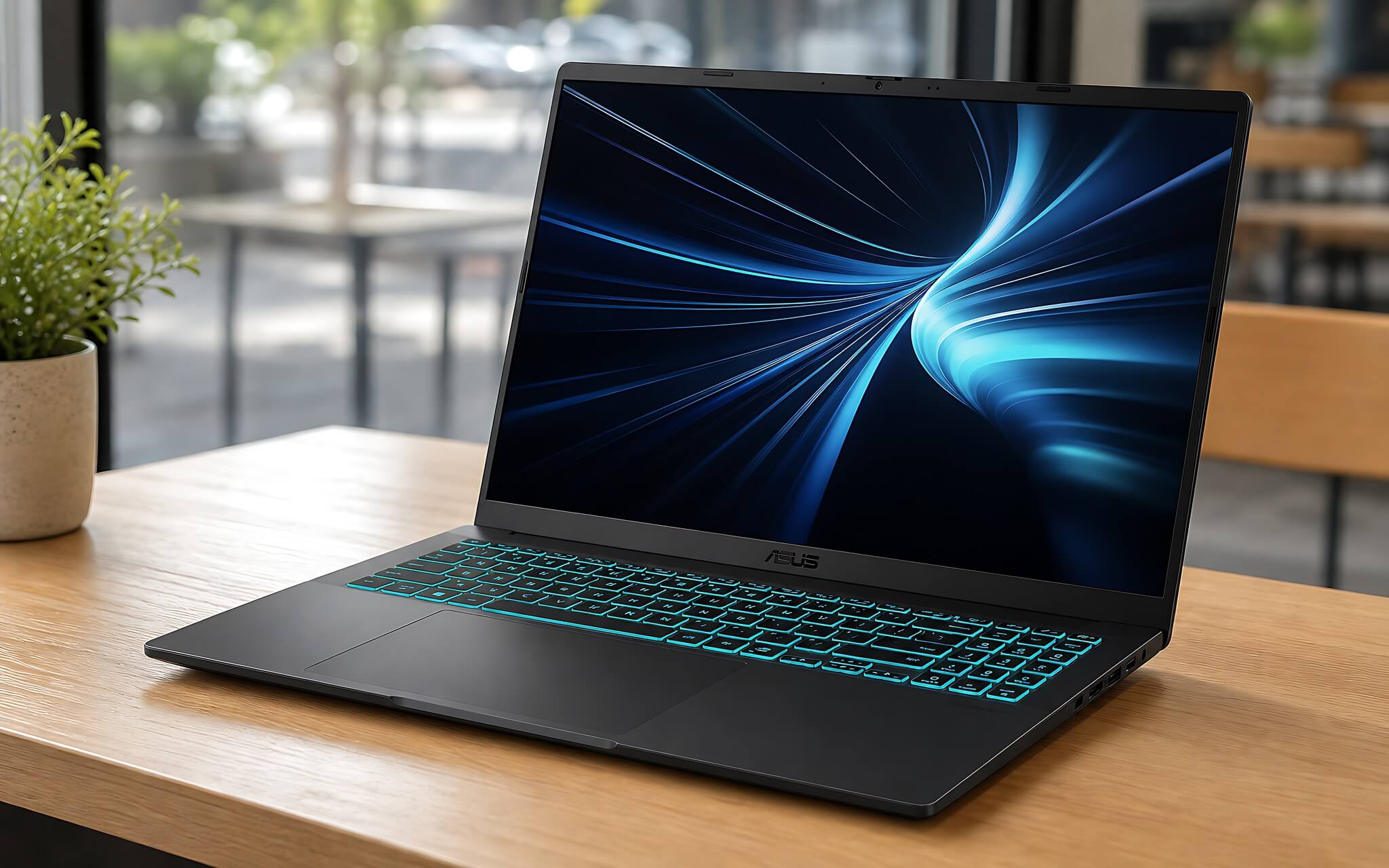
You should choose the Asus Gaming V16 if you move around frequently, prefer a 16:10 screen, and want more powerful GPU options. This is also the model Hung Phat often recommends to students and working professionals. The 1.95 kg weight makes it exactly 350 grams lighter than the A15, which is noticeable when carrying it in a backpack every day. The 63Wh battery also offers an advantage of 15Wh, providing about 5 - 7 hours of light office work compared to 3 - 5 hours on the A15; however, under heavy load or gaming, both will only last 1 - 1.5 hours and should be used while plugged in.
At the same price point, Hung Phat's advice is not to choose the base Asus Gaming V16 just because it has 6GB of VRAM. The RTX 3050 6GB and RTX 3050 4GB differ by less than 2% in Time Spy scores, so at this price level, you are actually choosing between the durable chassis with LAN on the A15 and the lighter, wider-screen chassis of the V16, rather than choosing raw power. Real power only shifts when you step up to the RTX 4050 version, which is only a few hundred thousand VND more expensive.
Gaming performance, battery, and upgradeability of both machines
For eSports games like Valorant, League of Legends, CS2, or Dota 2, both machines feature 144Hz screens, so the experience is smooth if graphics settings are adjusted appropriately. For heavy AAA games on both the Asus TUF Gaming A15 and Asus Gaming V16, the RTX 3050 group (whether 4GB or 6GB) should use medium settings to maintain stable frame rates, as both VRAM and core counts are at moderate levels. Only the RTX 4050, RTX 5050, or RTX 5060 versions of the Asus Gaming V16 have the headroom to enable new upscaling technologies and handle heavy textures.
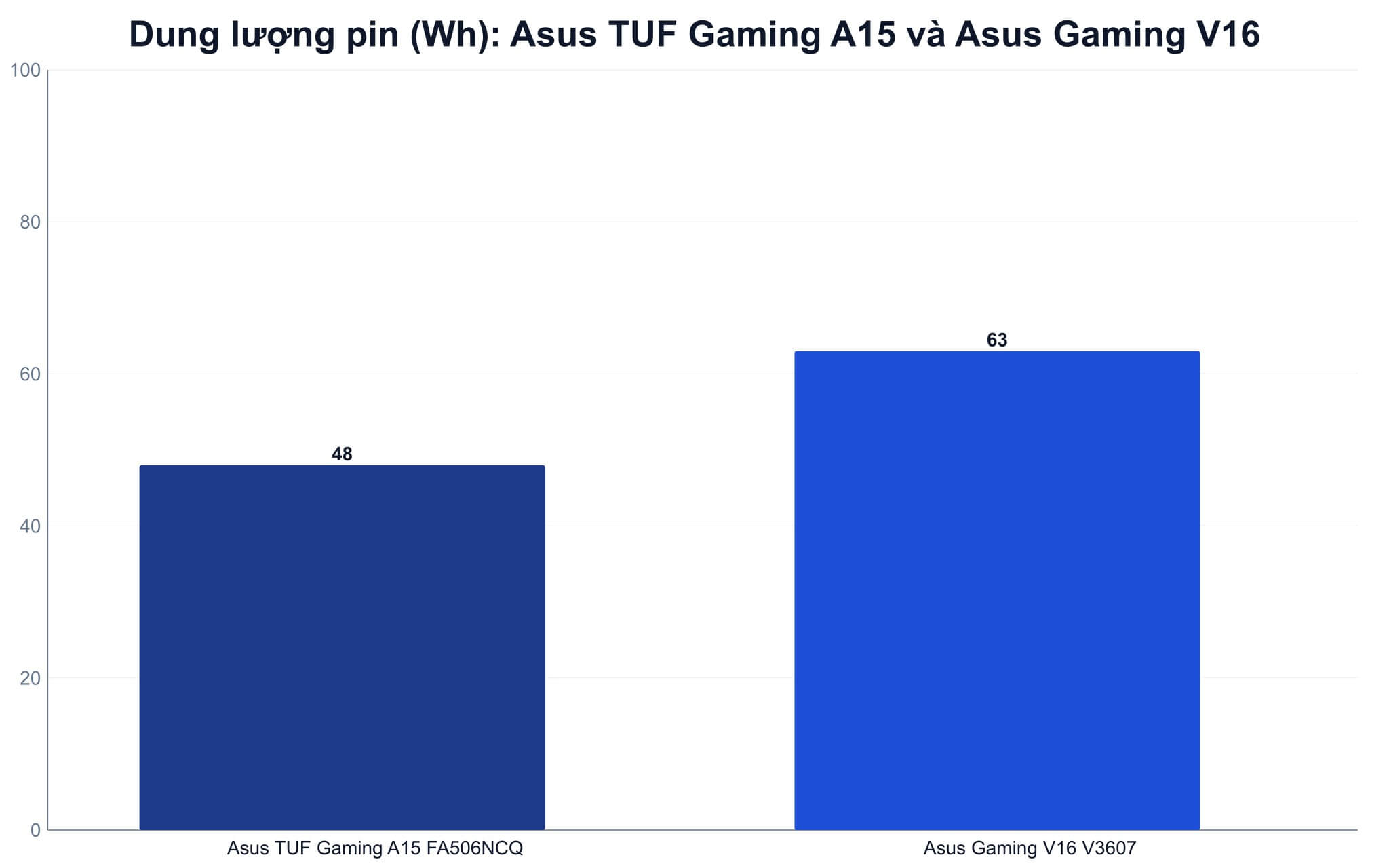
Regarding heat and battery, both are gaming laptops, so high performance still requires being plugged in. The A15 with its 48Wh battery is best suited for a fixed desk setup, especially during gaming or rendering. The V16, with its 63Wh battery, 300 nits brightness, and lighter chassis, is more flexible for classrooms, coffee shops, or client meetings. If you want to understand why both machines use H-series chips but have different battery lives, our article Do H-series or U-series chips determine if a laptop runs hot or has long battery life? explains this clearly.
In terms of upgrades, both use SO-DIMM RAM and M.2 PCIe 4.0 SSDs. The Asus TUF Gaming A15 has 16GB DDR5 4800MHz RAM with 2 slots, upgradable to 64GB, while the Asus Gaming V16 uses faster DDR5 5600MHz RAM but is limited to 32GB. For storage, the A15 only comes in a 512GB version, so you may need to plan for an early upgrade if you install many games, whereas the V16 offers a 1TB option in its highest version. This is a trade-off you should decide based on your planned usage for the next 3 - 5 years.
Hung Phat's advice for buying in Ho Chi Minh City based on real needs
If you want a quick decision, Hung Phat suggests answering three questions: Do you carry your laptop every day? Do you use a wired connection for gaming? And do you perform GPU-intensive tasks like video editing or AI? If most of the answers are "no," the Asus TUF Gaming A15 at around 28 million VND is a streamlined option with clear specs, no version confusion, and future RAM upgradeability up to 64GB.
If you need a larger screen, a lighter machine, and a more powerful GPU, the Asus Gaming V16 is worth looking at, but you must clarify the exact version before paying, as prices vary by several million VND for the same Asus Gaming V16 name. The Core 5 210H with RTX 3050 6GB is in the same price range as the Asus TUF Gaming A15; the Core 7 240H with RTX 4050 is only a few hundred thousand VND more; the RTX 5050 version is around 31 - 32 million VND; and the 1TB SSD with RTX 5060 version is around 34 - 35 million VND. According to Hung Phat, the RTX 4050 version is the most logical choice because it costs only slightly more but provides both a stronger CPU and a GPU with over 78% higher graphics performance.
In summary, the Asus TUF Gaming A15 is for those who need a durable machine, fixed configuration, RJ45 LAN, 1080p gaming, and mostly stationary use. The Asus Gaming V16 V3607 is for those who need longer battery life, a 16:10 screen, a lighter chassis, and want to choose a newer generation GPU. If you are in Ho Chi Minh City, you can visit Hung Phat to check the physical condition, confirm the exact version, stock status, warranty, and promotions before deciding; other notes for buying laptops in the city can be found in our article Experience buying laptops in Ho Chi Minh City.
Frequently Asked Questions (FAQ)
At the same price, should I choose the Asus TUF Gaming A15 or the Asus Gaming V16?
At the same price, you aren't choosing raw power but rather the type of chassis, because the RTX 3050 4GB on the Asus TUF Gaming A15 has a Time Spy score of 4,497, while the RTX 3050 6GB on the Asus Gaming V16 reaches 4,571-a difference of less than 2%. Choose the A15 if you need a sturdy machine with an RJ45 LAN port and want to upgrade RAM to 64GB. Choose the Asus Gaming V16 if you need it to be 350 grams lighter, with a 16-inch 16:10 screen at 300 nits and a 63Wh battery.
Which machine handles real-world tasks better?
Regarding the CPU, the Ryzen 7 170 on the Asus TUF Gaming A15 has 8 cores, 16 threads, and a PassMark of 21,040, which is higher than the 18,280 of the Core 5 210H on the base V16, making it stable for multitasking, studying, and basic photo editing. However, the Core 5 210H performs better in single-core tasks with a Cinebench R23 score of 1,771, meaning daily application operations are more responsive. If you need to export files and edit video, the Core 7 240H version with a 15,764 multi-core score is the best choice.
Is the price difference between Asus Gaming V16 versions worth it?
The RTX 4050 version is only a few hundred thousand VND more expensive than the base model, but its Time Spy score is 8,125 compared to 4,571-an increase of about 78%-and it also upgrades to the Core 7 240H, making it the most worthwhile upgrade. The Asus Gaming V16 RTX 5050 version, priced around 31 - 22 million VND, achieves a Time Spy score of 9,122 and 440 AI TOPS according to NVIDIA, which is suitable for content creators. The 34 - 35 million VND version with an RTX 5060 and 1TB SSD is for those who need long-term headroom.
How do the battery and heat of the two machines differ?
The A15 has a 48Wh battery, providing about 3 - 5 hours of light office work and about 1 hour under heavy load. The V16 has a 63Wh battery, providing about 5 - 7 hours of light office work and about 1 - 1.5 hours under heavy load, plus it is 350 grams lighter. Both should be used while plugged in during gaming to maintain stable performance, as both use high-power H-series chips.











