

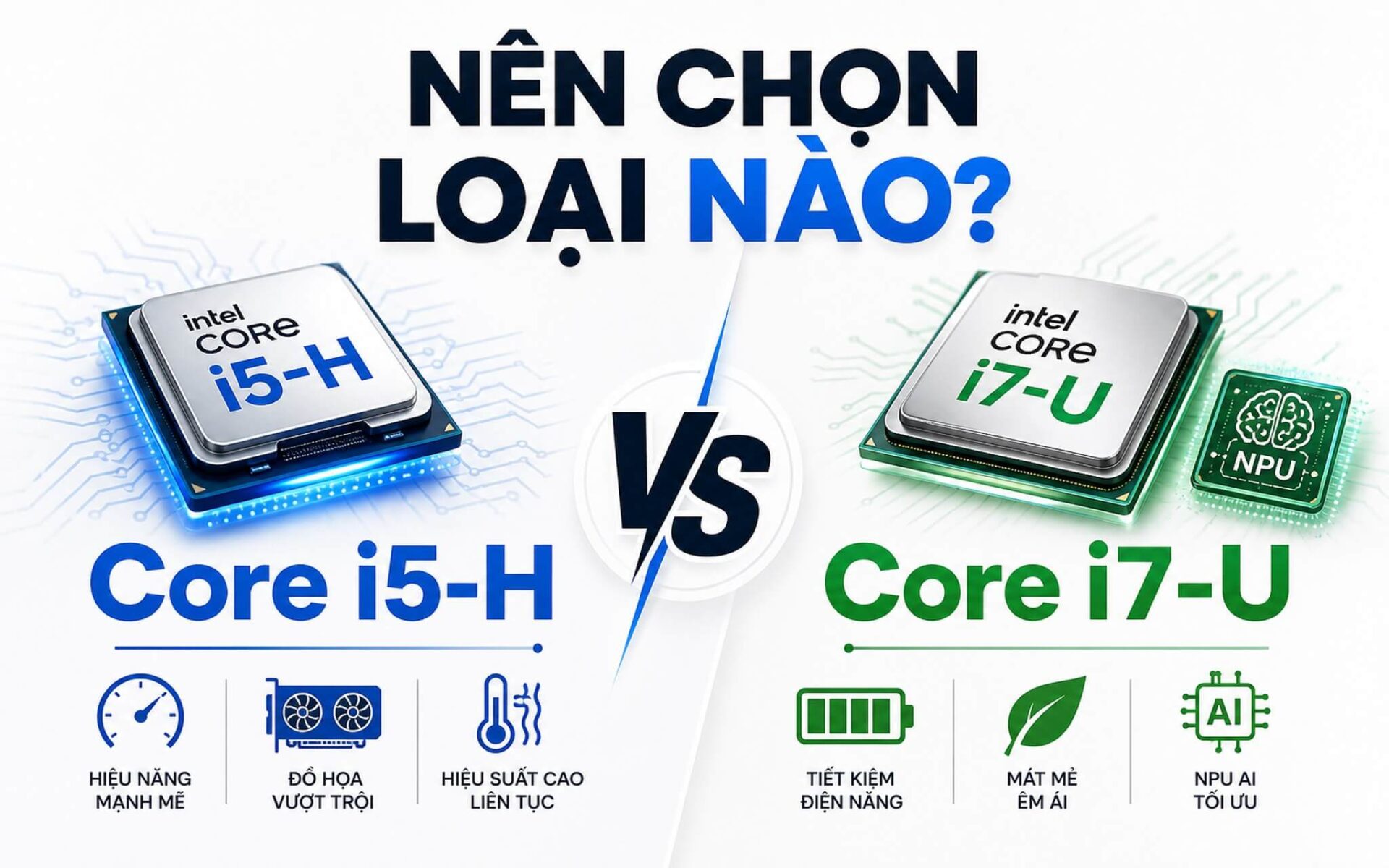
Is an H or U chip the real factor in determining whether a laptop runs hot or has long battery life, rather than just the i5 or i7 label? A Core i5 H operates at 45W, while a Core i7 U only requires 15W; this 3-fold difference directly impacts machine temperature and your daily battery life. If you are debating between choosing an H or U chip when buying a laptop, understanding this from the start will prevent wasting money on a machine that doesn't meet your needs.
What is the difference between H and U chips
When seeing laptop CPU names like "Core i5-13420H" or "Core i7-1355U", many people immediately think an i7 is more powerful than an i5. In reality, it is not that simple. With Core i5 H, the "H" at the end is what distinguishes its performance nature from the U series. H is a high-performance series, designed for laptops with good thermal management. U is an ultra-low power series, designed for thin and light ultrabooks with long battery life.
| Specifications | Core i5 H (e.g., i5-13420H) | Core i7 U (e.g., i7-1355U) |
|---|---|---|
| Base TDP (PBP) | 45W | 15W |
| Max Boost (MTP) | ~95W | ~55W |
| Core Architecture | 4P + 4E = 8 cores / 12 threads | 2P + 8E = 10 cores / 12 threads |
| Integrated iGPU | Intel UHD / Iris Xe depending on model | Intel Iris Xe / Intel Graphics depending on model |
| Best Suited For | Gaming laptops, mobile workstations with good cooling | Thin and light ultrabooks, office laptops |
| Representative Laptops | Lenovo LOQ, Acer Nitro V | Dell Latitude, ThinkPad T14, HP EliteBook |
| Common Price Range | ~16-25 million (with discrete GPU) | ~12-25 million depending on generation, new/used |
To be more specific: an H chip like the i5-13420H has a base CPU TDP index of 45W, boosting up to ~95W when needed. A U chip like the i7-1355U only has a 15W base, with a max boost of around 55W. This means an H chip "consumes" 3 times more power than a U chip under normal conditions. In practice, many people buy a laptop only to complain that it runs hot or has poor battery life, only to realize they chose an H chip for light office work that didn't require that level of power.
The core architecture also differs significantly. The i5-13420H has 4 Performance-cores (P-core) and 4 Efficient-cores (E-core), totaling 8 cores and 12 threads. Meanwhile, the i7-1355U has only 2 P-cores but 8 E-cores, also resulting in 10 cores and 12 threads. Having more P-cores helps the i5-H perform about 30% faster in sustained multi-core tasks like rendering or compiling (according to Cinebench R23), but at the cost of consuming three times more power. Conversely, in short bursts or background tasks, the i7-U's abundance of E-cores allows it to keep up closely while running quieter and preserving battery life better.
Which CPU runs cooler, Core i5 H or Core i7 U
When considering temperature specifically for office work, the i7-U runs significantly cooler than the H chip. When you are browsing the web, using Word, or opening dozens of Chrome tabs, the U chip operates at low power most of the time, with temperatures typically staying below 50-55 degrees Celsius. Meanwhile, a Core i5 H performing the same tasks still requires more robust cooling because its architecture inherently generates more heat.
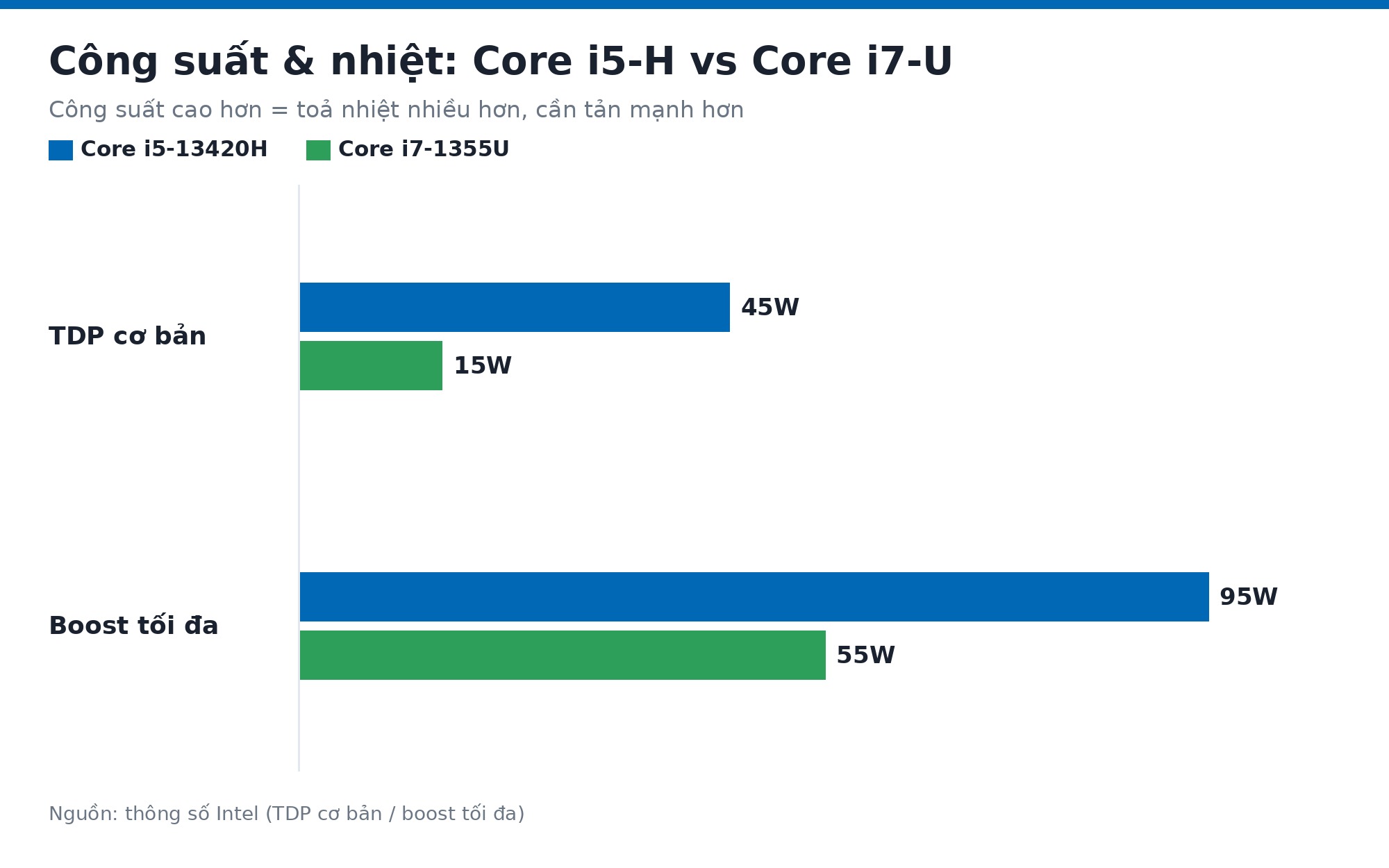
However, it is important to understand: heat is not determined by the CPU alone. A machine with an i5-H, such as a Lenovo LOQ or Acer Nitro V, is designed with dual copper heat pipes and dual fans sufficient to keep the H chip stable. On the other hand, an ultrabook with an i7-U that has a thin aluminum chassis and a single small fan may still feel warmer than usual under heavy load. The key point: the laptop's thermal design must match the chip's TDP to achieve truly good temperatures.
When weighing H vs U chips, a practical question to ask is: do you often place your laptop on your lap? If so, the U chip in a thin and light ultrabook will be much more comfortable: the bottom of the laptop stays cooler, and the fan rarely needs to spin loudly. An H chip is better suited for use on a desk with good airflow or when using a cooling pad. Dell Latitude or ThinkPad T14 models with i7-U series are famous for running quietly and cool in office environments for this very reason.
Which chip has better battery life, H or U, and which should you choose
Regarding battery life, when comparing H and U chips in light office environments, the i7-U is a clear winner. With the same 56Wh battery capacity, a laptop using an i7-1355U typically achieves 8-10 hours of actual use, while a laptop using an i5-13420H with a discrete GPU often only lasts 4-6 hours in power-saving mode. The reason is simple: a chip that consumes less power results in longer battery life.
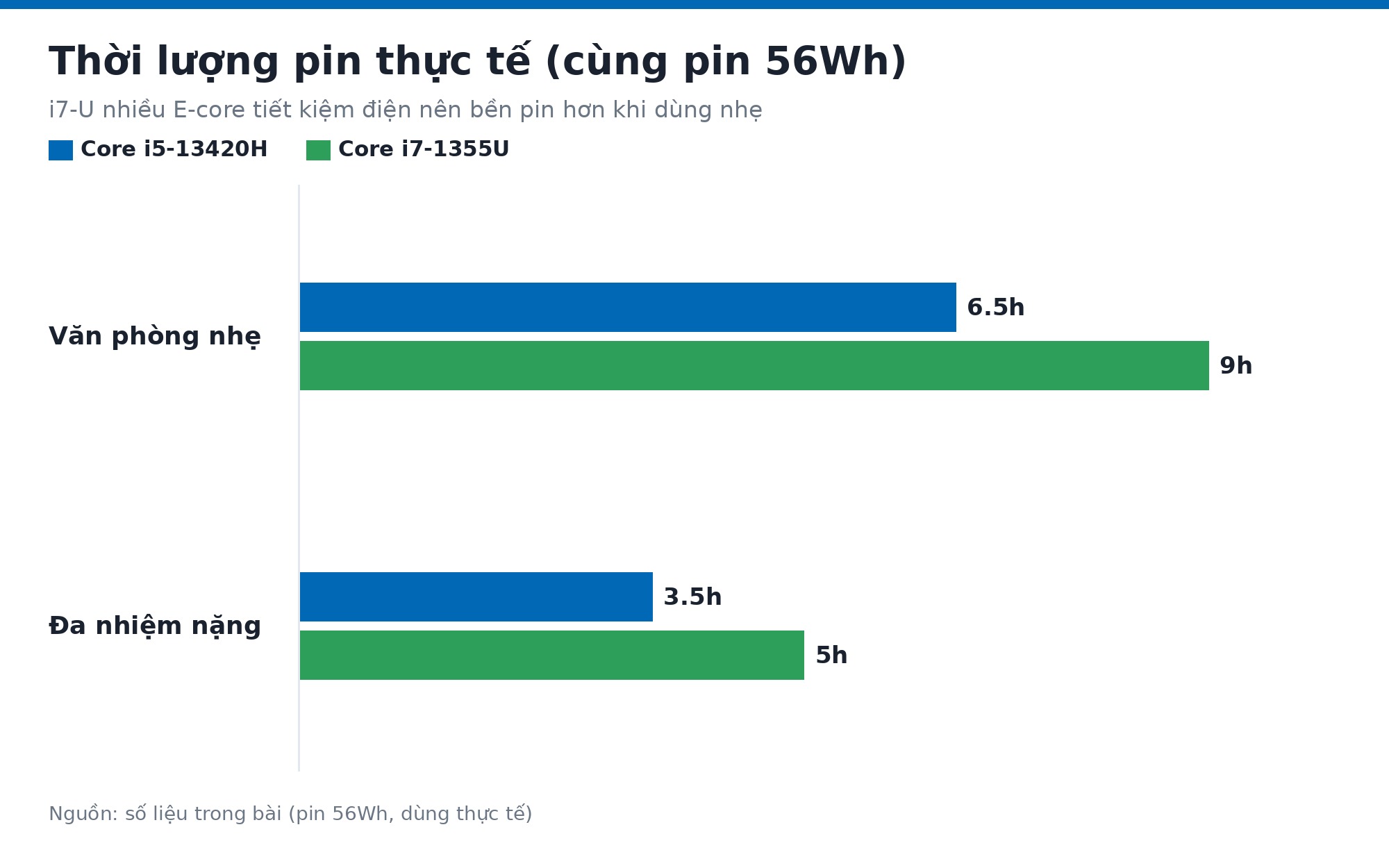
But battery life isn't just about the CPU. High-resolution screens, continuous RAM and SSD activity, a discrete GPU that doesn't fully turn off, or the habit of keeping screen brightness at 100% all consume significant battery. A well-optimized Core i5 H laptop-with the discrete GPU turned off when not in use and a standard 60Hz screen-can still achieve 6-7 hours of battery life for light work. Conversely, an i7-U laptop with a 4K OLED screen might drain the battery just as quickly.
So, should you choose an H or U chip? If you primarily use your machine for email, online meetings, typing, and studying for 8 hours a day and move around frequently without access to a power outlet, an i7-U in an ultrabook is the more practical choice: thin and light, long battery life, runs cool, and has minimal fan noise. However, if you need to do light to medium photo/video editing, programming, basic CAD, or gaming with a discrete GPU in the evening, the i5-H will process tasks significantly faster and offer better value. The trade-off is shorter battery life and the need to stay near a power outlet.
With the new Core Ultra generation, the distinction between H and U chips maintains this same philosophy: Core Ultra H focuses on performance with a more powerful AI NPU, while Core Ultra U focuses on battery life and thinness. The iGPU has been upgraded to Intel Arc for both series, offering much better integrated graphics than previous generations. The deciding factor remains the H or U suffix after the chip name, while Ultra 5 or Ultra 7 simply denotes the tier within the same series. If you are considering the HP Envy 17 and Dell Inspiron 14 Plus, these are real-world examples of two different design philosophies within the same segment.
Frequently Asked Questions (FAQ)
Which chip series is more common on mid-range laptops today?
Both are common but in different segments. Mid-range laptops priced between 15-20 million with discrete GPUs often use i5-H chips like the i5-12450H or i5-13420H; this is a common configuration in mainstream gaming laptops and affordable mobile workstations. Meanwhile, office laptops and ultrabooks in the 14-20 million range often opt for i7-U chips like the i7-1255U or i7-1355U due to the good balance between performance and battery life. As of 2026, the market is gradually shifting toward Core Ultra H/U, but 12th and 13th Gen i5-H and i7-U models still make up a large volume of high-quality refurbished stock at good prices, making the choice between H and U chips a very relevant question.
Can a laptop CPU be upgraded?
Most modern laptops have the CPU soldered directly onto the motherboard (BGA chip), meaning it cannot be removed and replaced like a desktop CPU. This applies to both common i5-H and i7-U series. Some high-end mobile workstation models from older generations used socketed CPUs (LGA) that allowed for replacement, but these are very rare, and the cost of a replacement motherboard is often not cheaper than buying a new machine. In practice, consulting shows that the cost of upgrading a laptop CPU (if possible) is typically 40-70% of the price of a used machine, which is not economically viable. Therefore, it is best to choose the correct CPU from the start.
Which configuration will perform well for the next 3-5 years without becoming obsolete?
For office and study needs, when choosing between H or U chips, an i7-1355U or Core Ultra 5/7 U-series with 16GB RAM and a 512GB SSD will be sufficient and stable for the next 4-5 years. If you perform heavier tasks like 4K video editing, 3D rendering, or programming with virtual machines, an i5-13420H or i5-12450H with a discrete GPU provides a better foundation to avoid early upgrades. A key note: 8GB of RAM is increasingly insufficient for Windows 11 and heavy applications, so prioritize machines with at least 16GB or those with an expansion slot for future upgrades.
What are the current prices for laptops using H or U chips?
The price range for H vs U chip laptops varies widely. Laptops using i5-H like the Lenovo LOQ 15 or Acer Nitro V with RTX 3050/4050 discrete GPUs currently range from 16 to 25 million VND depending on RAM, SSD, and GPU generation. Laptops using i7-U like the Dell Latitude 14, ThinkPad T14, or HP EliteBook range from 12 to 25 million VND, with 12th-13th Gen refurbished units being significantly cheaper while remaining in good condition. You should inspect the actual machine and ask for a consultation to choose the right configuration for your budget before deciding.











