

File Explorer on Windows 11 has just integrated AI Actions into the context menu, marking a new step in Microsoft's strategy to bring artificial intelligence into the operating system. This feature allows quick access to AI-based image editing tools and is currently being tested in the Windows 11 Insider Preview Build 26200.5603 (KB5058488) update on the Dev channel. However, instead of receiving support, this change has met with much controversy from the user community.
New Changes in Windows 11 File Explorer
Since its launch, Windows 11 has brought a series of user interface changes that many are not satisfied with. The state of File Explorer is particularly concerning, but Microsoft seems to show no signs of stopping its efforts to overhaul this interface, making a simple file manager become complex and confusing, frustrating long-time users and driving the development of third-party tools to restore the old interface.
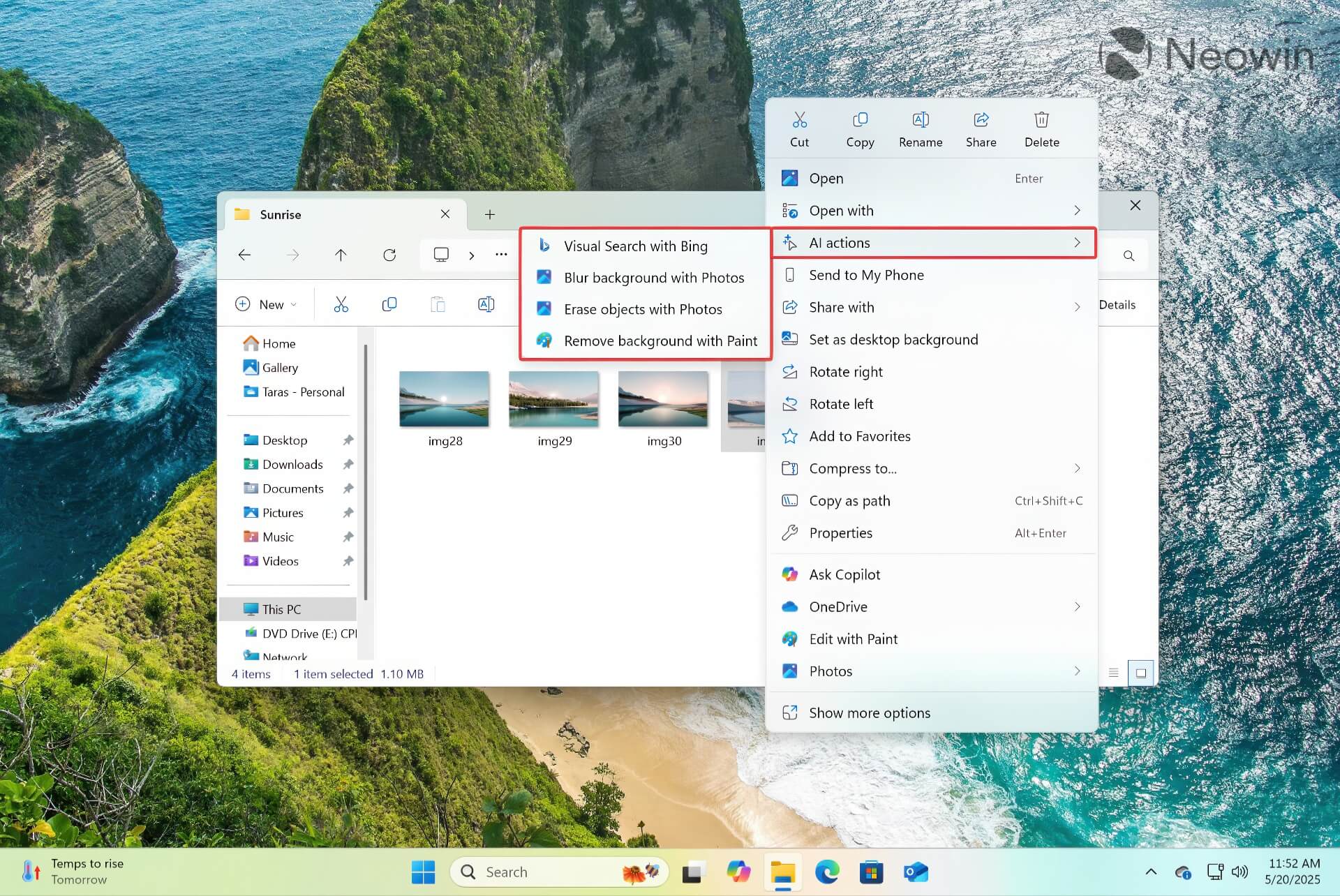
Microsoft's redesign of the File Explorer context menu in Windows 11 has hidden or removed many useful features, leading to an explosion of third-party tools aimed at restoring the old interface. Once again, Microsoft is reinventing the wheel with the redesigned Start Menu, bringing even more frustrating changes to the right-click menu.
Specifically, Microsoft explained that AI Actions in File Explorer provides deeper interaction with user files through AI technology. The first four AI features focus on image editing, including:
- Bing Visual Search: Helps search for similar images online
- Blur Background: Automatically detects and blurs the background in the Photos app
- Erase Objects: Automatically detects and erases objects in Photos
- Remove Background: Allows users to extract the background of an image in Paint
The AI options in this context menu support JPG and PNG files, but it is hard to consider them an AI revolution. These new actions are simply direct links to Bing search or image editing features from the File Explorer menu.
New AI Features for Microsoft 365 Users
Microsoft also plans to expand AI Actions features in the coming weeks. Microsoft 365 subscribers will soon receive a new "Summarize" option to create summaries of larger documents-Word, PDF, or TXT-stored on OneDrive and SharePoint. Microsoft is also developing a "Create an FAQ" feature using the Copilot chatbot to convert cloud documents into beautifully formatted, AI-generated Q&A lists.
The new AI Actions features specifically for Microsoft 365 sound more promising than a few shortcuts to AI tools in some built-in Windows image editors. However, these features are unlikely to alleviate the frustration of anyone who has disliked File Explorer in Windows 11 since day one.
Microsoft's new mission is to bring AI everywhere, so prepare to welcome a fully AI-powered Windows operating system sooner than you think. However, the question remains whether these AI features will truly improve the user experience or just further complicate an already confusing interface?
Summary: Windows 11 continues the trend of integrating AI into every aspect of the operating system by adding AI Actions to the File Explorer right-click menu. While new features like Bing Visual Search, Blur Background, Erase Objects, and Remove Background may be useful to some users, they do not address the core issues that many users are facing with the current File Explorer interface. As Microsoft continues to push its AI strategy, users still have to turn to third-party solutions to get the File Explorer experience they desire. Is AI truly the solution to every problem, or should Microsoft focus on improving the fundamental aspects of the user experience first?











