
In an era where web browsers are racing to cram Artificial Intelligence (AI) into every corner, Firefox 148 has chosen a different path: respecting user autonomy. Instead of forcing everyone to accept new features, Mozilla has officially unveiled an in-depth control panel, allowing you to be completely proactive in blocking or enabling AI utilities. In reality, this move is not just a routine technical update but an affirmation of the privacy protection philosophy that has built the "Firefox" reputation. If you are someone who loves simplicity and wants your browser to remain under your control, this is undoubtedly the most worthwhile upgrade to date.
AI Controls Interface and Global Blocking Capability on Firefox 148
The most valuable highlight of this version is the "Block AI enhancements" section located right at the top of the settings menu. With just a single toggle, you can disable all current AI enhancements as well as features that will be released in the future. Actual interface screenshots show that Mozilla has designed this button to be extremely intuitive, accompanied by a clear explanation that blocking will prevent you from being disturbed by AI-related notifications or suggestion windows. This provides a pure browsing experience, helping you focus entirely on content without worrying about personal data being collected illegally to train machine learning models.
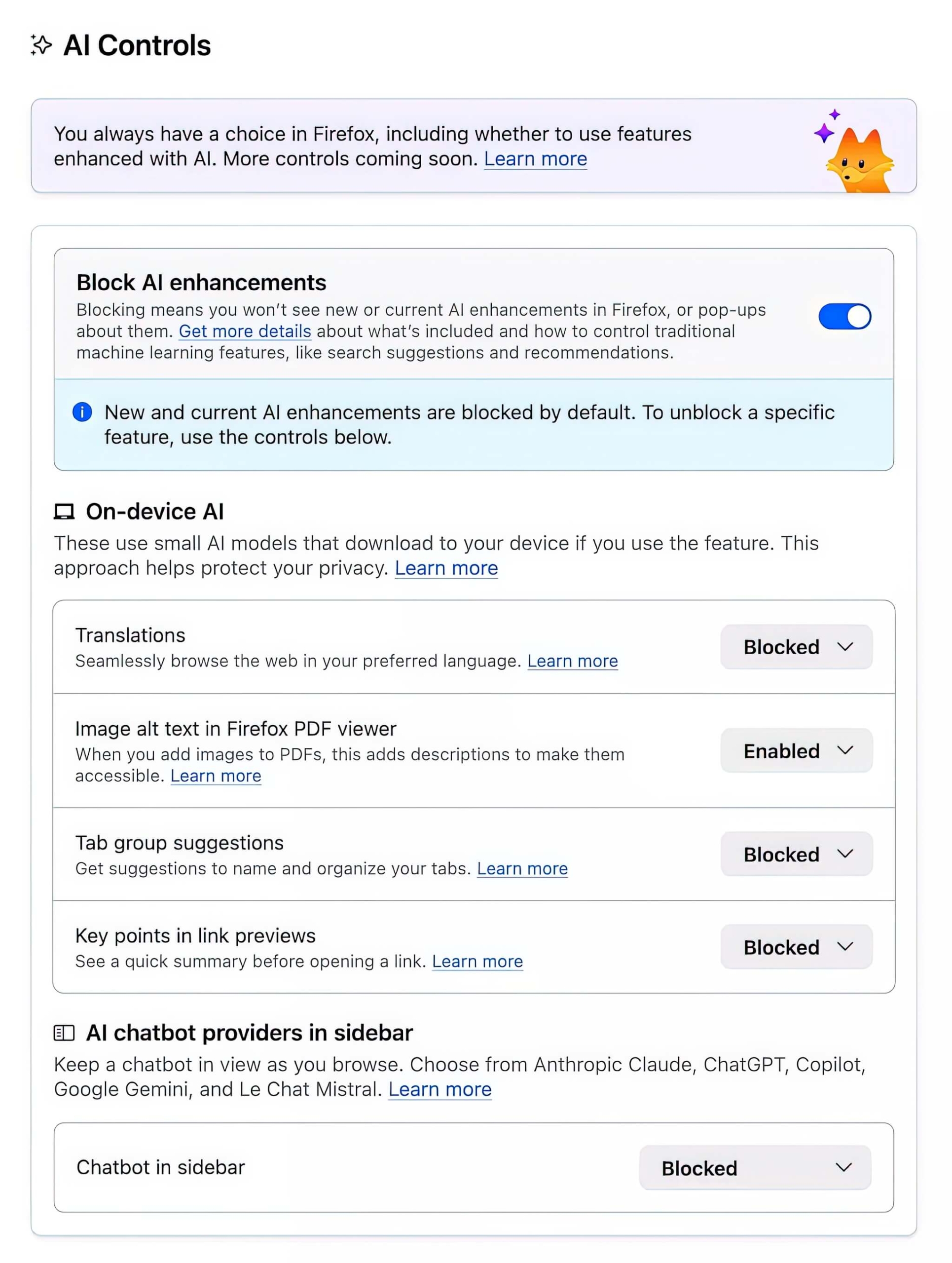
Furthermore, the sophistication of Firefox 148 lies in its clear classification capability. Even when you have enabled the global block mode, the browser still allows you to "unlock" specific features individually below. This approach ensures users do not face an "all or nothing" situation. For example, you can block tab group suggestions but still allow AI to assist in generating alt text for images in PDF files to increase utility. This is the perfect balance between modernity and privacy, allowing each individual to tailor a "custom-fit" browser for themselves without any barriers.
On-device AI Experience and Diverse Chatbot Ecosystem of Firefox 148
Analyzing deeply into hardware power and security, Firefox 148 introduces the impressive "On-device AI" concept. Instead of pushing data to the cloud, the browser will download compact AI models directly to your device for local processing. In practice, this list of features includes: multilingual website translation, generating alt text for images in PDF files, tab group organization suggestions, and summarizing key points when previewing links. Processing directly on the machine not only ensures faster response times but also guarantees that your personal information never leaves your device, completely eliminating the risk of data leaks during communication with central servers.
The long-term value of Firefox 148 is also affirmed through the flexible chatbot integration in the sidebar. If you need to work with virtual assistants, Firefox provides a "top-tier" list including: Anthropic Claude, ChatGPT, Microsoft Copilot, Google Gemini, and Le Chat Mistral. You have the right to choose the provider you trust most or simply block them entirely if you find them unnecessary. This transparency ensures users do not feel "tracked" by any default AI tool. A practical piece of advice is to spend a few minutes exploring this "AI Controls" section; you will see how customizing your computer to serve you, rather than the other way around, brings a sense of comfort and professionalism.
In summary, Firefox 148 does not reject AI but is simply placing it in its proper position as a supportive tool that can be turned on or off at will. Providing an intelligent block button helps users escape the onslaught of redundant AI features while retaining truly useful utilities that run directly on the machine. This change will certainly satisfy both general users and the most demanding tech experts regarding privacy. Would you like me to provide detailed instructions on how to set up each small AI feature in this control panel to optimize your daily work while keeping your computer secure?