Photoshop Android has officially been released by Adobe as a free beta version on Google Play on June 4, 2025. This is great news for the Android user community following the iOS version launch earlier this year. This app is specifically designed for creators who love working on mobile phones, bringing a professional photo editing experience directly to handheld devices.
According to official information, Adobe Photoshop Beta for Android requires a device running Android 11 or higher with minimum 6GB RAM, although the company recommends 8GB RAM for optimal performance. All features are provided for free during the beta phase, with a promise from Adobe that "additional capabilities will be released soon."
Key Features of Photoshop Android Beta
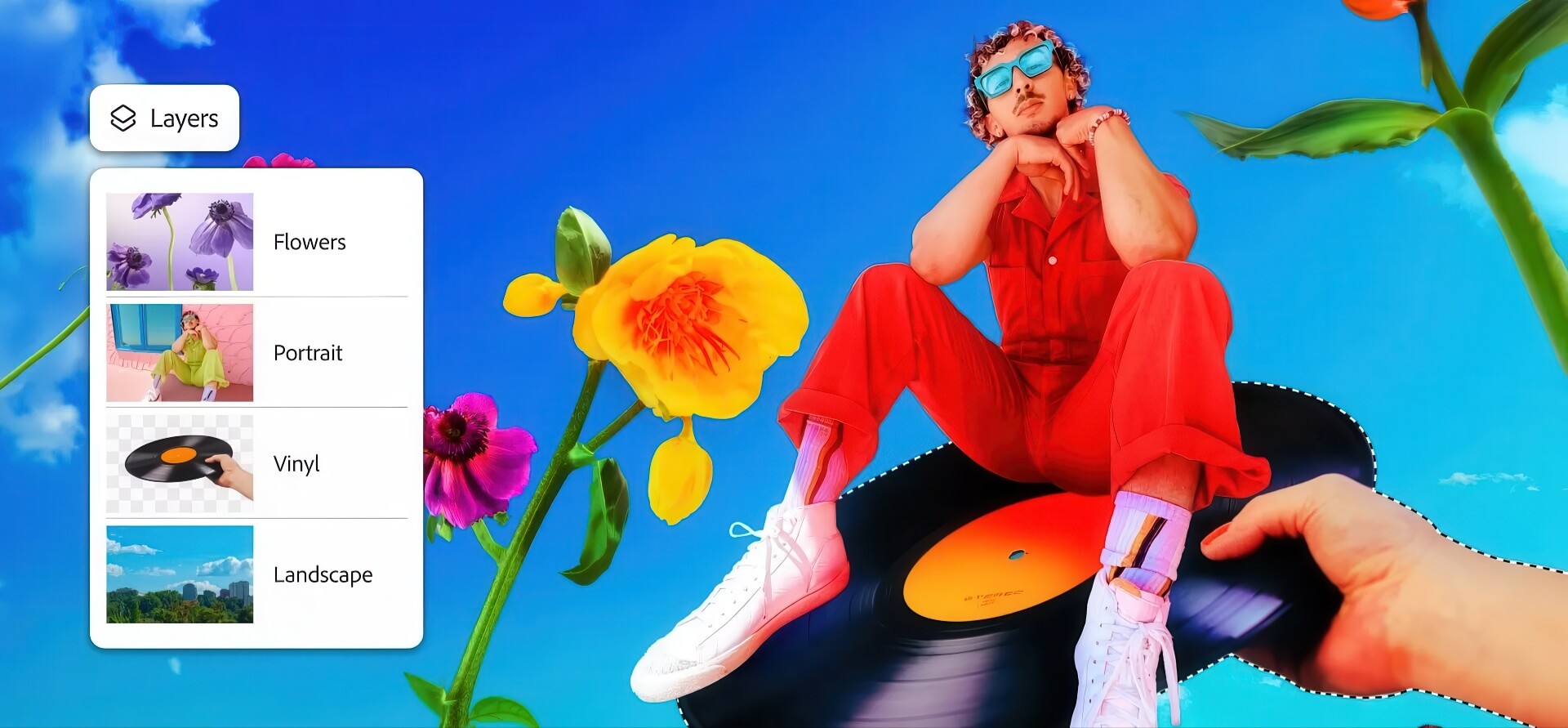
The Photoshop Mobile version for Android comes with an impressive toolkit, equivalent to many core features of the desktop version. Users can combine and blend images using basic Photoshop tools such as selections, layers, and masks. The intuitive Tap Select tool allows for quickly removing or replacing parts of an image with just a few taps.

In particular, Photoshop Android integrates powerful AI Firefly technology with the Generative Fill feature, allowing users to easily add or transform elements in a design using text prompts. This tool opens up limitless creative possibilities for mobile users.
Other professional photo editing tools available in this version include:
- Spot Healing Brush helps remove blemishes and unwanted details in seconds
- Remove tool and Clone Stamp to remove or copy elements in a photo
- Object Select and Magic Wand to create precise selections
- Adjustment Layers to selectively adjust lighting and color
- Blend modes advanced and adjustment layers to control layers and effects
Additionally, Adobe provides an increasingly rich Adobe Stock asset library, giving creators a diverse range of resources for their projects.
Practical Applications of Photoshop on Android Devices
Photoshop Android opens up many new creative possibilities for mobile users. From basic photo editing to complex design projects, this app meets the needs of both beginners and professionals.
For design and creative work, users can create collages, mood boards, flyers, posters, and album covers directly on their phones. Dragging, dropping, cropping, and layering images from the photo library or Adobe Stock has become easier than ever. Additionally, users can customize designs with effects like texture, film grain, or vintage elements.
The Type tool allows turning quotes or song lyrics into visual imagery. Users can design memes, logos, or story slides with custom text, stickers, and overlays. Notably, the export and share feature allows saving projects in various formats such as JPG, PNG, TIF, or PSD, while Quick Export helps instantly send files to the device library or share them with others.
Adobe also encourages newcomers to familiarize themselves with the built-in tutorials in Photoshop Mobile to learn how to make the most of the app. Users can also join the Photoshop community through the Adobe forums to receive feedback and support from other users. Meanwhile, the Adobe Inspiration Hub provides many starting ideas for those needing a creative spark.
Although Adobe Photoshop Beta for Android is currently free during the testing phase, the company's language suggests that users may have to pay for extended features or continued use in the future. However, this is purely speculation at this time.
Summary: Adobe Photoshop Beta for Android marks a significant step forward in bringing professional photo editing tools to mobile users. With a full feature set from the desktop version, advanced AI integration, and an interface optimized for touch devices, this app meets the needs of both beginners and professionals. While the desktop version remains more powerful and versatile, the ability to perform quick edits on a phone when away from a computer is an undeniable advantage of Photoshop Android. Android users should take this opportunity to experience the world's leading photo editing tool for free during the beta phase.