

When choosing a processor (CPU) for your laptop, two prominent options are Intel Core Ultra 7 155H and Intel Core Ultra 7 165U. Both CPUs belong to Intel's Ultra 7 series, based on the Meteor Lake core architecture, and are designed to provide high performance and optimal energy efficiency. However, each CPU has distinct characteristics, making it crucial to compare and select the right CPU for your specific needs.
Overview of Intel Core Ultra 7 155H and Intel Core Ultra 7 165U
Intel Core Ultra 7 155H is a CPU with 16 cores and 32 threads, featuring a base frequency of 1.4 GHz and a Turbo frequency of up to 4.8 GHz. It uses a 7 nm manufacturing process and has a maximum power consumption of 65W. Additionally, it is equipped with 24MB of L3 cache and supports LPDDR5-7467, LPDDR5x-7467, and DDR5-5600 memory types.
On the other hand, Intel Core Ultra 7 165U is a CPU with 12 cores and 24 threads, with a base frequency of 1.7 GHz and a Turbo frequency of up to 4.9 GHz. It uses the same 7 nm manufacturing process and has a maximum power consumption of 57W. Furthermore, it is equipped with 12MB of L3 cache and supports the same memory types as the 155H.
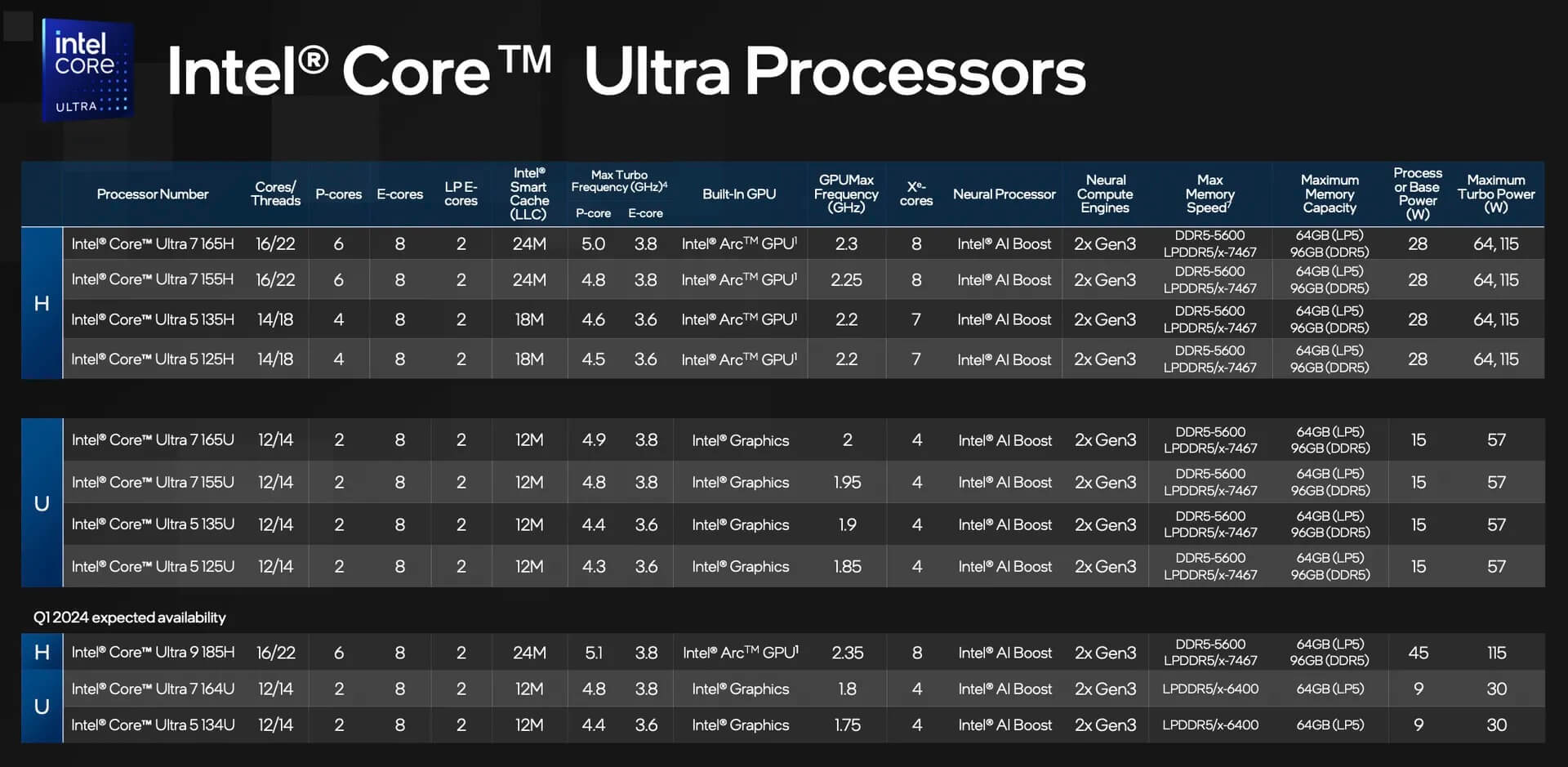
The main difference between these two CPUs lies in the core count, power consumption, and L3 cache size. Additionally, the Intel Core Ultra 7 155H is equipped with a more powerful Arc Graphics card with 8 cores, compared to the 4 cores on the Intel Core Ultra 7 165U.
Performance Comparison between Intel Core Ultra 7 155H and Intel Core Ultra 7 165U
When comparing the performance of the two CPUs, we can rely on benchmark results from Cinebench R23, Geekbench 6, and Passmark.
Single-Core and Multi-Core Performance
In the Cinebench R23 test, the Intel Core Ultra 7 155H achieved a single-core score of 1733, which is 2% higher than the Intel Core Ultra 7 165U (1694 points). However, in multi-core performance, the Intel Core Ultra 7 155H outperformed with 13144 points, which is up to 30% higher than the 165U (10103 points).
Similarly, in Geekbench 6, the two CPUs had fairly similar single-core scores (2386 vs 2384), but in multi-core performance, the Intel Core Ultra 7 155H continued to excel with 12518 points, 28% higher than the 165U (9763 points).
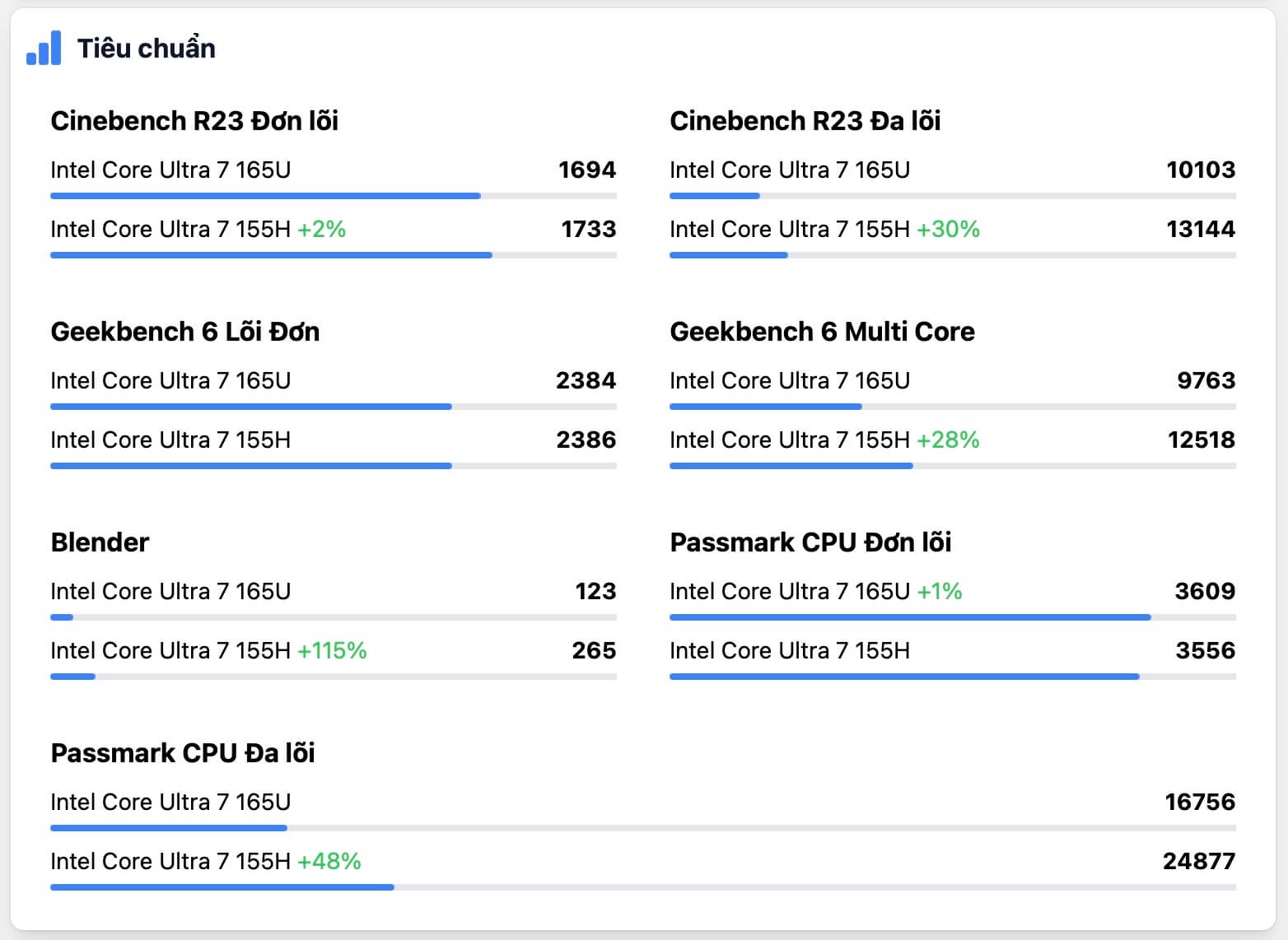
Passmark results also show a significant difference in multi-core performance, with the Intel Core Ultra 7 155H reaching 24877 points, 48% higher than the 165U (16756 points). However, in single-core performance, the two CPUs are almost equal (3609 vs 3556 points).
Graphics Performance
In the Blender test, the Intel Core Ultra 7 155H demonstrated the superior power of its 8-core Arc Graphics, completing the task in just 265 seconds, which is up to 115% faster than the 165U (123 seconds).
Thus, based on the test results, it can be seen that the Intel Core Ultra 7 155H has superior multi-core and graphics performance compared to the Intel Core Ultra 7 165U. However, in single-core performance, there is no significant difference between the two CPUs.
Power Consumption and Operating Temperature
Besides performance, power consumption and operating temperature are also important criteria when choosing a CPU for a laptop.
Power Consumption
The Intel Core Ultra 7 165U has a maximum power consumption of only 57W, significantly lower than the 65W of the Intel Core Ultra 7 155H. This indicates that the 165U has better energy efficiency, making it more suitable for mobile applications and ultra-portable laptops.
Operating Temperature
Both CPUs have a maximum operating temperature of 110°C. However, since the 155H consumes more power, thermal management will become more critical, requiring a more efficient cooling system.
Technology and Upgradeability
In addition to performance and power consumption, the features and upgradeability of the CPU are also factors to consider.
Architecture and Technology
Both the Intel Core Ultra 7 155H and 165U are based on Intel's latest Meteor Lake core architecture with a 7 nm manufacturing process. This ensures that both CPUs leverage the latest advancements in performance and energy efficiency.
Memory and Connectivity
Both CPUs support LPDDR5-7467, LPDDR5x-7467, and DDR5-5600 memory types, with a maximum capacity of 96GB. However, the Intel Core Ultra 7 155H has a larger L3 cache (24MB vs 12MB), as well as support for PCIe 5.0 instead of PCIe 4.0 on the 165U, providing faster connectivity capabilities.
Upgradeability
Both CPUs use the same FCBGA-2049 socket, so future upgradeability will be relatively similar. However, with its superior multi-core performance, the Intel Core Ultra 7 155H can be considered a better choice for tasks requiring high processing throughput.
Optimal Applications and Use Cases for Each CPU Series
Based on the characteristics and comparisons above, we can determine the suitable applications for each CPU:
Intel Core Ultra 7 155H
- Tasks requiring high multi-core performance, such as video editing, 3D rendering, software development...
- Applications that maximize integrated graphics performance, such as gaming, graphic design, AI/ML...
- Tasks requiring many processing threads, such as servers, multitasking applications...
Intel Core Ultra 7 165U
- Mobile applications and ultra-portable laptops that need optimal energy efficiency, such as thin and light laptops, ultrabooks...
- Single-threaded tasks that require high frequency, such as word processing, web browsing, watching movies...
- Applications that do not require extremely high multi-core performance but still need stable performance.
Summary and Which is the Optimal Choice for You
When comparing the Intel Core Ultra 7 155H and the Intel Core Ultra 7 165U, it is evident that each CPU has its own advantages and disadvantages, suitable for different needs and applications. The Intel Core Ultra 7 155H is the more powerful choice when multi-core processing power and optimal graphics performance are needed, making it particularly suitable for professional tasks and high-performance laptops.
Meanwhile, the Intel Core Ultra 7 165U is a more suitable choice for laptops that require optimal energy efficiency or applications that do not demand excessive multi-core performance. Depending on your specific usage needs, carefully consider the features and suitable applications of each CPU to make the most optimal decision.
Reference: TopCPU











