

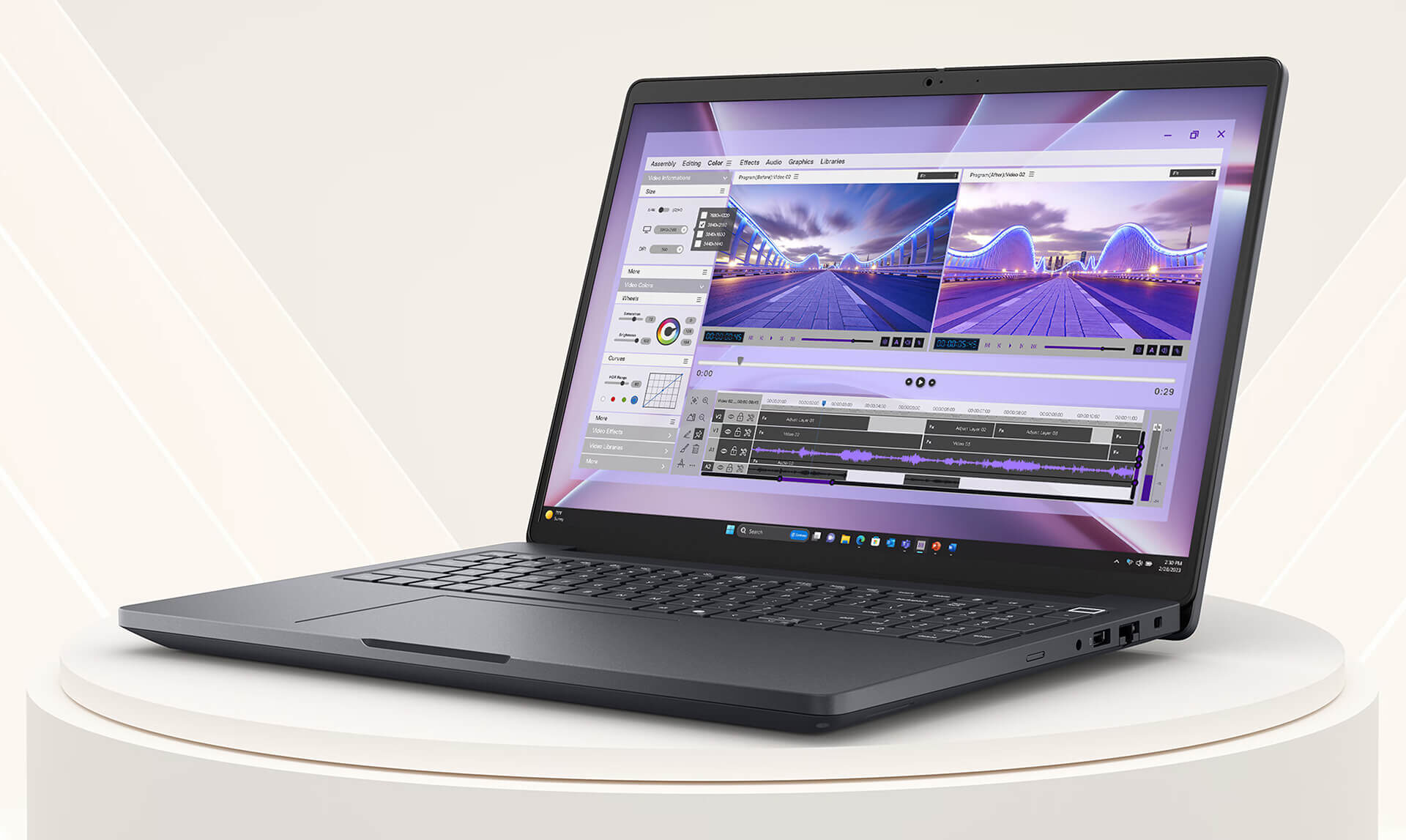
When you first unbox the Dell Pro Max 16 MC16250, the first sensation is a surprising level of sturdiness. The chassis, made from 90% recycled magnesium alloy, provides a premium feel without the heavy heft of solid aluminum, and the minimalist Magnetite color is very close to Apple's Space Gray. After nearly a year of daily use through numerous CAD projects, rendering, and heavy programming, this is the most authentic review that professionals need to read before spending over $2,700 on the Dell Pro Max 16 MC16250 configuration currently available at Hung Phat.
Design and build quality after nearly 1 year: still like day one
The chassis is sturdy in both a literal and figurative sense. After nearly 12 months of being carried between the office and survey sites, the frame shows no signs of warping or hinge loosening. Dell's MIL-STD 810H rating is not just marketing fluff, and real-world experience confirms it. The machine withstands light impacts, dust, and a wide temperature range without complaint. The Magnetite surface is excellent at resisting fingerprints; although slight smudges may appear after long periods if not wiped, a quick pass with a microfiber cloth cleans it instantly.
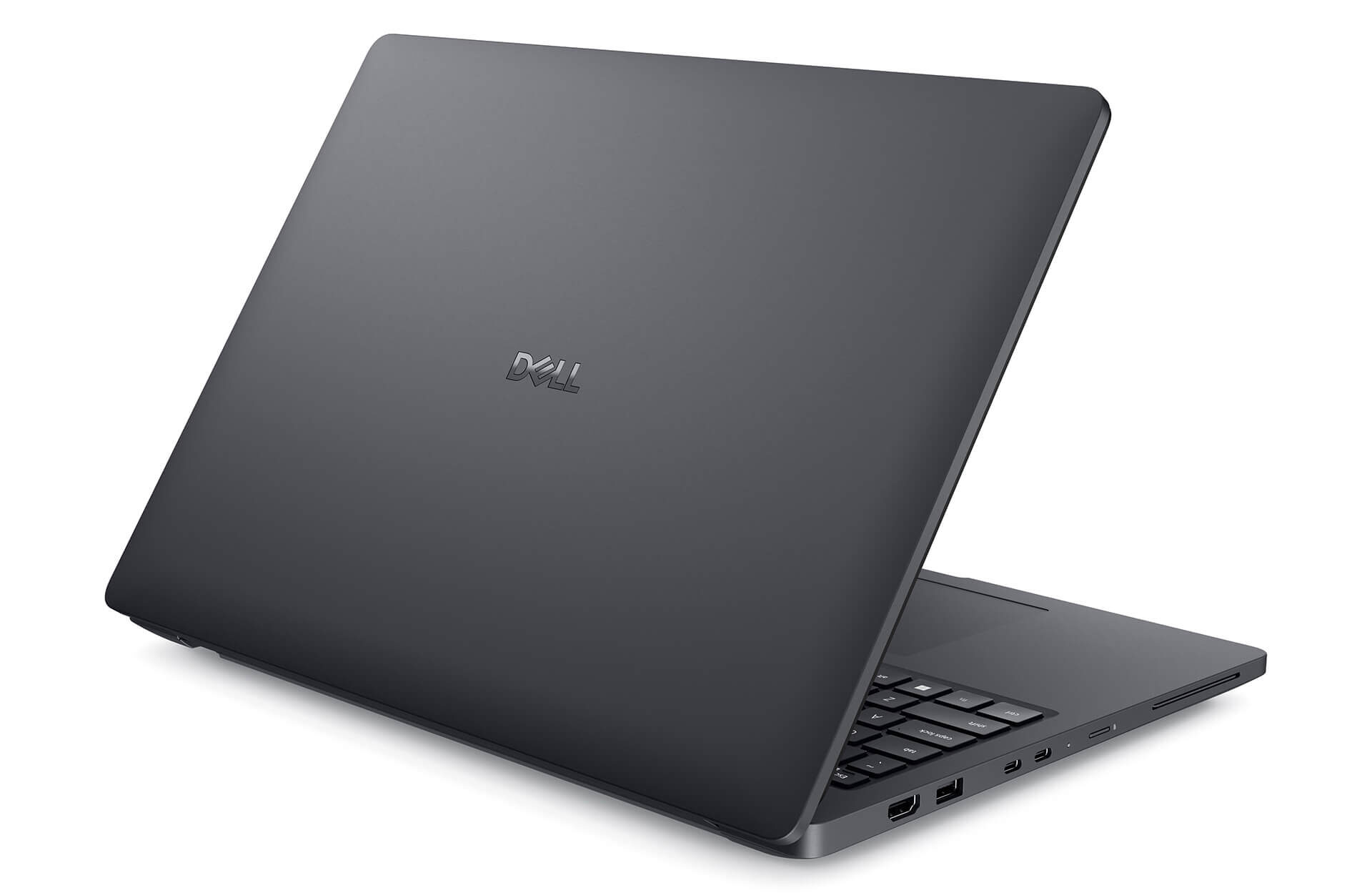
The dimensions of 358 x 256 x 15-19mm and a weight of 2.1kg are acceptable for a workstation laptop. The hinge opens to 180 degrees; it is quite stiff, which keeps the screen stable while working. The only design drawback is the lack of a dedicated barrel charging port; all charging must go through Thunderbolt 4, meaning the charging cable will always protrude from the center of the chassis rather than the rear corner as is common with most workstations.
Keyboard and trackpad: the machine's true strengths
After hundreds of hours of coding and writing technical reports, the Dell Pro Max 16's keyboard is one of the best laptop keyboards I have ever used. It is full-sized with a complete NumPad, featuring deep key travel, excellent tactile feedback, and bright white backlighting. The 125 x 88mm trackpad is responsive and precise, making an external mouse unnecessary for 80% of daily tasks. The fingerprint reader integrated into the power button is a pleasant surprise-it wasn't in the spec sheet, but it works reliably with Windows Hello.
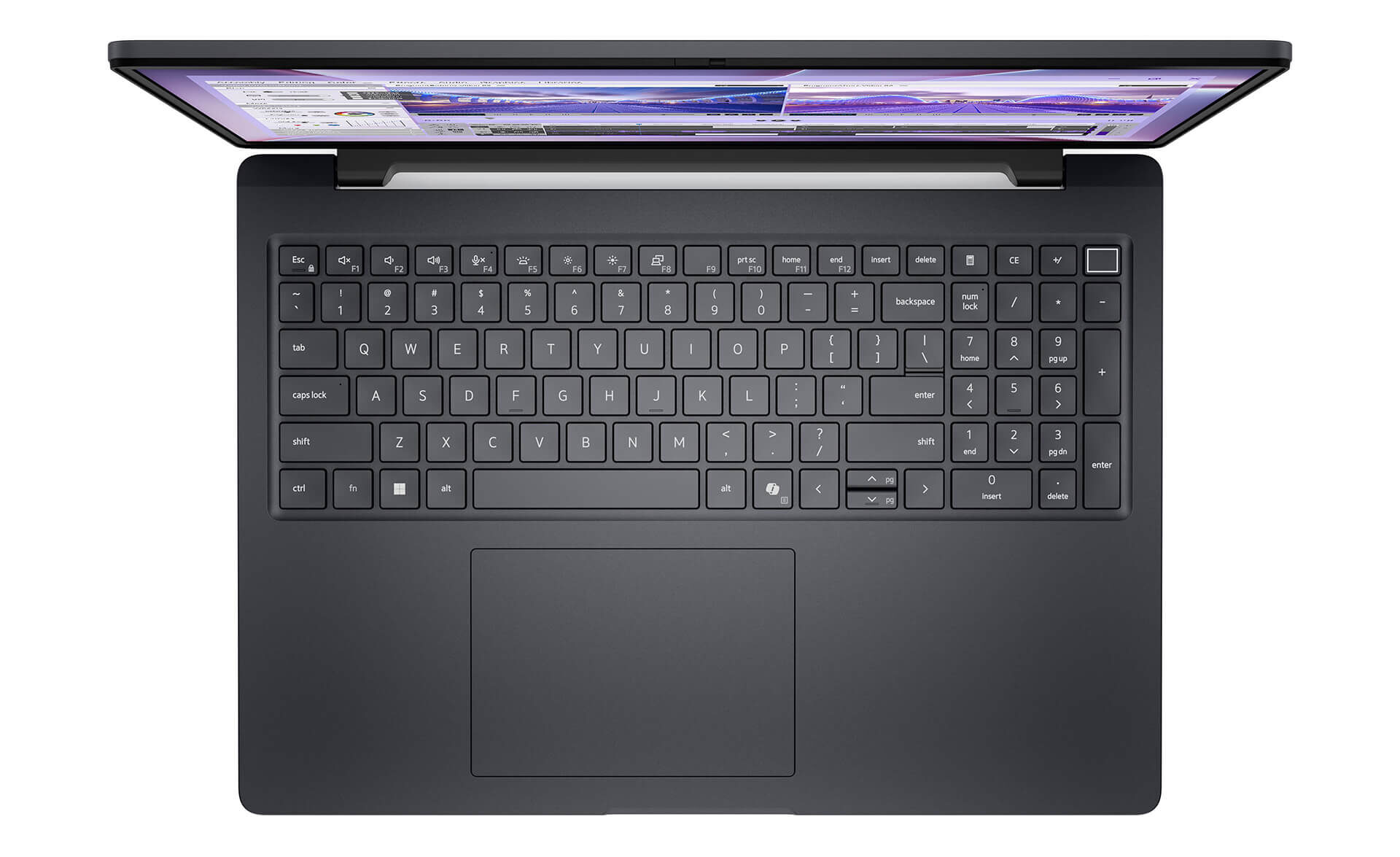
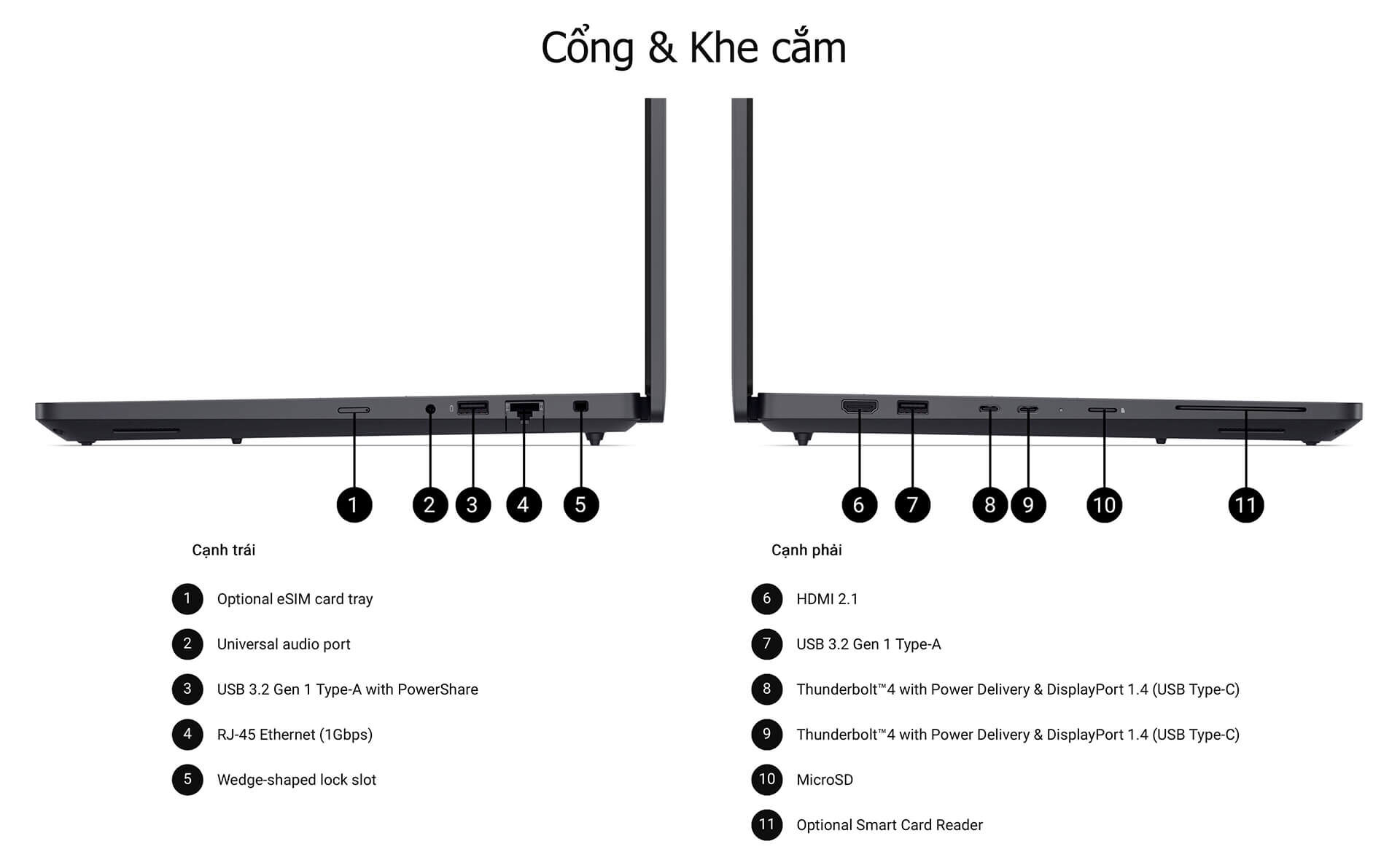
The connectivity system is very comprehensive: 2x Thunderbolt 4 (40Gbps, supporting Power Delivery + DisplayPort), HDMI 2.1, 2x USB-A 3.2, microSD, RJ45 Gigabit, and a 3.5mm combo jack. For users connecting many peripherals, this is a setup that requires no external hub.
CPU performance and heavy task processing capability
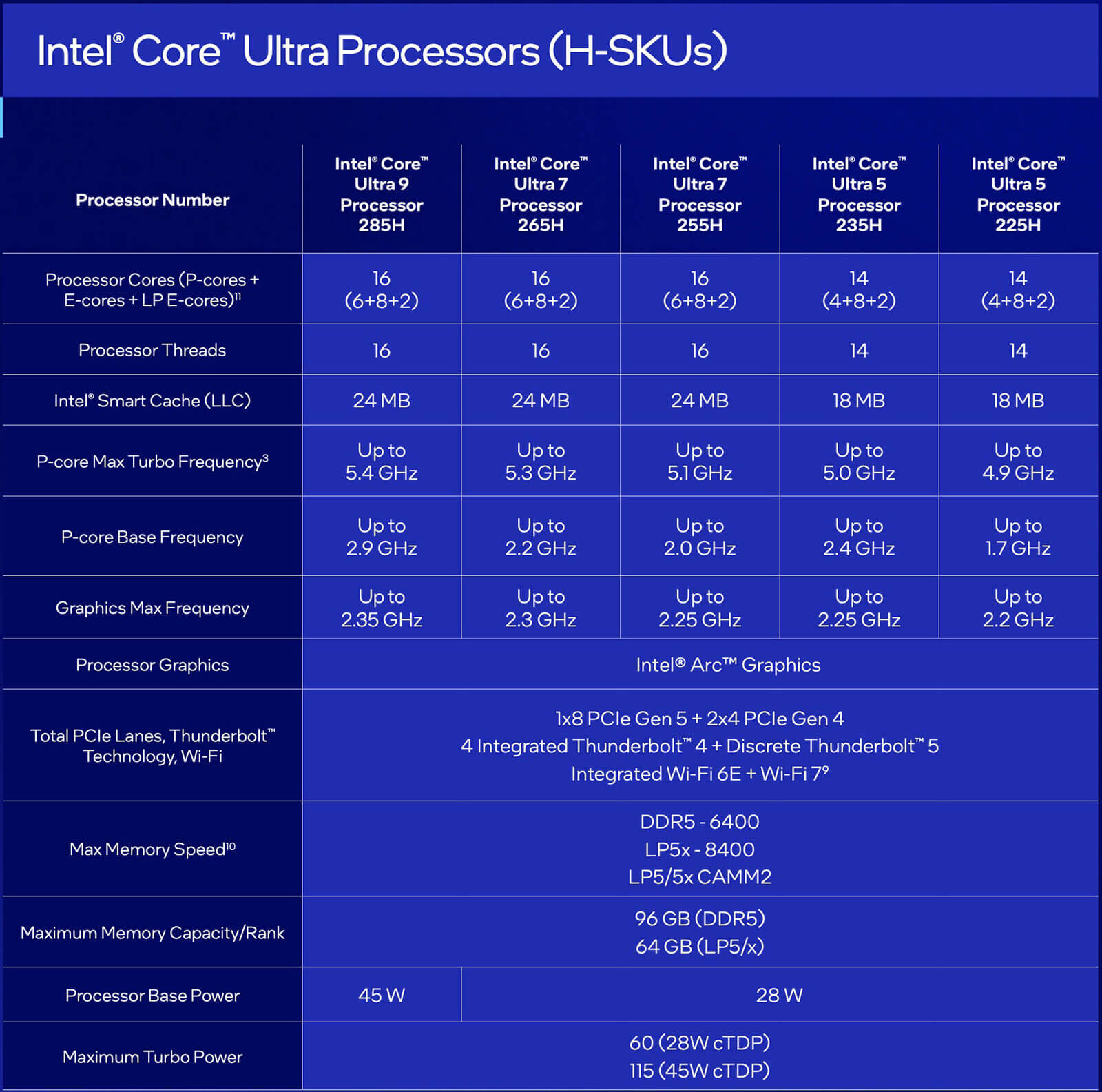
The review configuration uses the Intel Core Ultra 7 255H (16 cores, boost up to 5.1 GHz), and according to benchmarks from LaptopMedia, the machine achieves Geekbench 6 Single-Core scores of 2,861 and Multi-Core scores of 15,542. Notably, in the Cinebench 2024 Multi-Core test, the Dell Pro Max 16 achieved 1,136 points, leading even the ASUS Zenbook DUO equipped with the Core Ultra 9 285H (981 points) thanks to its superior thermal system.
In Dell Optimizer's Ultra Performance mode, the CPU maintains an average clock of 3,495 MHz through 30 minutes of 100% load, consuming 65W with an average temperature of 89°C, which is acceptable for a workstation. In a direct comparison with the Lenovo Yoga Book 9i using the same CPU, which only maintains 2,583 MHz at 32W, the Dell clearly leverages its dual-fan cooling much better. The KIOXIA BG6 NVMe Gen4 SSD achieves read/write speeds of 5.0/4.4 GB/s, which is more than sufficient for professional work.
| Specifications | Dell Pro Max 16 (Core Ultra 7 255H) |
|---|---|
| Geekbench 6 Single-Core | 2,861 |
| Geekbench 6 Multi-Core | 15,542 |
| Cinebench 2024 Multi-Core | 1,136 (segment leader) |
| 30-minute sustained CPU Clock | 3,495 MHz avg / 65W / 89°C |
| SSD Read/Write | 5.0 / 4.4 GB/s |
| Battery (video playback) | 10 hours 04 minutes (64Wh) |
Display and battery: critical factors to consider before choosing a configuration
This is the most important part to be blunt about. The Dell Pro Max 16 comes with 5 display options, and the entry-level configuration (FHD+ 60Hz, 45% NTSC) is only suitable if you primarily use an external monitor. According to real-world measurements from LaptopMedia, this panel only covers 52% of sRGB, with a maximum brightness of 333 nits and a contrast ratio of 1020:1. This is insufficient for designers or editors. If you need to perform color-accurate content creation, you must upgrade to the QHD+ 2560x1600 120Hz with 100% sRGB.

The positive side: the screen uses no PWM (flicker-free), providing excellent eye comfort, and the reflectance coefficient is only 51.2 GU, which is among the best in the market. After nearly a year, this is why my eyes do not fatigue even after working 8-10 hours continuously.
The 64Wh battery (a 96Wh option is available) achieves 10 hours and 04 minutes of video playback in Dell Optimizer's Quiet mode; real-world mixed workloads last about 7-8 hours. Upgrading to the 96Wh version can easily reach 12-13 hours.
Upgradability: the most important reason to choose this machine
In an era where most laptops have soldered RAM and SSDs, the Dell Pro Max 16 is a valuable exception. Simply remove the back cover using 9 captive Phillips screws and use a plastic pry tool to gently pop it open. No technician is required, and your warranty remains intact. Inside, there are 2 DDR5 SO-DIMM slots (up to 64GB, 6400MT/s) and 2 M.2 2280 PCIe 4.0 slots for SSDs. The second M.2 slot can also be used for WWAN (5G) if you choose a configuration without a modem.
After nearly a year of use with 16GB RAM, upgrading to 32GB after 6 months took only 20 minutes, and the machine remained completely stable. This is the kind of flexibility that gaming laptops or ultrabooks at the same price point simply cannot offer.
Professional RTX PRO Blackwell GPU: how does it differ from gaming cards?
The Dell Pro Max 16 MC16250 allows you to choose between Intel Arc 140T (integrated) or NVIDIA RTX PRO Blackwell discrete graphics, ranging from the RTX PRO 500 (6GB GDDR7) to the RTX PRO 2000 (8GB GDDR7). The core difference is not in raw benchmarks, but in drivers and ISV certifications. RTX PRO Blackwell cards are specifically optimized by Dell and NVIDIA for SolidWorks, AutoCAD, Revit, Blender, and Maya, providing stable drivers for continuous production environments rather than prioritizing high framerates in games.
In the 3DMark Time Spy Graphics test, the Intel Arc 140T on the base configuration achieved 3,353 points, lower than the AMD Radeon 880M (3,444 points) found in the MSI Summit A16 AI+. However, if you opt for a configuration with an RTX PRO 1000 or RTX PRO 2000, the graphics performance will far exceed integrated GPU business laptops. For engineers who frequently render Blender on a mobile machine, this is a more practical choice than a desktop workstation for hybrid work environments.
Notably, regarding the disassembly: Dell uses a dual-fan, dual-heat-pipe system with a vapor chamber running the length of the motherboard, and foam seals to direct airflow through the heatsink rather than allowing it to circulate within the chassis. This design explains why the CPU can maintain significantly higher clock speeds than laptops using the same chip with inferior cooling.
Dell Pro Max 16 MC16250 vs. competitors in the same segment
In the $2,700+ price range, buyers often compare the Dell Pro Max 16 MC16250 with the Lenovo ThinkPad P16 Gen 2, HP ZBook Firefly 16, and Asus ProArt Studiobook 16. Dell's standout advantage lies in a combination of three factors rarely found together: hardware upgradability (RAM + 2 SSDs), excellent battery life for a workstation (10+ hours with 64Wh), and a full-size keyboard with a practical NumPad for engineers.
The ThinkPad P16 has a better screen in equivalent configurations but is heavier and has worse battery life. The HP ZBook Firefly 16 is thinner but has limited upgradability. The Asus ProArt Studiobook is better suited for color-focused creatives due to its OLED screen.
It is important to understand: the Dell Pro Max 16 is not for everyone. For users who only need a standard business laptop for Office and email, the price and configuration are overkill. This machine truly shines for CAD/CAM engineers, BIM architects, programmers needing heavy compile environments, and designers requiring continuous mobile workloads. After nearly a year, here is the most honest assessment: the Dell Pro Max 16 MC16250 is a worthwhile investment if you belong to those groups, and unnecessary if you do not.
For the latest configuration details and pricing, visit the Dell Pro Max 16 MC16250 product page at Hung Phat Laptop.
So, should you buy the Dell Pro Max 16 MC16250?
After nearly a year of daily use, the answer depends on your specific purpose more than anything else. The Dell Pro Max 16 MC16250 is not a laptop for everyone, but for the right user, it is one of the most practical mobile workstation options currently available.
For those needing a stable, durable computing environment that can be upgraded over time and has enough battery to last a full day without a charger, the Dell Pro Max 16 delivers on all counts. Maintaining a 3,495 MHz CPU clock through 30 minutes of 100% load is not the highest number on the market, but it is stable and consistent over months of real-world use-something many thin gaming laptops fail to achieve.
One point to reiterate: choose the right screen from the start. The base configuration with FHD+ 45% NTSC is suitable for users who primarily use an external monitor. Anyone needing the integrated screen for color work must choose the QHD+ 100% sRGB version from the beginning, as it cannot be upgraded later.
Overall, the Dell Pro Max 16 MC16250 is proof that mobile workstations do not necessarily have to be bulky and have poor battery life. With its durable magnesium design, top-tier CPU performance that holds up under heavy loads, easy RAM and SSD upgradability, and impressive battery life, this is a long-term investment for professionals who truly need a reliable tool. Benchmark source: LaptopMedia
Real-world Pros and Cons after nearly 1 year
| Key Pros | Cons to Note |
|---|---|
| Excellent sustained CPU performance under heavy load (3,495 MHz avg / 30 mins) | No dedicated barrel charging port; must use Thunderbolt 4 |
| Easy RAM and SSD upgrades; not soldered | Entry-level screen (45% NTSC) is not suitable for graphics work |
| 64Wh battery lasts 10+ hours of video; 96Wh option for 12-13 hours | Stiff hinge; cannot be opened with one hand |
| Full-size keyboard with NumPad, large and precise trackpad | High price for RTX PRO configurations, starting from $2,700 |
| Non-PWM screen, good anti-reflection, no long-term eye fatigue | |
| Full connectivity: 2x TB4, HDMI 2.1, RJ45, microSD | |
| 90% recycled magnesium chassis, MIL-STD 810H, durable over time |
Frequently Asked Questions (FAQ)
Is the Dell Pro Max 16 MC16250 suitable for engineers and designers?
Configurations with the RTX PRO 1000 or RTX PRO 2000 are highly suitable due to ISV certification for SolidWorks, AutoCAD, Blender, and Maya. Mechanical engineers and architects are the primary beneficiaries.
Which screen should I choose?
If you mainly use an external monitor: the FHD+ 60Hz version is a cost-effective choice. If the built-in screen is your primary display: you must choose the QHD+ 120Hz 100% sRGB version for sufficient color accuracy.
Is the battery enough to last all day?
The 64Wh battery is sufficient for 7-8 hours of real-world work. For more peace of mind, choose the 96Wh option when ordering.
Can the RAM and SSD be upgraded?
Yes, this is its strongest point. Both the 2x DDR5 SO-DIMM slots (up to 64GB) and 2x M.2 PCIe 4.0 slots are easily accessible without a technician.
What is the price of the Dell Pro Max 16 MC16250 in Vietnam?
Reference prices and full configurations are available on the Dell Pro Max 16 MC16250 product page at Hung Phat Laptop.











