


Choosing a gaming laptop that fits your budget while still handling heavy AAA titles requires a careful balance between real-world performance and the amount spent. Many gamers struggle to decide between an affordable, entry-level machine and a high-end powerhouse that costs several times more. Hung Phat has compiled several representatives across different price segments, equipped with advanced GPUs from NVIDIA to help you clearly see the value received for every cent. Understanding the practical pros and cons of each model will help you make an accurate investment decision.
Gaming laptops and the performance-per-dollar equation
Before comparing individual specs, you should define your budget range before considering the corresponding configuration. For the same amount of money, the difference between an older discrete card and a new Blackwell card can determine whether you play games on Medium or Ultra settings. Discrete cards with large VRAM and GDDR6 or GDDR7 memory standards help maintain high rendering speeds at FHD or QHD resolutions, but prices jump significantly with each GPU tier.
| Model | Reference Price | Processor (CPU) | Memory (RAM) | Display | Why choose this? |
|---|---|---|---|---|---|
| Lenovo LOQ 15ARP9 (2025) | Around 25 million | Ryzen 7 7435HS / Ryzen 5 7235HS | 16GB / 24GB DDR5 4800 MHz | 15.6" FHD 144Hz 100% sRGB | Affordable price, color-accurate screen, high performance-to-price ratio. |
| Alienware 15 Gaming Laptop (2026) | Around 36-37 million | Intel Core 7 240H / Ryzen 7 260 | 16GB DDR5 5600 MHz | 15" FHD+ 165Hz 62.5% sRGB | New RTX 5050 8GB GDDR7 GPU, sturdy alloy chassis. |
| Alienware 16X Aurora (2025) | 50-60 million | Intel Core Ultra 7 255HX | 32GB / 64GB DDR5 5600 MHz | 16" QHD+ 240Hz 100% DCI-P3 | Powerful RTX 5070 8GB configuration, sharp 2K screen. |
The display is also worth an extra investment if you play a lot. Refresh rates from 144Hz to 240Hz combined with 100% sRGB or 100% DCI-P3 color gamut provide vivid imagery and minimize screen tearing during high-speed action. A minimum of 16GB DDR5 RAM with clock speeds from 4800 MHz to 5600 MHz ensures smooth multitasking without exhausting system memory.
For those needing mobility, battery life and weight also impact long-term usability. Some models focus heavily on performance and omit the integrated iGPU, forcing the discrete card to run continuously, which consumes more power. You should clearly determine whether you need a fixed setup or frequent travel to choose the right segment for your budget.
Review of the budget-optimized Lenovo LOQ 15ARP9 gaming laptop
The best value representative in the entry-level segment is the Lenovo LOQ 15ARP9 at a price of around 25 million. The machine uses the AMD Ryzen 7 7435HS processor based on the Rembrandt-HS Refresh architecture with 8 cores and 16 threads, achieving 1,818 single-core and 9,679 multi-core scores on Geekbench 6. Combined with the NVIDIA GeForce RTX 3050 A Laptop 6GB GDDR6 graphics card, which scored 5,386 in Time Spy, it smoothly handles AAA games at Medium or High settings at Full HD resolution.
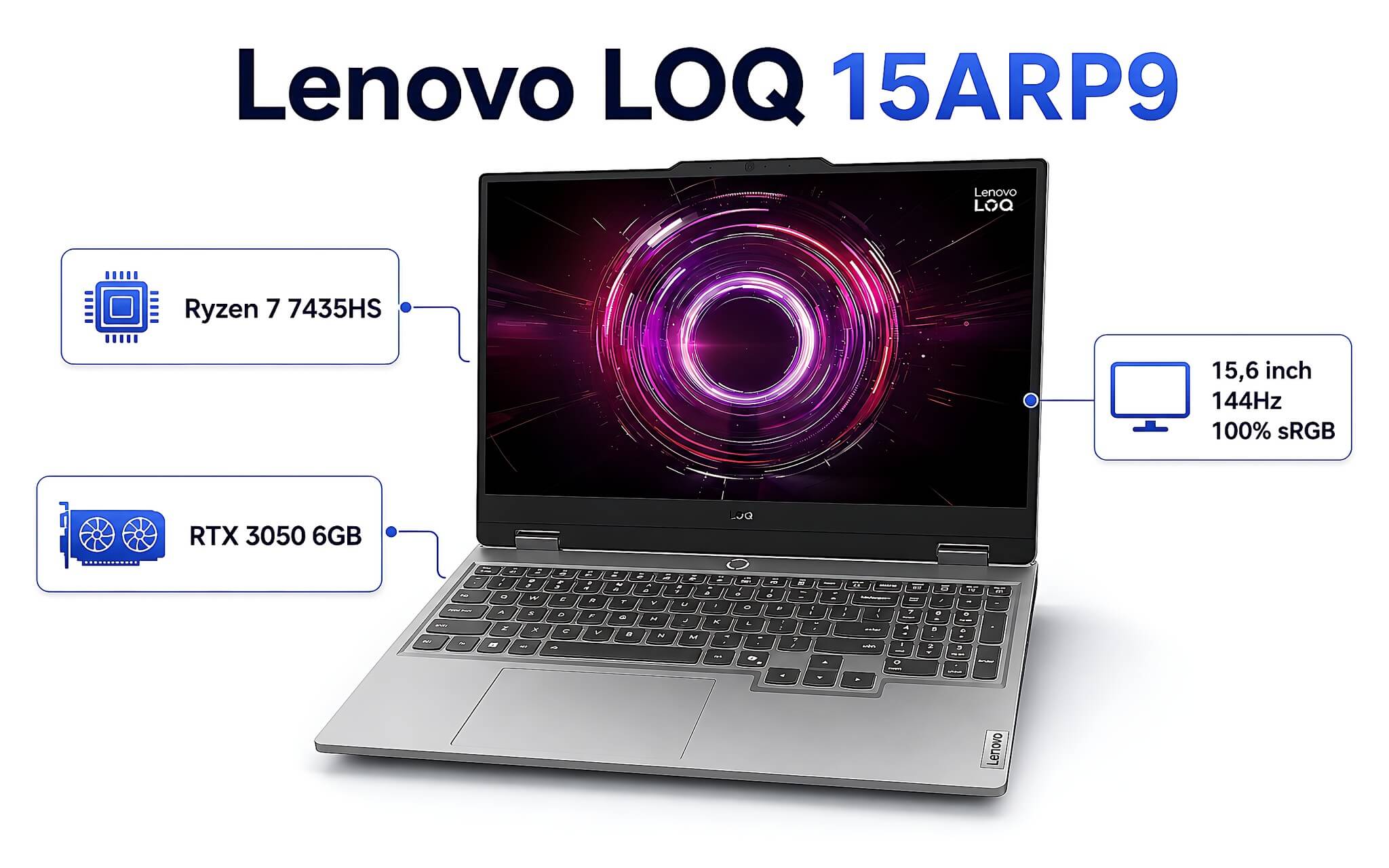
The strength that enhances this model's value is the 15.6-inch FHD IPS display with a 144Hz refresh rate, 100% sRGB color gamut, and 300 nits brightness. According to real-world testing, the display quality is top-tier for its price range, offering vibrant and realistic colors. The sturdy synthetic plastic chassis comes with 2 DDR5 4800 MHz RAM slots for flexible expansion and the ability to quickly upgrade the PCIe Gen4 SSD.
A downside to note is that the Ryzen 7 7435HS processor lacks an integrated iGPU, forcing the RTX 3050 A discrete card to run all the time, which drains the 60Wh battery quickly during gaming. This is a reasonable choice for budget-conscious gamers who play primarily at home and want the lowest initial investment while still playing popular AAA games well.
Alienware 15 gaming laptop elevates performance in the upper segment
In the 36-37 million price range, the Alienware 15 Gaming Laptop attracts attention thanks to the NVIDIA GeForce RTX 5050 8GB GDDR7 graphics card based on the Blackwell architecture. With AI processing capabilities reaching 440 TOPS, the machine recorded 24,926.5 Fire Strike and 9,122 Time Spy points. Compared to the entry-level group, the extra cost buys a significantly newer generation of GPU, allowing for smooth gameplay in most heavy titles at FHD+ resolution with High settings.
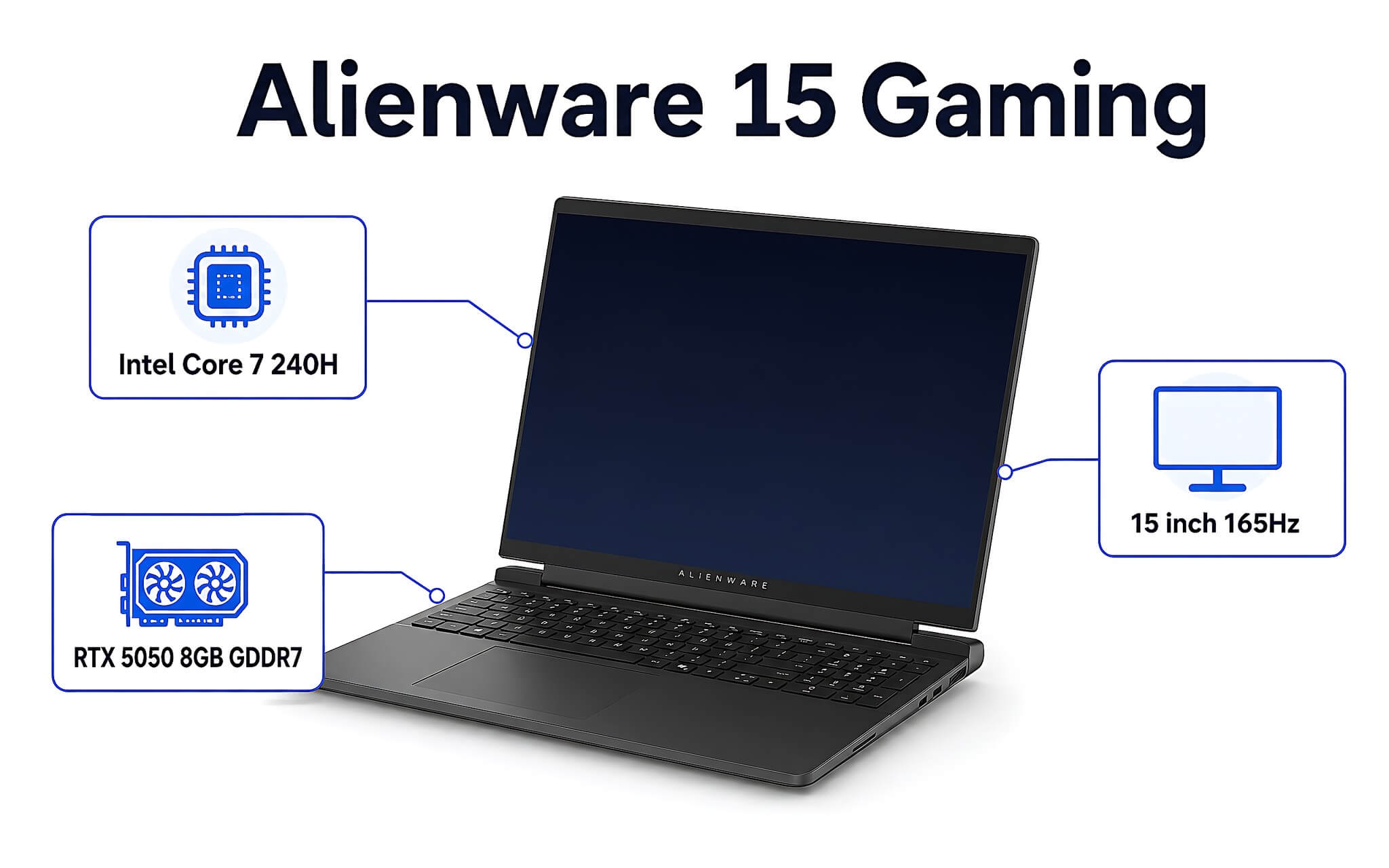
The machine's configuration uses the Intel Core 7 240H processor based on the Raptor Lake-H Refresh architecture with 10 cores and 16 threads, achieving 1,719 Cinebench R23 single-core and 15,764 multi-core points (or an AMD Ryzen 7 260 option achieving 28,209 PassMark points). It comes with 16GB DDR5 5600 MHz memory and a 1TB PCIe Gen4 NVMe SSD, providing ample space for both gaming and large libraries.
The machine features a sturdy alloy chassis with a 54Wh or 70Wh battery depending on the configuration; however, a point to consider relative to the price is the 15-inch 165Hz panel which only reaches 62.5% sRGB. The limited color gamut makes images look paler compared to some competitors in the same price range. This Alienware model is suitable for those who favor the brand and want to step up to a new generation GPU without needing a high-end budget.
The power of Alienware 16X Aurora gaming laptop for the high-end segment
For gamers with a 50-60 million budget who want a machine that lasts many years, the Alienware 16X Aurora is a notable representative. The machine uses the Intel Core Ultra 7 255HX processor based on the Arrow Lake-HX architecture with 20 cores and 20 threads, achieving 2,163 single-core and 32,612 multi-core points on Cinebench R23, and recording 48,542 PassMark points. This computing power meets both gaming needs and profitable heavy graphics tasks.
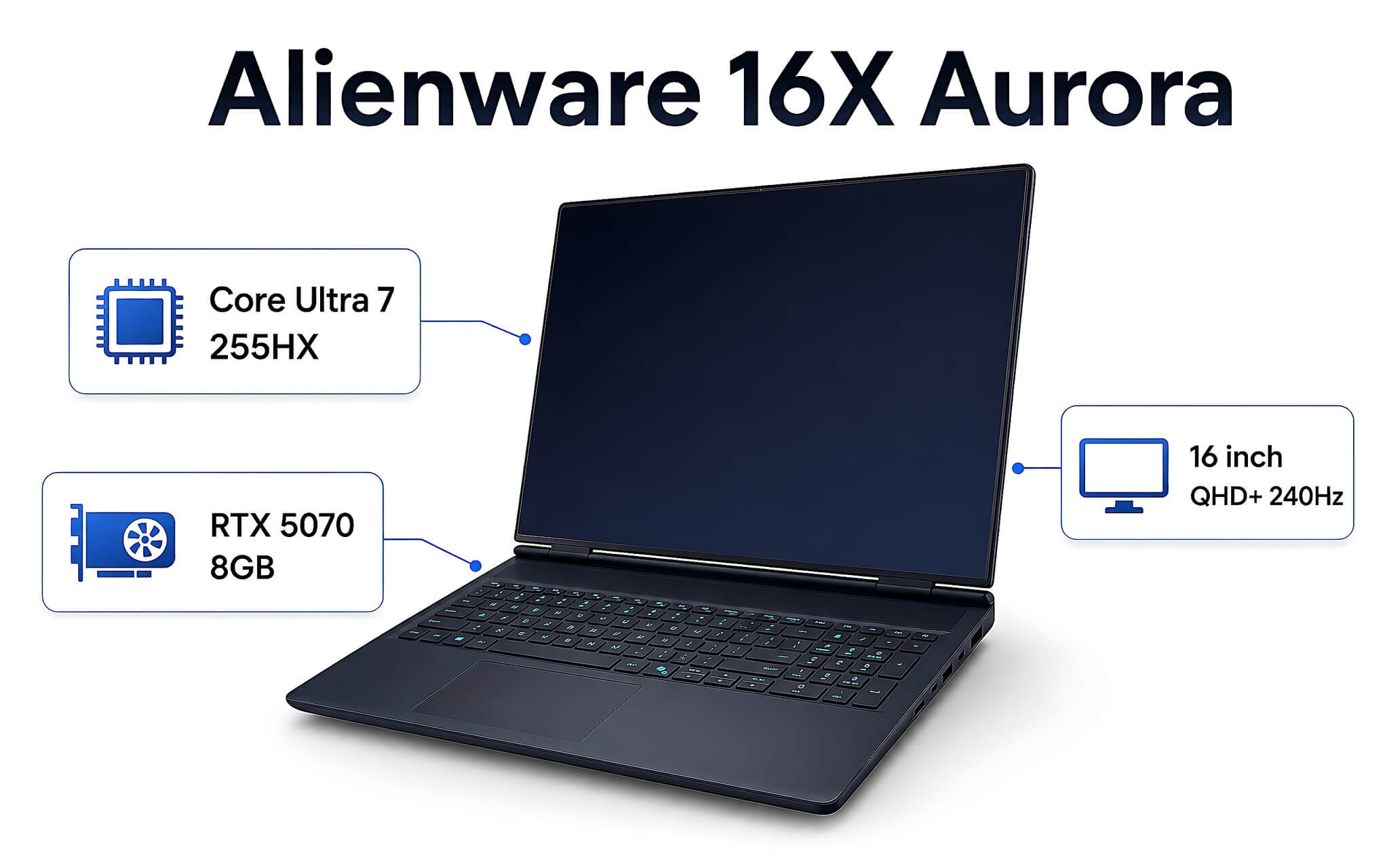
Graphics power comes from the NVIDIA GeForce RTX 5070 8GB GDDR7 card based on the Blackwell architecture with 4608 CUDA cores, achieving 35,841.5 Fire Strike and 13,535.5 Time Spy points. It is paired with a 16-inch QHD+ (2560x1600) resolution display with a 240Hz refresh rate covering 100% DCI-P3 color gamut. This represents the largest price difference compared to the Alienware 15, in exchange for a 2K gaming experience at Ultra settings.
Additionally, the machine has a large 94Wh battery, sufficient for basic office tasks. Although the 2.6 kg weight feels quite substantial, the vapor chamber cooling system helps components run stably during extended sessions. This is a worthwhile investment for those wanting a comprehensive machine with few weaknesses that won't need early upgrades. If you prefer a 16-inch frame in the same line but with a tighter budget, the standard Alienware 16 Aurora using an RTX 3050 6GB card is a much more affordable option.
Choosing a gaming laptop by price segment and needs
When choosing a machine in the 25 million to over 60 million range, correctly identifying the segment that fits your budget will help you save significant costs. If your primary need is home entertainment gaming with limited funds, the Lenovo LOQ offers the highest return on investment per cent. Conversely, if you want long-term durability and to exploit new graphics technologies like DLSS 4 or the next generation of Ray Tracing, the Alienware series equipped with RTX 50-series GPUs will be the long-term choice.
Besides hardware configuration, do not overlook future usage costs such as warranty, RAM, or SSD upgrades as your needs increase. An entry-level machine with extra upgrade slots can sometimes be more economical in the long run than a high-end machine with a fixed configuration. Balancing processing performance, display quality, and the amount spent will determine your satisfaction during use.
To make comparison and quick decision-making easier, the technical specifications and price levels for both the Lenovo LOQ and the two Alienware models have been clearly listed above. All products sold at our store come with a reputable warranty policy and long-term technical support.
Frequently Asked Questions (FAQ)
Should I look for used gaming laptops if I have a limited budget?
Buying a used gaming laptop is a solution that helps you save about 20% to 35% in costs compared to a brand-new machine. However, used components carry potential risks regarding thermal quality and battery degradation. You should carefully check the repair history and run a FurMark stress test for about 15 to 20 minutes to ensure the graphics card does not drop its clock speed. Additionally, prioritize stores with a minimum 6-month warranty policy for long-term peace of mind.
How can I choose a cheap used gaming laptop that is still durable?
To safely choose a cheap used gaming laptop, you should prioritize versions with dual independent fans and a chassis with original factory seals intact. Ask a technician to open the machine to check the motherboard to see if it has undergone repairs or GPU reballing. A reasonable price for a used machine with an RTX 3050 configuration usually ranges from 14 to 18 million VND. You should absolutely avoid buying heavily dented machines or those that have lost the ability to recognize the SSD.
Where can I find reputable places to buy used gaming laptops in Ho Chi Minh City?
If you are looking for a quality place to buy used gaming laptops in Ho Chi Minh City, Hung Phat Laptop is a reputable destination with many years of direct consulting experience. All used products brought in undergo a strict 24-step inspection process, from the screen and keyboard to actual thermal performance. The store guarantees original machines that have not been repaired, accompanied by a 30-day 1-for-1 exchange policy and a free trial. Customers in Ho Chi Minh City can visit the showroom directly to experience the machine before deciding.
How should I choose an Acer gaming laptop for study and entertainment needs?
Acer gaming laptop lines like Nitro 5 or Predator are well-known for optimizing performance-to-price in the entry-level segment. When choosing this brand, you should prioritize versions with 16GB RAM and a 144Hz refresh rate screen to avoid lag while gaming. The NitroSense cooling system supports flexible fan speed adjustment depending on whether you are doing light work or heavy gaming. You should clean and re-apply thermal paste periodically, about once a year, to keep the machine running most stably.
Can the Gigabyte G5 GE gaming laptop handle AAA games in the entry-level segment well?
The Gigabyte G5 GE gaming laptop, equipped with an Intel Core i5-12500H chip combined with an RTX 3050 4GB graphics card, can still handle AAA games well at 1080p Medium settings. The machine features a smooth 144Hz screen and flexible RAM upgradeability. However, the 4GB VRAM capacity is somewhat limited when enabling heavy graphics features like Ray Tracing in new 2026 generation games. It remains a budget-friendly entertainment machine for students.











