
With every new chat session, many people have to remind their AI assistant of their writing style, reporting standards, and work context all over again. Claude's memory feature can retain these details across regular conversations and in the Claude Cowork workspace, but the stored data can still be wrong or outdated without a review. The five Claude prompts below help you check, use, and clean up memory, so each answer fits your actual needs instead of old context.
What Claude Memory is and how it works
Claude Memory is the memory feature of the Claude assistant. It automatically remembers your personal details, preferences, and ways of working as you chat. As a result, you repeat familiar instructions far less often whenever you start a new chat session, and the experience stays consistent across many conversations.
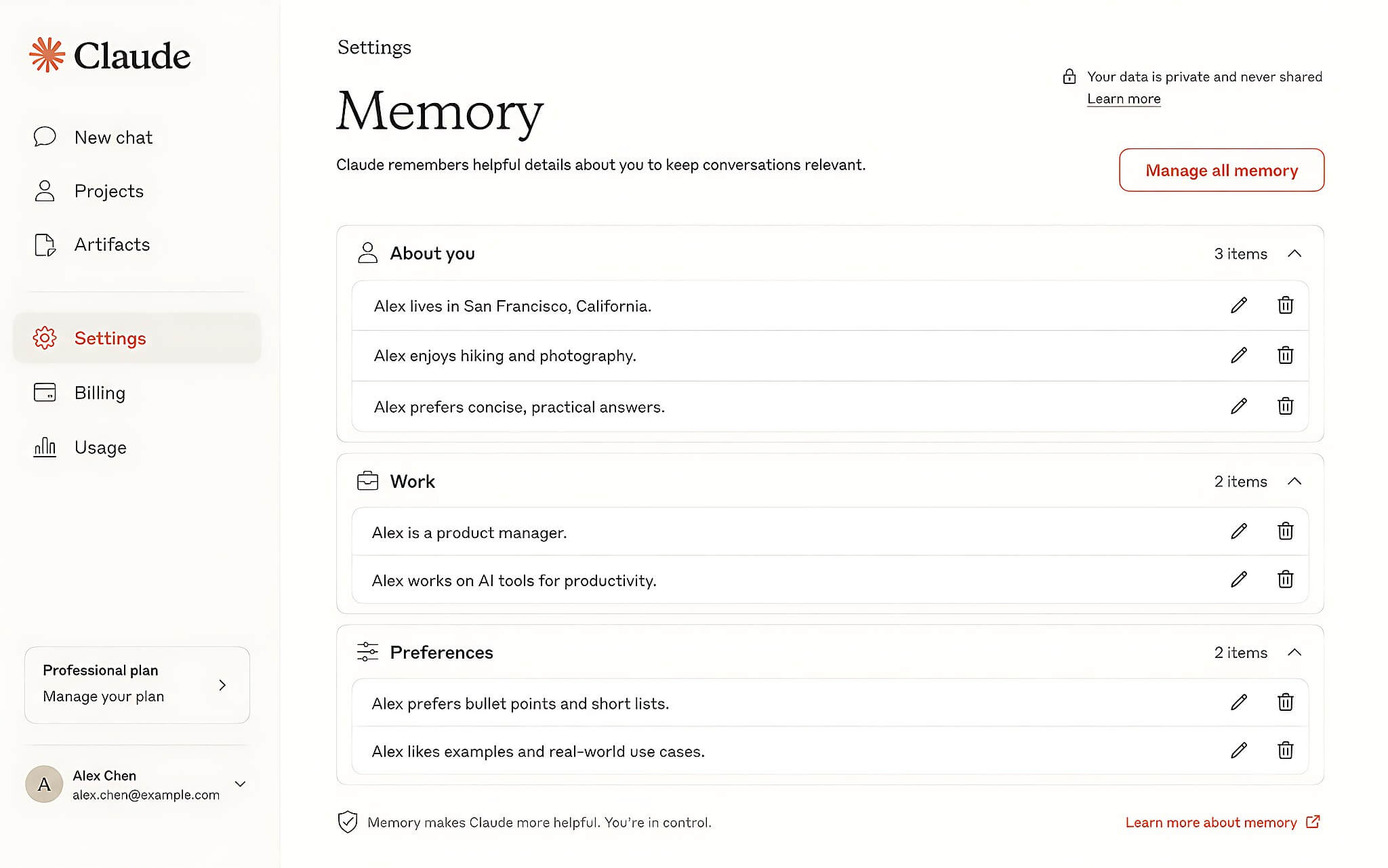
Claude stores memory as individual topics while you chat, rather than summarizing after a session ends. Each project gets its own separate memory space, and this data syncs between regular conversations and the cloud-based work environment. You can read more about the setup process in the article on Claude Cowork.
To verify what Claude has saved, go to Settings and open the Memory section. All of the information is organized by topic (Topics), so you can read it back, edit it, or delete individual entries. How it works and where it is supported are described in the official documentation on Claude's memory.
The five most effective Claude prompts for using memory
The first Claude prompt checks what the assistant currently remembers: "Before taking any new information, review the details Claude has collected on its own from previous conversations. Based on the existing memory, list the 5 most useful things about the account owner's working style, preferences, and work priorities. Do not use information from the current session unless it is already in memory." This verification step helps you catch incorrect data early so you can fix it.
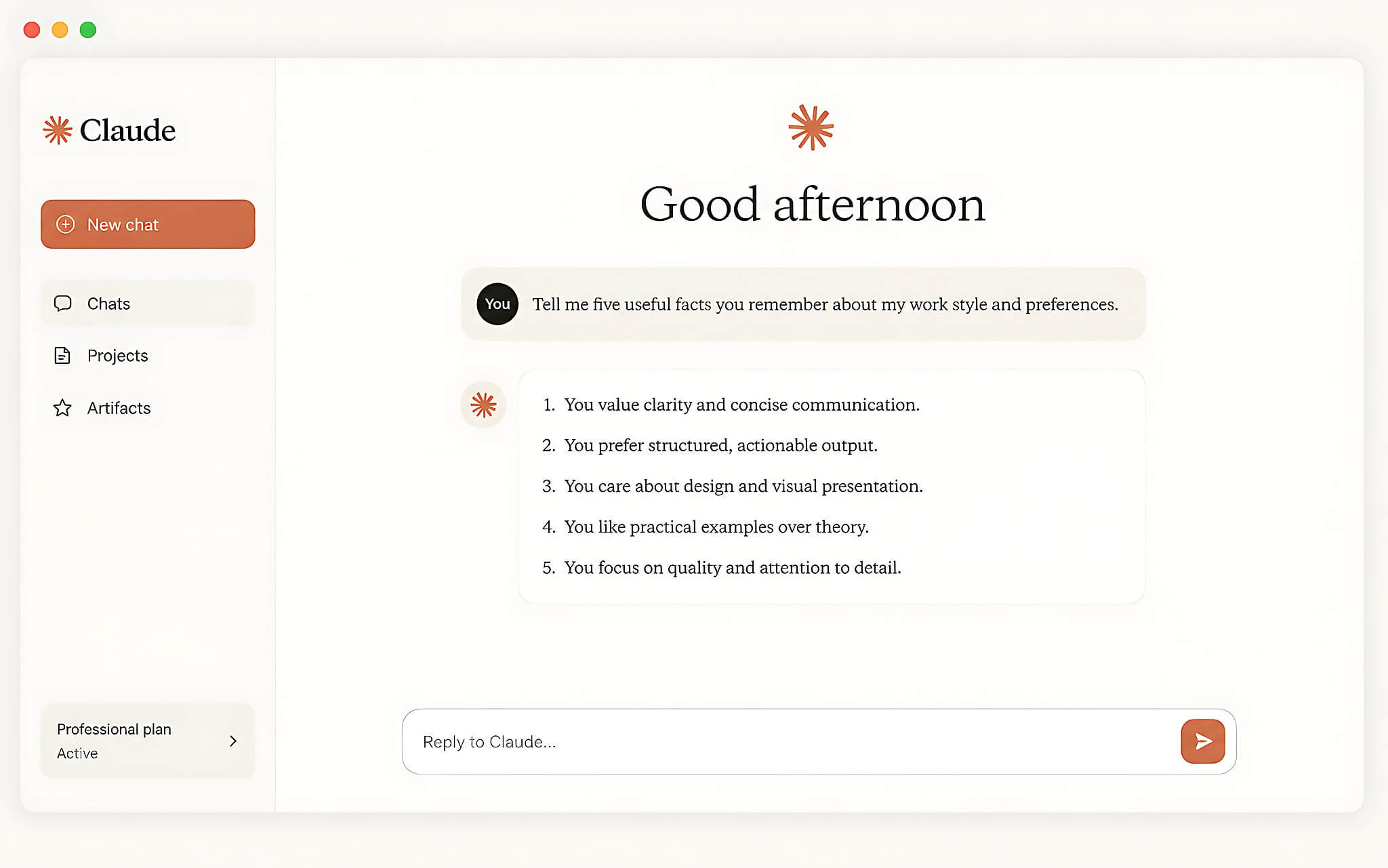
The second Claude prompt focuses on situations you should not have to explain from scratch: "Based on the existing memory, point out 3 contexts that do not need to be explained again in later sessions. For each context, give an example of how Claude would apply that information in a future conversation without being reminded." Writing commands this concisely and clearly is closely tied to Prompt Engineering techniques.
The third Claude prompt suits the start of a project: "A new project is about to begin. Before taking further instructions, use the memory of the account owner's preferences and working style to suggest an approach. Separate the part based on memory from the part Claude is assuming on its own." Once you have the initial framework, you can add details such as business trip planning, project scheduling, or task allocation.
How to apply the five Claude Memory prompts step by step
A sensible order is to review Claude's memory first, then use the prompts to draw on it or add to it. This approach lets you control the data before handing off work, so Claude does not rely on outdated context.
First, open Claude and go to Settings, then the Memory section, to see what is currently stored. Next, send the first prompt, asking Claude to list the 5 useful things it knows about your working style and interests, then check each detail against reality; if an entry is wrong, edit or delete it right away. After that, use the second prompt to identify 3 contexts where Claude can apply what it already knows, with concrete examples, and use the third prompt each time you open a new project to separate the memory-based part from what Claude is assuming.
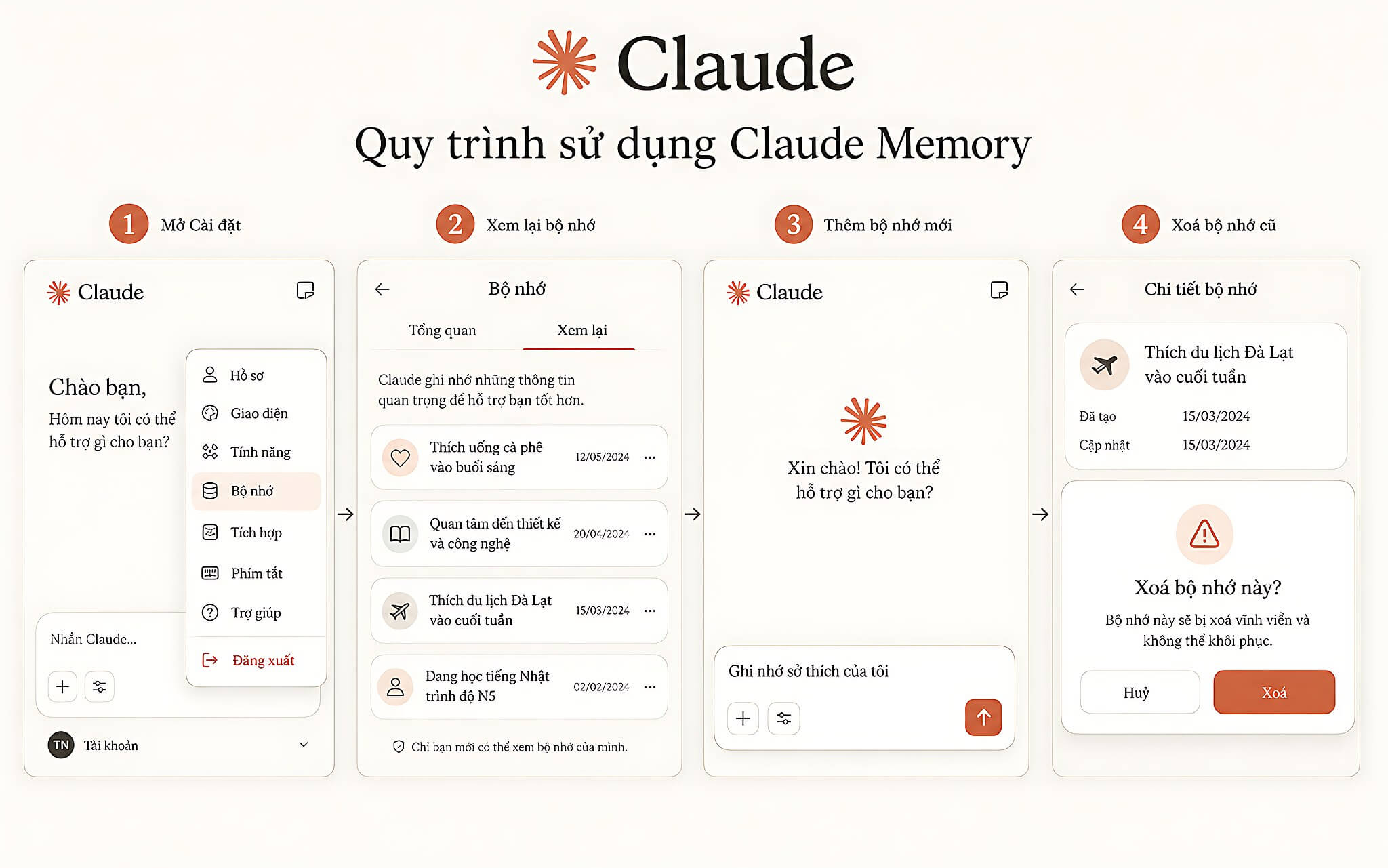
The fourth Claude prompt has the assistant ask you questions to fill gaps rather than guess: "Based on the types of work you are usually asked to do, point out 5 things about preferences, habits, or goals that, if added to memory, would help Claude assist better. Ask the questions one at a time to fill in the gaps." You answer in turn, and the useful details are recorded to improve later responses.
The fifth Claude prompt suits projects that change over time: "Review all existing memory and sort each entry into 1 of 4 groups: Useful, Outdated, Unclear, or Unnecessary. Briefly explain why and suggest which entries should be considered for deletion." Finally, return to the Memory section and delete memories that are finished, outdated, or no longer needed, keeping memory lean and accurate.
Limitations and data privacy notes
By default, Claude does not save sensitive topics such as health, race, religious beliefs, political views, or gender identity. Some data, such as ID numbers, criminal records, and financial account numbers, is never remembered. You can still adjust the permission to store these topics in settings.
Claude's memory can contain information that is wrong, missing context, or outdated, so do not assume every detail Claude lists is completely accurate. The first and fifth Claude prompts are two verification tools that surface the points worth checking before you keep relying on them.
You should also delete memories that no longer have practical value, especially information tied to finished projects. When memory accumulates too much old data, Claude is more likely to rely on context that no longer fits in later conversations, which lowers the quality of its responses.
Who should use Claude Memory, and notes for Vietnamese users
Claude Memory suits people who regularly use the assistant for work, study, writing emails, planning, or organizing projects. Anyone with a distinct writing style who has to repeat many standards in every chat session can also save time retyping instructions, which improves productivity.
As for availability, Claude Memory is currently offered on the Free, Pro, and Max plans via web, desktop app, and mobile; the Team and Enterprise plans have it turned off by default and require the account owner to enable it. Even so, the feature does not replace checking the content yourself, because you still have to confirm whether Claude's memory is correct and still relevant.
For Vietnamese users, the prompts above can be used to save a writing style, report formatting, or work habits in Vietnamese. Claude handles repetitive items well, such as remembering email standards, frequently used tools, and project context, but the final decision should still rest on information you verify yourself in the Memory section.