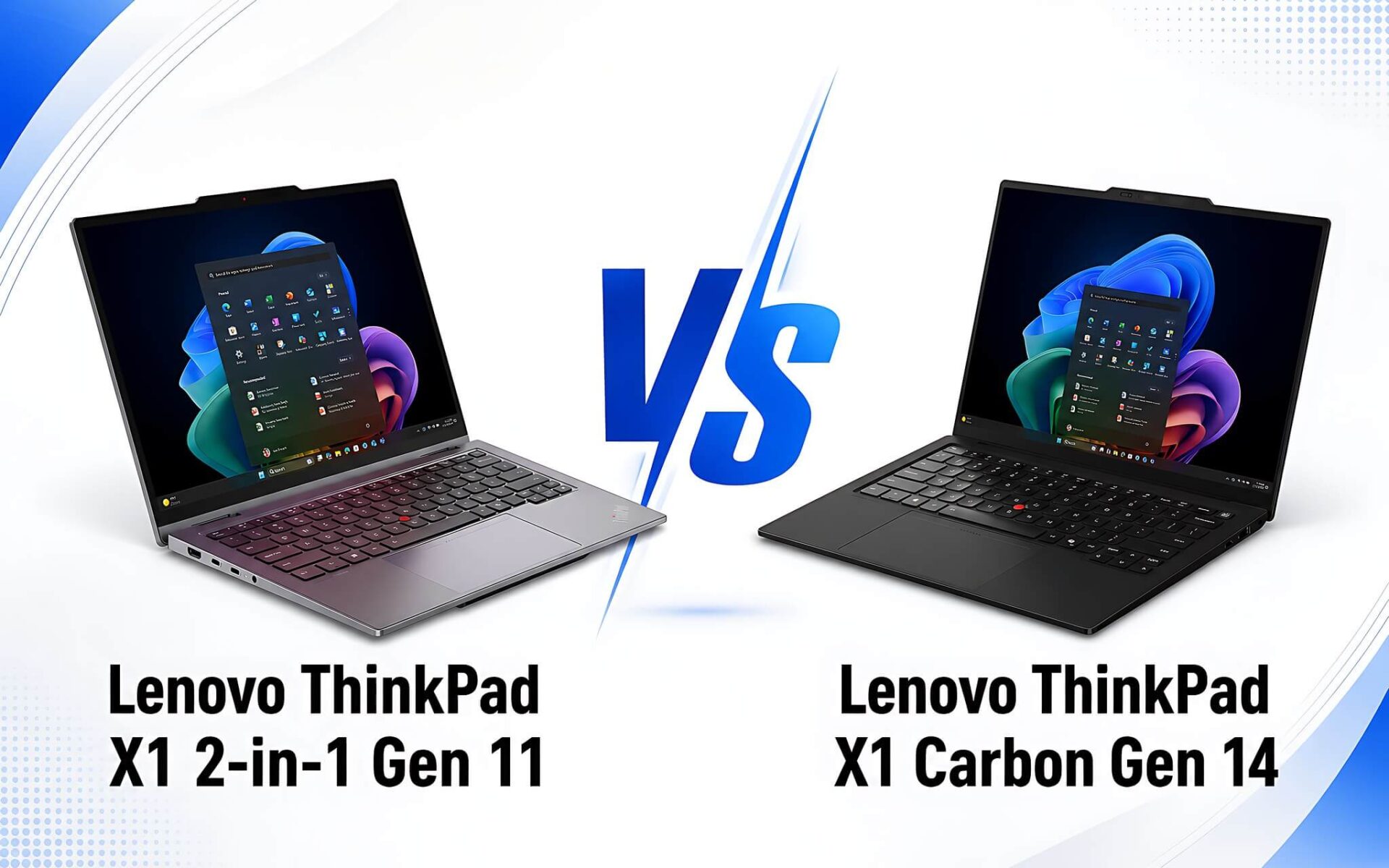
Two ThinkPad X1 Aura Edition 2026 models both target customers needing thin and light business machines with good battery life and high build quality, but they take two completely different directions. The ThinkPad X1 2-in-1 Gen 11 features a 360-degree folding touchscreen for note-taking and signing documents directly, while the X1 Carbon Gen 14 trades that for a sub-1 kg chassis and a 2.8K OLED display. A detail many overlook is that the OLED screen on the Carbon is non-touch by default, so it is not a matter of which machine is better, but rather a matter of deciding what to sacrifice.
What's new with the ThinkPad X1 2-in-1 Gen 11 Aura Edition compared to Gen 10
The biggest upgrade for Gen 11 lies in the platform. The machine has transitioned to Intel Core Ultra Series 3, codenamed Panther Lake, replacing the Lunar Lake and Arrow Lake platforms of Gen 10. The version currently sold at Hung Phat uses the Core Ultra 7 365 vPro with 8 cores and 8 threads, 25W TDP, and a max clock speed of 4.8 GHz. According to standard benchmark data, this chip achieves 2,737 single-core and 10,960 multi-core points in Geekbench 6, and 21,203 points in PassMark.
Battery and weight have also changed. Gen 11 uses a 58Wh battery and starts at 1.14 kg with the standard trackpad version, and 1.15 kg with the haptic version according to Lenovo's PSREF documentation. The previous Gen 10 weighed between 1.22 and 1.30 kg and only had a 57Wh battery. The difference may sound small, but combined with the thinner chassis, the feeling when carrying it all day is noticeably different. You can compare this further in our ThinkPad X1 2-in-1 Gen 10 Aura Edition review if you are considering buying an older model to save money.
| Criteria | ThinkPad X1 2-in-1 Gen 11 Aura Edition | ThinkPad X1 Carbon Gen 14 Aura Edition |
|---|---|---|
| Price at Hung Phat Laptop | Around 53 million | Around 57.5 to 78.5 million depending on configuration |
| Current CPU version | Core Ultra 7 365 vPro, 8 cores, 8 threads, max 4.8 GHz | Core Ultra 5 335 in base model, with options for Ultra 7 365 and X7 368H |
| Integrated Graphics | Intel Graphics Xe3 architecture, 4 Xe cores | Intel Graphics Xe3 architecture, 4 Xe cores in base model |
| RAM | 32GB LPDDR5X 8533MHz, soldered | 32GB LPDDR5X 8533MHz, soldered |
| Storage | 512GB PCIe Gen4, one M.2 2280 slot supporting up to PCIe 5.0 | 512GB or 1TB PCIe Gen4, one M.2 2280 slot supporting up to PCIe 5.0 |
| Display | 14 inch WUXGA 1920 x 1200 IPS, touchscreen, 500 nits, 100% sRGB | 14 inch 2.8K 2880 x 1800 OLED, 120Hz, HDR True Black 500, non-touch |
| Battery | 58Wh, Rapid Charge | 58Wh, Rapid Charge |
| Weight per PSREF | Starting at 1.14 kg (trackpad) or 1.15 kg (haptic) | Starting at 0.977 kg (trackpad) or 0.998 kg (haptic) |
Regarding local AI performance, the Core Ultra 7 365 features an NPU reaching 49 TOPS according to Intel Core Ultra specifications, sufficient for Copilot+ features and background processing in Windows. Note that the 180 TOPS figure you often see when reading about Panther Lake refers to the total platform peak for higher-end 12-core Xe versions, not the Ultra 7 365. For office work, this difference is almost imperceptible.
Notable upgrades for the X1 Carbon Gen 14 Aura Edition
The Carbon Gen 14 stays true to the Carbon identity: as light as possible. The machine starts at 0.977 kg with the standard trackpad version, which is about 160 grams lighter than the 2-in-1 version. This number might not seem much, but it is a noticeable difference when you are constantly carrying the laptop in a bag all day. The chassis still uses carbon fiber and meets MIL-STD-810H military standards, as is traditional for the ThinkPad line.
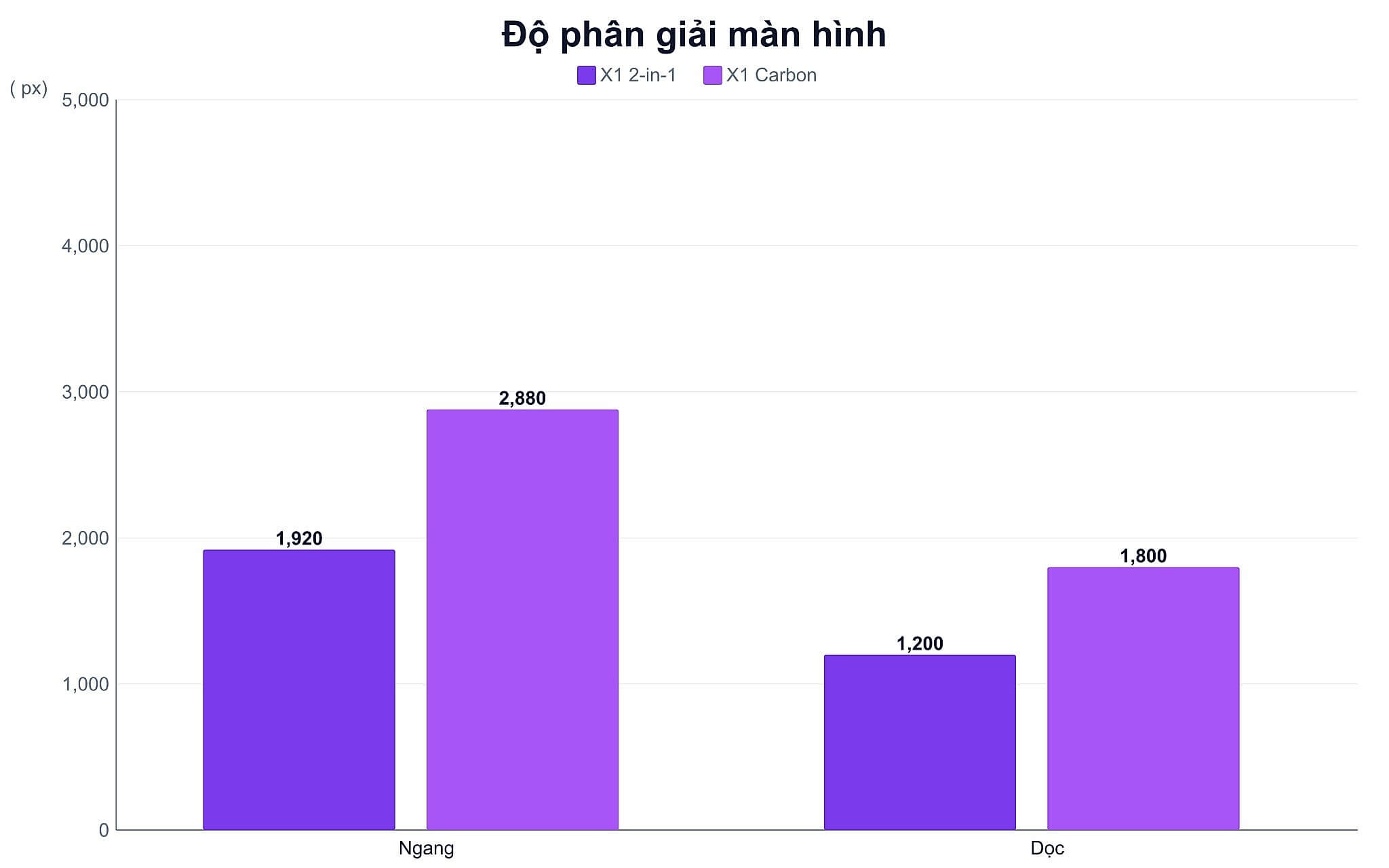
The display is where the Carbon Gen 14 sets itself apart. It features a 2.8K 2880 x 1800 OLED panel with a variable refresh rate from 30 to 120Hz, HDR True Black 500 certification, and 100% DCI-P3 coverage according to PSREF. Tom's Hardware measured a peak brightness of 473 nits in a July 2026 test. Compared to the WUXGA 1920 x 1200 on the 2-in-1, there are more than twice as many pixels, making a clear difference when reading small text or viewing images.
This is also where we must be blunt about something many retailers omit: the OLED version of the Carbon Gen 14 is non-touch by default. This means you cannot change your mind after purchase, as touch and OLED are on two different machines, not two options for the same machine. If your work requires touching the screen to sign or take notes, remove the Carbon Gen 14 from your list immediately, no matter how beautiful the screen is.
Is the ThinkPad X1 2-in-1 just a rebranded X1 Yoga?
This question arises frequently because Lenovo previously had the ThinkPad X1 Yoga line with a similar 360-degree hinge design. Since 2024, the company has merged that line into the ThinkPad X1 2-in-1 name, so in essence, this is an evolutionary successor rather than a completely new product. Anyone who has used the X1 Yoga will find the hinge, the integrated pen storage, and the way the machine switches between laptop, tent, stand, and tablet modes very familiar.
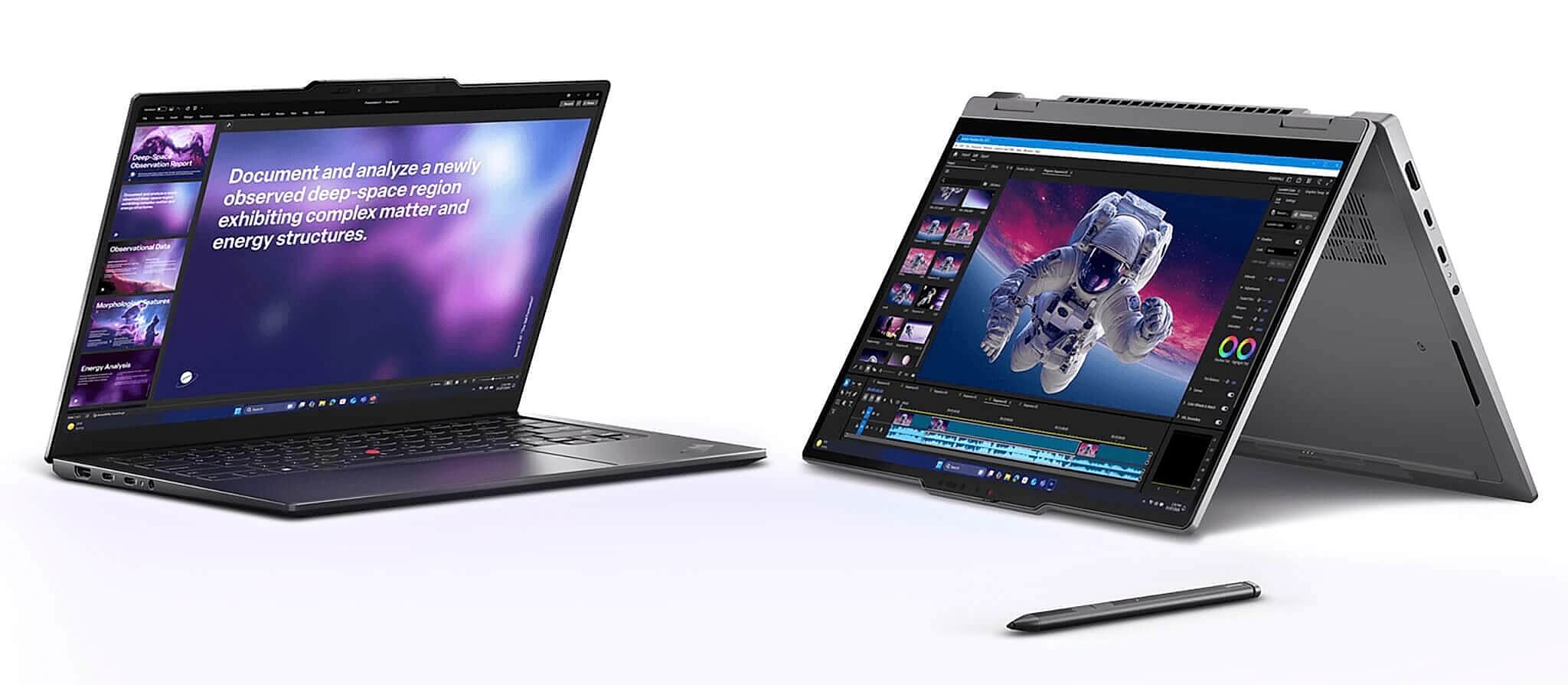
The difference compared to the X1 Yoga era is that the machine is significantly lighter and has a 500-nit bright screen, sufficient for outdoor use or brightly lit meeting rooms. The included pen is stored inside the chassis so it is hard to lose, a feature many other 2-in-1 machines still handle by attaching the pen magnetically to the side. For those who frequently take notes in meetings or sign contracts on the spot, this is a more practical difference than any benchmark score.
Is an OLED screen on a laptop durable for many hours of daily use?
The most common concern with OLED is burn-in when static elements like the taskbar or Excel formula bars are displayed for many hours. On modern business laptops, both Lenovo and Windows have mechanisms to mitigate this risk: blurring pixels when static content is detected, slightly shifting pixels, and lowering the brightness of large bright areas. For a typical office workload over three to four years, this risk is low.
A more practical issue is power consumption. OLED panels consume power based on the content being displayed, so a white background in spreadsheets and Word documents consumes significantly more power than a dark background. This is why a high-resolution OLED machine might have shorter battery life than an IPS machine with the same battery capacity, even though both use a 58Wh battery. If your work primarily involves white-background Excel and Word, this is a factor to consider in your decision.
Regarding reference data, Notebookcheck measured the ThinkPad X1 2-in-1 Gen 11 running a Core Ultra 7 355 with a WUXGA screen achieving about 21 hours and 56 minutes of Wi-Fi web browsing. On the Carbon Gen 14 side, Tom's Hardware recorded about 13 hours and 10 minutes in a test combining web browsing, video playback, and OpenGL tasks at 150 nits. Since the two measurements used different methods, they cannot be compared directly, but the trend of WUXGA being more power-efficient than OLED is consistent.
Which ThinkPad X1 Carbon Gen should you buy in 2026?
If you are aiming for the Carbon line, the common question is whether to get the latest Gen 14 or step back to a previous generation to save money. Gen 14 is worth choosing if you need 2.8K OLED, a weight under 1 kg, and the Panther Lake platform with an NPU for local AI features. If you only use it for basic office work and don't care about an OLED screen, Gen 12 or Gen 13 models still under warranty will perform well at a much lower cost.
One thing to consider carefully is the RAM. Both machines have soldered RAM that cannot be upgraded later, so 32GB is a choice you should finalize from the start if you plan to use the machine for four years or more. Storage is the opposite: the M.2 2280 slot supports up to PCIe 5.0, so you can replace it with a higher capacity drive, but since the machine only has one slot, you cannot add a second drive in parallel.
If you prioritize touch and a pen stored in the chassis, you can check out the ThinkPad X1 2-in-1 Gen 11 Aura Edition configurations currently for sale with the Core Ultra 7 365 and a 500-nit touchscreen. This is the only model of the two that allows 360-degree folding.
Conversely, if you prioritize weight and display quality, the ThinkPad X1 Carbon Gen 14 Aura Edition OLED version is a better fit, with a chassis starting under 1 kg. Prices for both vary depending on CPU, SSD options, and stock availability, so you should re-verify inventory before placing a deposit.
Advice on choosing a ThinkPad X1 Aura Edition in Ho Chi Minh City
A quick way to choose in one sentence: if you need to touch the screen, get the 2-in-1; if you need lightness and a beautiful screen, get the Carbon. The 2-in-1 is suitable for managers or those presenting to clients, lecturers, sales professionals signing contracts on the spot, and people who prefer note-taking with a pen. The Carbon is suitable for frequent travelers, those working with images, or those who often present using the laptop screen itself.

Neither machine is an option for gaming or heavy rendering. The integrated Intel Graphics Xe 4-core is sufficient for office work, online meetings, light photo editing, and eSports games at low settings. Notebookcheck measured the Gen 11 2-in-1 achieving about 84.9 FPS in Dota 2 at 1080p Ultra settings, while Final Fantasy XV at 1080p High only reached 25.9 FPS. If your work involves long video editing or 3D simulation, you should look at mobile workstation lines instead of these two machines.
When buying at Hung Phat, you should clearly ask for the specific CPU model, SSD capacity, whether the screen is touch-enabled, the warranty period, and whether accessories like a pen are included. For the Aura Edition line, configurations vary by batch, so confirming details before payment is safer. Specifically, the touch functionality is something that cannot be fixed after purchase, so this is the first question you need to settle, not an afterthought.
If you are still torn between the two design directions, our article ThinkPad X1 Carbon Gen 13 and Dell Pro 13 Premium for frequent travelers analyzes the OLED screen aspect compared to battery life in the business laptop group. If you are in Ho Chi Minh City, please schedule an appointment to see the machines in person to try both, as the 160-gram difference and the typing feel are things that can only be truly felt by hand.
Frequently Asked Questions (FAQ)
What is a 2-in-1 laptop and how is it different from a regular laptop?
This is a line of machines with a 360-degree hinge or a detachable screen, allowing them to be used as both a regular laptop and a tablet. With the ThinkPad X1 2-in-1 Gen 11, the hinge rotates fully to allow the machine to stand in four positions: laptop, tent, stand, and tablet. The trade-off is that the machine is about 160 grams heavier than a clamshell version of the same size due to the reinforced hinge and the addition of a touch layer for the screen.
Is an OLED or LCD screen more durable for work use?
In terms of lifespan, IPS LCD panels are more stable with static content because they do not have the risk of burn-in. OLED provides deeper colors and superior contrast but requires pixel protection mechanisms when displaying fixed interfaces for many hours. For an office workload of three to four years, both are sufficiently durable; a more significant difference to consider is that OLED consumes more power when working with white backgrounds like spreadsheets.
Does the ThinkPad X1 Carbon Gen 14 have a touch screen version?
The 2.8K OLED version of the Carbon Gen 14 is non-touch by default. This is a key difference from the 2-in-1 version, which has touch on all screen options. If your work requires touching the screen to sign documents, take notes with a pen, or rotate the machine for clients to see, you should choose the 2-in-1 from the start, as there is no way to add touch to a Carbon after purchase.
Which ThinkPad series should I buy for high-end office work?
The X1 series is suitable if you need a thin and light machine, travel frequently, and prioritize build quality. Within the X1 line, the 2-in-1 is suited for those who interact directly with documents, while the Carbon is for those who prioritize weight and the display. If your budget is more limited or you need more ports and RAM upgradeability, the T14 series will be more practical, even though it is significantly heavier and thicker.