


Many people still choose laptops based on the last letter of the chip name: U for long battery life, H for high performance, and HX for maximum power. However, the 28W threshold is shaking that rule: a laptop CPU in the U group can run at 28W, a Core Ultra H can also run at 28W, and even some chips with the HX suffix only operate at 28W. Therefore, the characters after the chip name are now just segment indicators and are not enough to conclude whether a machine has long battery life or sustained performance. In this article, Hung Phat examines the most confusing areas-the 28W threshold and the HX 55W branch-so you can avoid buying a machine that runs hot, loud, or loses power after a few months.
What do the U, H, and HX suffixes in a laptop CPU mean?
U, H, and HX are how Intel and AMD categorize laptop CPUs based on power consumption, heat, and performance orientation. The U series is like a fuel-efficient car-quiet and built for long distances; the H series is like a family car with a stronger engine, capable of handling heavy tasks; while the HX series is like a high-performance vehicle, requiring a robust chassis, cooling system, and power supply to perform correctly. Hung Phat has discussed the fundamental comparison between the U and H groups in detail in the article H or U chips: deciding if your laptop runs hot or has long battery life, so this article dives deeper into the more unpredictable zones.
| CPU Group | Common Wattage | Suitable For | Key Checkpoints |
|---|---|---|---|
| U | 15 - 28W; AMD Ryzen U has cTDP around 15 - 30W | Office work, studying, online meetings, frequent travel | Battery, RAM, cooling, manufacturer power limits |
| H / HS | 28 - 45W; Core Ultra H typically has 28W PBP, AMD HS/H around 35 - 54W | Programming, photo editing, medium video editing, heavy multitasking | Cooling, noise, charger, dual-channel RAM |
| HX | Intel HX typically 55W, turbo can exceed 100W depending on the machine | Heavy gaming, rendering, mobile workstations, many virtual machines | Weight, battery, temperature, charging capacity |
| Naming Exceptions | Ryzen AI 9 HX 370 sounds high-end but TDP is only 28W | High-performance thin-and-light machines, AI-focused | Must check actual TDP, do not guess by the letter |
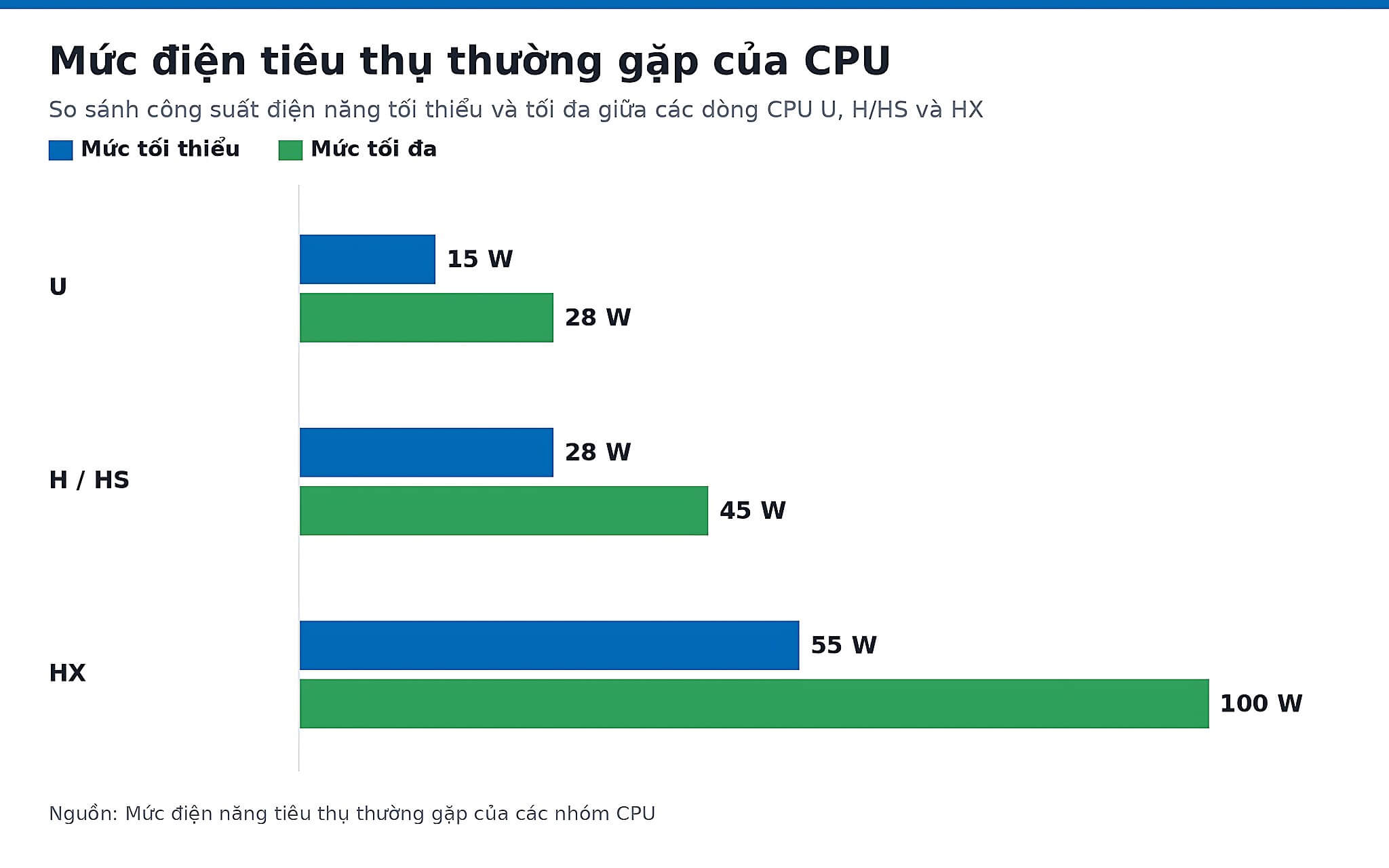
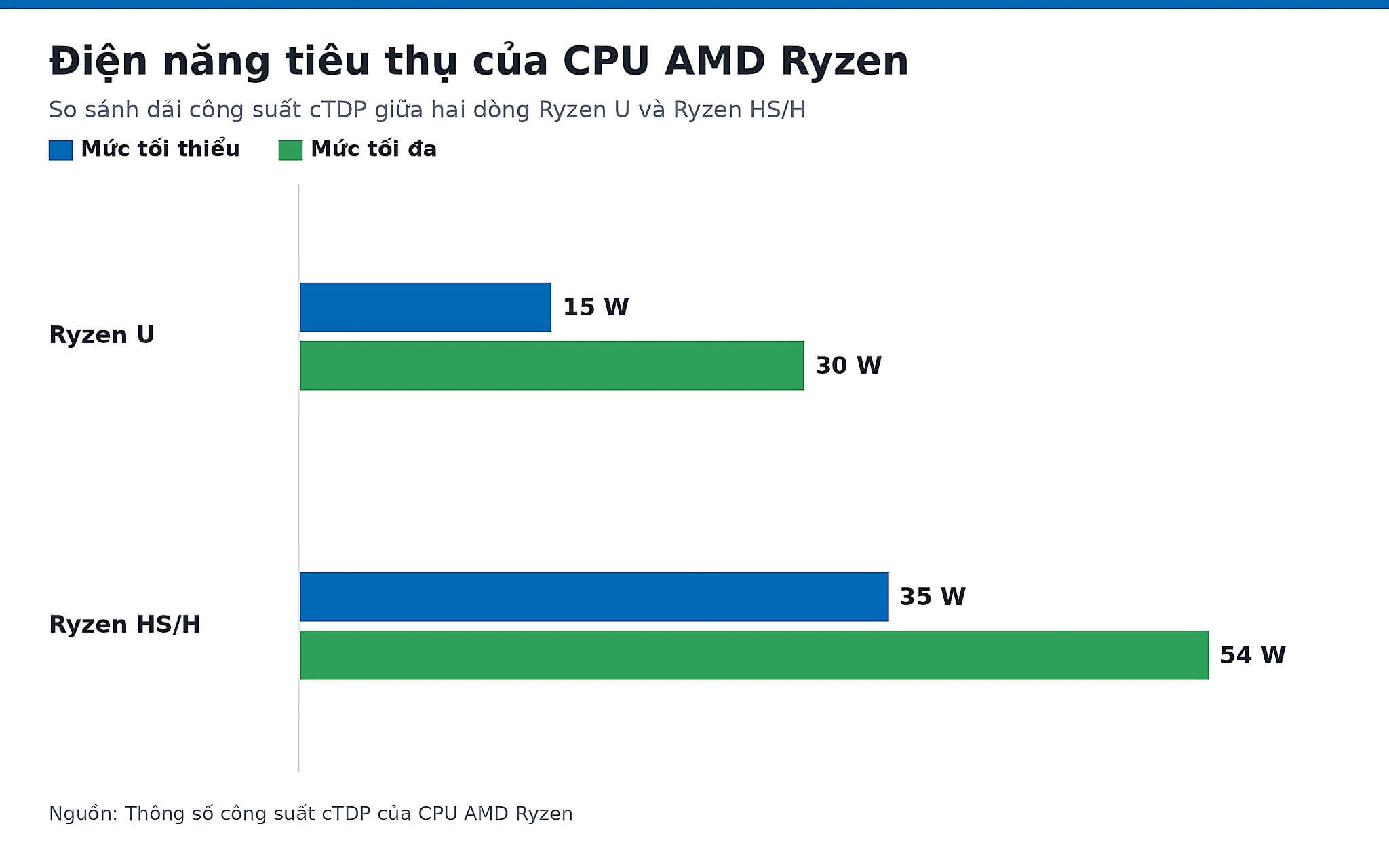
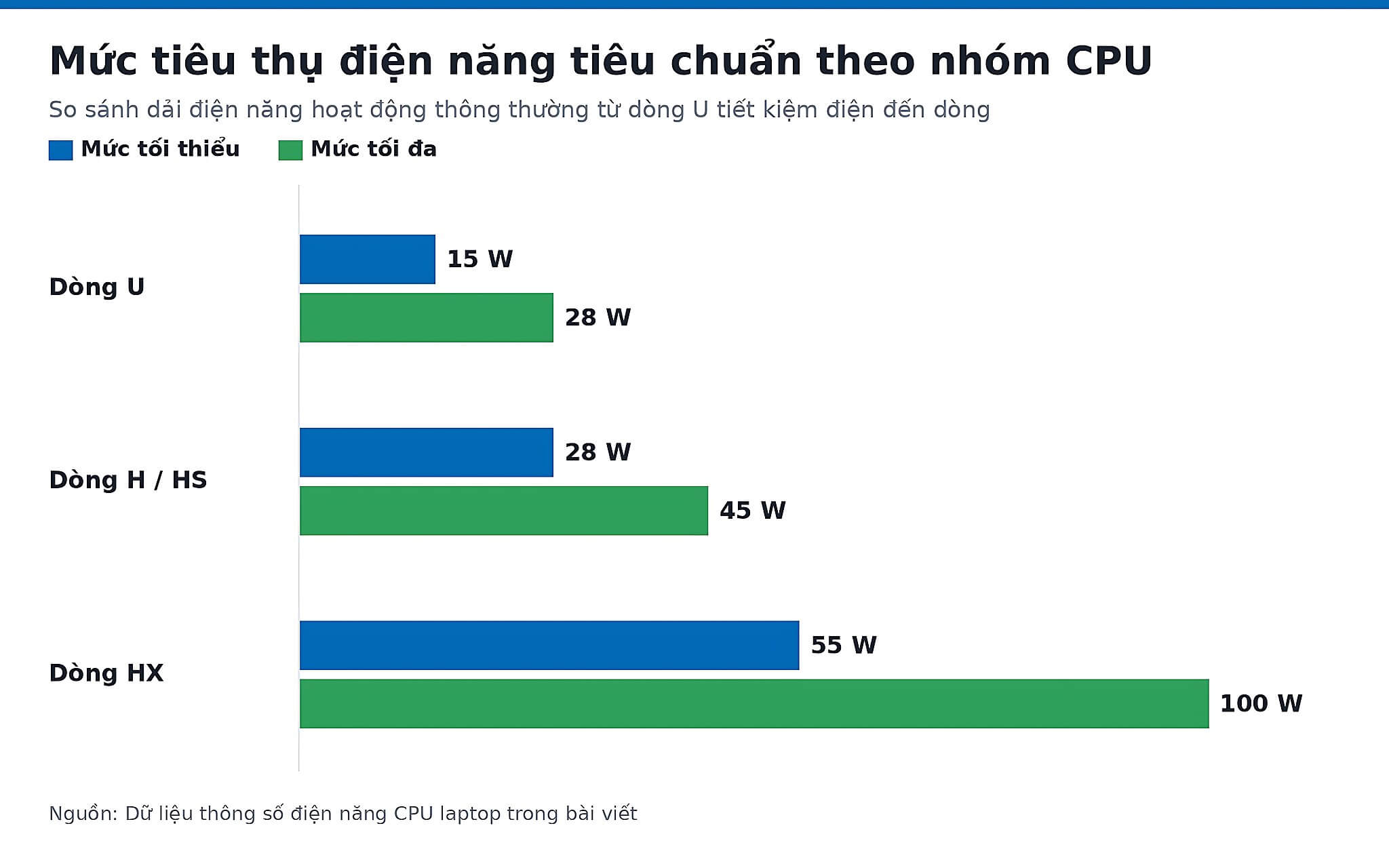
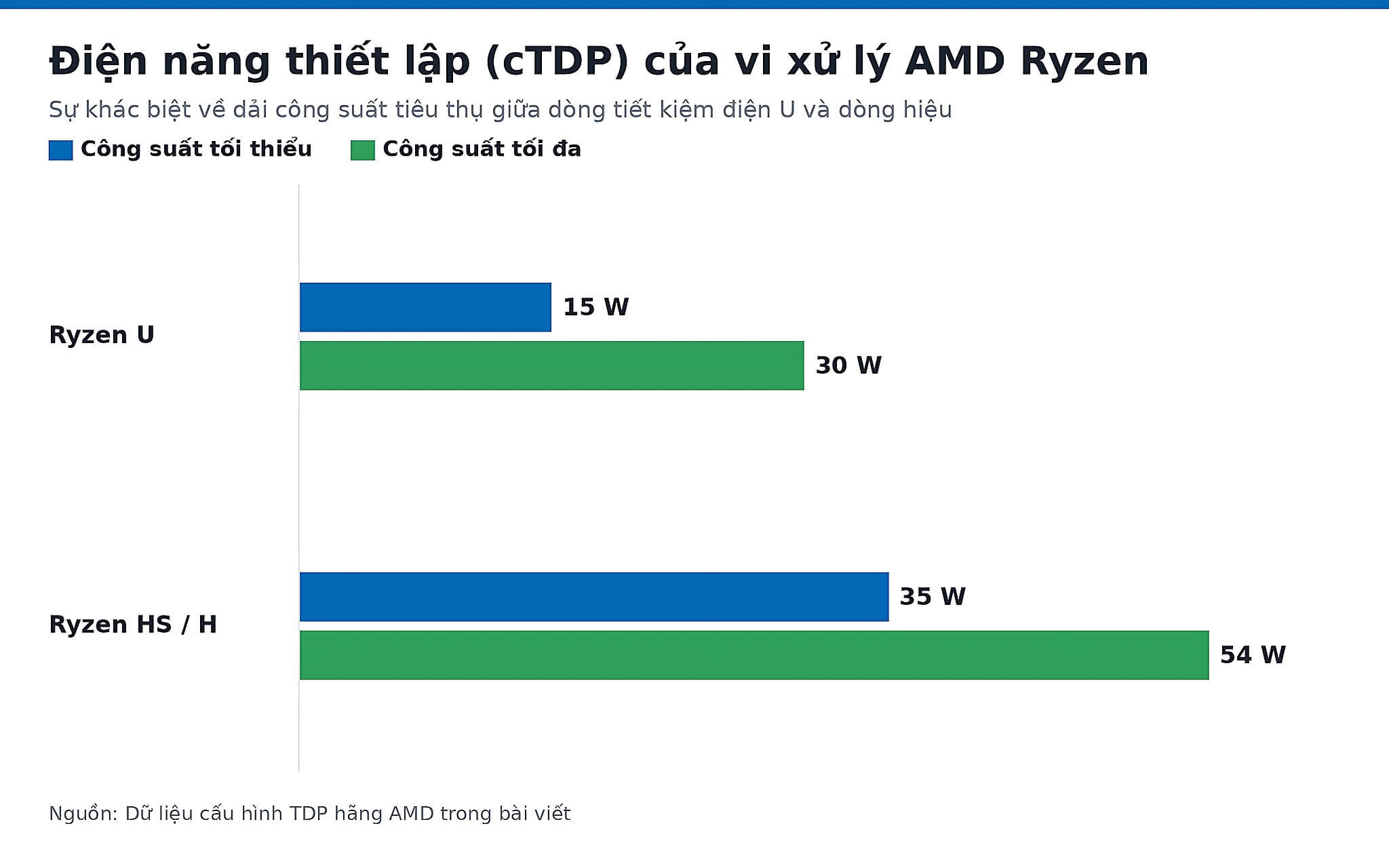
The key point is that the laptop manufacturer is the one who decides the final power level. Intel Core Ultra U typically has a 15W PBP, but some thin-and-light machines are configured around 28W; AMD Ryzen U has a cTDP of approximately 15 - 30W, and many models default to 28W. Therefore, even with the same "U" letter, the experience still varies depending on how the manufacturer sets the power limits.
In the H group, previous generation Intel H chips commonly had a 45W PBP, whereas current Core Ultra H chips typically have a 28W PBP but compensate with higher turbo speeds; AMD HS/H chips fluctuate between 35 - 54W depending on the model. The HX group targets gaming laptops and mobile workstations; Intel HX chips are commonly around 55W and can turbo past 100W depending on the design. This means the three letters now overlap right at the 28W mark.
Why the 28W threshold makes suffixes harder to predict than before
Previously, the gap was quite clear: U was 15W, H was 45W, so you could guess just by looking at the letter. Currently, the 28W mark has become a gray area because all three groups are present there: U chips configured at 28W, Core Ultra H with exactly 28W PBP, and AMD even has chips in the highest group that only have a 28W TDP. When three groups stand at the same power level, the letter is no longer a reliable basis for predicting battery life or sustained performance.
The clearest example is the Ryzen AI 9 HX 370: the name sounds like a high-end series, but the TDP is only 28W, belonging to the high-performance thin-and-light and AI-focused category, rather than the traditional 55W gaming group. In contrast, the Intel Core Ultra 9 285HX is true Arrow Lake-HX 55W, with significantly more cores and higher multi-core performance. Two chips with the same final character serve two completely different types of machines.
Therefore, when providing consultation, Hung Phat always asks about your actual workload before looking at the chip name. If you mainly use Office, online meetings, web browsing, or light photo editing, the U or H group at the 15 - 28W mark is ideal because the machines are thin, cool, and have good battery life. If you do video editing, open many tabs, program large projects, or run virtual machines, the H/HS group is more suitable; for 3D rendering, long code builds, or sustained multi-core performance, the HX 55W offers the advantage, provided the cooling is sufficient.
Real data for U 28W, HX 28W, and the 55W level
Benchmark scores do not replace real-world experience, but they help clarify what the 28W mark signifies. In the U 28W group, the AMD Ryzen 7 8840U (Hawk Point-U, Zen 4, 8 cores 16 threads, TDP 28W) achieves approximately 1,703 single-core and 12,972 multi-core points in Cinebench R23, and 2,528 single-core and 10,366 multi-core in Geekbench 6. This level is more than enough for office work, studying, online meetings, and light photo editing on a thin chassis.
Also at the 28W mark, the AMD Ryzen AI 9 HX 370 (Strix Point-HX, Zen 5/5c, 12 cores 24 threads, TDP 28W) achieves 2,018 single-core and 21,761 multi-core in Cinebench R23, 2,880.5 single-core and 14,996 multi-core in Geekbench 6, 35,029 in PassMark, and 50 TOPS NPU. Compared to a U chip at the same 28W, the multi-core performance is about 1.7 times higher due to more cores, showing that even at the same power level, performance can vary significantly.
Moving up to the true HX 55W branch, the Intel Core Ultra 9 285HX (Arrow Lake-HX, 24 cores 24 threads, TDP 55W) achieves 2,187.5 single-core and 36,429.5 multi-core in Cinebench R23, 3,026 single-core and 19,479 multi-core in Geekbench 6, 57,229 in PassMark, and 13 TOPS NPU. The multi-core gap compared to the U 28W chip is nearly 2.8 times-this is the level of difference that renderers or long-term code builders will clearly feel.
Specifications to check before looking at the suffix
Don't choose a laptop just because you see i7-H, Ryzen 7-H, or i9-HX, because the final character is not a performance guarantee. For the same laptop CPU model, a machine with good cooling, wide power limits, and an optimized BIOS will run more stably than a thin machine with restricted power. Conversely, a chip with a very high-sounding name in a thin chassis may still lose to a lower-spec configuration placed in a thick gaming laptop.
You should look at at least five points before spending your money: base power level (TDP, PBP, or cTDP); number of cores and threads; turbo boost level and turbo duration; the cooling system; and finally, RAM, battery capacity, and usage needs when not plugged in. For those running Docker, virtual machines, or heavy development environments, RAM capacity sometimes impacts the experience even more than the laptop CPU's final character, as Hung Phat analyzed in the article Choosing a laptop to run Docker smoothly: RAM is the real lifesaver.
For video post-production professionals, a powerful configuration is still not enough if the screen has inaccurate colors. You can read more about how to choose a machine based on screen and color gamut in the article 4K DCI-P3 screens for content creators. In short, the laptop CPU's final character is just a starting point for categorization; the final decision still depends on actual power levels, cooling, memory, and the screen.
Buying advice in Ho Chi Minh City by the three groups
If you need a lightweight machine with stable battery, low noise, and primarily for office work, aim for the U group and prioritize sufficient RAM, a good SSD, an easy-to-view screen, and a large battery instead of chasing a high suffix. A currently available option is the Lenovo ThinkPad T14s Gen 4 using a Core i7-1355U vPro (15W PBP), priced around 18.5 million VND, suitable for frequent travelers who don't want to carry a charger all day.
If you do both office work and programming, photo editing, short video exporting, or need heavy multitasking, the H group at the 28W mark is the sweet spot. The HP Envy 17-DA0047R uses a Core Ultra 7 155H vPro (16 cores 22 threads, exactly 28W PBP), priced around 21.9 million VND, which is a clear example that the "H" suffix no longer automatically means 45W. When inspecting a machine, you should check if it runs hot under long loads, if the fan is too loud, and if the RAM will be sufficient for your work for the next 3 - 5 years.
If you play heavy games, do rendering, run many virtual machines, or need a mobile workstation, look toward the HX 55W with a large-chassis cooling system. The Lenovo Legion 5 15IAX10 uses a Core Ultra 7 255HX (20 cores, 55W PBP) along with an RTX 5060, priced around 50.3 million VND, which is a true mobile workstation-style machine. Hung Phat recommends sending us your specific needs, the software you use most, and your actual budget before finalizing, to receive advice on the correct configuration, stock status, and clear warranty in Ho Chi Minh City.
Frequently Asked Questions (FAQ)
Why can't U, H, and HX suffixes be used to predict wattage accurately anymore?
Because all three groups now appear at the 28W mark: U chips have 28W configurations, Core Ultra H has exactly 28W PBP, and the Ryzen AI 9 HX 370, despite its high-end name, also has only a 28W TDP. When three groups overlap at the same power level, you need to check the actual TDP, core count, and cooling of each specific machine instead of guessing by the letter.
Can a laptop CPU be upgraded?
Most modern laptop CPUs are soldered directly onto the motherboard, so they cannot be upgraded like RAM or SSDs. If you want to switch from a U to an H or HX, the practical option is to replace the entire laptop, as the motherboard, cooling, and power delivery are specifically designed for each group.
Which group will be sufficient for the next 3 - 5 years?
If your work is mainly Office, web browsing, online meetings, and data management, the U group (15 - 28W) is still sufficient when paired with adequate RAM and a good SSD. If you do programming, photo editing, or frequent video editing, the 28W H group is a safer bet. If you do heavy rendering or run many virtual machines, the HX 55W is the best choice.
Are there specific machines representing each group with exact prices?
The U group has the Lenovo ThinkPad T14s Gen 4 (Core i7-1355U, 15W) at approximately 18.5 million VND. The 28W H group has the HP Envy 17-DA0047R (Core Ultra 7 155H) at approximately 21.9 million VND. The HX 55W group has the Lenovo Legion 5 15IAX10 (Core Ultra 7 255HX, RTX 5060) at approximately 50.3 million VND. These three levels cover the 15W, 28W, and 55W thresholds to help you visualize easily.











