


The biggest waste of money when buying a laptop isn't in buying too little, but in paying extra for a specification that the chassis cannot fully utilize. Two machines running the same Core Ultra 7 can still differ by 55% in multi-core scores, simply because the manufacturer provides a different power limit for the chip. Therefore, choosing a laptop configuration based on your budget should start with the chassis and thermal capabilities, rather than just the processor's name. Hung Phat has scanned 87 machines currently in stock to point out where budgets are often misspent.
Where is your budget often misspent when choosing a laptop configuration?
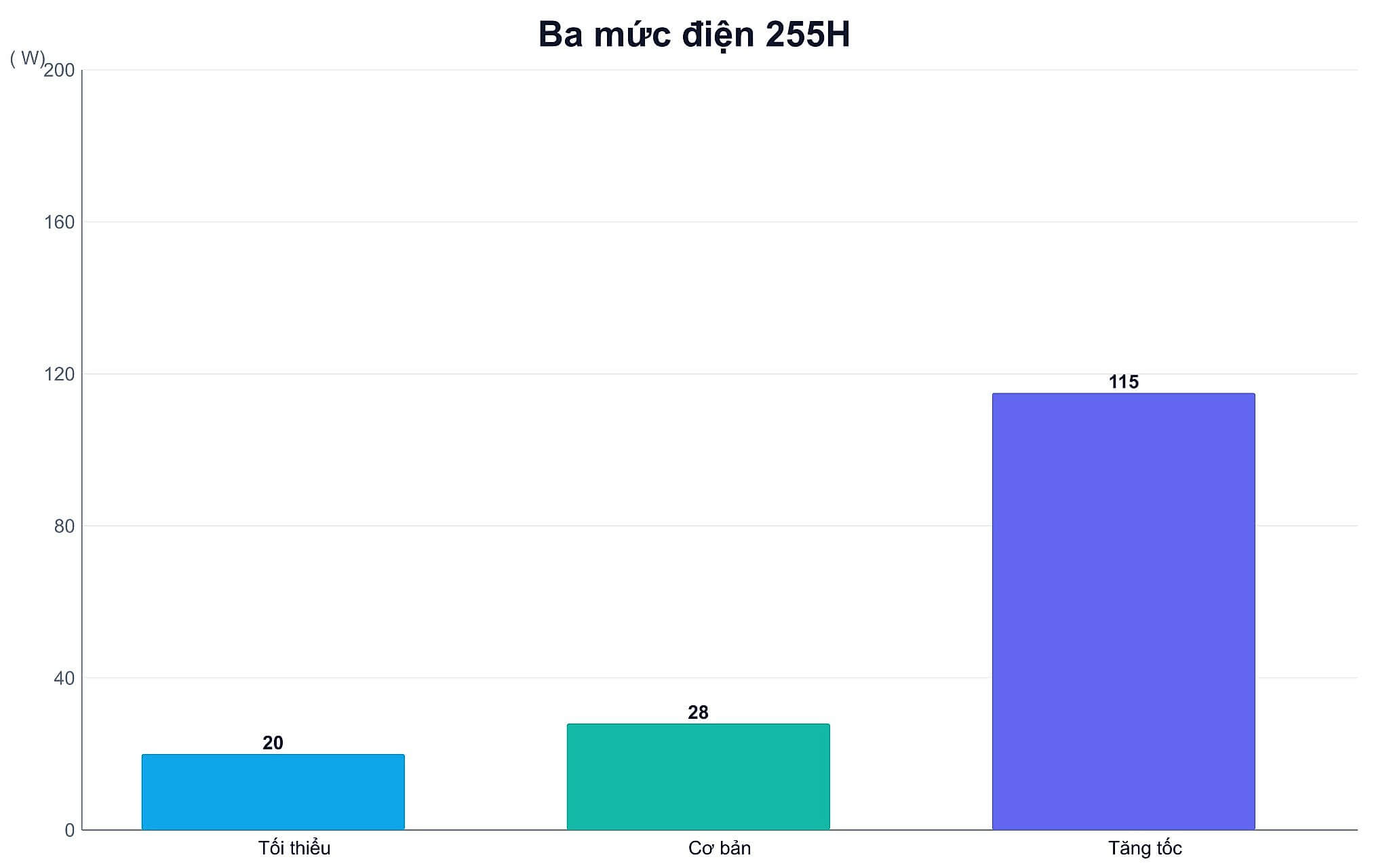
From the 12th generation, Intel replaced the term TDP with Processor Base Power and Maximum Turbo Power. These are the figures that determine the actual value of a laptop configuration. The specification page for the Intel Core Ultra 7 Processor 255H clearly states three thresholds for the same chip: 20W minimum guaranteed, 28W in base mode, and 115W when boosting. With the same silicon, two laptop configurations can be allowed to differ by nearly six times, and you won't see that difference on the sticker.
The impact on laptop configurations is very specific. A Core Ultra 7 155U at 15W achieves 9,674 Cinebench R23 multi-core points, while a Core Ultra 7 155H at 28W achieves 15,028 points, a 55.3% difference. More notably, the single-core scores of these two chips differ by only 4.6%. In other words, the extra money you pay for a high-core-count laptop configuration only pays off when your work involves sustained multi-threaded tasks.
Conversely, this is where budget for laptop configurations is often overspent. The Ryzen AI 9 HX 375 running at 54W is only 0.2% higher in multi-core scores than the HX 370 running at 28W. The Core Ultra 9 288V at 30W is even lower than the Core Ultra 7 268V at 17W. When clock speed ceilings and cooling capacities are reached, every additional watt produces almost no performance gain, only more fan noise and higher electricity bills.
So, where is the clearest evidence regarding laptop configurations? The Ryzen 7 8840HS and 8845HS share the same Zen 4 silicon with 8 cores and 16 threads, differing only in power levels of 28W versus 45W, resulting in a 23.8% difference in multi-core scores. Meanwhile, the 8840U version at 28W is only 0.8% behind the 8840HS. The suffix in the chip name doesn't matter much. The power limit allowed by the chassis is the core factor of a laptop configuration.
Data from 87 machines shows that laptop configurations are dictated by the chassis
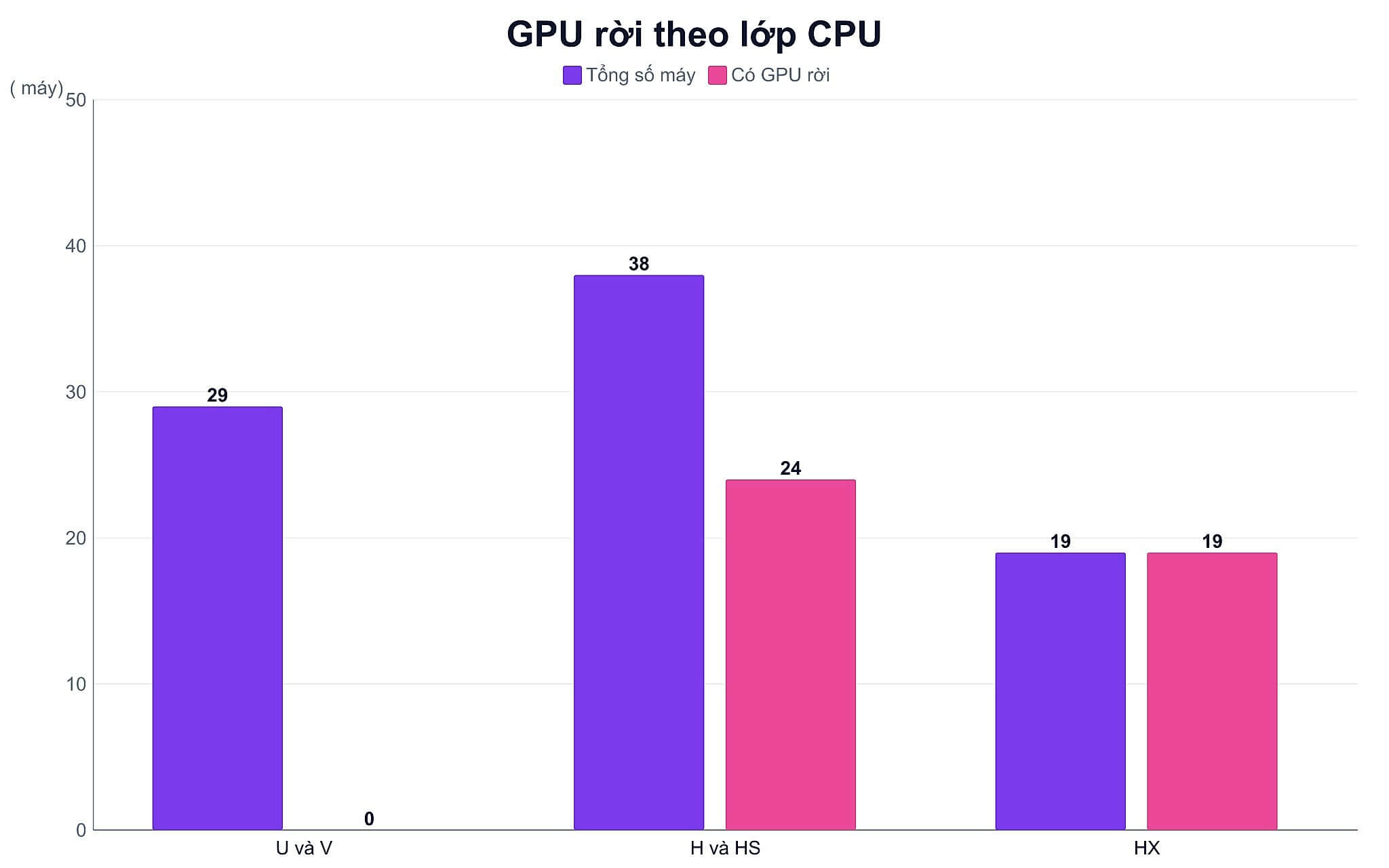
To avoid generalizations, Hung Phat categorized 87 machines listed on our website by processor power class, then averaged the weight, battery capacity, and the ratio of machines with a discrete GPU. This is real-world data on laptop configurations currently being sold in Ho Chi Minh City, not marketing figures.
| Processor Class | Number of Machines | Average Weight | Average Battery | Discrete GPU Ratio |
|---|---|---|---|---|
| U and V Suffix | 29 | 1.50 kg | 52.7 Wh | 0 out of 29 machines |
| H and HS Suffix | 38 | 1.87 kg | 69.4 Wh | 24 out of 38 machines |
| HX Suffix | 19 | 2.44 kg | 83.4 Wh | 19 out of 19 machines |
Not a single machine using a U-suffix processor among these 87 machines can be equipped with a discrete GPU. The "0 out of 29" figure is a crucial lesson for your wallet: if you plan to buy a thin and light laptop and expect to do rendering or gaming, that expenditure will essentially have to be redone from scratch with a second machine. Each higher power tier results in a chassis that is about 2 to 6 mm thicker and a battery that is 15 to 30 Wh larger.
That extra volume is exactly where manufacturers tuck in heat pipes and fans, meaning a laptop configuration cannot simultaneously offer both extreme portability and sustained performance. If you want to understand chip suffixes more deeply before deciding, Hung Phat has an article whether H or U chips determine if a machine runs hot or has long battery life that analyzes the temperature and battery life aspects specifically.
Which laptop configuration is worth your money in 2026?
The principle of budget allocation for laptop configurations is quite simple: put money into what you touch every day and cannot upgrade, and cut back on what can be added later. Screens, keyboards, batteries, and the chassis belong to the first group. Storage drives and most peripherals belong to the second group. Memory sits in the middle; depending on the machine, it may have an upgrade slot or be soldered onto the motherboard.
Comparing 77 laptop configurations with public pricing, a clear paradox emerges: the ratio of non-removable onboard RAM increases with price, from 16% in the 15-25 million VND group to 29% in the over 35 million VND group. The more you spend, the easier it is for memory upgradeability to be locked down. This is a hidden cost that few consider before checking out.
| Segment | Where to focus budget | Easiest waste | Onboard RAM ratio in stock |
|---|---|---|---|
| Under 15 million | Screen, battery, weight | Paying extra for high-core chips | 22% (4 out of 18 machines) |
| 15 to 25 million | Memory and upgrade slots | Upgrading processor name tiers | 16% (3 out of 19 machines) |
| 25 to 35 million | GPU power and cooling | Excessive high-refresh-rate screens | 25% (4 out of 16 machines) |
| Over 35 million | Memory, screen, warranty | Locked upgrade configurations | 29% (7 out of 24 machines) |
In the 15 to 25 million VND range, a reference point in our stock is the HP EliteBook 640 G11 (2024), priced around 19 to 20 million VND, featuring a 12-core Core Ultra 7 155U, upgradable DDR5 SO-DIMM RAM, and a 56 Wh battery. This machine perfectly illustrates the logic above: many cores, thin chassis, so multi-core performance is limited by the 15W power limit. You buy it for portability and upgradeability, not for the core count.
From 25 to 35 million VND, discrete GPUs become truly viable, but in exchange, the chassis becomes significantly thicker and heavier. The Lenovo LOQ 15AHP10 (2025) at around 34 million VND is an easy example, with an 8-core Ryzen 7 250, RTX 5050 8GB GDDR7, 60 Wh battery, and a weight of 2.4 kg. The price you pay is in portability, not just money, so consider this carefully before choosing.
GPU in laptop configurations can easily inflate your budget
In a laptop configuration, the GPU name is the most confusing and most expensive part. An RTX 5070 laptop version only has 8GB of memory on a 128-bit bus, while the desktop version has 12GB on a 192-bit bus. An RTX 4080 laptop version stops at 12GB, while the desktop version has 16GB. If you use desktop prices and scores as a reference for a laptop configuration, your expectations will be far from reality.
NVIDIA also does not list a fixed clock speed for laptop GPUs. On the GeForce RTX 50 Series Gaming Laptops page, Boost clock is listed as a range, such as 1597 to 2160 MHz for the RTX 5090 laptop version. The specific power limit for each laptop configuration is determined and announced by the laptop manufacturer. Therefore, two machines with the same RTX 5050 but a difference of a few million VND can still deliver different frame rates.
Graphics memory specifications only tell part of the story. An RTX 5050 laptop version has a bandwidth of 384 GB/s, double the 192 GB/s of the RTX 4050 laptop version, with 8GB instead of 6GB. So, how much does the score increase? Only about 12.3% in Time Spy. Paying more for a specification that sounds very powerful does not mean your laptop configuration will be exactly that much faster.
Regarding frame rates, Notebookcheck data at 1080p resolution is a useful reference, as it represents the median for the entire GPU series across various models with different power limits. Cyberpunk 2077 on Ultra settings achieves about 50.8 fps with an RTX 4050 and 72.3 fps with an RTX 4060. A machine with a lower power configuration will fall significantly below these levels, so treat these as reference points rather than guarantees.
Laptop configurations for developers should focus money on memory
The appropriate laptop configuration depends on the project, not the job title. Compiling large projects, running several containers, or opening multiple virtual machines are sustained multi-core tasks, which are the exact tasks most heavily throttled by power and thermal limits. Conversely, web development with a few browser tabs and a text editor leans toward single-threaded tasks, where the difference between the two chip tiers is only around 5%.
For this reason, in laptop configurations for software development, memory capacity is usually a better investment than a higher processor tier. Insufficient memory causes immediate system freezes, while a 20% slower chip only makes you wait a few extra minutes during each compilation. The price difference between two chip tiers is often enough to upgrade the laptop configuration's memory by one level, and that investment yields clearer benefits.
Verify whether the laptop configuration uses one or two memory channels, if there are empty slots, and the maximum capacity announced by the manufacturer. A small detail that saves real money: a machine that can charge via USB-C allows you to share a charger with your phone, saving you from carrying a separate, heavy charger when traveling.
What to verify when finalizing a laptop configuration in Ho Chi Minh City
Before paying, you should request confirmation of the full name, model code, condition (new or used), factory configuration, and any upgrades. The same model name can exist in multiple versions with vastly different memory, screens, and GPU power limits, leading to price differences of several million VND. The quoted price should include the validity period, accessories, and specific warranty conditions.
For new laptop configurations, check the seals, serial number, and manufacturer warranty period. For used machines, you need to check the appearance, hinges, keyboard, pixels, battery, storage, charger, and repair history. Verbal promises are difficult to verify when warranty issues arise, so request that they be written directly onto the sales invoice.
If you primarily do office work, focus your budget on the screen, battery, and portability. If you do software development, prioritize memory and upgradeability. If you play games or do rendering, GPU power and cooling are the key elements of a laptop configuration. You can send the model code and your expected budget to Hung Phat for a comparison of specifications, potential compromises, price, and warranty conditions before finalizing, with absolutely no pressure to buy.
Frequently Asked Questions (FAQ)
What constitutes a powerful laptop configuration in 2026?
A laptop configuration is considered powerful when the processor has a base power of 28W or higher, the chassis is thick enough to maintain clock speeds during sustained loads, has at least 16GB of memory, and includes upgrade slots. The chip's name comes after these three factors.
For a laptop configuration at this level, you should cut back on storage capacity since it can be added later at a low cost, and cut back on processor name tiers because a thin chassis won't provide enough power to utilize them fully. Save your budget for the screen, battery, and a laptop configuration with an empty memory slot, as these parts are almost impossible to upgrade later.
TGP is the maximum power limit provided by the manufacturer to the GPU. NVIDIA only announces the Boost clock range, while the specific power figure is set by each laptop manufacturer based on their cooling capabilities. A machine with higher TGP requires a larger cooling system and is therefore more expensive, and the frame rate gap between two laptop configurations with the same GPU name can be very noticeable.
Acer Aspire 5 còn phù hợp năm 2026 không?
The ASUS TUF Gaming A15 laptop configuration is still maintained by ASUS, with the standard version using Ryzen 5 7535HS paired with an RTX 3050. The Acer Aspire 5 is an older generation and is still available, while the 2026 successor line has changed its naming convention to Aspire 14 AI and Aspire 16 AI. You need to check the full model code because each version has different power limits and memory capacities.











