

A chip boasting 120 Platform TOPS sounds vastly superior to a chip stating only 50 TOPS on its NPU. However, when running Windows AI features, the two machines might perform equally, because most AI tasks utilize only a single processing unit rather than combining all three. The reason lies in how the numbers are calculated: Platform TOPS aggregates the theoretical power of the CPU, GPU, and NPU into a single figure, regardless of whether these three components actually work together on a single task. If you choose an AI laptop based solely on the highest Platform TOPS number, you might be overlooking a much more important specification: the standalone power of the NPU.
What is the concept of cumulative TOPS on AI laptops?
TOPS stands for Tera Operations Per Second-a unit used to measure the number of matrix operations a chip can perform in one second, commonly used to evaluate AI processing power. On modern laptops, this number appears across three distinct components: the CPU (general-purpose processing), the integrated GPU (graphics and parallel computing), and the NPU (Neural Processing Unit-a specialized neural processor for AI).
Platform TOPS-or the cumulative TOPS calculation method-is a way to sum the theoretical power of all three components into a single number. Intel is the pioneer in bringing this calculation into product communications, especially starting from the Lunar Lake generation (Core Ultra 200V). As a result, impressive figures like "120 Platform TOPS" appear in marketing materials, while the NPU-the component that actually handles power-efficient AI processing-contributes only 48 of those 120 TOPS.
| Platform | NPU TOPS | GPU TOPS | CPU TOPS | Platform TOPS | Cinebench R23 Multi-Core |
|---|---|---|---|---|---|
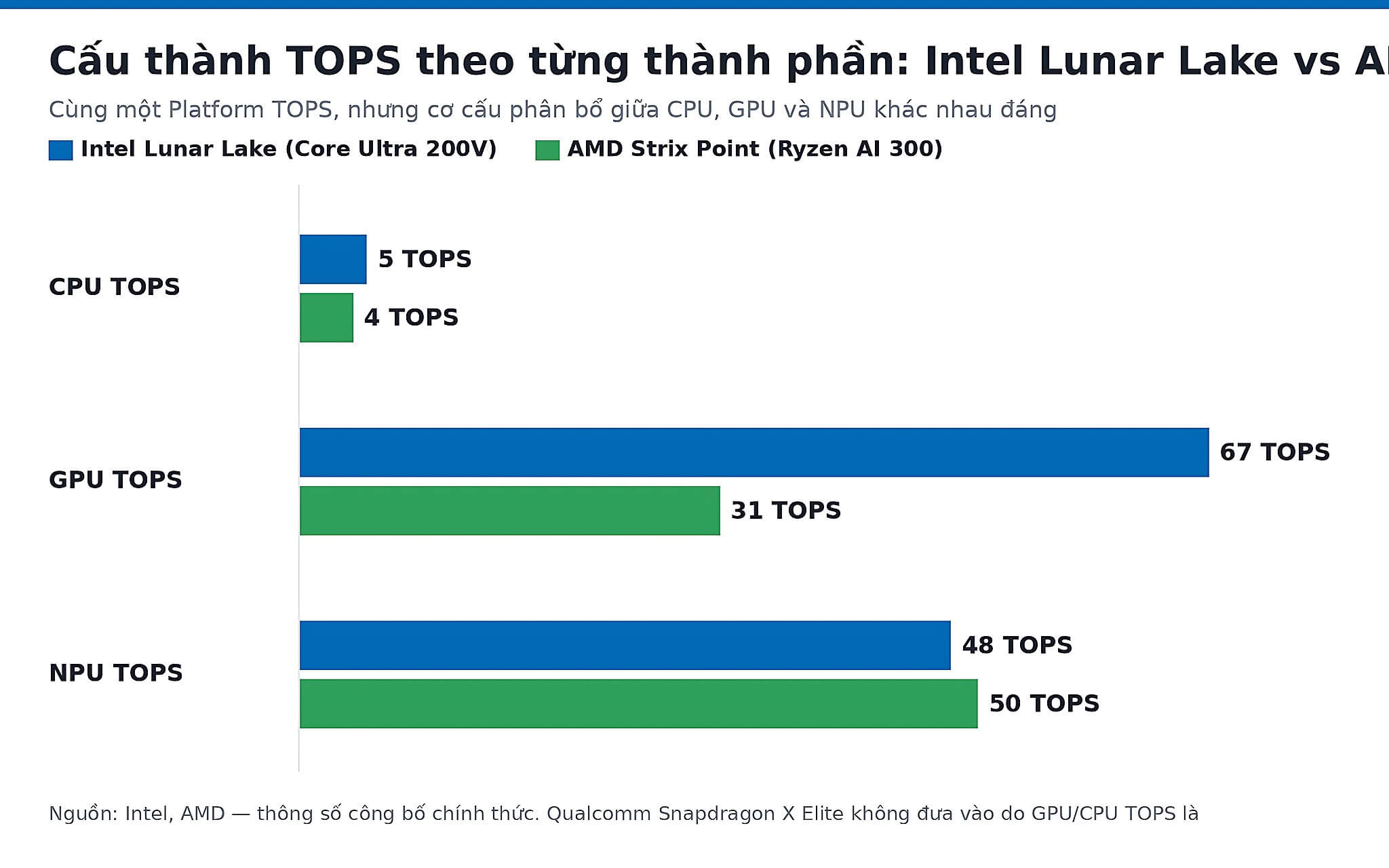
| Intel Lunar Lake (Core Ultra 200V) | 48 | 67 (Arc 140V) | 5 | 120 | 10,301 |
| AMD Strix Point (Ryzen AI 300) | 50 | 31 (Radeon 890M) | 4 | 80-85 | 21,761 |
| Qualcomm Snapdragon X Elite | 45 | Not disclosed | Not disclosed | ≈45 (NPU only) | N/A (ARM) |
The core issue: most current AI software only runs on one component at a time. Stable Diffusion uses the GPU. LM Studio uses the NPU or CPU. Windows Copilot+ Recall feature uses the NPU. No task actually "cumulates" all three simultaneously in the way the Platform TOPS figure implies. This is the distinction between marketing and technical reality that Hung Phat wants you to understand before making a decision.
Breaking down the actual TOPS of the three platforms
Each major AI chip platform currently has a different TOPS allocation across the three components. Intel Lunar Lake (Core Ultra 200V) reaches 120 Platform TOPS, but the internal structure is quite uneven: the Arc 140V GPU contributes 67 TOPS, the NPU contributes 48 TOPS, and the CPU contributes only 5 TOPS. Looking at real-world benchmarks, the Core Ultra 7 258V achieves 1,872 single-core and 10,301 multi-core points on Cinebench R23-the multi-core score is lower than AMD's due to having only 8 cores/8 threads with a 17W TDP, but in return, it offers much longer battery life.
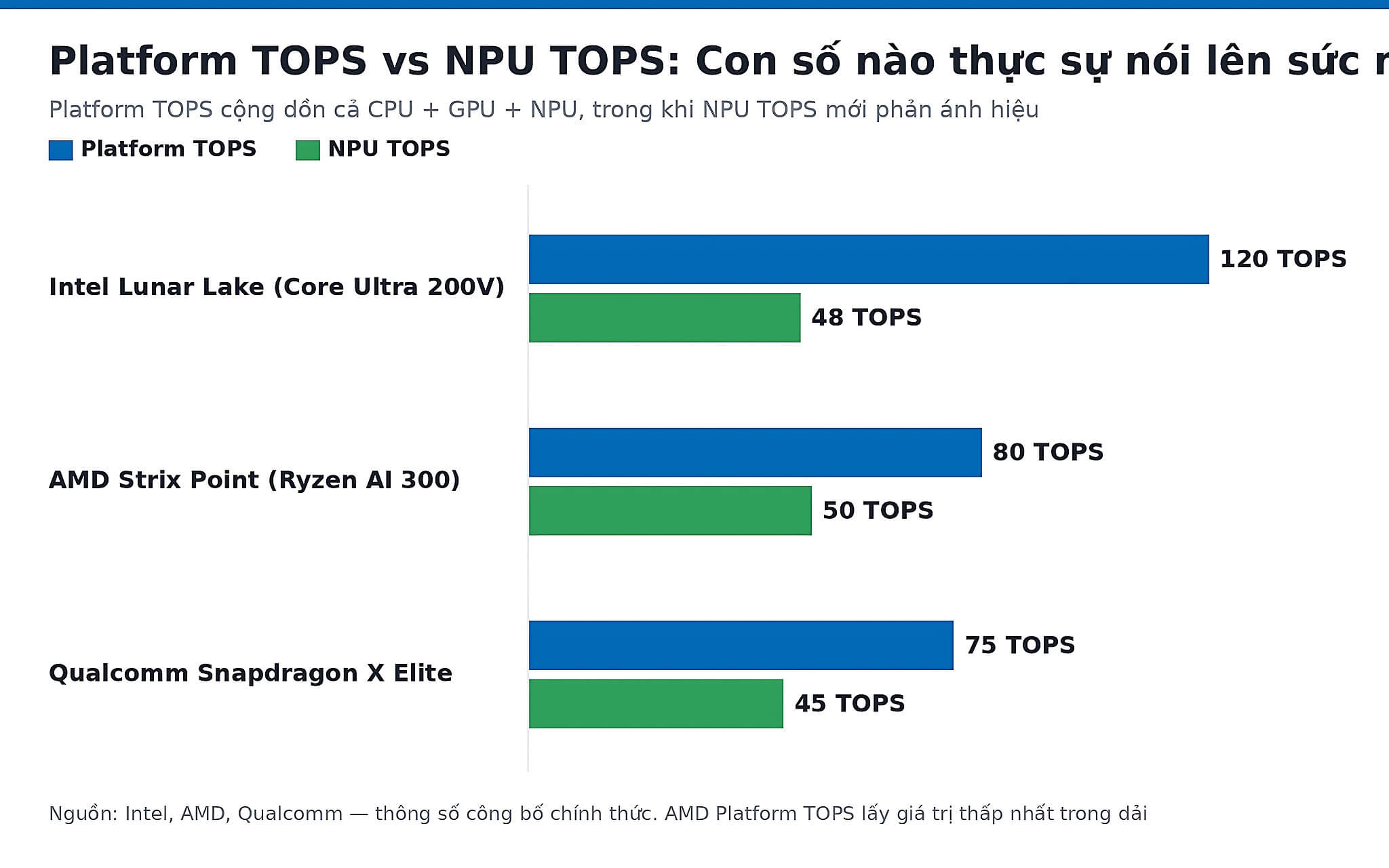
AMD Strix Point (Ryzen AI 300) has a more balanced allocation: the XDNA 2 NPU contributes 50 TOPS, the Radeon 890M GPU contributes 31 TOPS, and the CPU contributes about 4 TOPS-totaling 80-85 Platform TOPS. The total figure is lower than Intel's, but the NPU is slightly higher. More importantly, the Ryzen AI 9 HX 370 achieves 2,018 single-core and 21,761 multi-core points on Cinebench R23-nearly double Intel's multi-core power thanks to the Zen 5/5c 12-core/24-thread architecture. For tasks like code compilation, video rendering, or heavy file exporting, this gap is very real.
The Qualcomm Snapdragon X Elite, on the other hand, clearly illustrates the main point of this article: Qualcomm does not disclose a cumulative Platform TOPS figure like Intel or AMD; instead, the company only states the Hexagon NPU at 45 TOPS. In other words, whether the "total figure" is large or small depends largely on whether the manufacturer wants to aggregate them, rather than being based on a universal standard. This remains the only ARM platform in the group, with its 12-core Oryon architecture achieving 3,020 single-core and 15,969 multi-core points on Geekbench 6. High single-core scores help single-threaded tasks respond quickly, but the clearest advantage remains actual battery efficiency.
One point to note when reading the table above: GPU TOPS and NPU TOPS are not equivalent in terms of energy efficiency. The Arc 140V GPU has 67 TOPS, but when processing AI tasks, its power consumption is approximately 5-10 times higher than a dedicated NPU. An NPU is designed to do one specific thing-continuous AI inference-so it consumes only about 1-2W, while a GPU can pull 15-25W for the same task. This is why Lunar Lake laptops actually achieve 12-15 hours of battery life even though their GPU has higher TOPS than AMD's.
Is the Platform TOPS figure actually reliable?
The answer is both, depending on how you use the machine. An NPU threshold of 40 TOPS or higher is what matters-this is the minimum required to activate offline Windows Copilot+ PC features like Recall, Live Captions, and Auto Super Resolution without an internet connection. All three platforms-Intel Lunar Lake (48 TOPS NPU), AMD Strix Point (50 TOPS NPU), and Snapdragon X Elite (45 TOPS NPU)-exceed this threshold. This is where the real value lies.
The less substantial part is the total Platform TOPS figure. When you use LM Studio to run local language models or use AI noise reduction software in a meeting, the system only uses the NPU. Whether the total accumulated TOPS is high or low has no impact on the speed or quality of that task. For reference: a discrete RTX 4090 Laptop GPU reaches 686 TOPS INT8 with 9,728 shaders-this figure is not included in the Platform TOPS of any thin-and-light laptop, and when you need real AI power for rendering or model training, the dGPU is what truly matters.
Hung Phat often gets asked, "Is a 120 TOPS machine better than an 85 TOPS machine?" and the answer is almost always: it depends on what you do. If you travel frequently, attend online meetings requiring real-time AI noise reduction, or want to test local LLM models efficiently-a powerful enough NPU (over 40 TOPS) is what you need, not the total Platform TOPS. If you only do basic office work or heavy gaming via a dGPU-the TOPS figure has almost no impact on your daily experience. You can read more about the 13 and 45 TOPS NPU thresholds for Copilot+ PC, or the article How many TOPS does a 2026 laptop NPU need to be sufficient to choose the right threshold for your actual needs.
If you want a machine that meets the Copilot+ PC standard and is currently available at Hung Phat, here are three representative options across the three platforms: the HP OmniBook X 14 AI running Snapdragon X Elite (45 TOPS NPU), priced at 25.7 million VND, ideal for frequent travelers thanks to the power-efficient ARM platform; the HP OmniBook X Flip 16 with Ryzen AI 7 350 (50 TOPS NPU) or Core Ultra 5 226V options, around 20-26 million VND, strong in multi-core performance; and the HP OmniBook X Flip 14 with Core Ultra 7 256V (Lunar Lake, ~47 TOPS NPU) or Ryzen AI 5 340, around 19.5-24.9 million VND, balancing battery and performance. All three exceed the 40 TOPS NPU threshold to fully activate offline Copilot+ features; the main differences lie in the chip platform, battery life, and budget. If you are debating between upgrading NPU or RAM, the article NPU TOPS 45 or 32GB RAM: Which should you prioritize? will provide a useful perspective.
Frequently Asked Questions (FAQ)
How is cumulative TOPS different from the TOPS calculation of previous chip generations?
Before Lunar Lake and Strix Point, first-generation AI laptops like Intel Raptor Lake Refresh or AMD Hawk Point only had very weak NPUs (under 16 TOPS) or no dedicated NPU at all-all AI tasks were offloaded to the CPU or GPU. At that time, no one accumulated TOPS because the NPU wasn't significant enough to mention. From 2026, as the 40-50 TOPS NPU becomes the Copilot+ standard, manufacturers have begun aggregating the three components to create more impressive total figures. The practical difference is that new-generation NPUs can run medium-sized INT8 models (7-13 billion parameters) entirely locally, whereas older chips cannot, even if they have a stronger GPU.
Will a laptop without a powerful enough NPU become obsolete soon?
Not necessarily, but it requires a realistic view. If you use a machine dedicated to graphics or gaming with a separate dGPU-like the RTX 4090 Laptop GPU which reaches 686 TOPS INT8-then the discrete card already handles AI more powerfully than any integrated NPU. A laptop lacking an NPU will only be limited in offline Windows Copilot+ features: Recall, Live Captions, and Auto SR will either not run or will run via the GPU with significant battery drain. For users only doing office work, watching movies, or online learning-not having an NPU will not affect daily experience for the next 2-3 years. Copilot+ features also depend on how deeply Microsoft integrates them into Windows-this is a software factor, which is not as certain as hardware specifications.
How much extra should I pay to get an AI laptop with a standard-compliant NPU?
The 40 TOPS NPU threshold (Copilot+ standard) currently falls in laptops starting from approximately 20 million VND-for example, the HP OmniBook X 14 AI with Snapdragon X Elite at about 25.7 million VND, or the HP OmniBook X Flip 14 starting from around 19.5 million VND at Hung Phat. Compared to previous-generation Intel (Raptor Lake Refresh) or AMD Hawk Point laptops in the same segment, you pay about 5-10 million VND more to get a sufficiently powerful NPU. This price difference includes upgrades to both CPU and integrated GPU architecture, not just the NPU. If your budget is under 18 million VND, the market does not yet have many worthwhile Copilot+ PC compliant options.
Which laptops at Hung Phat have an NPU that meets the Copilot+ PC standard?
Currently, the Copilot+ machines available at Hung Phat primarily belong to the HP OmniBook X series: the HP OmniBook X 14 AI (Snapdragon X Elite, 45 TOPS NPU, ~25.7 million VND) is ideal for frequent travelers due to the power-efficient ARM platform; the HP OmniBook X Flip 16 (optionally Ryzen AI 7 350 with 50 TOPS NPU, ~20-26 million VND) is strong in multi-core performance; and the HP OmniBook X Flip 14 (Core Ultra 7 256V Lunar Lake, ~47 TOPS NPU, ~19.5-24.9 million VND) balances battery and performance. All three are sufficient to activate Recall, Live Captions, and Auto SR offline; choosing between them is mainly based on your preferred chip platform, battery life, and budget. If you need specific configuration advice, you can contact Hung Phat for assistance in choosing the right machine for your needs.











