Intel Core Ultra 7 265U and 258V both target thin, light business laptops, but they distribute performance differently. The 265U has 12 cores, 14 threads, and a maximum clock speed of 5.3 GHz, while the 258V prioritizes a 47 TOPS NPU along with Arc 140V graphics. The ThinkPad X1 2-in-1 Gen 10 picks the 265U to balance multitasking, portability, and a large amount of RAM. Whether the upgrade makes sense depends on your software and your AI needs.
What stands out about the Intel Core Ultra 7 265U architecture
The Intel Core Ultra 7 265U uses the Arrow Lake-U architecture on the Intel 3 process. The processor has 2 performance cores, 8 efficient cores, and 2 LP-E cores, for a total of 12 cores and 14 threads. The two P-cores support hyper-threading. You can find more information about the processor lineup on Intel's official site.
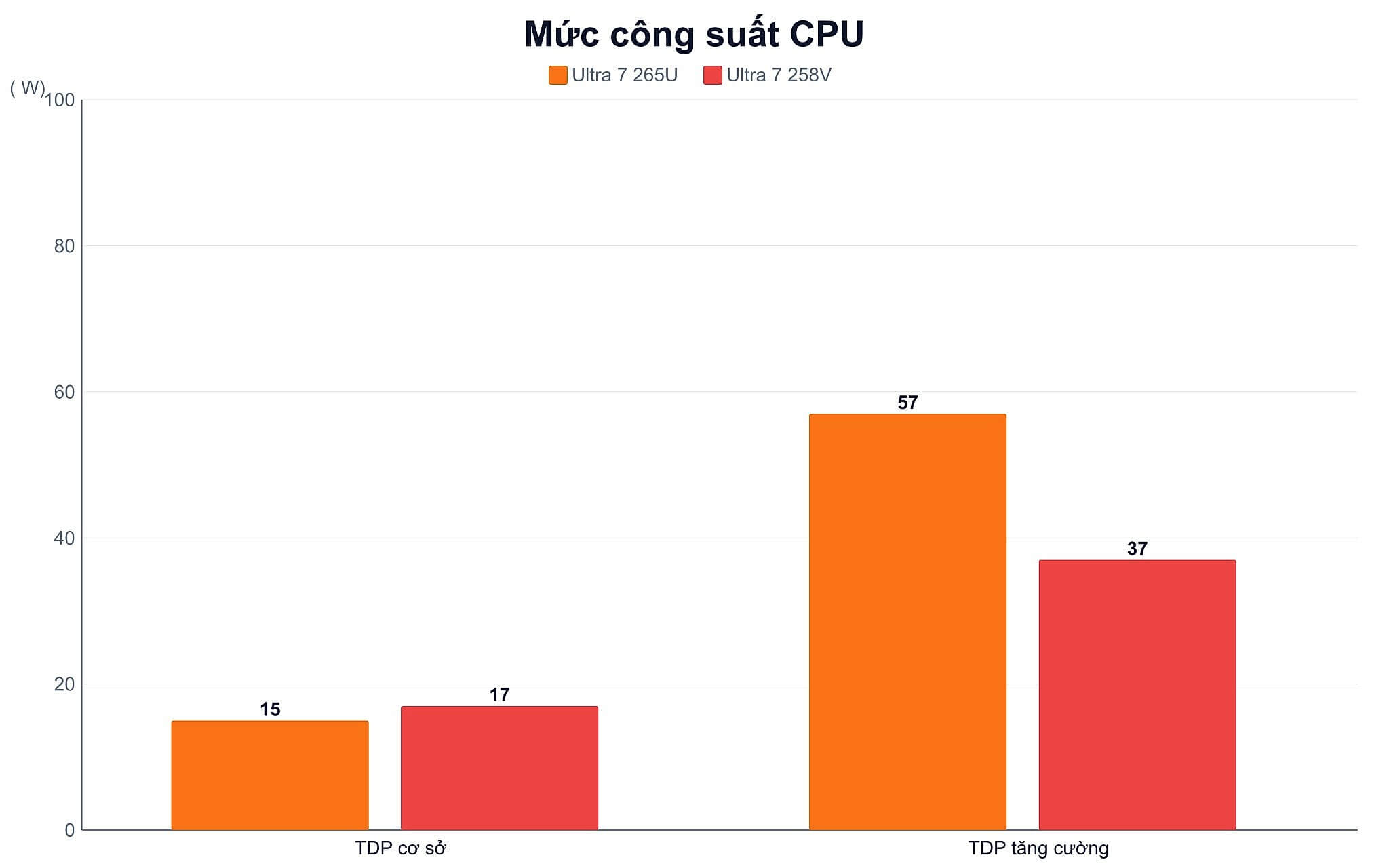
On the 265U, P-core clock speeds range from 2.1 to 5.3 GHz, E-cores top out at 4.2 GHz, and LP-E cores reach 2.4 GHz. Base power is 15W and maximum turbo power is 57W, though manufacturers can lower it to 12W. As a result, sustained performance can vary between laptops because of power limits and the cooling system.
The 265U's NPU delivers 12 TOPS, which falls short of the 40 TOPS threshold for Copilot+ PCs. That is worth noting if you regularly run AI workloads directly on your device. In return, the 14-thread design suits browsers with many tabs, large spreadsheets, online meetings, and office apps running at the same time.
What the Intel Core Ultra 7 performance numbers show
Cinebench R23 shows the Intel Core Ultra 7 265U scoring 1,749 in single-core and 10,623 in multi-core. The 258V scores 1,872 and 10,301. That puts the 258V roughly 7% ahead in single-core, while the 265U holds a lead of about 3% in multi-core. The gap can shift with the power level each laptop allows.
| Specification | Core Ultra 7 265U | Core Ultra 7 258V |
|---|---|---|
| Architecture | Arrow Lake-U, Intel 3 | Lunar Lake, TSMC N3B |
| Cores and threads | 12 cores, 14 threads | 8 cores, 8 threads |
| Max clock speed | 5.3 GHz | 4.8 GHz |
| Base and turbo TDP | 15W and 57W | 17W and 37W |
| NPU | 12 TOPS | 47 TOPS |
| Cinebench R23 single and multi-core | 1,749 and 10,623 | 1,872 and 10,301 |
| Geekbench 6 single and multi-core | 2,477 and 10,707 | 2,754 and 10,965.5 |
| PassMark | 17,615 | 18,925 |
Geekbench 6 records the 265U at 2,477 in single-core and 10,707 in multi-core. The 258V scores 2,754 and 10,965.5, respectively. PassMark also leans toward the 258V, with 18,925 points against 17,615 for the 265U. Data from Notebookcheck's Core coverage helps put the Lunar Lake characteristics in context.
These numbers show that the Intel Core Ultra 7 265U does not open a large gap in overall performance. Its practical advantage lies in its 14 threads, which suit running many background tasks or business applications. However, the 265U results are based on an HP model with PL1 set to 24W. The ThinkPad X1 may produce different results depending on its power configuration, BIOS, and cooling.
How the ThinkPad X1 sustains 265U performance in use
On the ThinkPad X1 2-in-1 Gen 10, the Intel Core Ultra 7 265U configuration suits Word, large Excel files, browsers with many tabs, management software, and online meetings. The 5.3 GHz maximum clock speed supports quick responses when opening apps or handling short tasks. Under sustained load, performance also depends on the power mode and cooling.

The configuration currently on sale has 64GB of LPDDR5X 8533MHz RAM and a 1TB PCIe Gen 5 SSD, which is useful for virtual machines, large datasets, and many apps running in parallel. Soldered RAM is inconvenient to upgrade, so you should pick the right capacity from the start.
The independent battery data currently available comes from the HP EliteBook 8 Flip G1i, which uses the same processor and lasted 13 hours 39 minutes of Wi-Fi browsing on a 62Wh battery. The ThinkPad X1 uses a 57Wh battery but has no equivalent measurement yet, so the figures should not be converted directly. Screen brightness, video calls, and performance mode still have a significant effect.
How the Intel Core Ultra 5 naming affects your choice
The Intel Core Ultra 5 or Ultra 7 name alone is not enough to determine performance. You need to check the U, H, or V suffix, the core count, the power level, and the NPU. U-series chips balance performance with battery life, V-series chips prioritize AI and integrated graphics, and H-series chips typically require higher processing power.

The integrated graphics of the Intel Core Ultra 7 265U have 4 Xe-cores and fall into the basic tier. Cyberpunk 2077 at 1080p Low reaches about 21.1 fps, and F1 24 at Low reaches 35.1 fps on the tested HP model. The 258V's Arc Graphics 140V is stronger, scoring 9,819 in Fire Strike and 4,047 in Time Spy. Cyberpunk 2077 at 1080p High reaches 31.75 fps but drops to 13.9 fps at 1440p.
If your main needs are office work, presentations, and light photo editing, the 265U's graphics are still adequate. If you need to play games or accelerate graphics tasks, the 258V has a clearer advantage. You can also read the article on the Dell Latitude 7530. Neither replaces a discrete GPU for heavy rendering.
Who the two laptops with the new processors are for
The Lenovo ThinkPad X1 suits managers, consultants, and people who present often. The 14-inch WUXGA touchscreen supports flexible use. The 64GB RAM and 1TB SSD configuration is aimed at long-term multitasking. The price at Hung Phat falls in the range of 40-50 million.
| Product | Typical configuration | Reference price |
|---|---|---|
| Lenovo ThinkPad X1 2-in-1 Gen 10 | Intel Core Ultra 7 265U vPro, 64GB LPDDR5X 8533MHz RAM, 1TB PCIe Gen 5 SSD, Intel Arc Xe2, 14-inch WUXGA IPS touchscreen | About 40-50 million |
| Dell Pro 16 Plus PB16250 | Intel Core Ultra 7 268V vPro option, 16GB or 32GB RAM, SSD from 256GB | About 25-35 million |
The Dell Pro 16 costs about 25-35 million and comes with many configuration options. It suits people who prioritize a large screen, mostly stationary work, and a lower budget than the ThinkPad X1. The version with the 268V has a 48 TOPS NPU, which is better suited to on-device AI.
The two products serve different audiences. The ThinkPad X1 prioritizes a convertible design, large RAM, and portability. The Dell Pro 16 Plus offers a more accessible price along with a stronger NPU option. Comparing the two machines side by side gives additional perspective on performance and size.
Which configuration to choose when buying in Ho Chi Minh City
You should choose the 265U if you often run many applications, need 64GB of RAM, and like the ThinkPad X1's fold-over hinge design. This configuration also suits business managers, finance professionals, and moderate virtual machine use. If you only do basic office work, an investment of 40-50 million may exceed what you need.

Within the Intel Core Ultra lineup, you should favor the V series when you need a Copilot+ PC, local AI processing, or stronger integrated graphics. The 258V's 47 TOPS NPU clears the 40 TOPS threshold, while the 265U's 12 TOPS NPU does not. For 3D rendering, heavy video editing, or frequent gaming, both chips should still be weighed against laptops with a discrete GPU.
Hung Phat recommends checking the configuration, stock status, warranty, and promotions at the time you place an order. These factors can change with the RAM, SSD, and display. Choose the ThinkPad X1 if you need a premium design with large capacity, or the Dell Pro 16 Plus if you want to optimize for budget and AI features.
Frequently asked questions (FAQ)
How do the Intel Core Ultra 7 155H and 265U differ for work?
The 265U targets power-efficient business laptops with a 15W base TDP and 12 cores, 14 threads. There are no direct comparison results against the 155H on the same laptop model. For sustained workloads, you should compare actual power levels and cooling systems.
Is the Intel Core Ultra 7 255H better than the 265U for heavy tasks?
H-series chips typically run at higher power levels, but performance also depends on the laptop's design. The 265U scores 10,623 in Cinebench R23 multi-core and 10,707 in Geekbench 6 multi-core. Sustained rendering workloads call for additional real-world testing of a machine with the 255H.
What criteria should you use to compare Intel Core Ultra 5 vs i7?
You should check the chip suffix, core count, power level, and NPU before looking at the Core Ultra 5 or i7 name. A V-series model may handle AI better than a U-series model despite a lower tier name. For the 265U, the strengths are 14 threads and a 5.3 GHz maximum clock speed, while the NPU delivers 12 TOPS.
Is Intel Core Ultra series 3 necessary for today's AI needs?
AI needs depend on NPU power and the software you use. The 265U delivers 12 TOPS, so it does not meet the Copilot+ PC standard, while the 258V delivers 47 TOPS. If you mainly use online AI, the 265U still performs well because the processing happens on remote servers.