

Whether you are a freshman or a senior, IT students face the same challenge: needing a powerful enough machine to run VS Code, Docker, and Jupyter Notebook without breaking the bank in the 15-30 million VND range. Laptops for IT students are abundant today, but choosing the wrong CPU, a weak battery, or non-upgradable RAM can lead to regrets throughout the semester. Hung Phat has selected 3 truly suitable machines: from the lightweight 1.36kg EliteBook to the OmniBook 5 with on-device AI NPU, each catering to a different type of student.
Criteria for choosing a laptop for IT students to code and learn AI within 15-30 million VND
IT students don't just need a machine that "works"; you need a machine that runs stably for 4 years, from basic programming and databases to Docker, virtual machines, and ML pipelines in your final year. The first criterion is the CPU: at least 8 threads or more for fast compilation and running IDEs alongside browsers without lagging. Second is RAM: a minimum of 16GB if you frequently use Docker or WSL2, while 8GB is only suitable for years 1-2 when programs are still lightweight.
| Model | Reference Price | CPU | RAM | Display | Why choose it |
|---|---|---|---|---|---|
| HP EliteBook 840 G10 | 15-20 million | Intel Core i7-1360P, 12 cores 16 threads | 16GB DDR5-5600 | 14" WUXGA IPS 60Hz | Lightweight at 1.36kg, durable build, 2x Thunderbolt 4, perfect for 4 years of coding |
| Lenovo V15 Gen 4 | 20-25 million | Intel Core i5-13420H / i7-13620H, 8/12 cores | 8/16GB DDR4-3200 | 15.6" FHD IPS 60Hz | Powerful H-series CPU, large screen, great for heavy compilation when plugged in |
| HP OmniBook 5 | 27-30 million | Intel Core Ultra 5 225U, 12 cores 14 threads, NPU | 16/32GB LPDDR5x-7467 onboard | 16" WUXGA IPS 60Hz | 7-9 hours battery, on-device AI NPU, large screen, 32GB version highly recommended |
Battery life is a factor many overlook when choosing a laptop, yet it is the one you feel most every day. Laptops with batteries under 45Wh typically only last 3-5 hours in real-world use; if you study from morning to afternoon, you'll need to find a power outlet. A 14-16 inch IPS screen with at least 300 nits of brightness helps prevent eye strain when coding outdoors or in bright rooms. Connectivity is also crucial: USB-A for your mouse, HDMI for presenting on large screens, and USB-C or Thunderbolt for fast charging and connecting external monitors.
Regarding GPU: for IT students learning basic AI using Google Colab or Kaggle Notebooks, a dedicated GPU is not mandatory in this price range. Intel Iris Xe or Intel Arc iGPUs are sufficient for light inference and running small models. If you need to perform serious model training, even a laptop with a dedicated GPU in the 15-30 million range won't be enough; you should combine it with Colab Pro or your university's server. The real difference lies in build quality, warranty, and the ability to upgrade RAM/SSD later.
Quick comparison of the top 3 laptops for IT students to code and learn AI from 15-30 million VND
The three machines below cover three different budget levels and three different types of needs. Hung Phat selects these based on actual specs, measured benchmarks, and feedback from customers, not just manufacturer catalogs. The downsides of each machine will be stated directly so you can make the right choice.
HP EliteBook 840 G10: The choice for students needing a durable, lightweight machine for 4 years
The HP EliteBook 840 G10 is for those with a budget of 15-20 million VND who need a machine that is powerful, durable, and light enough to carry to class every day. The Intel Core i7-1360P CPU (12 cores, 16 threads) handles VS Code, IntelliJ, light Docker, and local databases well-the tools IT students use daily. It weighs only about 1.36kg, making it the lightest of the three mentioned here.
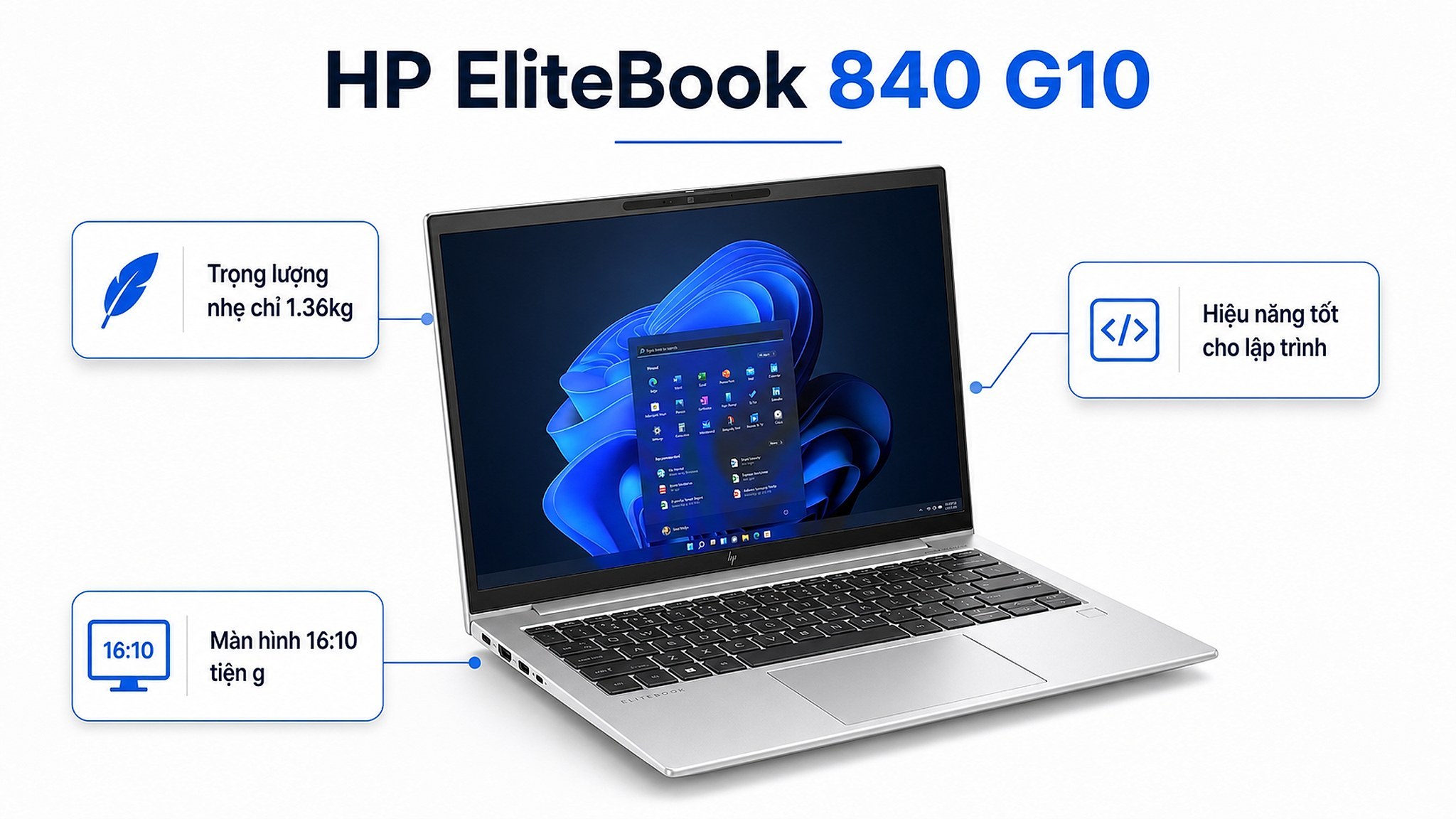
The business-class keyboard is excellent for long coding sessions, and the webcam and microphone quality are superior to standard laptops at the same price, which is useful for online classes or project presentations. It features full connectivity: 2x Thunderbolt 4, HDMI, and USB-A, so you won't need to buy extra hubs. The 14-inch WUXGA 1920x1200 IPS anti-glare screen with a 16:10 aspect ratio displays more vertical content compared to standard 16:9 screens, which is very convenient for coding.
Downsides to note: The Intel Iris Xe iGPU is only sufficient for theoretical AI study and running small inference models; for actual model training, you must use Colab. The 51Wh battery lasts about 6-8 hours in real-world use-enough for a school day, but not much extra. This machine is best for those who prioritize durability, lightness, and connectivity over a large screen or GPU.
Lenovo V15 Gen 4: The choice for students prioritizing CPU performance and a large screen
In the 20-25 million VND range, the Lenovo V15 Gen 4 is the choice when you need a 15.6-inch screen to split windows between an IDE, terminal, and browser simultaneously without feeling cramped. The Intel Core i5-13420H or i7-13620H H-series CPUs are significantly more powerful than U-series chips when compiling heavy code, running virtual machines, or local backends. The Cinebench R23 multi-core score for the i5-13420H reaches 11,084, which is enough to run real-world projects comfortably in later semesters.
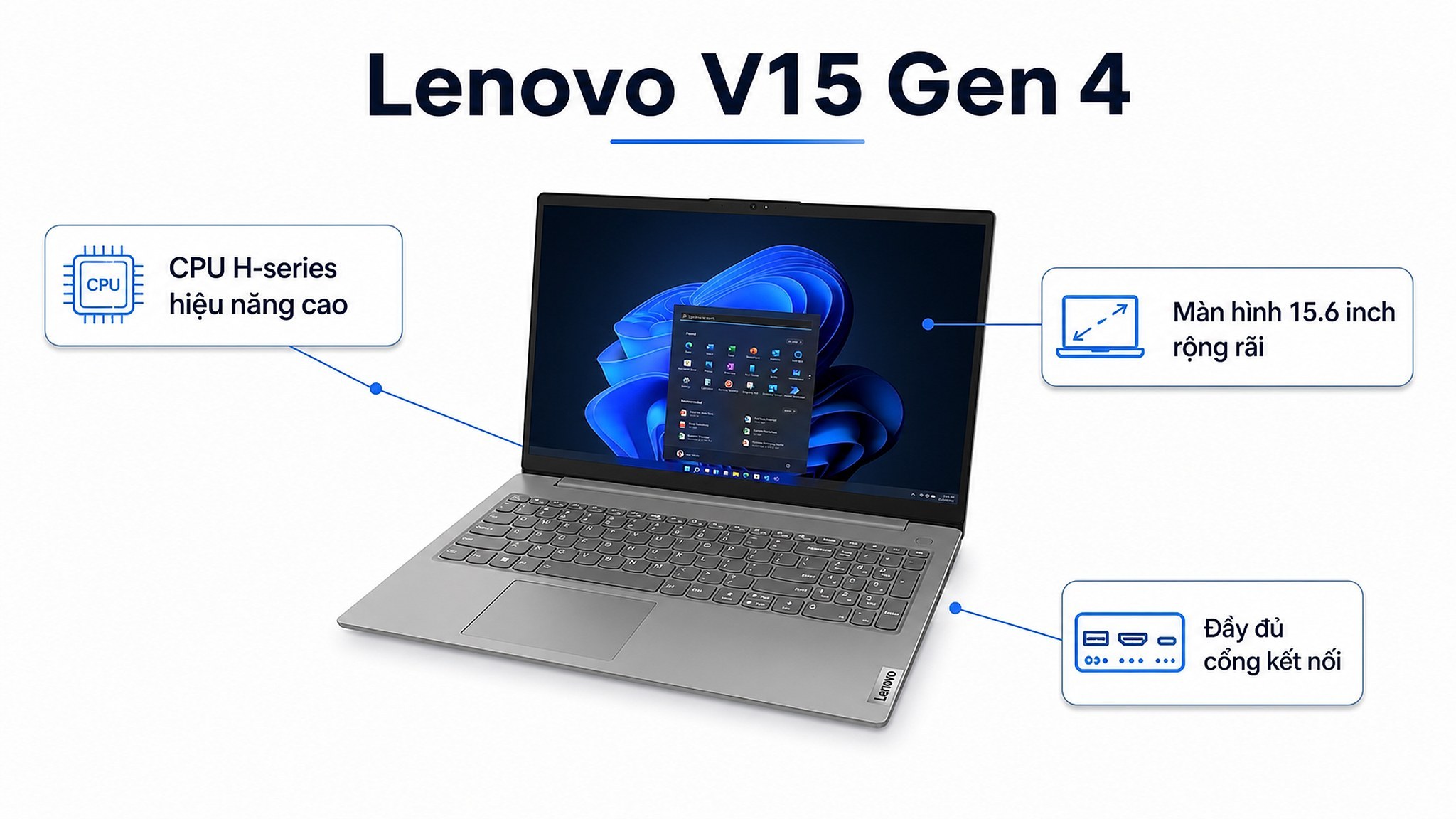
The wide 15.6-inch screen makes it easy to split windows; students coding in Java, .NET, or working on group projects that require many open tabs will notice the difference. It has sufficient ports: HDMI, USB-C, and USB-A. The 16GB DDR4-3200 RAM is enough for most academic tasks and is upgradable if needed (be sure to check the specific SKU before buying extra RAM).
Important downside: The 38Wh battery is weak, lasting only 3-5 hours in real-world use; this machine needs to be plugged in frequently. The 45% NTSC screen has poor color accuracy, making it unsuitable if you plan to study UI/UX or serious design. If you need all-day battery life or a beautiful screen, consider other models. The V15 Gen 4 is best when you usually study in places with power outlets and need maximum CPU performance for the price.
HP OmniBook 5 LaptopAI 16 inch: The choice for students wanting long battery life, a large screen, and readiness for AI
The HP OmniBook 5 LaptopAI 16 inch in the 27-30 million VND range is the choice for those wanting the newest technology, the best battery life, and the largest screen among these three options. The Intel Core Ultra 5 225U CPU integrates an NPU with approximately 13 TOPS, allowing you to run some light on-device AI tasks without needing a cloud connection-useful when learning AI inference or testing small models offline.
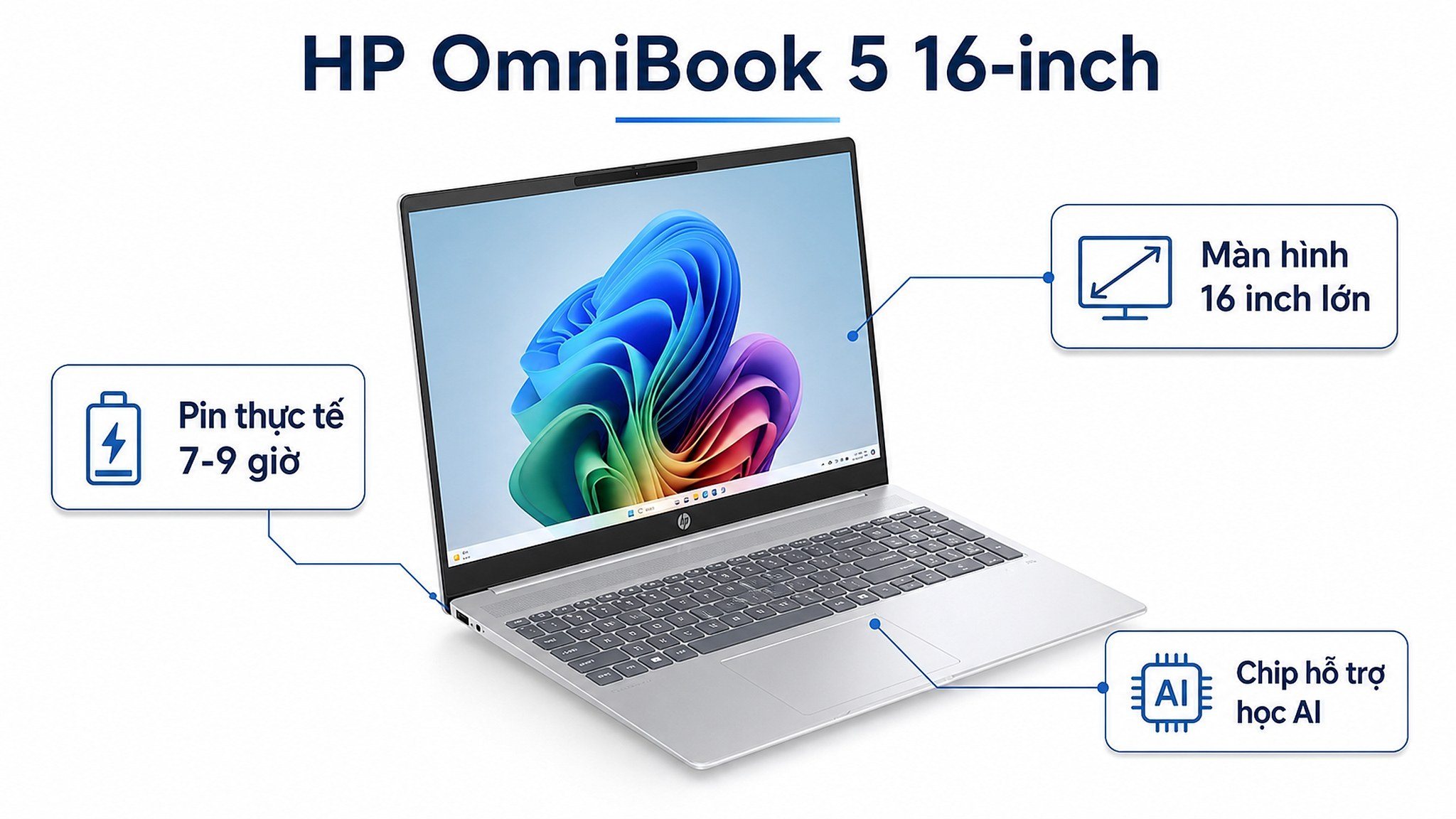
The 59Wh battery is the largest of the three, lasting 7-9 hours in real-world use, allowing you to study all day without needing a charger. The LPDDR5x-7467 RAM is fast; the 32GB version is highly recommended if you use Docker with many containers, run WSL2 alongside other tasks, or run Jupyter Notebook with large datasets. The 16-inch 1920x1200 16:10 screen, Wi-Fi 6E, and USB-C PD make it perfect for a modern setup.
The most important downside: The RAM is onboard and cannot be upgraded after purchase, so you must choose the correct configuration from the start. If your budget allows, the 32GB version is highly recommended. A note on specs: some places incorrectly label the screen as "2K"; 1920x1200 is the WUXGA standard, not true 2K. This machine is ideal for those with a 27-30 million VND budget who want to study AI in depth and need a battery that lasts all day without charging. If you need more information on choosing a laptop for developers based on specific stacks, check out our article on choosing laptops for developers running Docker by stack.
Buying Guide: HP EliteBook 840 G10, Lenovo V15 Gen 4, or HP OmniBook 5 LaptopAI?
These three machines serve three different types of IT students. If you are in years 1-2, have a budget under 20 million VND, move around a lot, and need a durable machine, the EliteBook 840 G10 is the lowest-risk choice: lightweight, well-connected, and high build quality. If you need a powerful CPU for fast compilation or sit at a desk with a power outlet and prioritize a large screen, the Lenovo V15 Gen 4 in the 20-25 million VND range offers better raw performance. If you are nearing graduation, studying AI or Data Science in depth, and need a machine that will last 3-5 years without becoming obsolete, the OmniBook 5 (32GB version) is the best investment.
Practical note: All three machines use iGPUs and are not suitable for training large ML models directly. This is a limitation of this price range, not a specific flaw of any machine. The practical solution is to use Google Colab, Kaggle, or your university's GPU servers, which is what most AI and Data Science students do. If you want to understand more about how AI coding agents support modern programming workflows, refer to the article on OpenAI Codex and AI coding agents in modern programming for a broader perspective.
Hung Phat has all three series in stock with official warranties. If you are in Ho Chi Minh City, you can visit us to try the machines in person before deciding, as comparing actual weight and keyboard feel is much clearer than looking at photos. Contact us for consultation if you need to finalize a machine based on a specific budget or the latest stock availability.
Frequently Asked Questions (FAQ)
What is a suitable budget for coding and studying IT without needing an early upgrade?
Around 15-20 million VND is sufficient for years 1-3 with a machine like the EliteBook 840 G10: the i7-1360P CPU and 16GB DDR5 can handle most subjects well. If you know that in years 3-4 you will deal with heavy Docker, multiple containers, or data pipelines, you should increase your budget to 27-30 million VND and choose the 32GB version from the start. Spending an extra 7-10 million VND initially is usually cheaper than buying a new machine after 2 years. Machines under 15 million VND often have fixed 8GB RAM or weaker CPUs; they are usable, but you will feel the limitations from year 2 onwards.
Should IT students choose Windows or macOS in this price range?
Windows is more suitable in the 15-30 million VND range due to a wider variety of choices, easier RAM/SSD upgrades, and better compatibility with academic software like XAMPP, SQL Server, and Android Studio. In this price range, macOS only offers older MacBook Air M2 or base M3 models; while performance is good, the 8/16GB onboard RAM cannot be upgraded, and prices are often higher for the same amount of RAM. WSL2 on Windows is now very smooth for students needing a Linux environment, so buying a Mac is not strictly necessary. You only need to prioritize macOS if you are studying iOS development or your school requires Xcode.
Which of these three options is the lightest and has the best performance?
The HP EliteBook 840 G10 is the lightest at 1.36kg and features a 12-core i7-1360P CPU, making it the best balance between weight and performance under 20 million VND. The HP OmniBook 5 is heavier, around 1.8-1.9kg, but offers a larger battery and a wider screen. The Lenovo V15 Gen 4 has a more powerful H-series CPU in terms of raw performance but weighs as much as the OmniBook and has the weakest battery. If you must choose a lightweight machine that is still powerful enough, the EliteBook 840 G10 meets this criterion best among the three.
Which machines are currently in stock at Hung Phat and are most suitable for beginner IT students?
Both the HP EliteBook 840 G10 and the HP OmniBook 5 LaptopAI 16 inch are available at Hung Phat with official HP warranties. For IT students in years 1-2 with a budget under 20 million VND, the EliteBook 840 G10 is the safe choice: durable, lightweight, fully connected, and won't become obsolete during your 3-4 years of study. For those in years 3-4 or specializing in AI and Data Science, the OmniBook 5 (32GB version) is a better investment because the onboard RAM cannot be upgraded, so choosing the right configuration from the start will save money in the long run. Contact Hung Phat to check current stock and the latest promotions before deciding.











