

The Core Ultra 7 155H features an NPU with 11 TOPS, while the Snapdragon X and Core Ultra 7 258V have reached 45-48 TOPS. This difference is significant because the Copilot+ PC standard requires an NPU of 40 TOPS or higher to run many local AI features. With Laptops with NPU, you need to look at the actual practical utility and avoid thinking that just because a machine has AI, it will play games better or process heavy graphics faster.
The Nature of AI Processing in Laptops with NPU Today
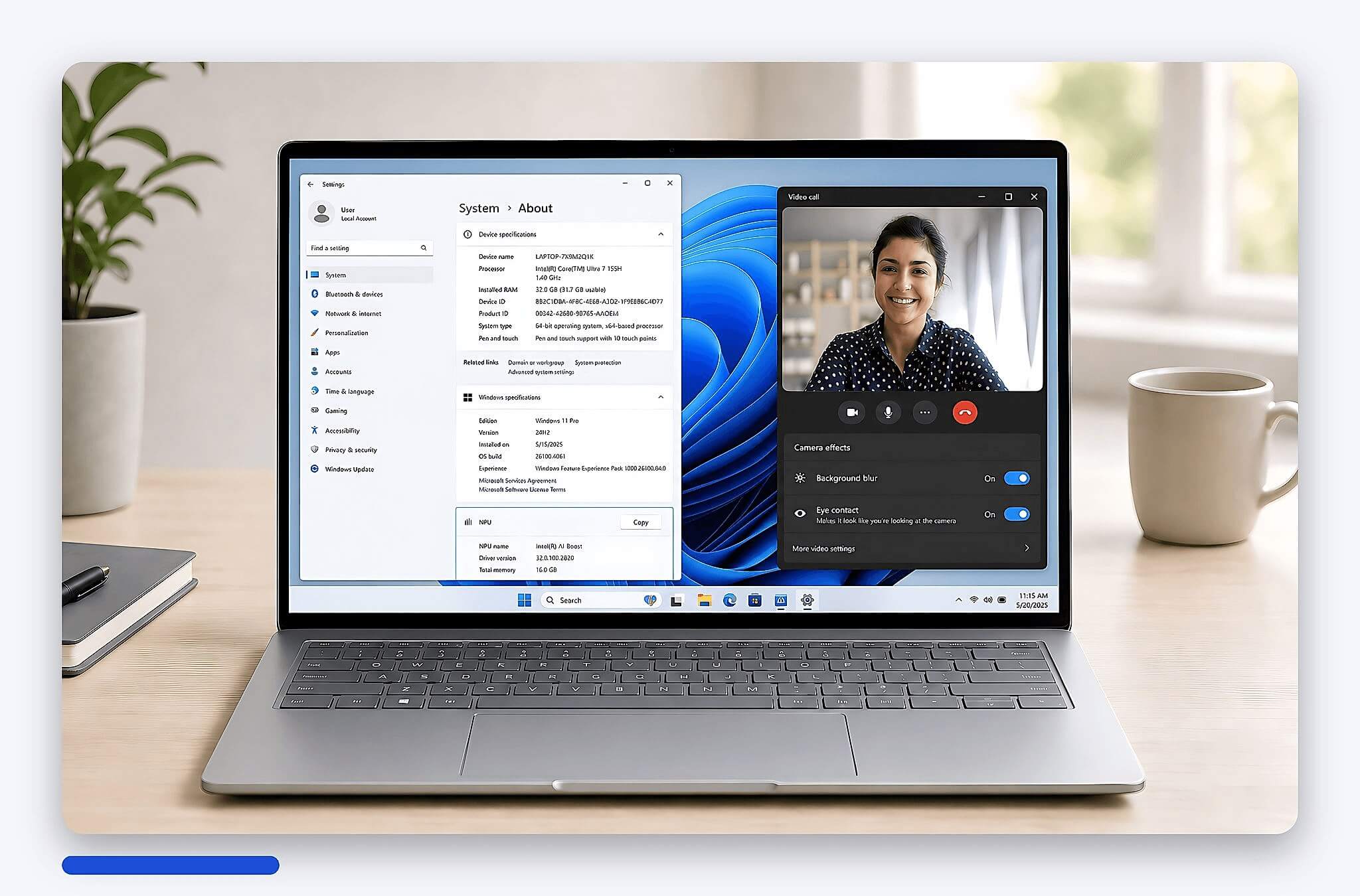
Laptops with NPU are supplemented with a Neural Processing Unit, which is a dedicated processing block for AI tasks and machine learning running directly on the device. Common tasks include image recognition, microphone noise cancellation, background blur, live captions, conversation translation, light image generation, and smart assistant support. The key advantage of an NPU is power efficiency, helping the machine handle light AI tasks without constantly engaging the CPU or GPU.
| Generation or Platform | Verified AI Specifications | Practical Difference for Average Users |
|---|---|---|
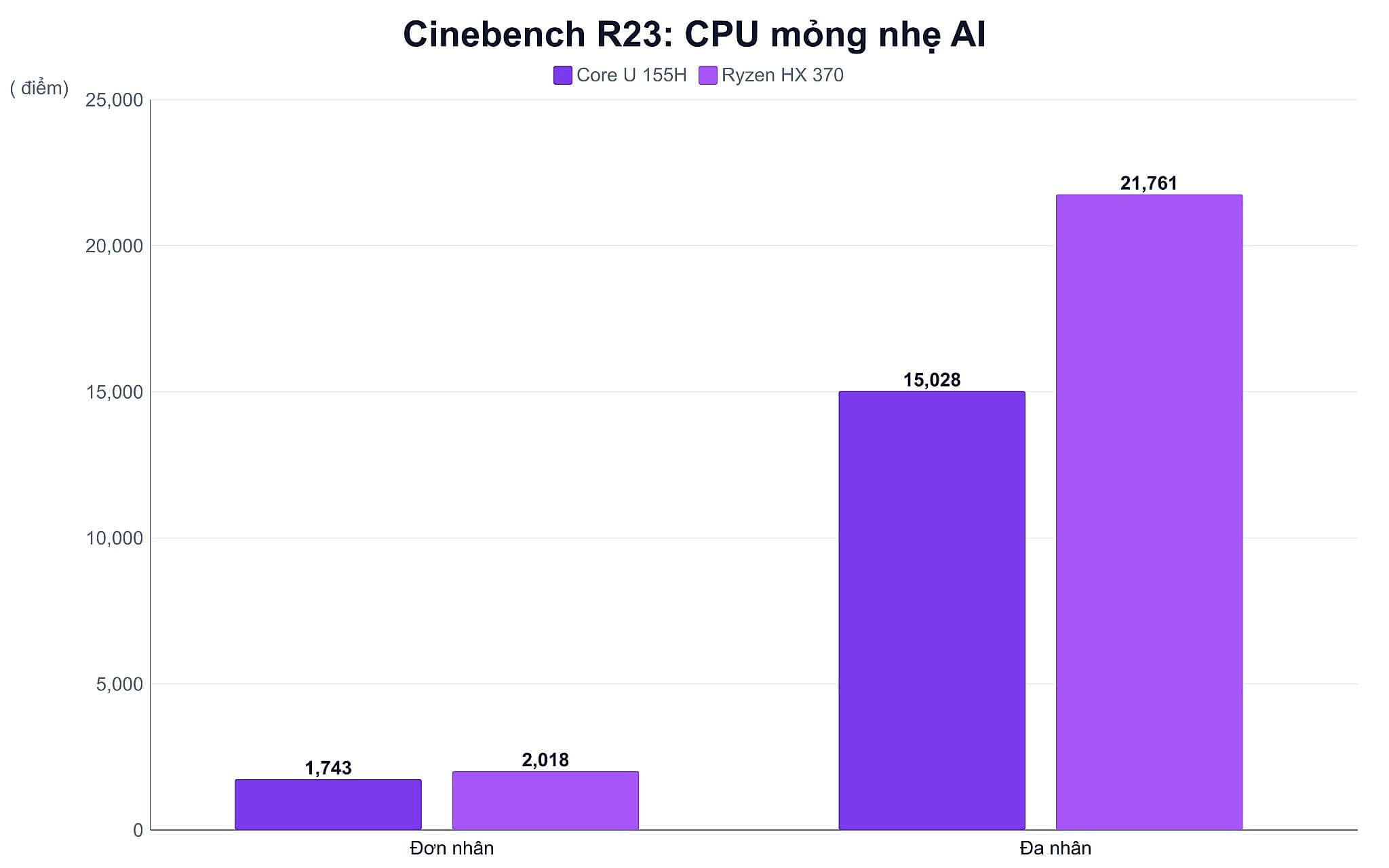
| Intel Core Ultra Series 1, Meteor Lake | Core Ultra 7 155H has 11 TOPS NPU, 33 TOPS total AI, Cinebench R23 1,743 single-core and 15,028 multi-core | Basic AI camera features, has not reached the 40 TOPS Copilot+ threshold |
| AMD Ryzen 7040 and 8040 | Ryzen 7000 AI is about 10 TOPS, Ryzen 8040 reaches 16 TOPS | Sufficient for light AI tasks, suitable for office work and basic online meetings |
| Qualcomm Snapdragon X and X Elite | Hexagon NPU 45 TOPS, Snapdragon X X1-26-100 has Geekbench 6 2,123.5 single-core and 10,584 multi-core | Meets Copilot+, good battery life, requires checking app and driver compatibility on Windows ARM |
| Intel Core Ultra 200V, Lunar Lake | Core Ultra 7 258V has 47 TOPS NPU, Arc 140V GPU 64 TOPS, 115 TOPS total | Ideal for thin and light laptops, online meetings, live captions, and local AI |
| AMD Ryzen AI 300, Strix Point | Ryzen AI 9 HX 370 has 50 TOPS NPU, Cinebench R23 2,018 single-core and 21,761 multi-core | Meets Copilot+, much stronger multi-core performance than many mainstream thin and light platforms |
| Snapdragon X2 Elite and X2 Plus | Qualcomm announced Hexagon NPU 80 TOPS, some X2 Elite versions up to 85 TOPS | High AI performance, but commercial machines in Vietnam still require real-world evaluation |
Previously, many AI tasks could run on the CPU or GPU, but they often consumed more power. During online meetings, a computer needs to separate backgrounds, cancel noise, adjust eye contact, and process camera feeds continuously. If all this work is dumped onto the CPU, the machine heats up more easily and the fans run louder. If it is dumped onto the GPU, battery life is also affected, especially on thin and light laptops.
TOPS is a metric commonly used to describe AI processing capability, simply understood as trillions of operations per second. However, high TOPS does not mean every application will run faster in direct proportion. Software must support the specific platform for the NPU to deliver its value. Therefore, Hung Phat recommends viewing the NPU as one part of the overall configuration, alongside the CPU, RAM, SSD, screen, and battery.
The Difference Between NPU, CPU, and GPU in AI Processing
With Laptops with NPU, the CPU, GPU, and NPU still fulfill different roles. The CPU is suitable for general tasks like opening applications, processing spreadsheets, browsing the web, compressing files, and system coordination. The GPU is powerful in parallel processing, typically used for graphics, gaming, 3D rendering, video rendering, and certain heavy AI models. The NPU is designed for repetitive AI calculations with low power consumption, so the machine operates efficiently when the operating system allocates the right tasks to each processing unit.
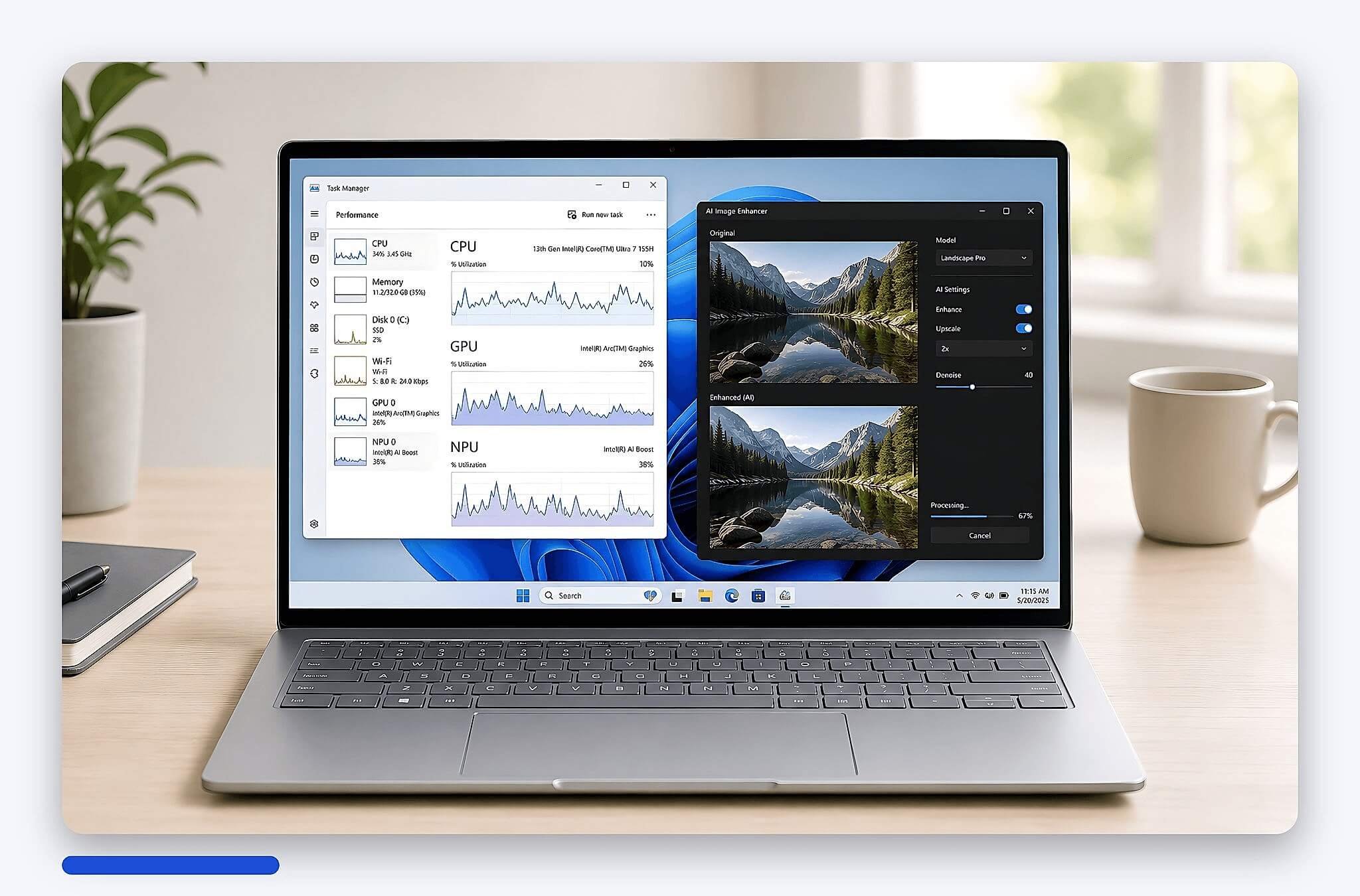
For average users, the noticeable difference lies in continuous tasks. During a 1-2 hour video meeting, Windows Studio Effects can blur the background, auto-frame, and perform local noise cancellation. If the NPU supports this well, the CPU has more headroom for browsers, Word, Excel, or accounting software. You can also refer to our article on "Accounting Laptops for Excel MISA" if your primary needs are processing spreadsheets, MISA, and eTax.
It is important to clarify that the NPU does not increase game FPS in the way many expect. Gaming still primarily depends on the GPU, CPU, RAM, and the machine's power design. An NPU also does not replace an RTX card for 3D rendering, training large AI models, or heavy video rendering. If your goal is gaming, you should prioritize a dedicated GPU and cooling capability; a mid-range gaming laptop with the right configuration will better suit your needs.
Practical Uses and Popular NPU Generations
The clear use case for NPUs currently lies in local AI features. With the Copilot+ PC standard, Microsoft requires an NPU of 40 TOPS or higher, along with specific memory and storage requirements. When meeting this standard, the machine can support Recall, Live Captions with translation, Cocreator, and Windows Studio Effects through on-device processing. The benefit is faster response times in certain situations, reduced network dependency, and improved privacy.
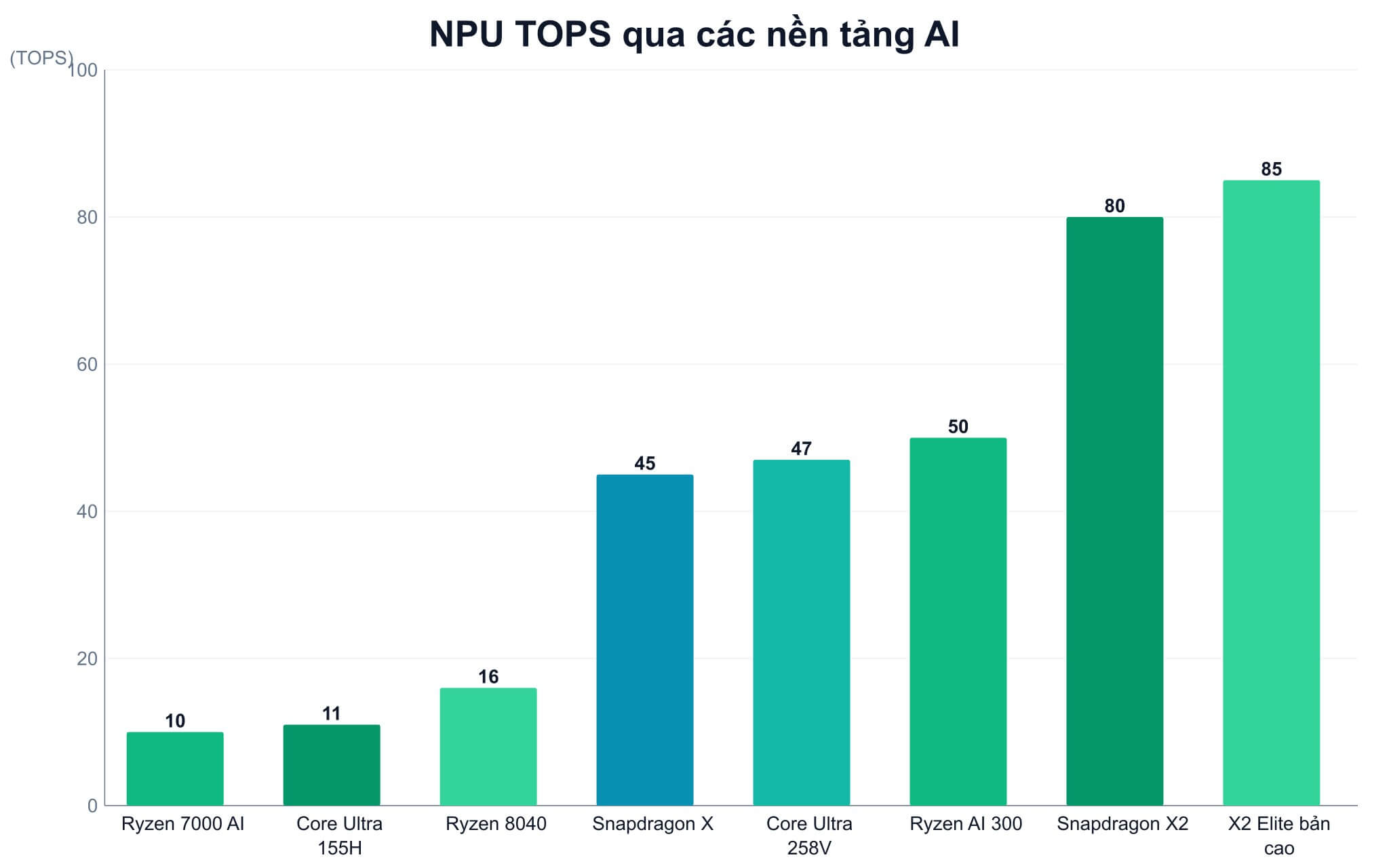
Early generations like Intel Core Ultra Series 1 or AMD Ryzen 7040/8040 still have an NPU, but their capability often hasn't reached the Copilot+ threshold. The Core Ultra 7 155H has an 11 TOPS NPU, 33 TOPS total AI, and an Intel Arc iGPU of 18 TOPS. Ryzen 8040 steps up to 16 TOPS, which is sufficient for AI cameras and basic tasks. Moving to Snapdragon X, Intel Core Ultra 200V, and AMD Ryzen AI 300, the 45-50 TOPS range has become more common, making them more suitable if you want to use local AI features in Windows during the 2026 era.
If you are buying a Laptop with NPU for office work, you should distinguish between an "AI PC" and a "Copilot+ PC." "AI PC" is a broad term used by many manufacturers as long as there is an AI-supporting component. "Copilot+ PC" has clearer requirements, where the 40 TOPS NPU threshold is the key factor. Therefore, the Core Ultra 7 155H is still good for office work, studying, online meetings, and light multitasking, but it does not meet the Copilot+ standard regarding NPU requirements.
Which Configuration Should Average Users Prioritize?
For office work, studying, web browsing, online meetings, and light entertainment, an NPU is a plus but not the top priority. You should prioritize 16GB of RAM or more if you frequently open many tabs and use Teams, Excel, browsers, and internal software simultaneously. An SSD also needs sufficient capacity for the system to run smoothly. If your budget is limited, upgrading RAM or choosing a stable CPU often provides a more noticeable improvement than just chasing TOPS.
The group that should prioritize powerful Laptops with NPU are those who attend many online meetings, work on the go, need good battery life, and want to experience Windows' local AI features. If you frequently use live captions, content translation, background blur, noise cancellation, or light content creation, the 45-50 TOPS level is more meaningful. For those who only use Word, Excel, browsers, and movies, the Core Ultra Series 1 or Ryzen 8040 will still perform well.
One downside to consider is the uneven software ecosystem. Some AI features depend on the Windows version, region, language, and specific applications. For machines using Snapdragon X on Windows ARM, you should check accounting software, printers, digital signatures, or old drivers before purchasing. If your work involves important data, security must go hand-in-hand with AI; you can read more about how to enable BitLocker on a new Laptop to learn more about disk encryption on Windows.
Guidance on Choosing an AI Machine Suited to Your Needs in HCMC
If you ask Hung Phat which option to choose, the answer depends on your daily usage. Basic office users should choose a machine with a stable CPU, 16GB of RAM, sufficient SSD, and a good display first. Users who frequently attend online meetings, work mobilely, and want to use Copilot+ features should prioritize platforms with an NPU of 40 TOPS or higher. Those doing graphics, video editing, or heavy AI still need to look at dedicated GPUs, RAM capacity, and cooling capabilities rather than just looking at the NPU metric.
Regarding cost, machines with the latest AI platforms are usually in a higher price segment than standard office machines. The difference can range from a few million to over ten million VND depending on the CPU, RAM, screen, thinness, and brand. If your budget is in the 20-30 million VND range, you need to balance Copilot+, RAM, and screen quality. Hung Phat advises you not to pay extra just for the "AI" label on a machine's sticker.
In HCMC, you should test the tasks closest to your actual needs in person before deciding. Open many browser tabs, run office applications, test the camera, microphone, fan noise, and battery life according to the recommended configuration. If you need Copilot+, check clearly whether the chip platform reaches 40 TOPS or higher. If you don't need local AI, choosing a machine with a balanced RAM, SSD, and screen will be more economical.
Frequently Asked Questions (FAQ)
How is the NPU on new laptops different from previous generations?
The big difference lies in local AI processing capability and the accompanying software standards. The Core Ultra 7 155H has an 11 TOPS NPU, while the Core Ultra 7 258V reaches 47 TOPS and the Ryzen AI 9 HX 370 reaches 50 TOPS. The 40 TOPS threshold is a critical milestone to meet Microsoft's Copilot+ PC requirements.
Will laptops without an NPU become obsolete quickly?
Not necessarily. Laptops without an NPU are still perfectly fine for Word, Excel, browsing, online learning, watching movies, and many office programs. If you don't use Copilot+, don't attend many video meetings, and don't need AI running directly on your machine, a good CPU, 16GB RAM, and SSD configuration remains more important.
How much extra do I need to spend to get a stronger NPU?
The price difference depends on the machine segment, not just the NPU. Moving from the 11-16 TOPS platform to the 45-50 TOPS group typically increases the cost by several million to over ten million VND because it comes with newer CPUs, better screens, thinner chassis, or larger batteries. If you only do basic office work, that money might be better spent on RAM or SSD.
What specifications should I look for to identify a Laptop with this technology?
You should look at the microprocessor platform name and the NPU's TOPS rating. For example, Snapdragon X has a 45 TOPS Hexagon NPU, Core Ultra 7 258V has a 47 TOPS NPU, and Ryzen AI 9 HX 370 has a 50 TOPS NPU. For Laptops with NPU intended for Copilot+, check for the 40 TOPS+ milestone rather than just looking for an "AI PC" sticker.











