

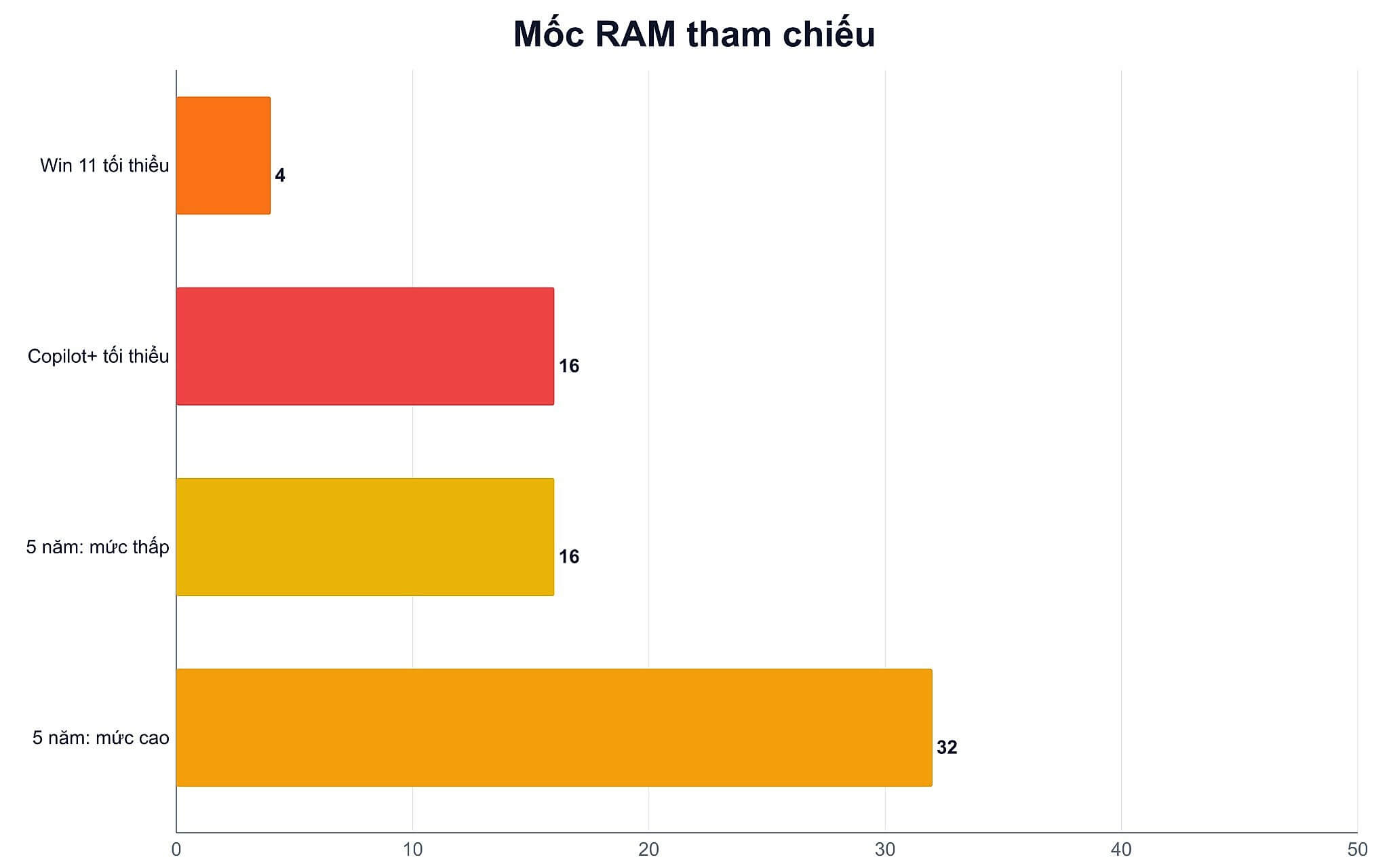
Windows 11 only requires a minimum of 4GB, while Copilot+ PCs must have at least 16GB DDR5 or LPDDR5. This gap shows that the startup requirement is far from the level needed for comfortable work. The question of how much RAM a laptop needs has no single answer because it depends on three things: your actual workload, whether the memory is soldered or has expansion slots, and the number of channels the machine is running. The third factor is the one most people overlook, yet it can strip away up to 40% of graphics performance.
How much RAM is enough for a 5-year usage cycle?
RAM is where Windows and your programs store active data. You can visualize it like a desk: the wider the desk, the more documents you can have open without constantly putting them away and taking them out again. When capacity runs out, Windows pushes data to the pagefile on the SSD. While SSDs are fast, they are still many times slower than memory, resulting in stuttering when switching windows, browser tabs needing to reload, and the hard drive running constantly even during light tasks.
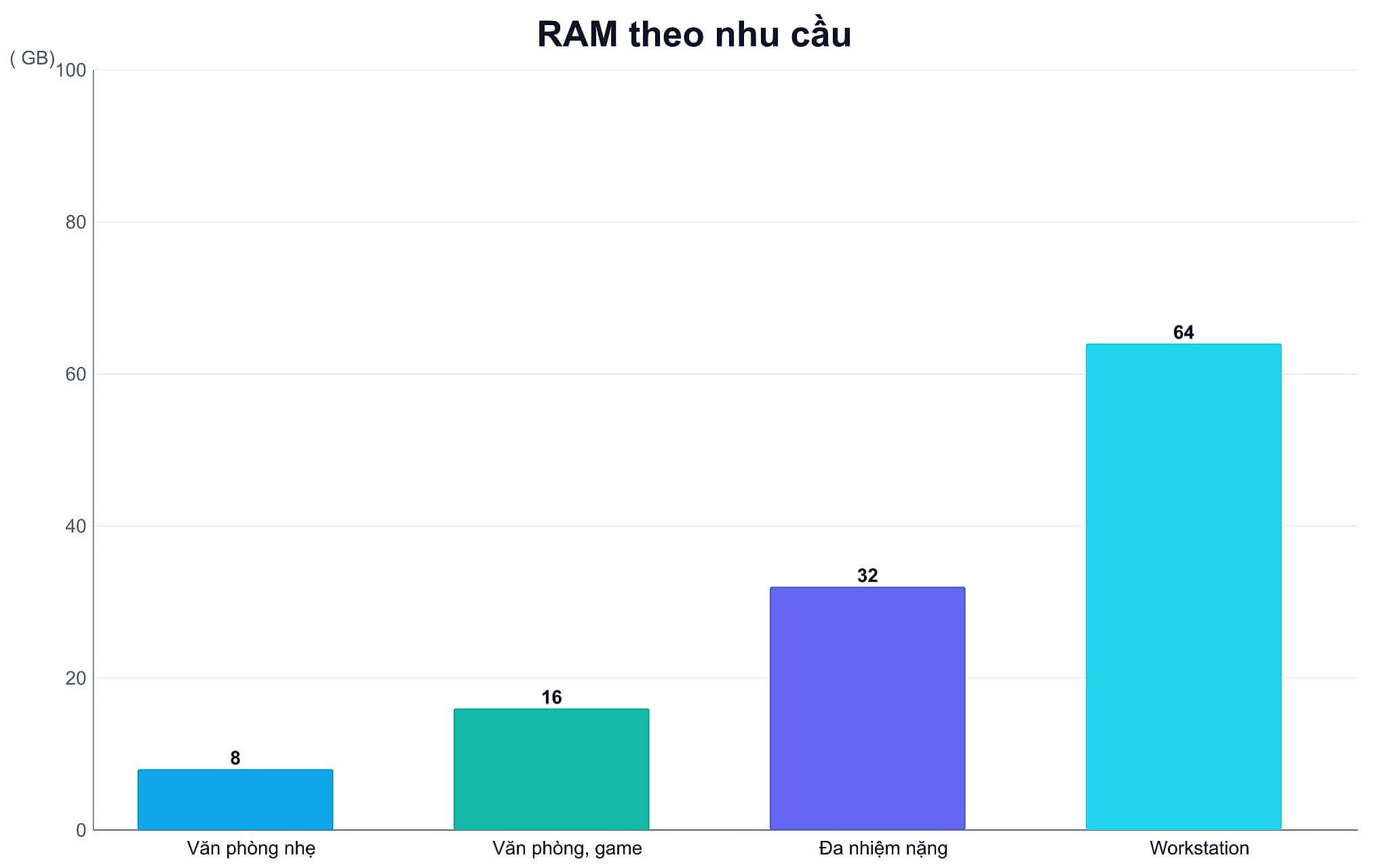
| Capacity | Suitable For | Limitations to Note |
|---|---|---|
| 8GB | Light office work, online learning, few simultaneous applications | Windows alone takes about 3.8GB when idle; opening 20 browser tabs nearly exhausts it |
| 16GB | Office work, studying, gaming, HD photo and video editing | May fall short during 4K editing, running virtual machines, or when the GPU only has 8GB VRAM |
| 32GB | 4K video editing, design, programming multiple environments, heavy multitasking | Almost no FPS increase if tasks do not utilize more than 16GB |
| 64GB or more | Mobile workstations, many virtual machines, big data projects | Exceeds the needs of most users, costs increase rapidly |
The 8GB level is only double the 4GB minimum requirement that Microsoft announced for Windows 11. This number sounds comfortable until real-world testing: a Windows 11 machine, just after booting up without any applications open, already occupies about 3.8GB. Opening a browser to watch a video along with a few email tabs brings it up to 5.7 to 6.6GB. Adding one photo editing software pushes it to the 7GB threshold.
The 16GB mark is the sweet spot for most students, office workers, and basic photo editors. This is also the mandatory minimum for Copilot+ PCs, which also require DDR5 or LPDDR5 memory. The 32GB mark provides a buffer for video editing, programming multiple services, and high-intensity multitasking. The simplest rule to remember: choose 16GB if the machine has upgrade slots, and prioritize 32GB from the start if the memory is soldered.
Is 16GB RAM enough for daily work?
For basic office tasks including Word, Excel, online meetings, and 10 to 20 browser tabs, 16GB handles things quite comfortably and leaves room for software updates for several years. A useful figure to remember when estimating: each light browser tab uses about 100 to 140MB, while heavy tabs like video or satellite maps use 200 to 300MB, not to mention the browser core itself consumes 400 to 500MB.
Regarding gaming, 2026 measurements show that 16GB is still fine for most titles, but exceptions are starting to appear. A series of recently released games specify 32GB in their official recommended specs, including Mafia The Old Country, Borderlands 4, DOOM The Dark Ages, Indiana Jones and the Great Circle, Microsoft Flight Simulator 2024, and Star Citizen. Conversely, many other new titles like Resident Evil Requiem or Monster Hunter Wilds still only list 16GB for all settings.
More important than the recommended number is the minimum frame rate. In an April 2026 test on an RTX 5070 card, the average frame rate between 16GB and 32GB was almost unchanged, but the 1% lows varied significantly in several titles: Star Citizen at 28 vs 15 frames, Escape from Tarkov at 63 vs 47, and Flight Simulator 2024 dropping from 6 to 2. This is exactly the stuttering sensation players describe, even when the average FPS looks good.
Content creators should compare based on resolution. Adobe Premiere technical documentation clearly recommends 16GB for HD video and 32GB or more for 4K. After Effects follows the same formula. A session running Premiere, Photoshop, a browser, and project folders simultaneously can easily exceed 16GB, at which point the machine must swap to the SSD, making drag-and-drop and rendering operations unstable.
When does 32GB truly make a difference for professional work?
Large capacity only pays off when total memory demand exceeds what is currently available. If a task only consumes under 16GB, upgrading to 32GB usually won't noticeably change frame rates or application opening speeds. It is also important to understand a common misconception: Windows will use more RAM when the machine has more RAM, as the system keeps more data in the cache. The same game might show 11GB on a 16GB machine but 14GB on a 64GB machine. This is optimized behavior, not a memory leak.
The case where 32GB makes the biggest difference comes not from the game itself, but from the GPU's VRAM. When the GPU only has 8GB of video memory, overflowing data spills into the system memory, and if the system memory is also full, it continues spilling into the pagefile. A January 2026 test noted that with an 8GB VRAM card, upgrading from 16GB to 32GB improved the 1% low frame rate by over 60%. With a 12GB or 16GB VRAM card, this difference almost disappears.
Light programming, learning Python, or building websites can start well with 16GB. If you are running virtual machines, containers, local databases, and browsers simultaneously, 32GB is much more practical, as analyzed in the article on how to choose a laptop that runs Docker smoothly. 3D graphics software also leans towards 32GB: Blender and Unreal Engine 5 both recommend that level, and DaVinci Resolve requires 32GB when using Fusion.
In early May 2026, Microsoft briefly posted a document recommending 16GB as a practical starting point and 32GB as a safe level for many years to come, only to remove it a day later. The removal doesn't make the numbers wrong, but it shows that even software manufacturers are uncertain as memory prices fluctuate wildly. For buyers, the safest approach is to measure actual needs rather than chasing general recommendations.
Onboard RAM or expansion slots decide the machine's lifespan
This is a question more important than whether you need 16GB or 32GB, because it determines whether you have a way out. DDR5 memory in removable stick form can be replaced if the machine has slots. LPDDR5X memory is usually soldered directly onto the motherboard; in exchange, the machine is thinner and has higher bandwidth, but the capacity you buy on day one is the capacity you will use for the entire life of the machine.
Regarding bandwidth, the actual difference is much larger than what is commonly cited. An LPDDR5X-8533 system running at 128-bit bus achieves about 136.5 GB/s. A single DDR5-5600 SO-DIMM stick only reaches 44.8 GB/s, and you need two sticks to reach 89.6 GB/s. This means LPDDR5X is about 1.5 times faster under comparable conditions, not just slightly better. The difference between the two standards is analyzed separately in the article DDR5 vs LPDDR5: which one should you choose.
LPCAMM2 is a new direction aimed at maintaining LPDDR5X speeds while remaining replaceable. Crucial's commercial version currently tops out at 8,533 MT/s with two capacities: 32GB and 64GB. The 9,600 MT/s level was the performance ceiling announced by chip manufacturers in early 2024, and actual modules at that speed have only been showcased, with mass production expected in the second half of 2026. To be blunt: LPCAMM2 is still very rare, currently appearing only on a few ThinkPad and Dell Pro lines for enterprises.
In the Hung Phat inventory, the three models below clearly illustrate three different scenarios. The HP EliteBook 840 G9, priced at 14.8 million VND, comes with 16GB DDR5 and has two SO-DIMM slots, meaning you can upgrade from 16GB later. This is the most economical option for those who are unsure how much their needs will grow.
In the ultra-thin group, the Dell XPS 13 DX13260, priced at 31.99 million VND, uses 16GB LPDDR5X-7467 soldered on. The machine is compact with high bandwidth, but that 16GB is the final number, so it should only be chosen if you are certain your work won't exceed that threshold in the next 5 years.
For video editors or designers, the Dell 16 Premium DA16250, starting from 43 million VND, has a 32GB LPDDR5x-7467 version paired with an RTX 5060 or RTX 5070 card. This configuration aligns with the argument above: an 8GB VRAM card needs ample system memory to avoid swapping to the hard drive during 4K editing.
Memory channels affect integrated graphics more than capacity
This is a part rarely mentioned in articles but causes the greatest damage. Integrated graphics chips do not have their own memory and must borrow system memory, making them very sensitive to the number of channels. A 16GB machine running a single stick will only use half the bandwidth compared to a 16GB machine split into two sticks, even though the capacity printed on the label is exactly the same.
The performance loss has been specifically measured. A machine using Radeon 780M sold with 16GB DDR5-5600 but only one stick achieved 4,677 points in 3DMark Fire Strike Graphics, while machines with the same chip running two sticks averaged 7,612 points-nearly 39% lower. In gaming, GTA V at High 1080p ran at 32.9 FPS compared to 58.7 FPS, a difference of about 44%. Another model using soldered RAM but only half the bandwidth showed similar results.
Fortunately, there is a fix. If a machine comes with 8GB soldered and has one empty slot, adding another stick will activate the flexible memory architecture of Intel and AMD: the equal capacity on both sides will run in dual-channel, while the remaining capacity runs in single-channel. Adding a 16GB stick to an 8GB soldered machine results in 16GB running in dual-channel and 8GB in single-channel, which recovers almost all the lost graphics performance. Therefore, when inspecting a machine, the question to ask is how many sticks it is running, not just how many GB it has.
Why 8GB is returning to the market in 2026
During 2024 and 2025, there was a feeling that 16GB was becoming the default standard. 2026 is moving in the opposite direction due to memory prices. Common DRAM prices rose about 45 to 50% in Q4 2025 and nearly doubled in Q1 2026. According to analyst forecasts, personal computer prices this year have increased by about 17%, and memory alone accounts for up to 23% of component costs, compared to 16% last year.
As a result, many new machines released in 2026 are returning to the 8GB mark to maintain price points. Notably, this phenomenon is not limited to the budget segment: some high-end ultrabooks are being sold with 8GB LPDDR5x in single-channel, and even enterprise machines priced over $1,200 are only equipped with 8GB. Even Apple, after upgrading the entire Mac lineup to 16GB in late 2024, introduced a budget MacBook in early 2026 with only 8GB of non-upgradable unified memory.
For buyers in Vietnam, this leads to a practical conclusion: do not assume that a newer machine will have better memory specs. You must read the specifications of each version carefully, and if you are considering an upgrade, plan early because memory prices show no signs of returning to previous levels. The article on NPU 45 TOPS or 32GB RAM: which should you prioritize compares these two investment directions in detail.
How to check your memory needs before deciding to buy
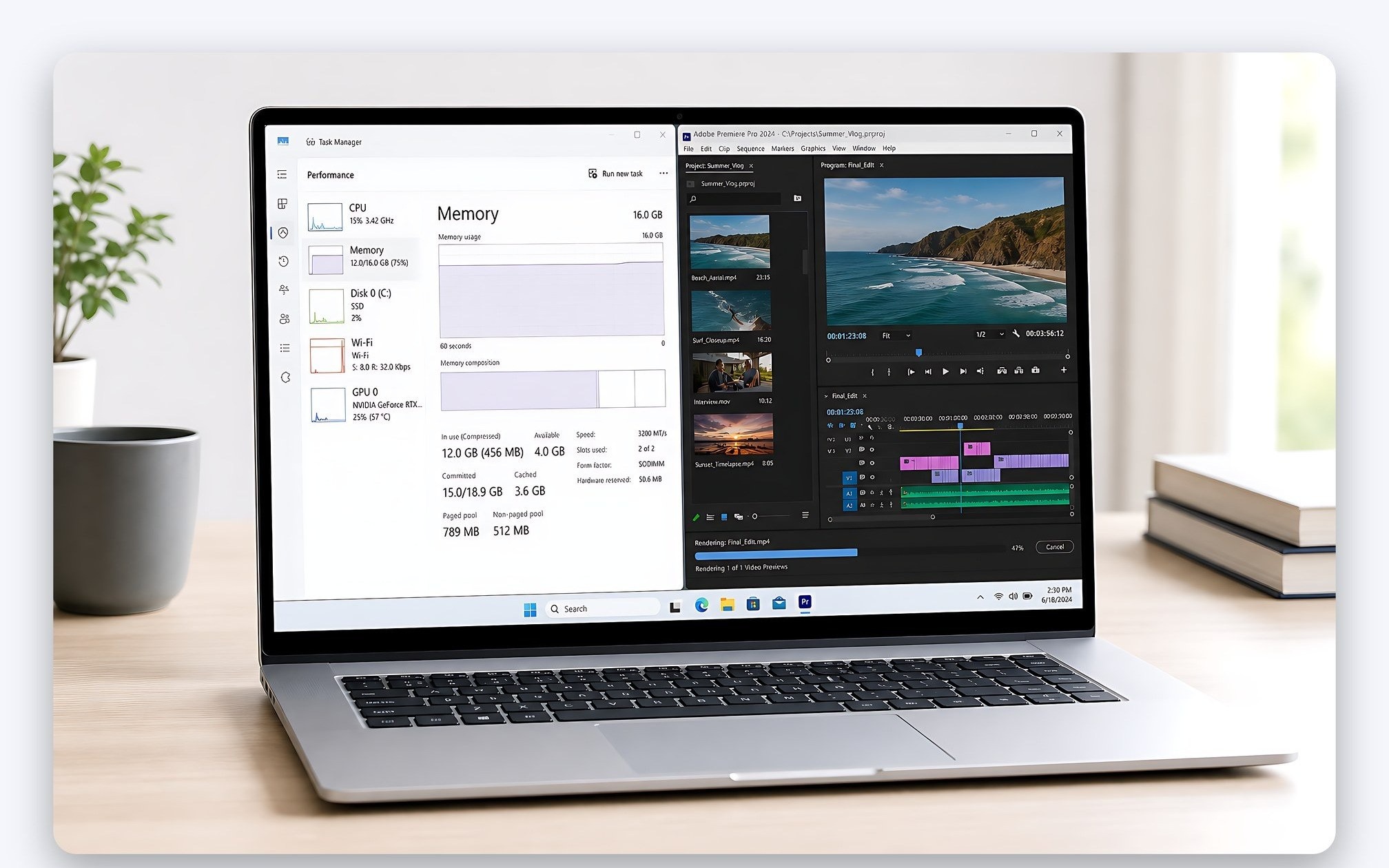
The most reliable way is to run the actual heavy workload you typically perform, rather than looking at the machine immediately after booting. Open your browser with your usual number of tabs, meeting applications, editing software, or development environments. Then, open Task Manager, go to the Performance tab, and select Memory to see the "In use" and "Committed" levels.
If your frequent usage hits 14 to 15GB on a 16GB machine, the system has almost no buffer left, and upgrading to 32GB is clearly valuable. Conversely, if the machine only uses around 8 to 10GB, that extra money should be saved for a larger SSD or a GPU with more VRAM. You should also check the "Working Set" column for each process to see which application is consuming the most memory.
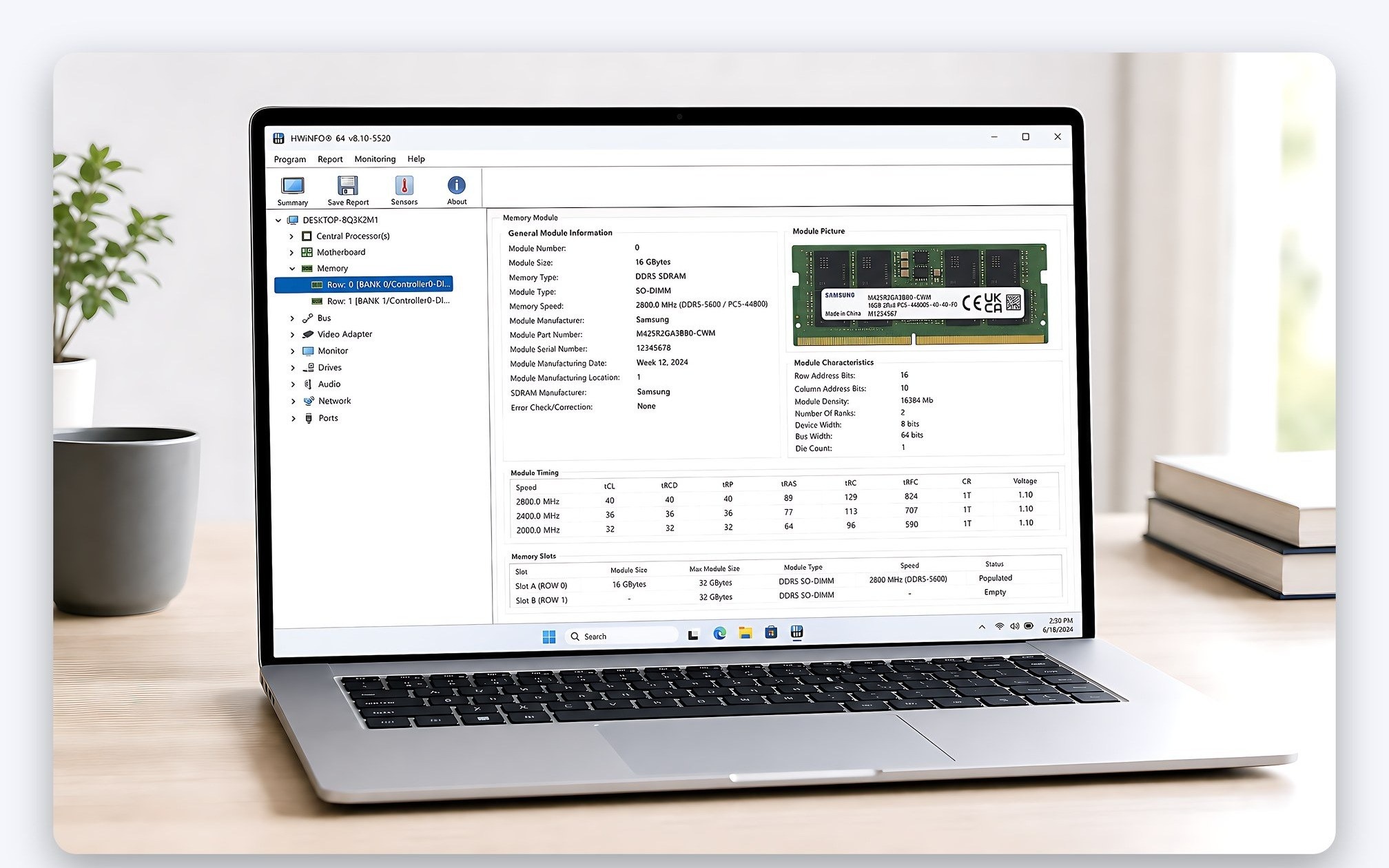
Before finalizing your purchase, there are four things to clarify: how many slots the machine has, whether it is running one stick or two, whether the memory is soldered or removable, and what the manufacturer's maximum capacity is. These four questions determine the machine's lifespan more than the 16 or 32 printed on the sticker.
When visiting the Hung Phat showroom in Ho Chi Minh City, you should bring a list of the software you use, the number of browser tabs you typically keep open, and a description of your heaviest weekly task. Our technicians will open the machine to check empty slots, confirm the memory channels, and advise whether you should choose a 16GB version that is upgradable or a pre-installed 32GB version. This approach is more practical than upgrading based on the psychological need for headroom for tasks you might never actually run.
Frequently Asked Questions about Laptop RAM Capacity
Is 16GB RAM enough for the next 5 years?
It is enough for office work, studying, casual gaming, and photo editing, provided the machine has upgrade slots so you have a way out. If the memory is soldered and your work tends to get heavier, you should consider 32GB from the start. Signs that you need an upgrade include frequent usage hitting 14 to 15GB, stuttering when switching windows, and the hard drive running constantly even during light tasks.
Can onboard RAM be upgraded?
LPDDR5X memory soldered directly to the motherboard cannot be replaced; the capacity you buy initially is what you will use for the machine's entire lifespan. Only removable sticks or LPCAMM2 modules can be replaced, and LPCAMM2 is currently very rare, appearing mainly on a few ThinkPad and Dell Pro enterprise lines. Therefore, when choosing a thin and light machine, you must determine the correct capacity at the time of purchase.
What if a 16GB machine only has one RAM stick?
The integrated graphics chip will lose about 35 to 45% of its performance because it can only use half the memory bandwidth. Real-world tests on a Radeon 780M showed 3DMark Fire Strike Graphics scores dropping from 7,612 to 4,677, and GTA V at High 1080p dropping from 58.7 to 32.9 FPS. If the machine has an empty slot, adding another stick will recover almost all of this performance.
What should I note when upgrading laptop RAM in Ho Chi Minh City?
You need to determine three things beforehand: whether the machine uses DDR4 or DDR5, whether there is an empty slot or you must replace the whole pair, and whether opening the machine affects your warranty. It is best to install sticks in pairs of the same capacity to enable dual-channel mode. Hung Phat provides free checks for slots and memory channel configurations before offering a solution to avoid purchasing incompatible sticks.
Should I choose 64GB for long-term laptop use?
The 64GB level primarily serves mobile workstations, running multiple virtual machines, or projects with massive datasets. For office work, studying, gaming, and standard editing, 32GB is more than sufficient. A logical reason to upgrade to 64GB is when the "Committed" line in Task Manager actually exceeds nearly 32GB, rather than increasing capacity just for peace of mind.











