

It seems like a simple question, but few articles answer it directly: how many Watt-hours does a long-lasting battery laptop need to last an eight-hour workday? The short answer is approximately 80Wh if the machine runs an x86 chip, but only 55 to 60Wh if the machine uses a modern energy-efficient chip. Hung Phat will explain why the same Watt-hour figure can yield two different results, along with a specific conversion table for each capacity level and the reason why manufacturer-announced figures are often three times higher than reality.
How manufacturer battery ratings on long-lasting laptops are measured
Most battery specifications for long-lasting laptops on flyers come from Japan's JEITA standard. The current version in effect is JEITA-BAT version 3.0, issued on May 31, 2023, and applicable to machines sold from December 1, 2023. Many Vietnamese articles still cite the old version 2.0, while version 3.0 has changed many measurement conditions.
The biggest difference is that version 3.0 requires the disclosure of two separate figures instead of an average: one for video playback and one for standby mode. Screen brightness has been raised from 150 to a minimum of 200 cd/m², the video test has switched to 4K at 60 fps with a 75.5 Mbps bitrate, and audio must not be muted. The full text can be found in the JEITA-BAT Ver 3.0 English document.
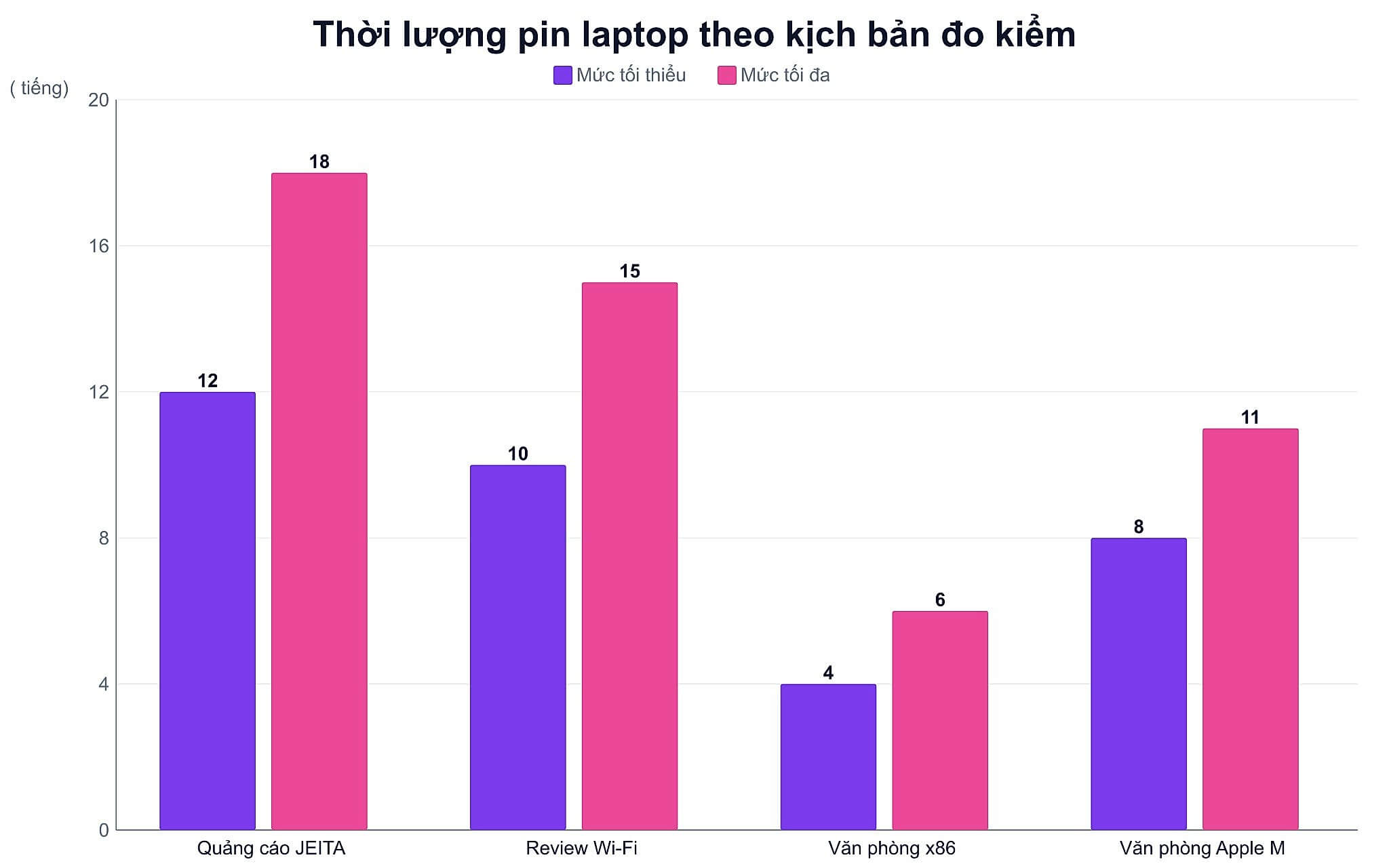
| Measurement Type | Conditions | Typical Results |
|---|---|---|
| JEITA 3.0, Manufacturer's claim | Min 200 cd/m2 brightness, Wi-Fi connected, 4K video playback or standby | 12 to 18 hours |
| Independent web browsing test | 150 cd/m2 brightness, Wi-Fi on, fixed scenario switching pages every 30 seconds | 10 to 15 hours with energy-efficient machines |
| Real-world multitasking office use | 250 to 300 nits brightness, 15 to 20 browser tabs, online meetings, Office | 4 to 6 hours with x86 chips, 8 to 11 hours with ARM chips |
There is a very common misconception: many articles claim that JEITA tests turn off Wi-Fi. In reality, the opposite is true; both versions 2.0 and 3.0 require the machine to be connected to a Wi-Fi access point throughout the measurement process. JEITA also does not specify processor power consumption, so the figure of under 3W for processors mentioned in some articles is unfounded.
Notebookcheck's independent tests are more realistic because they use Wi-Fi and continuous web browsing, but it is also important to understand correctly: the scenario involves using a fixed set of web pages, switching every 30 seconds, rather than random browsing. This fixed approach ensures that every measurement is repeatable. The full methodology can be found on the Notebookcheck test criteria page.
Converting Watt-hours to actual usage hours for long-lasting laptops
The simplest way to estimate is to divide the battery capacity in Watt-hours by the average power consumption. The problem is that the power consumption figures provided in many articles are outdated. A range of 8 to 12W used to be accurate for older machines, but modern ultrabooks are much more efficient: a MacBook Air only draws about 3.3W when browsing the web at 150 nits, while a ThinkPad X1 Carbon with a Lunar Lake chip uses around 5.2W.
Another misunderstanding is evaluating battery life through the number of cells. The number of cells only indicates how many battery blocks are combined and determines the voltage, not the stored energy. Watt-hours is the number you should look at, calculated as voltage multiplied by Ampere-hour capacity. A 3-cell battery reaching 70Wh contains significantly more energy than a 4-cell battery of only 50Wh.
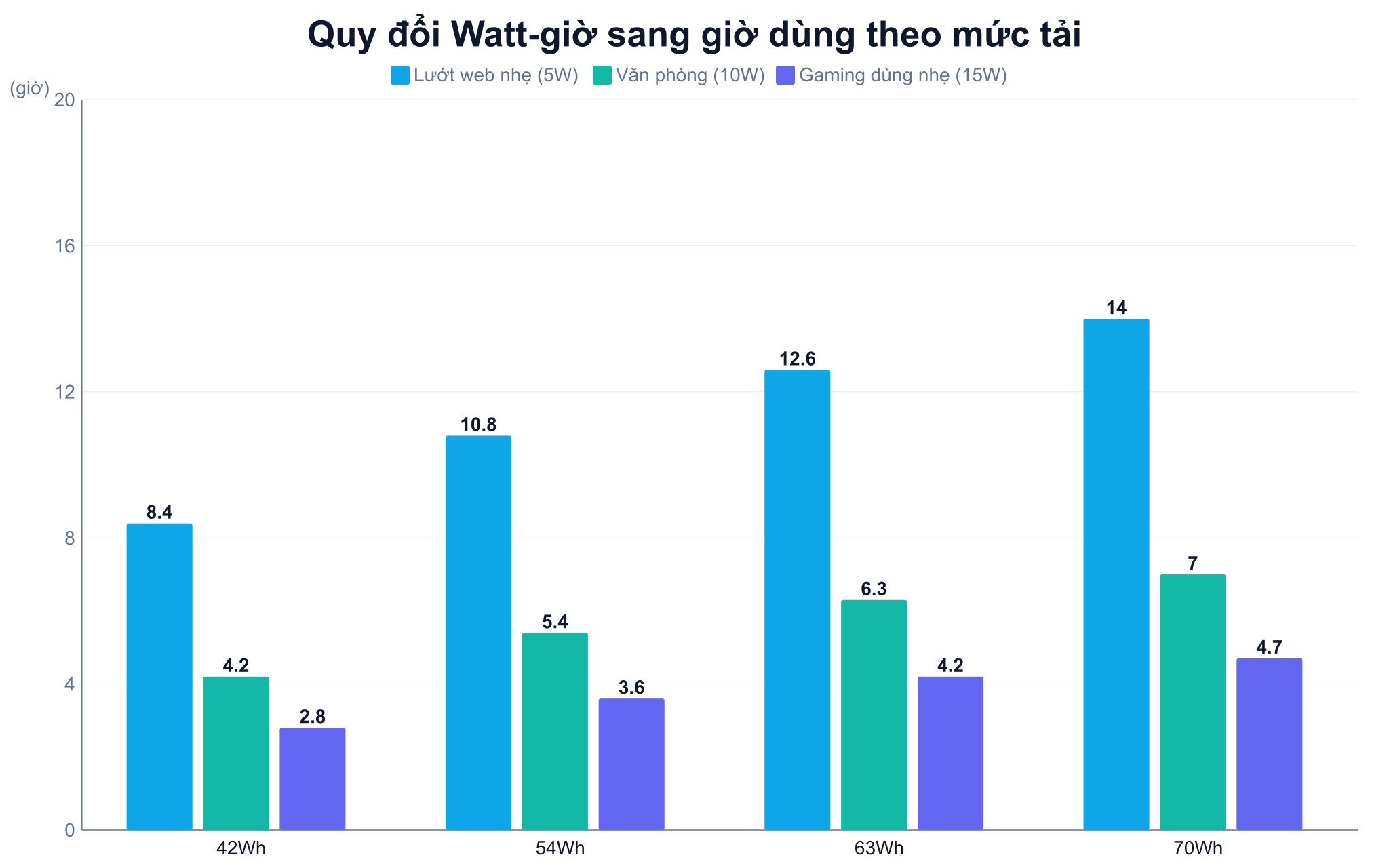
| Battery Capacity | Light web browsing, IPS screen (approx. 5W) | Multitasking office work (approx. 10W) | Light gaming machine (approx. 15W) |
|---|---|---|---|
| 42Wh | approx. 8.4 hours | approx. 4.2 hours | approx. 2.8 hours |
| 54Wh | approx. 10.8 hours | approx. 5.4 hours | approx. 3.6 hours |
| 63Wh | approx. 12.6 hours | approx. 6.3 hours | approx. 4.2 hours |
| 70Wh | approx. 14 hours | approx. 7 hours | approx. 4.7 hours |
Looking at the middle column provides the answer to the question posed at the beginning. To last a full eight-hour office workday at 10W consumption, a machine needs about 80Wh, which is significantly higher than the common standard for mainstream laptops hovering around 42 to 54Wh. This is why the 4 to 6-hour range is so common, and also why a truly long-lasting battery laptop is much rarer than the number of machines claiming to be so.
However, the 80Wh figure only applies to machines running x86 chips. If the machine uses an ARM chip or a modern energy-efficient platform, power consumption during work drops to around 5 to 7W, meaning 55 to 60Wh is sufficient for eight hours. The difference brought by the chip is much larger than the difference of a few Watt-hours of capacity, so a truly long-lasting battery laptop is one that balances all three factors, not just the one with the largest battery.
On long-lasting laptops, the screen is actually the biggest power consumer
For long-lasting laptops, the common saying that OLED screens consume about 20 to 35% more than IPS screens is actually unfounded, as the difference varies widely depending on the displayed content. The reason lies in how the two types of panels operate: OLED is self-emissive for each pixel, so the brighter the content, the more power it consumes, whereas IPS always has a backlight on regardless of what is displayed.
Measured figures illustrate this clearly. For the same model with a 60Wh battery, the Full HD IPS version lasts 9 hours and 54 minutes, while the 4K OLED version lasts only 6 hours and 6 minutes, a difference of about 62%. However, on another model, the difference between 4K OLED and 1080p IPS is only about 9%. Direct power measurements show that an OLED screen displaying a black background consumes almost no additional power when brightness is increased, while a white background jumps from 12.5W to as much as 27W.
Therefore, the most practical tip for OLED machines is to use dark mode. Some ThinkPad models with OLED screens can gain about 1.5 hours of extra life just by switching to dark mode. Additionally, screens with high refresh rates like 120Hz or 165Hz should be set to 60Hz when unplugged, as many machines do not automatically lower the refresh rate, and the extra power consumption is quite noticeable.
Why gaming laptops struggle to become long-lasting battery laptops
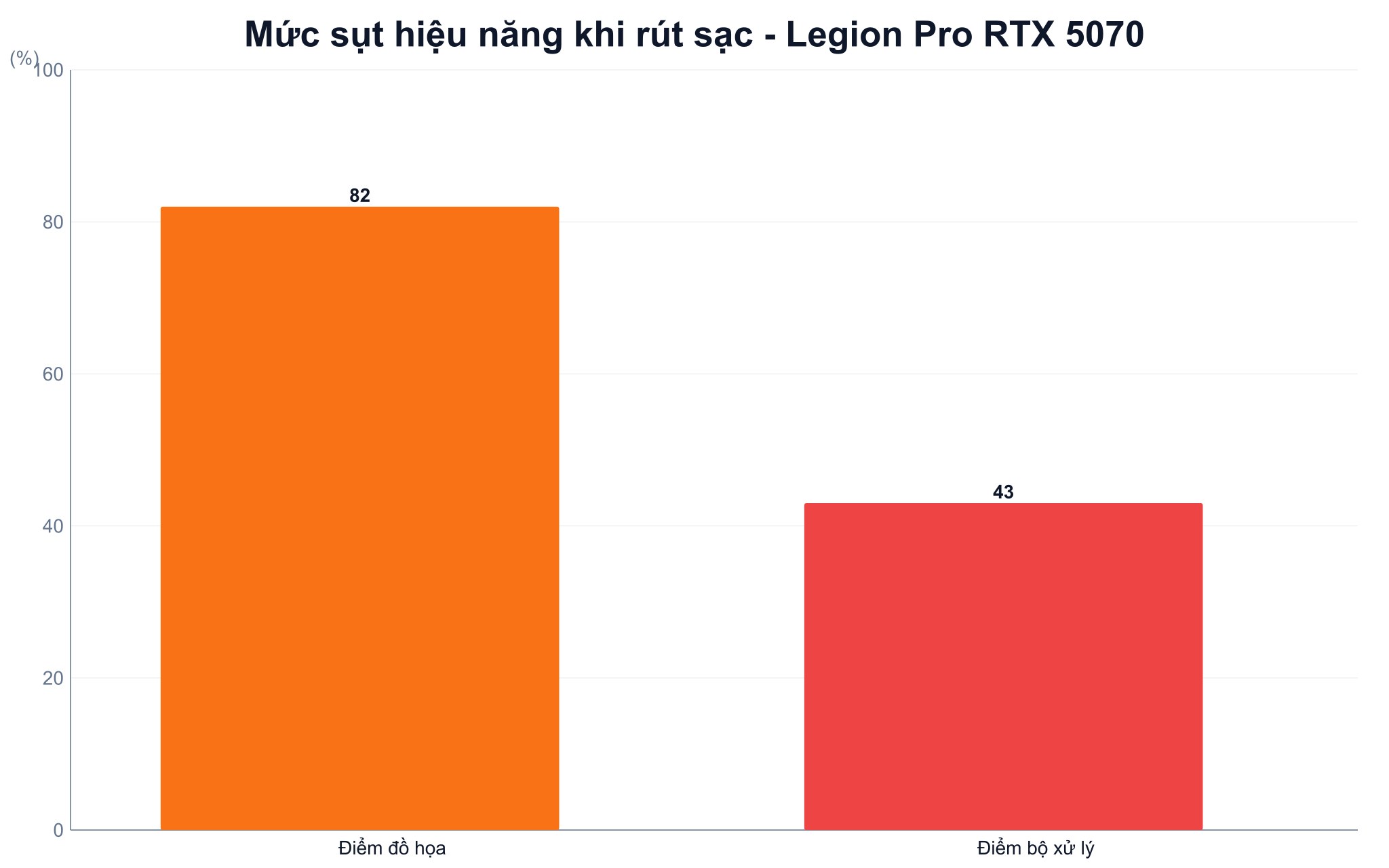
Machines with discrete graphics cards are the group least likely to become long-lasting battery laptops, and the performance drop when unplugged is much wider than the commonly mentioned 30 to 50%. Real-world testing on a Legion Pro model using an RTX 5070 shows that graphics scores drop by up to 82% and processor scores decrease by 43% when running on battery.
Conversely, the 2026 ultra-thin and light group shows almost no drop. This year's measurements recorded a Ryzen AI model dropping about 50%, but platforms like the Core Ultra X9 series, Apple M5 chips, or Snapdragon X2 Elite maintain nearly full performance when unplugged. In other words, the performance drop depends on the platform rather than being a universal rule.
For gaming machines, long-lasting battery life for light tasks is typically around 3 to 4 hours, while playing games or rendering graphics without a charger only lasts about 1 to 1.5 hours. This is an inherent trade-off for this category of machines, not a product defect.
Three tiers of long-lasting laptops currently available at Hung Phat TP.HCM
At the highest tier of long-lasting laptops, the Lenovo Yoga Slim 7 14Q8X9 (2024) priced at 32,000,000 VND features a 70Wh battery paired with a Snapdragon X Elite X1E-78-100 chip, 32GB LPDDR5x, and a 1TB SSD. The machine weighs 1.28kg and has a 14.5-inch 3K OLED 90Hz screen. This is the quintessential long-lasting laptop configuration: large capacity combined with an energy-efficient ARM platform.
In the mainstream office group, the DELL 14 DC14250 (2025) priced at 18,500,000 VND has a 54Wh battery, Core 5 120U chip, 16GB DDR5, and a 512GB SSD, with a 14-inch FHD+ 300 nits screen. According to the conversion table above, 54Wh provides about 5 to 6 hours of multitasking work, enough for a session but not a full day.
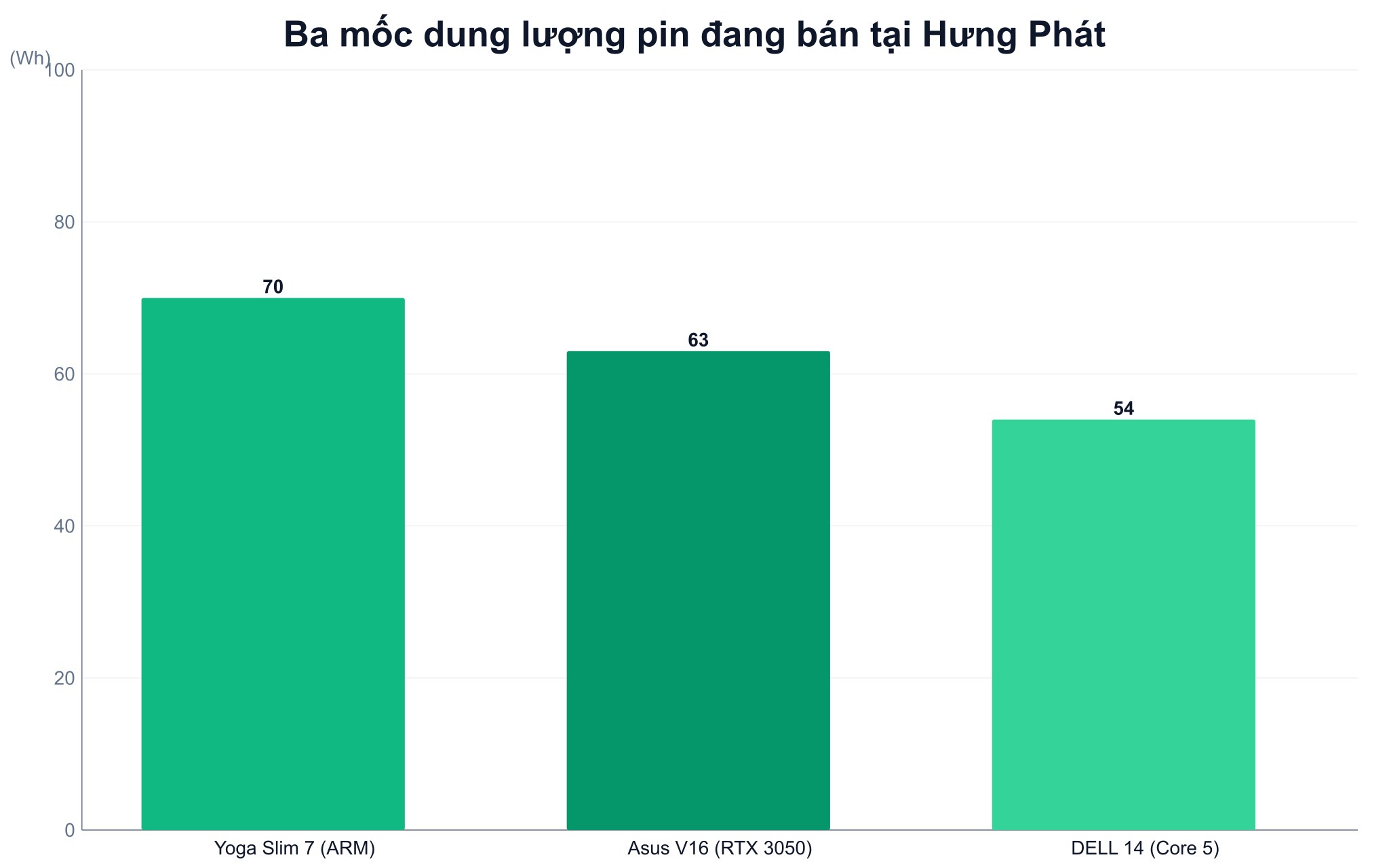
In the group with discrete graphics, the Asus Gaming V16 V3607 (2025) Core 5 210H version with an RTX 3050 6GB priced at 28,290,000 VND has a 63Wh battery and weighs 1.95kg. The battery capacity is not small, but due to the discrete graphics and 144Hz screen, the actual usage time is still significantly shorter than the two models above.
Looking at these three models side-by-side, you will see that for long-lasting laptops, capacity is only half the story. The 63Wh model lasts fewer hours than the 54Wh model if the discrete graphics are enabled, while the 70Wh ARM-based model far outperforms both. When choosing a machine, you should ask three things: how many Watt-hours, what chip series, and what type of screen.
How to maintain long-lasting laptop batteries: evidence-based advice
For long-lasting laptops, an 80% charge threshold is the official recommendation from all four major manufacturers. Apple has Optimized Battery Charging and a charge limit option; Lenovo has Conservation Mode which maintains the charge around 75 to 80%; Dell has a mode that prioritizes AC power; and ASUS has three levels: 100%, 80%, and 60%. Enabling this feature is worthwhile if you frequently keep your laptop plugged in.
Conversely, no manufacturer publishes a threshold for staying below 20%. This is anecdotal experience rather than official documentation from Apple, Lenovo, Dell, or ASUS stating that you shouldn't let the battery drop below 20%. Apple only recommends keeping it around 50% when storing the machine for long periods without use.
The idea that keeping it plugged in constantly is completely harmless also needs clarification. The power management circuit does actually stop charging when full so the machine isn't overcharged, but ASUS's own documentation clearly states that keeping the battery at 98 to 100% for long periods will reduce its lifespan. Apple also explains that their feature works by reducing the time the battery spends in a fully charged state. So, plugging it in is fine, as long as you enable the 80% limit.
Frequently Asked Questions about long-lasting laptops
How many Wh does a long-lasting laptop need to last a workday?
It depends on the chip. A machine running an x86 chip consumes around 10W during multitasking, so it needs about 80Wh to last eight hours. A machine using an ARM chip or a modern energy-efficient platform only draws 5 to 7W, so 55 to 60Wh is sufficient. The Watt-hour figure only has meaning when paired with the chip type and screen type, as a 70Wh ARM machine with an IPS screen far outperforms a 70Wh machine running a high-performance chip with a 4K OLED screen.
How long does a 54Wh laptop battery last?
Light web browsing with an IPS screen at moderate brightness lasts about 10 to 11 hours. Multitasking office work with many browser tabs and online meetings reduces this to about 5 to 6 hours. If the machine has a discrete graphics card and you perform heavy tasks, the number might drop to only 3 to 4 hours.
Why does a manufacturer claim 15 hours for a long-lasting laptop when it actually only lasts 5 hours?
Because both sides are measuring different things. Standard tests measure video playback or standby at a fixed brightness, while you are opening dozens of browser tabs, attending online meetings, and running background software at higher brightness. A three-fold difference is normal, not a product defect. The correct way to use the figure is to use the manufacturer's number when comparing different long-lasting laptops against each other, not to set expectations for actual usage time.
Does constant plugging in cause battery degradation?
The machine won't be overcharged because the management circuit automatically cuts off when full, but keeping the battery near 100% for long periods still reduces lifespan, as ASUS explicitly states in their documentation. The solution is to enable the 80% charge limit feature available in the manufacturer's software. As for the sub-20% threshold, no manufacturer recommends it; that is just anecdotal experience.
Does an OLED screen consume much more battery than an IPS screen?
It depends on the content you display; there is no fixed number. Real-world measurements show the difference varies from approximately 9% to 62% depending on the machine model and whether the background is light or dark. An OLED screen displaying a black background consumes almost no additional power when brightness is increased, whereas a white background consumes twice as much. Therefore, enabling dark mode on an OLED machine is the most effective way to save battery.











