

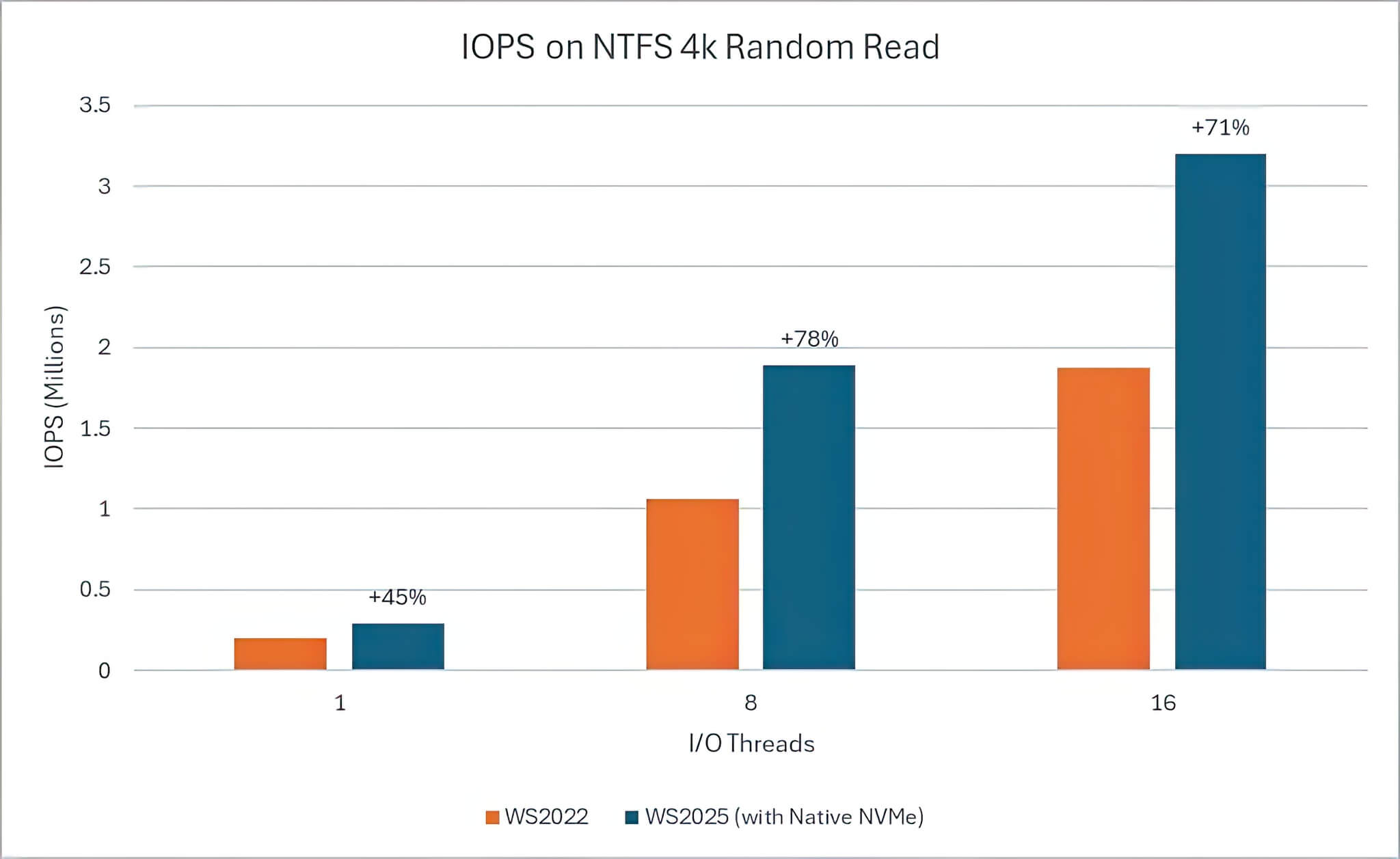
Microsoft has recently quietly updated its Windows Server 2025 operating system with a brand-new native NVMe driver, designed to significantly optimize the performance of modern SSDs. Although this driver has not been officially released for consumer versions of Windows, tech enthusiasts and explorers have discovered a clever Registry tweak to enable it directly on Windows 11. This method is claimed to have the potential to boost NVMe SSD performance by up to 80%; however, like any deep system modification, it comes with important caveats that users should carefully consider before proceeding.
How to enable the native NVMe driver and real-world performance
A developer who successfully tested and enabled this feature on Windows 11 (build 25H2) reported that the results were "quite good" on their machine. To help the community experience it, they shared a detailed step-by-step guide. To enable the new driver, users need to open the Registry Editor (Regedit) and navigate to the following path: HKEY_LOCAL_MACHINE\SYSTEM\CurrentControlSet\PoliciesMicrosoft\FeatureManagementOverrides. Here, you need to add three specific DWORD 32-bit values: "735209102", "1853569164", and "156965516", all set to a value of "1". After editing and restarting the computer, NVMe SSDs will appear under "Storage Media" instead of "Devices" in the Device Manager, signaling that the new driver is active.
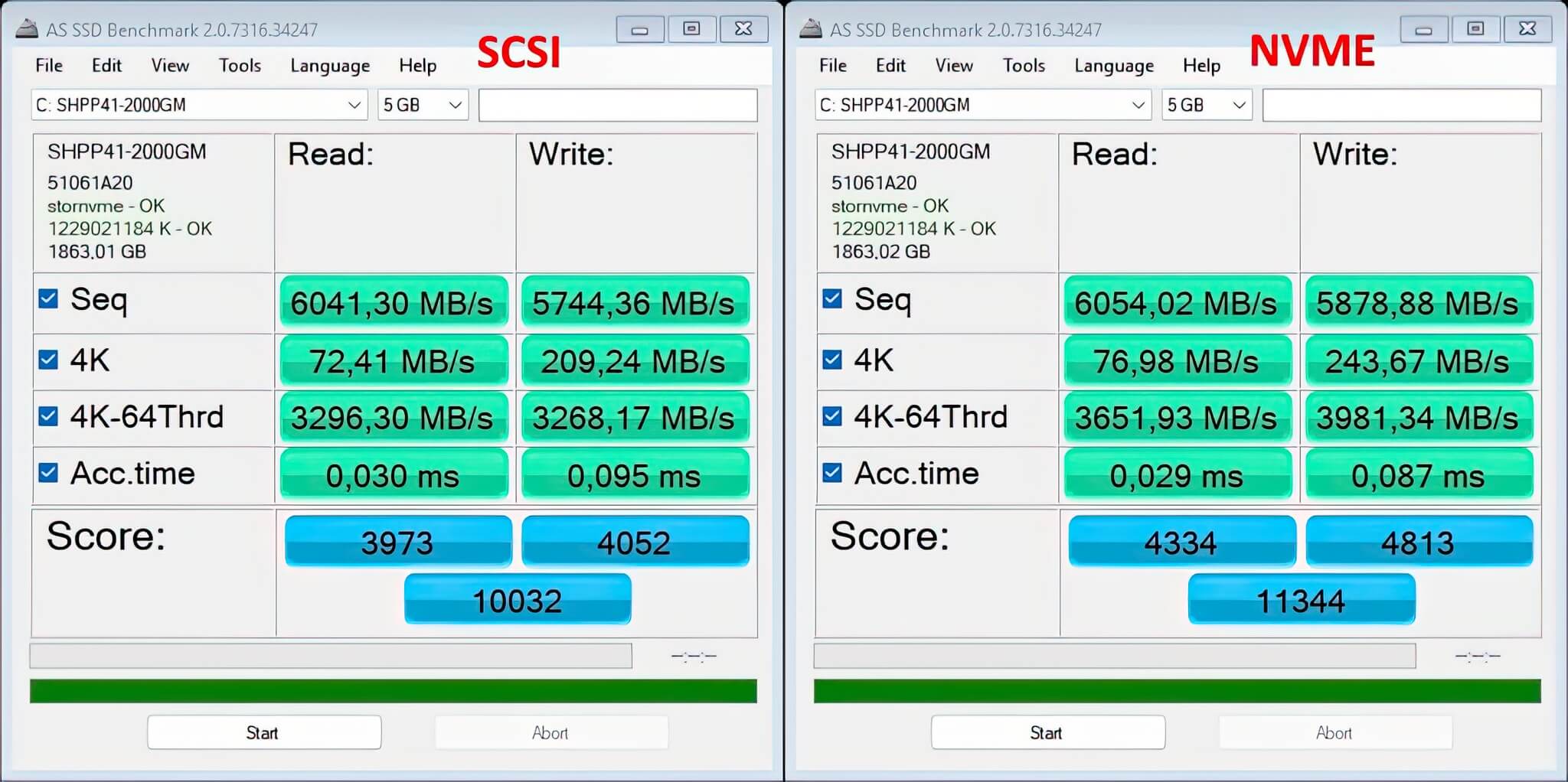
Theoretically, Microsoft claims that this native NVMe driver can increase IOPS (Input/Output Operations Per Second) by up to 80% and reduce CPU overhead by approximately 45%. These are incredibly impressive figures, especially for server systems. However, the reality on personal computers is slightly different. The German tech site ComputerBase conducted tests and found that the actual performance increase on Windows 11 only falls in the range of 10% to 15%. While this is still a welcome boost, it is much less dramatic than the figures Microsoft announced for Windows Server.
Explaining this discrepancy, Microsoft stated that the most noticeable improvements typically appear in specialized tasks such as database transactions, file server metadata operations, Hyper-V virtualization, and processing large datasets for Artificial Intelligence (AI) and Machine Learning (ML) applications. Therefore, general users performing office tasks or basic gaming may not experience the expected 80% "transformation."
Potential risks when modifying the Registry
While the performance benefits are real, those considering testing this trick must be extremely cautious. Some Windows 11 users have reported issues with third-party device management applications, such as Samsung Magician. In some cases, these tools fail to detect the NVMe drive entirely or, worse, list it twice as two separate devices, causing data management conflicts.

According to explanations from Tom's Hardware, the cause of this phenomenon is that the Registry modification alters the Disk ID. This change makes it difficult for third-party software to accurately identify the drive, leading to display errors or the inability to manage advanced SSD features. This is a "price to pay" that users should be aware of before deciding to intervene in the system.
To understand more deeply why this update is important, we need to look back at history. Although NVMe SSDs have become common over the past decade, Windows has relied on a SCSI (Small Computer System Interface) translation layer rather than a storage stack built specifically for NVMe from the ground up. To put it simply, the operating system still treats all storage devices as if they were old magnetic tape drives or mechanical hard drives.
The lack of native NVMe support means that SSDs using modern standards cannot fully exploit their performance advantages. Microsoft's latest update aims to improve read and write speeds by removing that outdated intermediary layer. Currently, Microsoft is encouraging Windows Server customers to switch to the native driver to benefit from these improvements through an opt-in option in the latest cumulative update for Windows Server 2025.











