


The most shared tip when hitting the limit is to time your first message right before working hours start, because of the "5-hour window from the first message" rule. Anthropic's official documentation does not contain this phrase, and evidence actually suggests the opposite, so this tip adds nothing. What truly governs Claude Pro limits are conversation length, effort level, enabled tools, and the model you choose. This article compares each claim with Anthropic's help page.
Where the timing tip goes wrong regarding Claude Pro limits
The original claim of this tip is that a 5-hour window starts from the first message and continues regardless of whether you use it or not. Hung Phat has searched through the entire Anthropic help center with various queries and found no page defining a session start point like that. The links previously cited for this claim now all return 404 errors, so it only exists on third-party sites that copy each other.
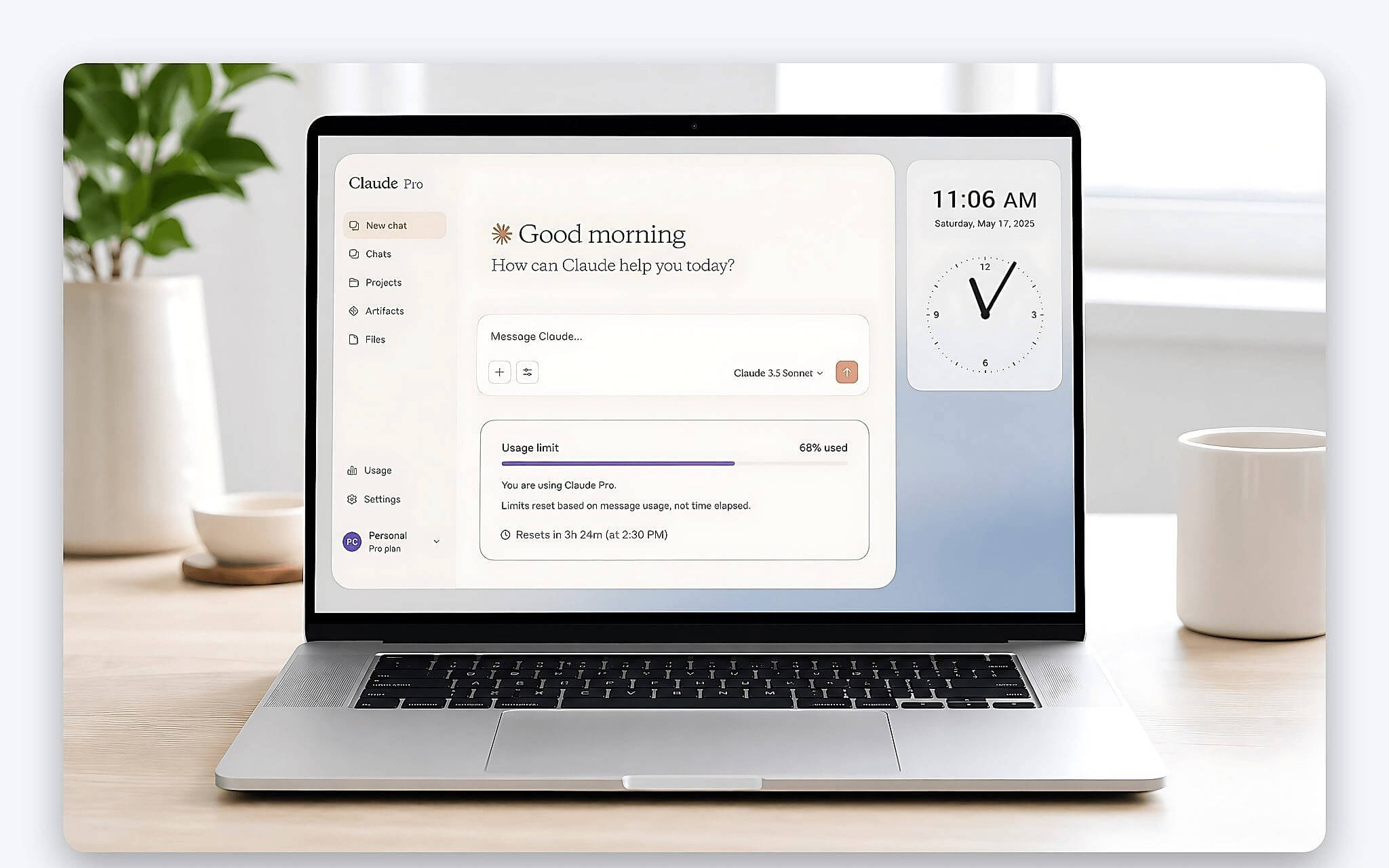
Living documentation regarding Claude Pro limits says otherwise. The Q&A section on usage credits states that limits reset every 5 hours from the moment you hit them, meaning the milestone is tied to the time of consumption, not the time you open the app. Claude Code documentation calls this a sliding window. With a sliding window, the portion already consumed drops out of the 5-hour window over time, so the concept of a session being "lost" because you opened it early does not exist in Claude Pro limits.
There is another point simpler than any technical argument: opening the app without sending anything consumes no tokens, meaning you haven't hit the Claude Pro limit at all. The cost of the timing tip is therefore quite high. You hold back on asking important questions just because you are afraid of opening a session, while your Claude Pro limit remains completely intact.
Official advice on Claude Pro limits is quite different. Anthropic suggests scheduling heavy tasks around the 5-hour window, rather than timing when to click a button. The rest of this article is based on the Usage limit best practices page, where the company specifically lists which factors consume the quota and what you should adjust.
The real mechanism of Claude Pro limits: 5-hour and weekly sessions
The first layer of Claude Pro limits is stated very concisely: session limits reset every 5 hours. This is also the only number Anthropic confirms. A little-known detail is that usage on claude.ai, Claude Desktop, and Claude Code all count toward a single shared limit, so if you use the command line version, it shares the quota with the chat version.
The second layer of Claude Pro limits is the part most often overlooked. Starting from late August 2025, Anthropic added weekly thresholds for both Pro and Max, applied to all models. The weekly reset time is a fixed milestone assigned to each individual account, independent of when you start using it or when you subscribe. The Max plan specifically has two weekly thresholds, not one.
| Personal Plan | Monthly List Price | Official Description Limit |
|---|---|---|
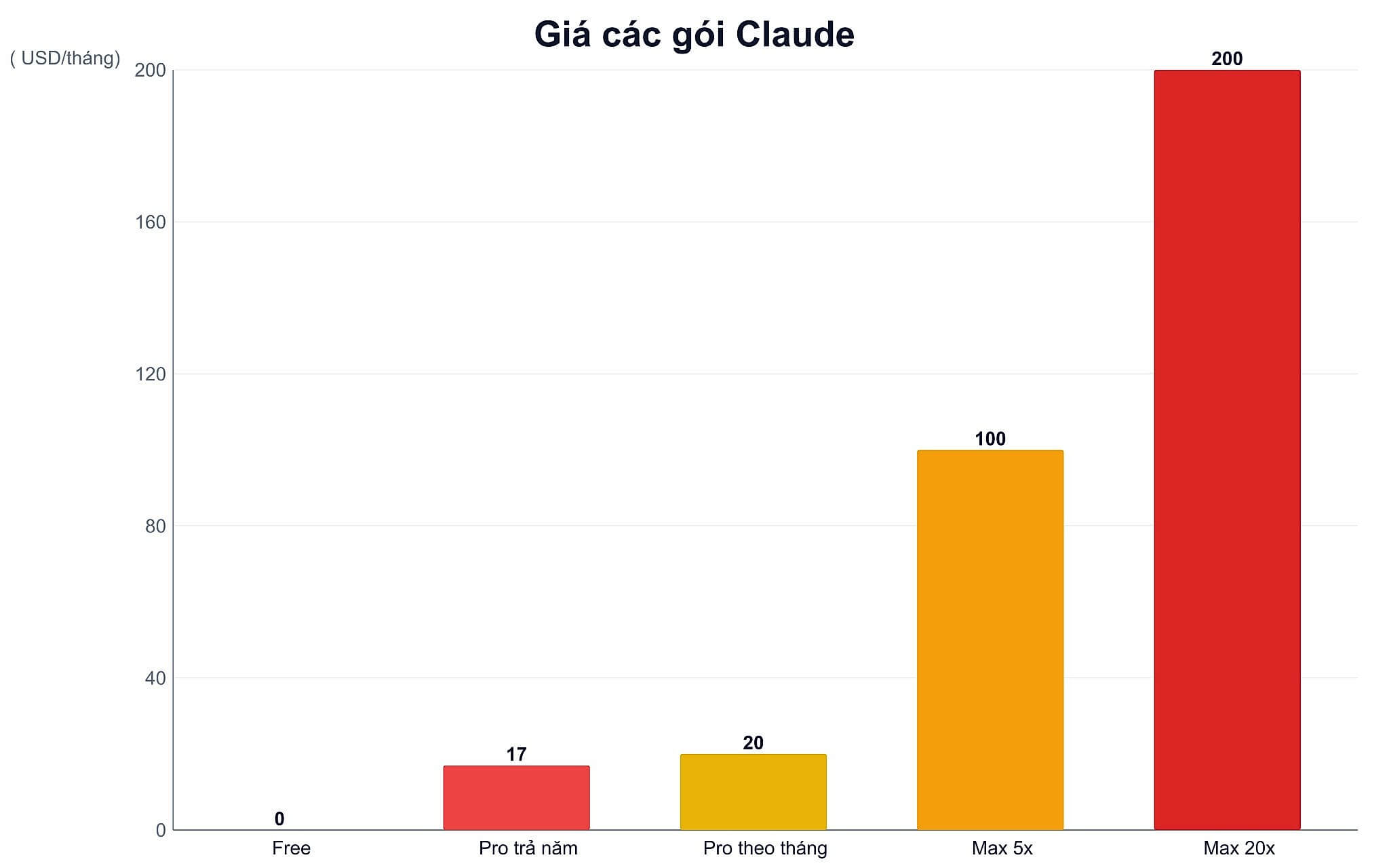
| Free | 0 USD | Baseline for comparison |
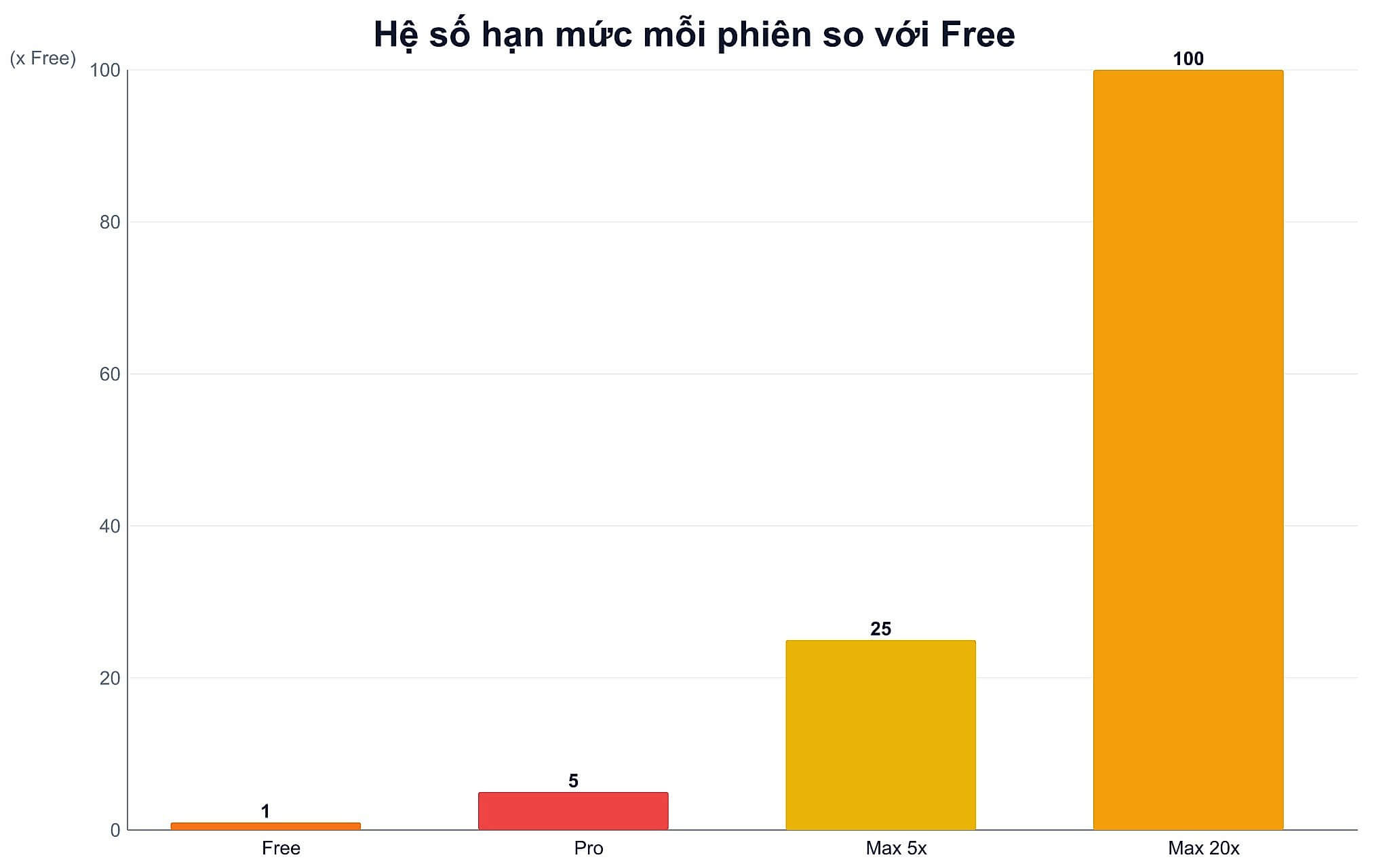
| Pro | 20 USD, 17 USD if paid annually | At least 5x the Free version per session |
| Max 5x | 100 USD | 5x Pro per session |
| Max 20x | 200 USD | 20x Pro per session |
Read this Claude Pro limit table correctly. The 5x and 20x multipliers for Max are relative to Pro, while Pro is at least 5x the Free version. Anthropic also clearly states that the prices above apply to web subscriptions; mobile app prices may differ, and both prices and plan structures are subject to change. Therefore, you should verify with the official page at the time of purchase instead of relying on a copied number.
A convenient feature is that the interface provides warnings rather than sudden cut-offs. When approaching the Claude Pro limit, you will see a warning like "Approaching 5-hour limit," and when you actually hit the threshold, it changes to "5-hour limit reached" along with the reset time. In the Settings menu, the Usage tab also features progress bars for the current session and the weekly threshold, allowing you to monitor usage instead of guessing.
What factors actually cause Claude Pro limits to run out quickly
Anthropic lists seven factors that affect the speed at which Claude Pro limits are consumed, and none of them relate to timing. This list is more useful than any hearsay, as each item can be toggled directly within the interface. The key point is that most Claude Pro limits are consumed by things users don't notice, rather than the number of questions sent.
Among these, conversation length is the silent consumer of Claude Pro limits. Each response requires reloading the entire previous context, so a conversation spanning an entire session will consume much more than three short conversations with the same workload. Anthropic explicitly recommends starting a new conversation if you are approaching your limit within a long chat.
| Factor | Why it consumes quota | How to handle it |
|---|---|---|
| Conversation length | Each turn reloads the entire previous context | Start a new conversation when changing topics |
| Effort level | High effort provides more detailed answers but consumes more tokens | Set to Low or Medium for daily tasks |
| Selected model | Opus consumes more than Sonnet; Sonnet consumes more than Haiku | Save Opus for complex tasks |
| Enabled tools | Research, web search, and connectors are all token-heavy | Turn off when questions don't require searching |
| Attachments | File size counts toward the limit | Trim unnecessary parts of the document |
| Artifacts | Both creation and editing count toward the limit | Combine multiple editing requests into one turn |
Effort level and extended thinking are two switches that immediately impact Claude Pro limits. Anthropic clearly states that high effort makes you hit the limit faster, while Low and Medium levels are sufficient for routine tasks and help extend your quota. Similarly, turn off extended thinking when questions do not require deep reasoning. These are two settings you can change in seconds that extend Claude Pro limits more effectively than any timing trick.
Regarding models, choosing a lighter version actually saves significant Claude Pro limits, as official documentation recommends using Haiku or the latest Sonnet version for most work due to lower token costs compared to the Opus line. You can refer to the article Claude Sonnet 5: Anthropic launches agentic Sonnet to understand the current capabilities of the Sonnet version. Note: once you are blocked, switching models will not unblock you, as the limit is shared across all models.
How to use Claude Pro efficiently according to official recommendations
The first principle to maintain Claude Pro limits is to prepare before typing. Anthropic recommends reviewing and refining your prompt before sending, grouping similar requests into a single message, and writing specifically and concisely. A single request that specifies the target audience, output format, and criteria to avoid can replace four or five follow-up questions. This is the most effective way to save without any trade-offs.
The second principle is to leverage Projects to maintain Claude Pro limits. Many tutorials claim Projects consume more quota, but official documentation says the opposite: content within Projects is cached and does not count toward the limit when reused; only new or uncached parts are counted. If you have to upload the same set of background documents every day, this is the most significant way to save.
The third principle is to monitor instead of guessing. The Usage tab in Settings shows how much of the current session's Claude Pro limit has been used, how much time remains, and when the weekly threshold resets. For those who frequently draft presentation content, the article 10 ChatGPT Slide Creation Prompts: From Idea to Finished Version is a good example of writing detailed prompts from the very first turn.
When to stick with Claude Pro and when to upgrade to Claude Max
Claude Pro limits are sufficient for users with one or two clear work blocks per day who need assistance with writing, summarizing, reading documents, and planning at a moderate intensity. If you only use it heavily for one session, lowering the effort and turning off unnecessary tools and grouping requests is usually enough to avoid hitting the limit midway.
Conversely, upgrading from Claude Pro to the Max plan is more reasonable when you process long documents, create many drafts, or work almost continuously all day. Details for each tier can be found on the What is the Max plan? page. A key consideration is that the 5x tier is already five times Pro per session, so most people who hit the limit daily will find this tier sufficient without needing the 20x tier.
The most practical approach is to try one week with the saving settings mentioned above, then check the Usage tab to compare. If you still hit the Claude Pro limit almost every day despite lowering effort, turning off extra tools, and grouping requests, then the issue is no longer how you use it, but the volume of your work. In that case, upgrading is a more logical option than continuing to look for tricks.
Frequently Asked Questions (FAQ)
How long can Claude Pro be used before hitting the limit?
Anthropic does not publish a fixed number of messages because Claude Pro limits depend on conversation length, effort level, the model, and enabled tools. The only thing the company confirms regarding Claude Pro limits is that the session limit resets every 5 hours, and Pro includes an additional weekly threshold.
What time do Claude Pro limits reset?
The session portion of the Claude Pro limit resets every 5 hours, while the weekly threshold resets at a fixed milestone assigned to each individual account. This milestone does not change based on when you start using it or when you subscribe, and you can see the exact reset time in the Settings menu under the Usage tab.
What is the difference between Claude Pro and Max?
The main difference lies in the available capacity per session, i.e., the limit ceiling. Max 5x provides five times the Pro capacity, and Max 20x provides twenty times the Pro capacity, while Pro provides at least five times the Free version. Both Claude Pro and Max have an additional weekly threshold.
How much is the Free plan limited compared to Claude Pro?
Anthropic describes Claude Pro limits as being at least five times the usage per session compared to the Free version, rather than announcing specific message counts for each plan. The Free version is also subject to session limits and resets after a certain period, so the most accurate way to check is to open the Usage tab in your account settings.











