

Out of stock

Lenovo · Gaming
Lenovo ThinkPad X1 Extreme Gen 4 (2021)
CPUIntel® Core™ i7-11850H
RAM32GB DDR4 3200MHz
SSD512GB PCIe
VGAGeForce® RTX 3070 8GB
29,000,000₫


 2 configurations


 2 configurations
 2 configurations


Lenovo laptops cover a very wide range: ThinkPad for business and engineers, ThinkBook for the office, Yoga and IdeaPad for study and creative work, and Legion and LOQ for gamers. From students to engineers, you can find a line that fits your work.
At Hung Phat Laptop, Lenovo has 9 groups of laptops with screen sizes from 13.3 to 16 inches, focused on 2024 and 2025 generations and the new 2026 models running Intel Core Ultra, AMD Ryzen AI, and GeForce RTX 50 Series graphics.

What Lenovo laptops share is a quiet-typing keyboard, most noticeable on the ThinkPad with its deep key travel and red TrackPoint nub. Thin and light models typically use soldered RAM, while the ThinkPad E, P16, Legion, and LOQ have RAM slots.
ThinkPad X Series is the premium ThinkPad group, including the X1 Carbon, X1 2-in-1, X13, and X9. Light, sturdy, and long-lasting on battery, they are made for executives and frequent business travelers.
The new Lenovo ThinkPad X1 Carbon Gen 14 | Aura Edition (2026) uses an Intel Core Ultra 7 365 from the Panther Lake generation, 32GB of LPDDR5X 8533MHz RAM, and a 512GB SSD.

If you need to fold the screen back to sign documents, the Lenovo ThinkPad X1 2-in-1 Gen 11 | Aura Edition (2026) has the same chip and RAM as the X1 Carbon Gen 14.
Two generations back, the Lenovo ThinkPad X1 Carbon Gen 13 (2025) uses a Core Ultra 7 255U and the Lenovo ThinkPad X1 Carbon Gen 12 (2024) uses a Core Ultra 7 165U, both with 32GB of RAM.
The convertibles Lenovo ThinkPad X1 2-in-1 Gen 10 | Aura Edition (2025) with a Core Ultra 7 265U and Lenovo ThinkPad X1 2-in-1 Gen 9 (2024) with a Core Ultra 7 165U both have 64GB of RAM.
In the newer branch, the Lenovo ThinkPad X9 14 inch | Aura Edition (2025) drops the TrackPoint and uses a Core Ultra 7 258V, while the smaller Lenovo Thinkpad X13 Gen 6 (Intel) (2025) with a 13.3-inch screen uses a Core Ultra 7 255H.
The whole X group uses soldered RAM, so choose 32GB if you plan to keep the laptop for a long time.
ThinkPad T Series is the main workhorse line at many companies, balancing durability, security, battery life, and cost. The T14s is thinner and lighter than the T14 and T16, and the whole group suits accountants, developers, and businesses equipping many employees at once.
The new Lenovo ThinkPad T14 Gen 7 (2026) uses an Intel Core Ultra 5 325, 32GB of LPDDR5X RAM, and a 512GB SSD.

If you need discrete graphics, you can choose the Lenovo ThinkPad T1G Gen 8 (2026) with a Core Ultra 7 265H, 32GB of RAM, and a GeForce RTX 5060 8GB, which can handle rendering while keeping the ThinkPad look.
The 16-inch Lenovo ThinkPad T16 Gen 4 (2025) uses a Core Ultra 5 225H, Intel Arc 130T graphics, and 32GB of RAM, suiting people who work with large spreadsheets.
In the thin and light group, the Lenovo ThinkPad T14s Gen 6 (2025) uses a Core Ultra 7 258V and 32GB of LPDDR5X RAM.
The Lenovo ThinkPad T14 Gen 6 (2025) uses a Core Ultra 5 235U and the Lenovo ThinkPad T14 Gen 5 (2024) uses a Core Ultra 7 155U, both with 16GB of slotted DDR5 RAM that can be upgraded later.
ThinkPad P Series consists of mobile workstations for design engineers, architects, and 3D artists. Dedicated NVIDIA RTX graphics keep AutoCAD, Revit, and SolidWorks running smoothly and reliably.
For long simulations and renders, the Lenovo ThinkPad P16 Gen 3 - Mobile WorkStation (2025) uses a Core Ultra 7 255HX, 32GB of DDR5 RAM, a 1TB SSD, and an RTX PRO 2000 8GB.

The P1 is the thin and light workstation. The Lenovo ThinkPad P1 Gen 8 - Mobile WorkStation (2025) uses a Core Ultra 7 255H with an RTX PRO 2000 8GB, while the Lenovo ThinkPad P1 Gen 7 - Mobile WorkStation (2024) uses a Core Ultra 7 155H with an RTX 2000 Ada 8GB.
The 14-inch Lenovo ThinkPad P14s Gen 5 - Mobile Workstation (2024) uses a Core Ultra 5 125H with an RTX 500 Ada 4GB, suiting 2D CAD and moderate 3D models.
The P1 uses soldered RAM, while the P16 has RAM slots.
ThinkPad E Series keeps the ThinkPad keyboard and durability at a lower cost, suiting small businesses and engineering students.
The new Lenovo ThinkPad E14 Gen 8 (2026) has an aluminum chassis and weighs about 1.4kg. It comes in Intel and AMD versions, and the AMD configuration uses a Ryzen AI 5 330 with Radeon 820M graphics, 16GB of DDR5 RAM, and a 512GB SSD.
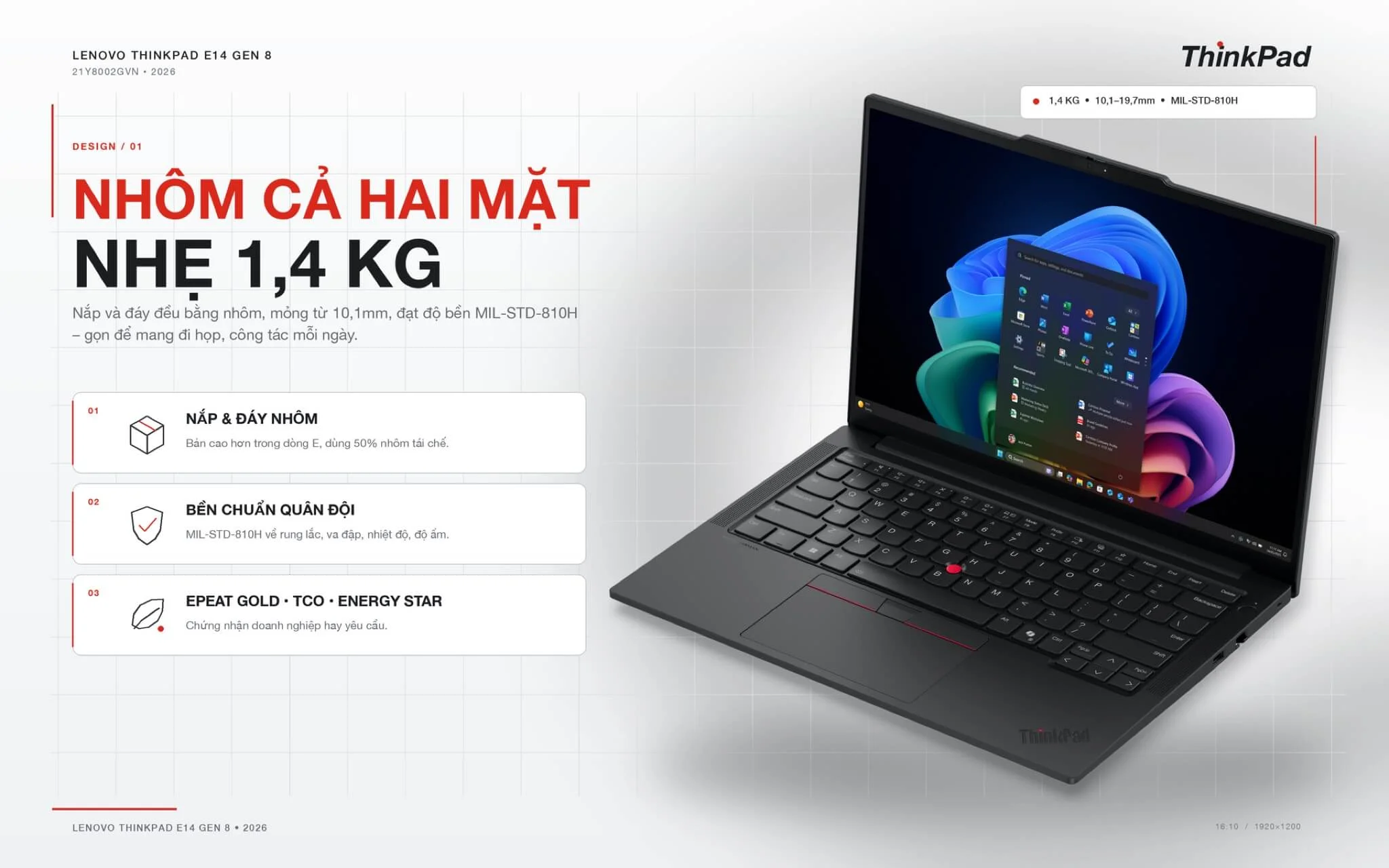
The 2025 generation includes the Lenovo ThinkPad E16 Gen 3 (2025) and the Lenovo ThinkPad E14 Gen 7 (2025), both with a Core Ultra 5 135H and 16GB of DDR5 RAM; the 16-inch model also has a numeric keypad.
The E line makes RAM upgrades easy, but ask about the display options for each model code first.
Lenovo Legion is Lenovo's premium gaming line, with an emphasis on the cooling system to keep performance steady during long play sessions.
The Lenovo Legion 5 15IAX11 (2026) uses a Core Ultra 7 251HX, 24GB of DDR5 RAM, a 512GB SSD, and an RTX 5060 8GB, with a 15.3-inch OLED screen at 2560 x 1600 and a 165Hz refresh rate.
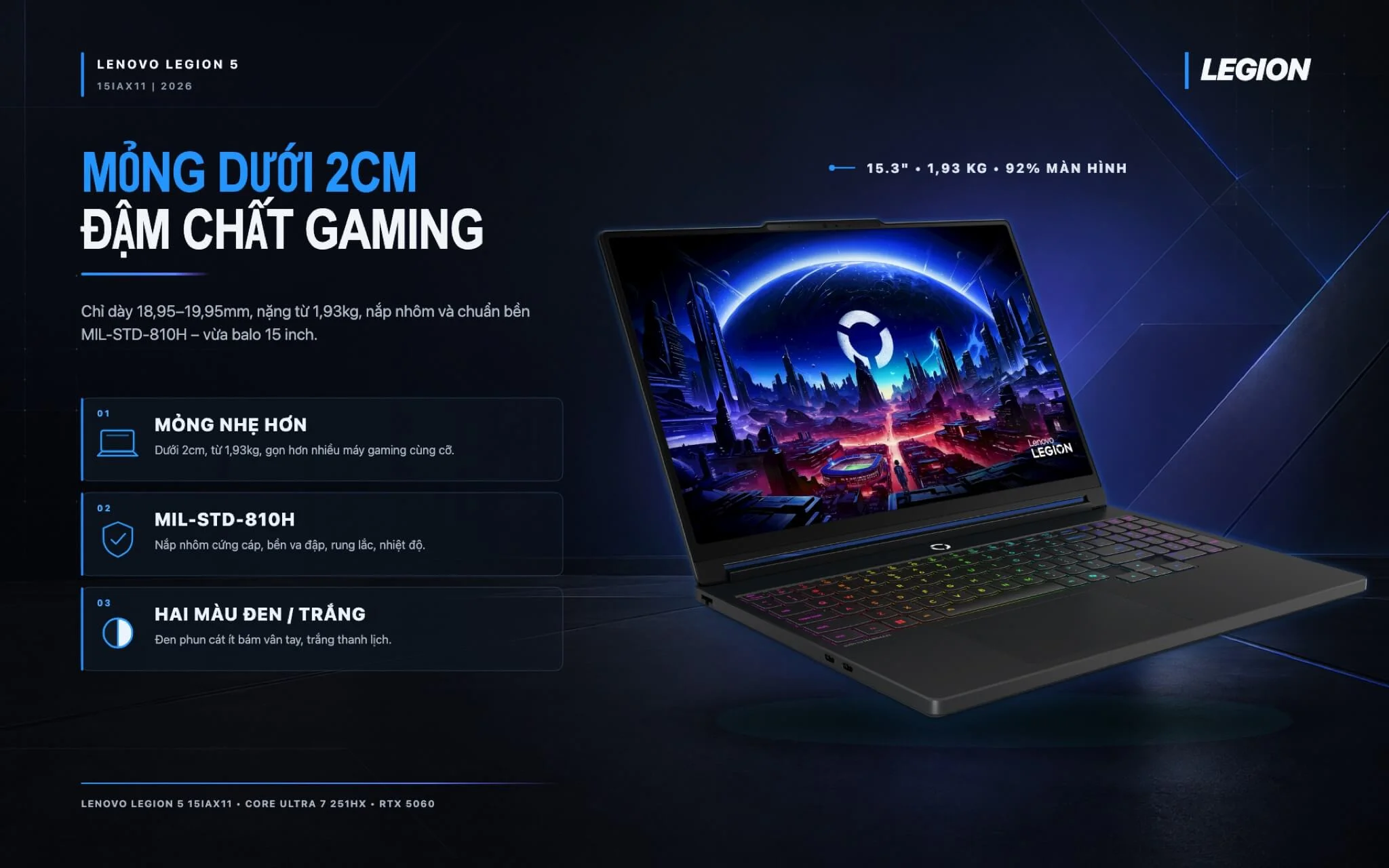
From the same 2026 generation, the Lenovo Legion 5 15IPH11 (2026) uses a Core Ultra 7 356H with an RTX 5060, while the Lenovo Legion 5 15AHP11 (AMD) (2026) uses a Ryzen 7 250 with an RTX 5050 8GB.
From 2025, the Lenovo Legion 5 15AHP10 (AMD) (2025) uses a Ryzen 7 260 with an RTX 5050 8GB.
For more power, there are the Lenovo Legion Pro 7 16IAX10H-83F5008VVN (2025) with a Core Ultra 9 275HX and an RTX 5070 Ti 12GB, and the Lenovo Legion 7 16IAX10 (2025) with an HX-series Core Ultra 9, an RTX 5060, and 32GB of RAM.
Legion laptops have upgradeable RAM slots, but battery life is short when gaming, so they suit use at a desk.
Lenovo LOQ is a choice for gaming and studying graphics at a lower cost than Legion, suiting middle school, high school, and college students.
The Lenovo LOQ 15IRX10 (2025) uses a Core i7-13650HX, 16GB of DDR5 RAM, a 512GB SSD, and an RTX 5050 8GB, enough for Valorant, CS2, and learning Photoshop and Premiere.

Also on sale are the Lenovo LOQ 15IRX9 (2024), which uses the same chip with an RTX 4050 6GB, and the Lenovo LOQ 15ARP9 (2025), which uses a Ryzen 5 7235HS with an RTX 3050 6GB for a lower budget.
The LOQ has RAM slots for upgrades, and if you will study graphics heavily, choose the RTX 4050 or RTX 5050 version.
Lenovo ThinkBook is aimed at office workers and small businesses that need a compact laptop with enough ports at a lower cost than ThinkPad.
The Lenovo ThinkBook 14 G8 IRL (2025) uses an Intel Core 5 210H, 16GB of DDR5 RAM, and a 512GB SSD, enough for office work and accounting.

The 16-inch ThinkBook 16 G7 IML (2024) is out of stock, so if you need a larger screen, contact us first.
Lenovo Yoga & IdeaPad includes the mainstream IdeaPad for students and the sleek, thin Yoga, which has a 360-degree convertible version with an OLED screen for creative users.
The new Lenovo IdeaPad Slim 3 16 inch (2026) uses an Intel Core 5 320, 16GB of DDR5 RAM, and a 512GB SSD, with a wide 16-inch screen for online learning.
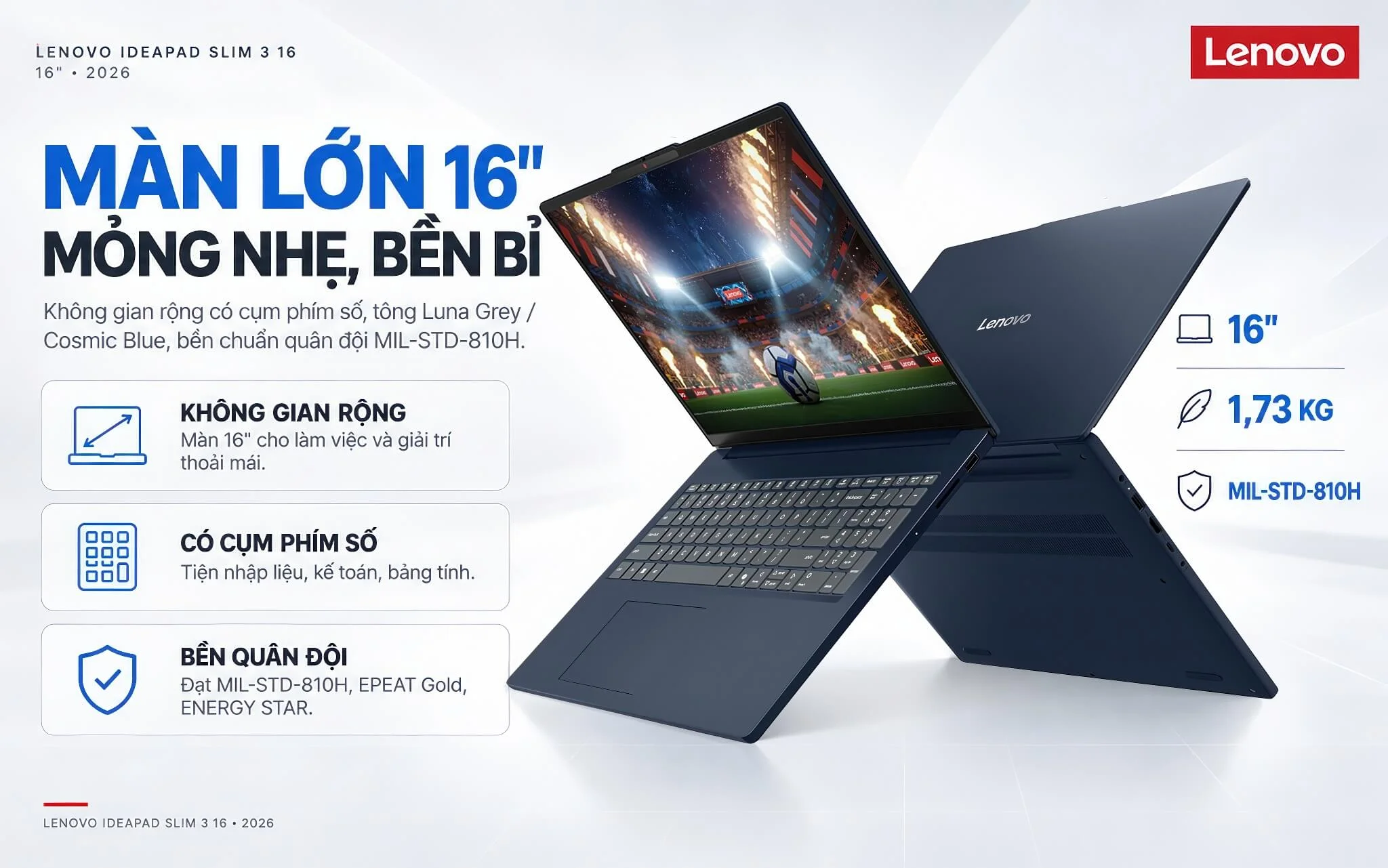
The Lenovo IdeaPad Slim 3 14 inch (2026) uses the same chip but weighs about 1.43kg, with a 400-nit WUXGA screen and 2 SSD slots.
The Lenovo Yoga 7 (2 in 1) 14IPH11 (2026) uses a Core Ultra 5 322 with a 14-inch OLED touchscreen and a pen included, weighs about 1.38kg, and suits note-taking and sketching.
Lenovo Other Models is mainly the Lenovo V line, basic laptops at a moderate cost for shops and small offices.
The Lenovo V15 Gen 4 (2025) has a 15.6-inch screen and uses a Core i5-13420H, 8GB of DDR4 RAM, and a 512GB SSD, enough for sales software.

The 14-inch Lenovo V14 Gen 4 (2025) uses the same chip but has 16GB of RAM and is more compact to carry.
The table below summarizes the main differences among the 9 Lenovo groups.
| Line | Display | Chip | Graphics | Best For |
|---|---|---|---|---|
| ThinkPad X Series | 13.3 to 14 inch | Intel Core Ultra | Integrated | Executives, business travel |
| ThinkPad T Series | 14 to 16 inch | Intel Core Ultra | Integrated, RTX 5060 on the T1G Gen 8 | Corporate offices |
| ThinkPad P Series | 14 to 16 inch | Intel Core Ultra H-series, HX | Dedicated NVIDIA RTX | CAD engineers, 3D rendering |
| ThinkPad E Series | 14 to 16 inch | Intel Core Ultra, AMD Ryzen AI | Integrated | Small businesses, students |
| Lenovo Legion | 15.3 to 16 inch | Intel Core Ultra HX, H, AMD Ryzen | RTX 5050 to RTX 5070 Ti | AAA games, video editing |
| Lenovo LOQ | 15.6 inch | Intel Core HX, AMD Ryzen | RTX 3050, RTX 4050, RTX 5050 | Esports games, graphics students |
| Lenovo ThinkBook | 14 inch | Intel Core 5 210H | Integrated | Office workers |
| Lenovo Yoga & IdeaPad | 14 to 16 inch | Intel Core 5, Core Ultra 5 | Integrated | Study, creative work, entertainment |
| Lenovo Other Models | 14 and 15.6 inch | Intel Core i5-13420H | Integrated | Basic office work, shops |
Specs are for reference based on the configurations available at Hung Phat Laptop and vary by version.
For office work, accounting, or study, the ThinkBook, IdeaPad, or ThinkPad E performs well at a reasonable cost. People who travel often should choose the ThinkPad X or T because the laptops are light, durable, and strong on security. Engineers who need dedicated graphics should choose the ThinkPad P, and for gaming or studying graphics, look at the Legion or LOQ.
HX-series chips deliver high performance, but the laptops are heavier and drain the battery faster. For laptops with soldered RAM, 16GB suits office work and 32GB suits graphics and programming.
If you need an everyday ThinkPad for work, you can start with the ThinkPad T Series category.
Every Lenovo laptop at Hung Phat Laptop is a genuine product with an invoice and a clear warranty. Tell us about your daily work, and our team will compare each available configuration for you, one by one. When you buy a machine, you get:


Hung Phat Laptop uses Google cookies (Analytics, Ads) and Microsoft Clarity to measure website traffic and advertising performance. Information about your browsing activity is sensitive personal data. If you do not agree, click “Decline”: these tools will be turned off and you can still browse and shop as usual.
See Privacy Policy