

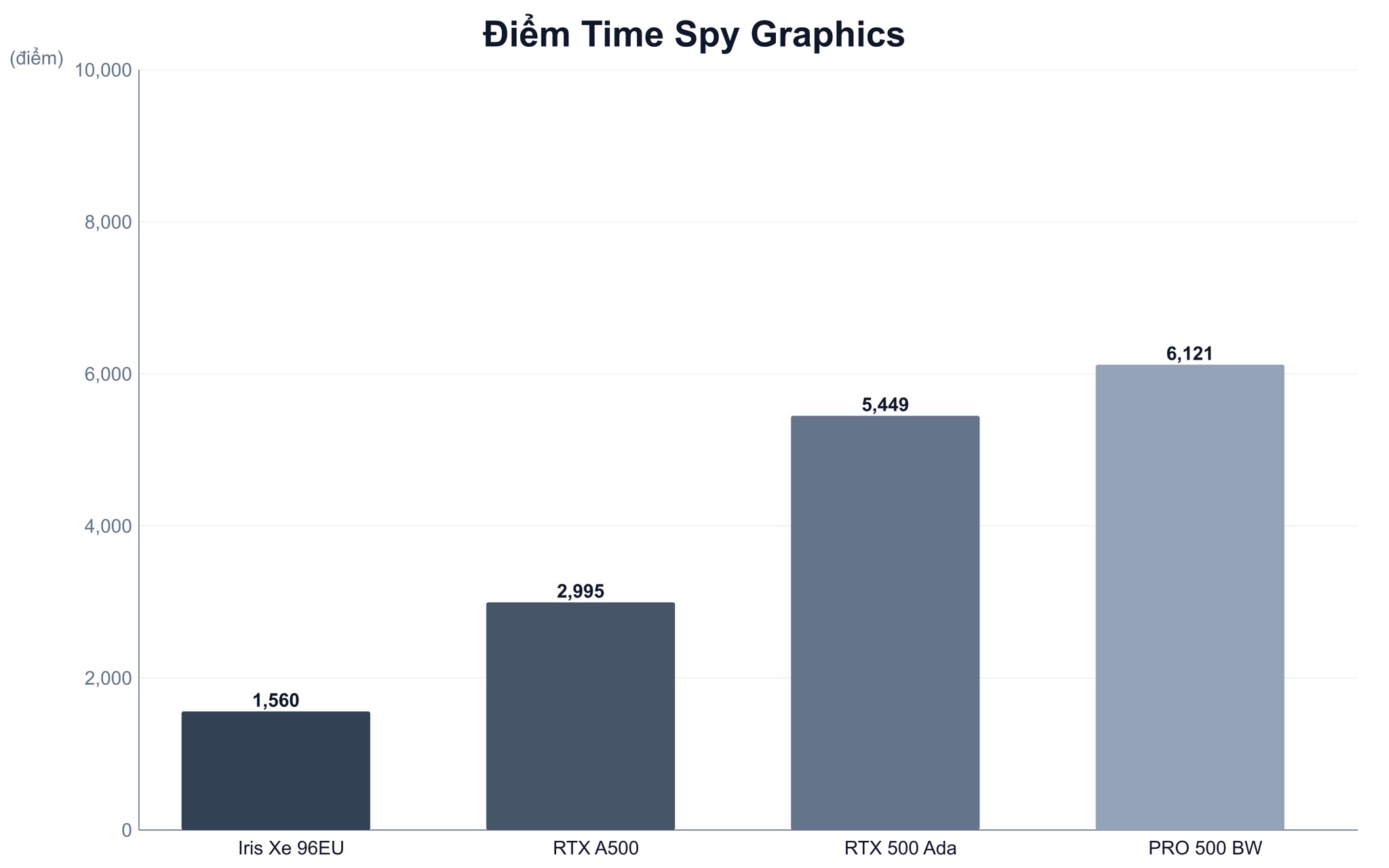
The RTX A500 averages 2,995 in Time Spy Graphics, nearly double the 1,560 score of the Iris Xe 96EU. However, the discrete GPU version typically carries a premium of about 5 million VND. This price gap primarily buys you CUDA cores, 4GB of dedicated VRAM, and a driver ecosystem optimized for mobile workstations. For the Dell Precision 3581, the right choice depends entirely on your specific software and workload intensity. Choosing the correct configuration is far more efficient than simply chasing the "RTX" label.
What is the nature of the NVIDIA RTX A500 Laptop GPU on the Dell Precision 3581?
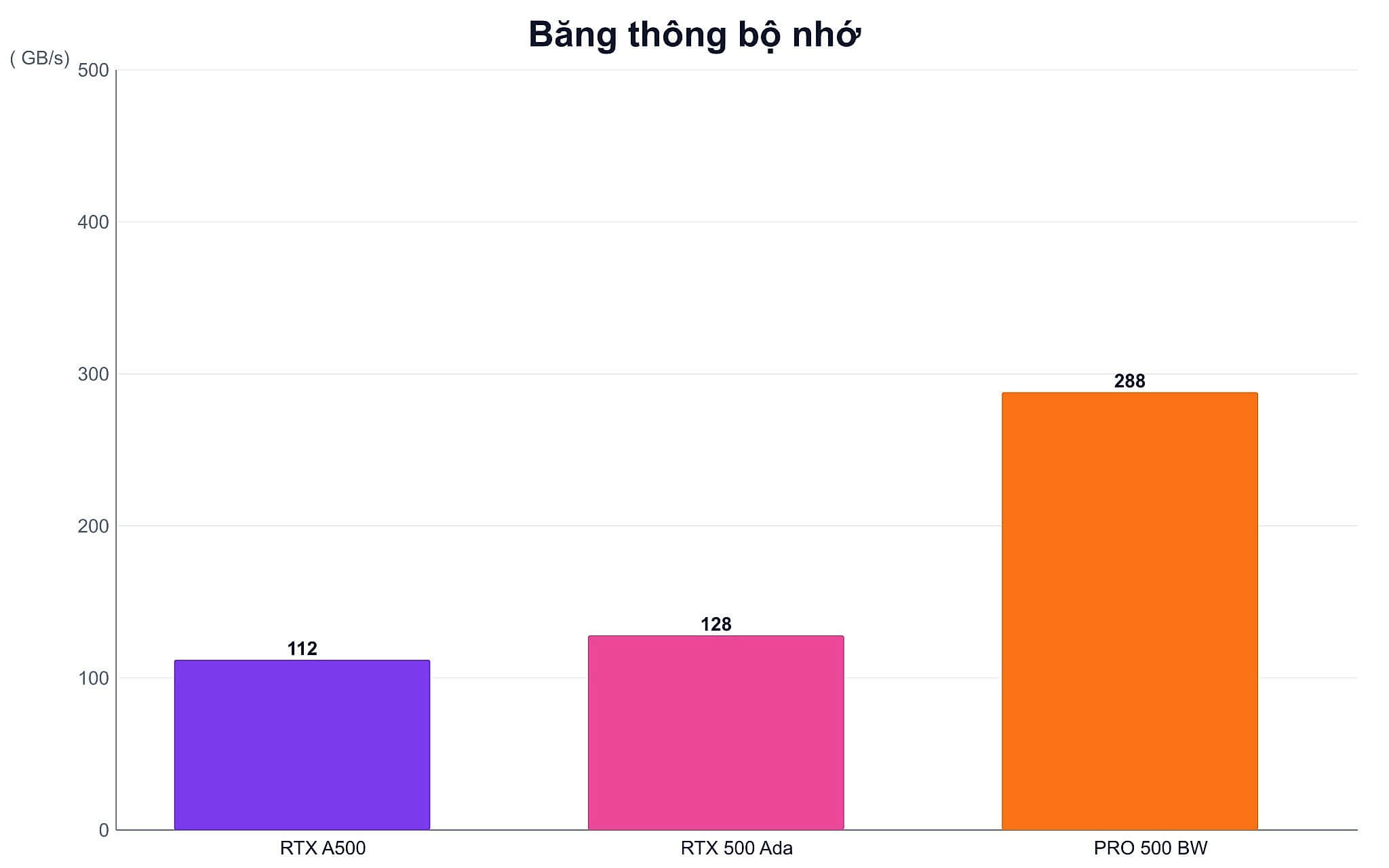
The NVIDIA RTX A500 Laptop GPU is an entry-level discrete GPU designed for mobile workstations. Released by NVIDIA in early 2022, this series utilizes the Ampere architecture, featuring 2,048 CUDA cores, 16 RT cores, 64 Tensor cores, and 4GB of dedicated GDDR6 memory. It operates on a 64-bit memory bus with 112GB/s bandwidth and a design power (TDP) ranging from 20W to 60W depending on the specific machine. On this workstation, the GPU is aimed at users requiring moderate professional graphics acceleration.
| GPU Generation | Key Specs | Real-World Difference |
|---|---|---|
| RTX A500 Ampere | 2,048 CUDA, 4GB GDDR6, 112GB/s, 20-60W | Average 2,995 Time Spy Graphics score |
| RTX 500 Ada | 2,048 CUDA, 4GB GDDR6, 128GB/s, 35-60W | Average 5,449 score, significantly higher than A500 |
| RTX PRO 500 Blackwell | 1,792 CUDA, 6GB GDDR7, 288GB/s, 35-75W | 35W model achieves 6,121 Time Spy Graphics score |
Compared to integrated graphics, the primary advantages are dedicated VRAM and CUDA acceleration. Rendering, rendering-heavy applications, image processing, or AI modeling software that supports CUDA will not have to share system RAM. The NVIDIA RTX ecosystem also prioritizes driver stability within professional software environments.
When selecting a Precision 3581, it is vital to distinguish between the RTX A500 Ampere and the RTX 500 Ada. While both GPUs feature 2,048 CUDA cores and 4GB of VRAM, the RTX 500 Ada averages 5,449 in Time Spy Graphics-roughly an 82% increase over the A500. Furthermore, the RTX PRO 500 Blackwell utilizes 6GB of GDDR7 and offers 288GB/s of bandwidth. Similar-sounding names do not equate to similar performance.
What real-world difference does the RTX A500 make on a mobile workstation?
To estimate this workstation's performance, we can look at the A500's average Time Spy Graphics score of 2,995, which is nearly double the 1,560 score of the Iris Xe 96EU. Note that this is an aggregate figure from various laptop models and not an independent measurement on a single specific configuration. Actual results may vary between machines due to GPU power limits, thermal management, and power profiles.
In a professional workflow, the A500 is suitable for moderate CAD work, small-to-medium 3D modeling, image editing, and CUDA-accelerated rendering. The 4GB VRAM capacity may become a bottleneck when dealing with large scenes, heavy textures, or memory-intensive AI tasks. Dell also offers higher-tier options, such as the 6GB RTX A1000 and the 8GB RTX 2000 Ada, for more demanding requirements.
Do not judge the RTX A500 primarily by gaming performance. This GPU is slower than the RTX 3050 Laptop and is engineered for professional software. If your primary goal is gaming, you should look toward the Alienware gaming line to avoid paying a premium for workstation-specific features that you won't utilize.
Which i7 configuration is best suited for professional work today?
The Dell Precision 3581 supports the Core i5-13600H, i7-13700H, i7-13800H, and i9-13900H. Specifically, the i7-13800H features 14 cores, 20 threads, and a max turbo frequency of 5.2GHz. It supports 4800MHz DDR5 RAM in capacities of 8GB, 16GB, 32GB, or 64GB. Battery options include 64Wh or 97Wh depending on the configuration.

For advanced office work, programming, data analysis, and moderate CAD, a Core i7 paired with 32GB of RAM is often a more balanced choice than prioritizing a Core i9 while settling for low RAM. When searching for "Dell Precision 3581 specs," ensure you verify the specific CPU, GPU, RAM, and battery capacity. Simply stating "13th Gen i7" is not enough to define the actual configuration.
The Core i5-13600H is built on the Raptor Lake-H architecture, featuring 12 cores, 16 threads, and a 45W TDP. This processor achieves 2,423 in single-core and 11,880 in multi-core Geekbench 6 tests. As this chip lacks a dedicated NPU, it does not meet the 40+ TOPS threshold typically associated with current Copilot+ AI requirements.
Is the 5 million VND premium for the RTX A500 worth it?
If you use your machine for Office tasks, web browsing, online learning, or administrative software, the integrated graphics version is the more economical choice. Iris Xe is perfectly capable of handling displays, basic multitasking, and won't eat into your budget for a discrete GPU. A laptop without a dedicated graphics card isn't "obsolete" just because it lacks CUDA; its longevity depends on RAM, SSD, and software requirements.
The roughly 5 million VND premium is justifiable if you use applications that require CUDA, dedicated VRAM, or workstation-class drivers. Spread over three years of use, this equates to about 140,000 VND per month. If the GPU reduces rendering times or prevents errors in your projects, this cost is easily recouped compared to upgrading just to get the "RTX" label.
One drawback to accept is that 4GB of VRAM is no longer ample for complex 3D projects. This card also lacks the performance of the RTX 500 Ada, despite the similar naming. For large scenes or frequent AI workloads, the RTX 2000 Ada with 8GB is a more sensible choice: it features 3,072 CUDA cores, 256GB/s bandwidth, and achieves 8,094.5 in Time Spy.
When is a used workstation a viable option?
A used Dell Precision 3581 is a good option if the condition is clearly documented and the price savings outweigh the depreciation. You should inspect the chassis, keyboard, screen, battery, SSD, and the system's ability to maintain clock speeds under heavy loads. For workstations, always verify the exact GPU in Device Manager or via hardware diagnostic tools to avoid confusing an Iris Xe model with an RTX A500.
Queries like "Dell Precision 3581 drivers" often arise after a fresh Windows installation. You should download drivers via your Service Tag from Dell's website, then verify the chipset, Intel graphics, and NVIDIA drivers. Regarding "Dell Precision 3581 charger," ensure the power adapter matches the actual configuration; an incorrect charger can cause the system to throttle performance under high loads.
Hung Phat recommends requesting that sellers clearly state the machine's condition, warranty period, and included accessories in the invoice. The 64Wh and 97Wh batteries offer significantly different runtimes, so do not judge based on appearance alone. A low price may be offset by the cost of a replacement charger, a degraded battery, or a very short warranty.
How should you inspect and request quotes in Ho Chi Minh City?
At Hung Phat, the Dell Precision 3581 is currently listed in a Core i9-13900H, 32GB DDR5, 1TB SSD configuration with an RTX 2000 Ada for 39.9 million VND, though stock may vary. If you require the integrated graphics version or the more budget-friendly RTX A500, please inquire about availability, as these configurations change by batch. You can view our current stock at genuine Dell Precision 3581.
When asking for a "Dell Precision 3581 price," you should request a full quote including the CPU, RAM, SSD, GPU, battery health, condition, and warranty. The price of an Iris Xe model cannot be used to determine if the RTX A500 version is high or low. Ensure that discounts, RAM upgrades, included chargers, and return policies are clearly documented rather than just comparing the initial sticker price.
If you are choosing the Precision 3581 for CAD and CUDA work, an i7 paired with the RTX A500 is a well-balanced option. For strictly office work, the integrated graphics version saves you about 5 million VND. If you need gaming or a versatile 2-in-1 design, you might also consider comparing it to the HP Envy x360. You can send your specific configuration and software requirements to Hung Phat for a tailored recommendation to ensure you don't overspend on unnecessary specs.
Frequently Asked Questions (FAQ)
What are the specs and performance of the Dell Precision 3581 i7-13800H?
The Core i7-13800H is part of the Raptor Lake-H generation, featuring 14 cores, 20 threads, and a max turbo frequency of 5.2GHz. The machine supports 4800MHz DDR5 RAM with a verified maximum capacity of 64GB. Final performance will depend on the specific GPU, RAM capacity, power mode, and the thermal management of your particular configuration.
Is the i9 version of the Precision 3581 necessary for all professional tasks?
Not every task can fully utilize the Core i9-13900H. For moderate CAD, programming, and general data processing, a Core i7 paired with 32GB of RAM is typically a more balanced choice. You should only prioritize the i9 if your software is highly CPU-intensive and your budget allows for sufficient RAM, SSD, and an appropriate GPU.
When was the Dell Precision 3581 manufactured and is it still relevant?
This is a 2023-generation mobile workstation utilizing 13th Gen Intel Core processors. This configuration remains highly capable in 2026, provided the RAM, SSD, and GPU meet your software requirements. Note that these CPUs lack a 40+ TOPS NPU, meaning they are not specifically designed for the local AI processing standards of Copilot+.
How much extra is needed for the RTX A500 and which models support it?
The estimated price difference between the integrated graphics configuration and the RTX A500 is approximately 5 million VND, depending on the accompanying hardware. The Precision 3581 is currently listed with an i9-13900H and RTX 2000 Ada for 39.9 million VND, though stock fluctuates. Since availability and promotions change, we recommend confirming the price, warranty, and stock status before making a decision.











