


In the era of digitalization and globalization, enterprise computers play a crucial role in supporting business operations, management, collaboration, and creativity for businesses and organizations. However, they also face many challenges and risks such as poor performance, weak security, difficult management, low stability, etc. To solve these issues, Intel has developed and provided a comprehensive technological solution for enterprise computers: Intel vPro.
Concept and components of Intel vPro
Intel vPro is a marketing term used by Intel for a suite of computer hardware technologies, including VT-x, VT-d, Trusted Execution Technology (TXT), and Intel Active Management Technology (AMT). This technology is designed to improve the manageability, security, performance, and stability of enterprise computers, especially remote computers or those without active users.
Components of Intel vPro
Intel vPro technology includes many components, such as:
1. Qualified Intel Core or Xeon processors
To use Intel vPro technology, a computer must have qualified Intel Core or Xeon processors that support virtualization, security, and high-performance features. This ensures that the computer can run heavy applications and tasks without glitches, while also enhancing system security and manageability.
2. Supported operating systems
Supported operating systems include Windows, Linux, and macOS. Support for various operating systems allows businesses to be flexible in choosing and deploying computer systems with Intel vPro technology.
3. Intel LAN and/or WLAN
Enterprise computers require high-speed and secure network connections to access critical data and applications. Therefore, using Intel LAN and/or WLAN components ensures that the computer can connect to the network quickly and securely.
4. Firmware enhancements
In addition to hardware components, Intel also provides firmware enhancements such as BIOS, firmware, and drivers to support Intel vPro's management and security features. This makes system deployment and management easier and more efficient.
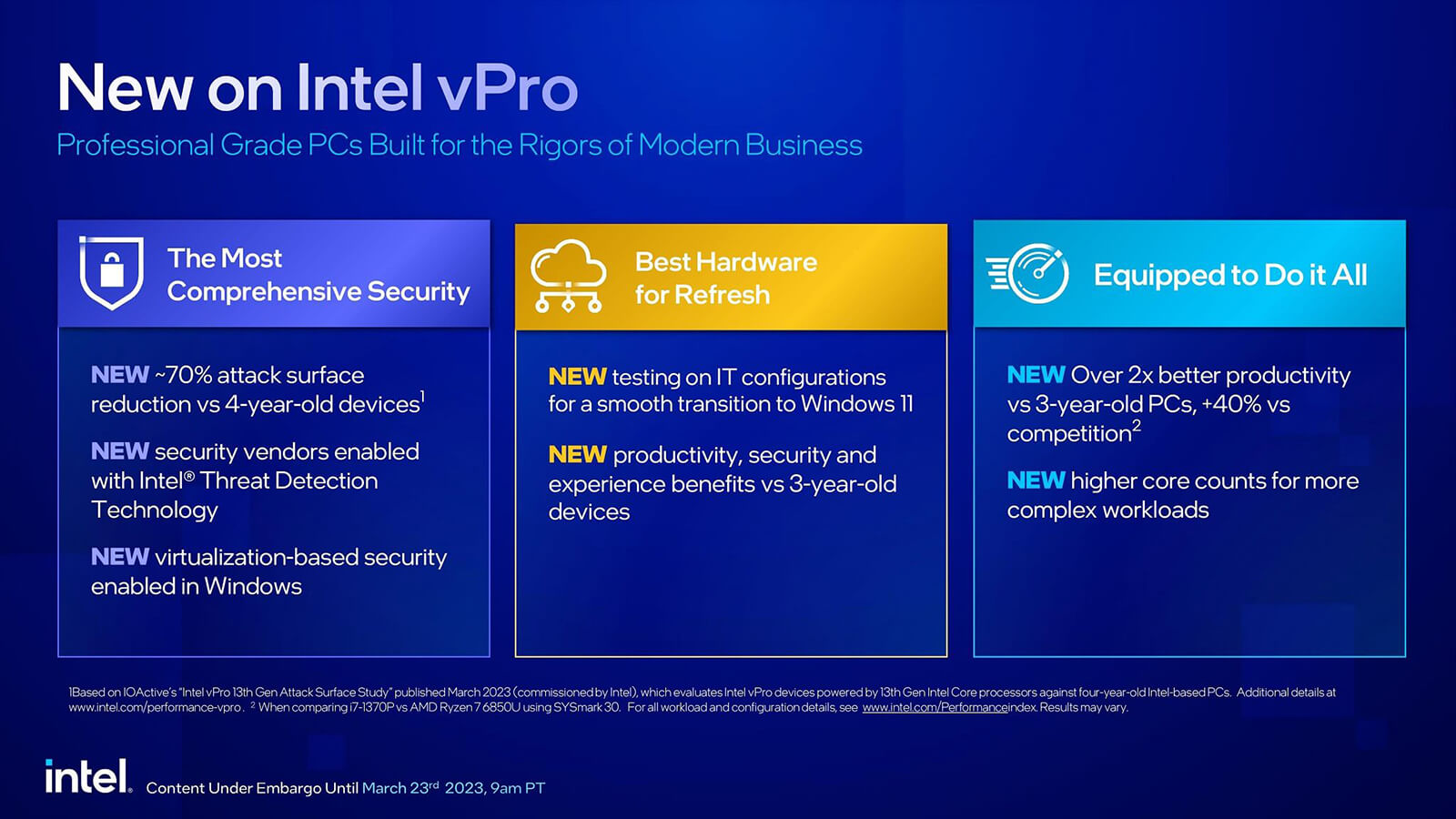
Key features of Intel vPro
Intel vPro technology provides many important features for enterprise computers, helping to enhance system performance, security, and manageability. Below are some key features of Intel vPro:
1. Virtualization
Virtualization technology is a key feature of Intel vPro, allowing a computer to run multiple operating systems and applications simultaneously on the same system. This helps increase performance and flexibility in using different applications and tasks.
2. Hardware-level security
With hardware-level security features like VT-x, VT-d, and TXT, Intel vPro helps protect the system from external attacks. These features allow for the control and monitoring of tasks and applications running on the system, while also helping to prevent malware and viruses from infiltrating the system.
3. Remote management
With AMT, enterprise computers can be managed remotely easily and effectively. This is very useful for businesses with many branches or remote employees, making system management and maintenance convenient and time-saving.
4. Self-healing feature
With Intel vPro's self-healing feature, enterprise computers can automatically recover after encountering an issue or an attack. This helps minimize downtime and ensures that the system always operates stably and efficiently.
Benefits of using Intel vPro for businesses
Implementing Intel vPro technology in enterprise computer systems brings many benefits to businesses, including:
1. Enhanced performance and flexibility
With virtualization features and qualified Intel Core or Xeon processors, enterprise computer systems gain enhanced performance and flexibility in using various applications and tasks. This helps businesses operate more effectively and meet increasing business demands.
2. Hardware-level security
With Intel vPro's hardware-level security features, enterprise computer systems are protected from external attacks. This helps minimize information security risks and ensures that important business data is always secure.
3. Convenient remote management
With the AMT feature, managing and maintaining enterprise computer systems becomes convenient and time-saving. Businesses can monitor and control computers remotely easily and quickly, helping to reduce costs and optimize the system management process.
4. Self-healing feature
With the self-healing feature, enterprise computers can automatically recover after encountering an issue or an attack. This helps minimize downtime and ensures that the system always operates stably and efficiently.
Products using Intel vPro technology
Currently, there are many products using Intel vPro technology on the market, from desktops to laptops and mini PCs like Intel NUC. Below are some typical Laptop products using the latest Intel vPro technology in 2023:
- Dell Precision 3581 (2023)
- Dell Precision 5680 (2023)
- Dell Precision 7680 (2023)
- Dell Precision 7780 (2023)
- Dell Latitude 3540 (2023)
- Dell Latitude 5440 (2023)
- Dell Latitude 5540 (2023)
- Dell Latitude 7440 (2023)
Conclusion
In the context of ever-evolving technology and the increasing need for computers to drive business activities, using Intel vPro technology is a smart and effective choice. With virtualization, hardware-level security, remote management, and self-healing features, Intel vPro helps enhance the performance, security, and flexibility of enterprise computer systems. If you are planning to upgrade your business computer system, consider using products with Intel vPro technology to ensure efficiency and security for your business.
Further reference link: Intel vPro











